Your team probably isn't short on tools. You've got rank trackers, AI visibility monitors, content planners, dashboards, Slack channels, and a reporting cadence that never really stops. The problem is that insights still stall somewhere between “we saw it” and “we changed it.”
That gap is where workflow optimization matters. In SEO and AI search, the biggest losses often happen in handoffs, not in the tools themselves. A content strategist finds a citation gap, an analyst spots an AI Overview opportunity, a writer waits for direction, and the update lands too late to matter.
The business case is no longer abstract. Workflow automation is now a major enterprise market, valued at $23.77 billion in 2025 and projected to reach $80.57 billion by 2035, which implies long-run expansion of roughly 239% (Anchor Group). That scale fits the reality many teams already feel, work is no longer won by having more data, but by moving the right data through the organization quickly and cleanly.
Why SEO and AI Search Workflows Break Down
A common agency scene looks like this, the SEO lead checks a rank tracker, the content manager reviews an AI visibility dashboard, and someone in client services is still pulling screenshots into a deck. Everyone is busy. Nobody is aligned. The work moves across three or four tools before a decision gets made, and each transfer creates another chance for delay, drift, or misunderstanding.
That's why the workflow problem hides in plain sight. Teams often think they need a better strategy, but the core issue is that their process can't carry the strategy from insight to execution. A strong recommendation that lands two days late is still a weak recommendation.
Where the breakage usually starts
The first failure point is usually ownership. One person watches AI search visibility, another handles technical SEO, and another owns client reporting, but nobody owns the full path from signal to action. The result is a set of partial responsibilities that look organized on paper and messy in practice.
The second failure point is tool sprawl. If you're bouncing between dashboards and spreadsheets, every handoff depends on a person copying context from one place to another. That's exactly the kind of friction that makes workflow optimization more valuable than yet another standalone tool.
Practical rule: if the insight has to be retyped, restated, or reinterpreted before anyone acts on it, the workflow is already leaking value.
For teams comparing systems, it helps to look at how different project-management setups handle the basics of assignment, visibility, and collaboration. A useful starting point is compare project management tools, not because project management software solves SEO, but because it exposes where ownership and handoffs are weak.
The third failure point is reporting lag. By the time a monthly deck lands, the opportunity has often moved. That's especially painful in AI search, where brand mentions, citation patterns, and content gaps can shift faster than a standard client review cycle can react.
Auditing Your Current SEO and AI Search Processes
Before changing anything, map the actual path work takes today. Not the process people describe in meetings, the one they're supposed to follow. The actual workflow is what matters, because that's where cycle time, rework, and missed handoffs show up.
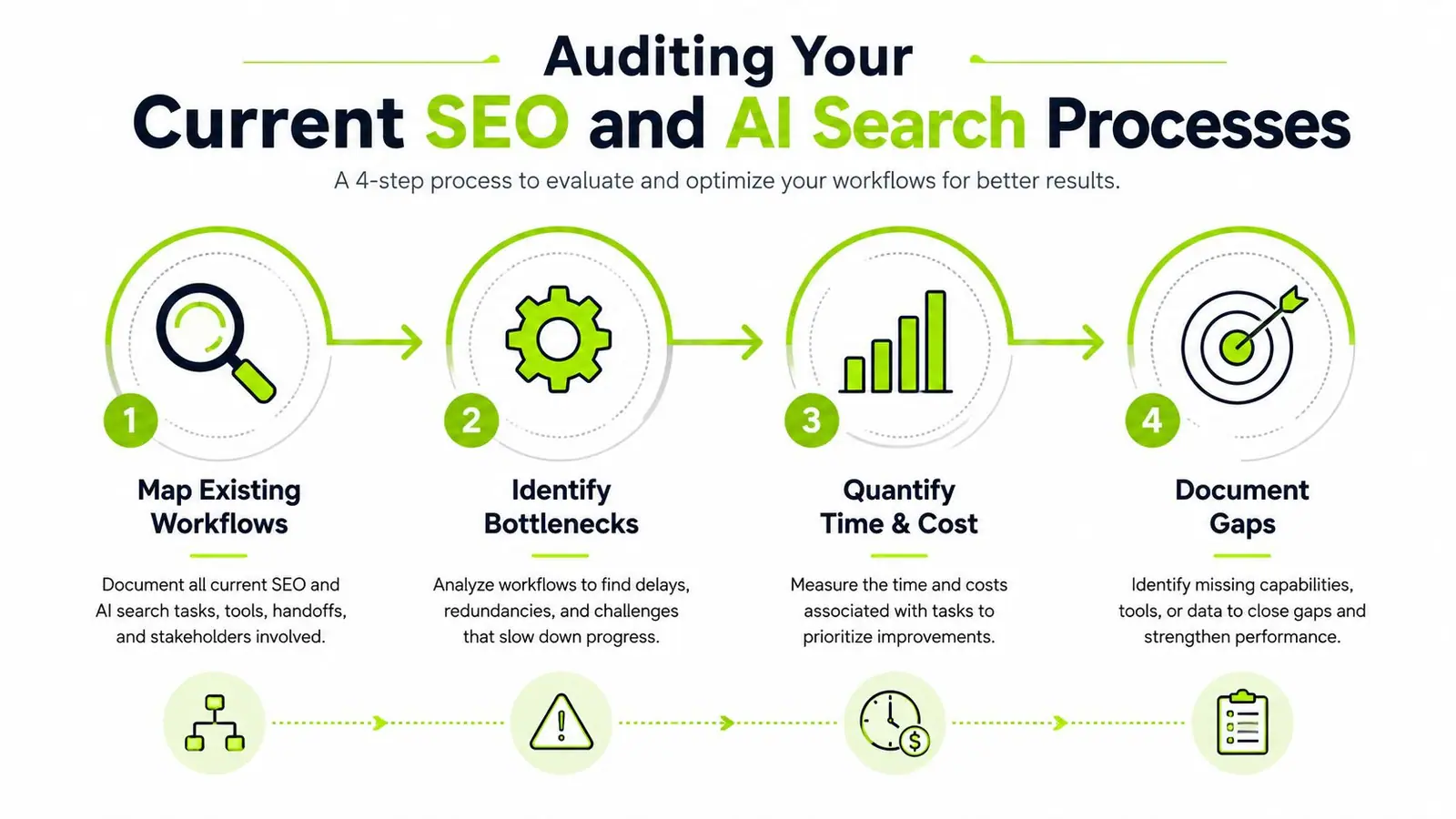
A useful audit starts with the end result and works backward. If the outcome is a report, a content brief, a technical fix, or a client recommendation, trace each handoff that produced it. Then note where the work waited, where context was lost, and where someone had to chase an answer in another channel.
What to document first
Map the path for each major workflow, then write down who touches it, what tool they use, and what decision they're expected to make. Include keyword research, AI visibility monitoring, technical audits, content production, review, approval, and reporting. If the same step appears in two systems, that's already a signal that the workflow may be duplicating effort.
Use log data where you have it. Enterprise process guidance recommends mapping the actual process first, then mining system event logs, then benchmarking cycle time, error, and throughput against a baseline before testing any intervention (Bitecode). That sequence matters because it keeps you from optimizing the wrong thing.
A simple audit checklist can look like this:
- Identify the trigger: what starts the workflow, client request, dashboard alert, monthly review, or content gap.
- List every handoff: who receives the work, who approves it, and where it waits.
- Capture the baseline: how long it takes, how often it gets reworked, and where errors appear.
- Record failure patterns: duplicate tasks, missing data, unclear ownership, and review loops that stall progress.
The same discipline applies to technical SEO. If you need a deeper diagnostic structure for that side of the house, the internal guide on how to do an SEO audit fits well beside workflow mapping because it helps separate issues in the site from issues in the process.
Here's the key point. Don't measure only the final deliverable. Measure the waiting, the rework, and the number of times someone had to ask, “Who owns this now?”
Prioritizing Workflow Fixes That Deliver Real ROI
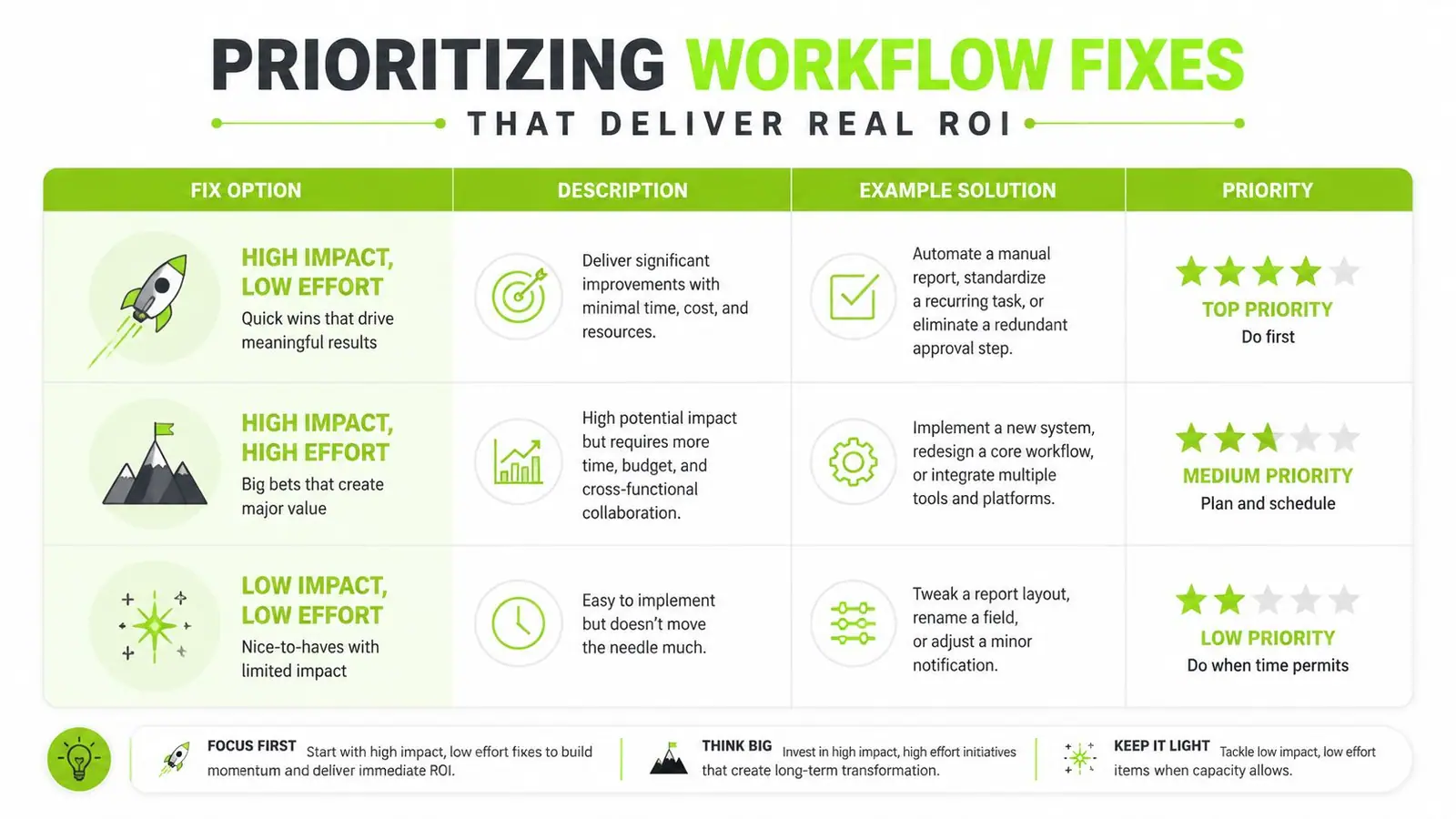
Not every broken process deserves immediate attention. Some fixes save time fast, while others improve decision quality but take longer to pay off. If you treat every issue as equally important, you'll spend the quarter polishing low-value workflows and still leave the actual bottlenecks intact.
The best way to prioritize is by combining impact and effort with strategic fit. A repetitive reporting task that eats analyst time every week is usually a cleaner first win than a full operating-model redesign. On the other hand, if your AI search insights never influence content planning, the bigger problem isn't reporting speed, it's the way the organization turns data into decisions.
What to fix first
The highest-priority changes usually do one of three things. They reduce cycle time, remove handoff delays, or improve decision quality. If a fix does none of those, it may still be useful, but it shouldn't jump the queue.
There's also a useful distinction between local and system-wide improvement. A team can get faster while the business gets slower if downstream work still waits on approvals, missing context, or fragmented ownership. That's why workflow optimization has to be judged end-to-end, not just inside one function.
Best target: start with changes that remove repeated manual work and expose whether the rest of the process can actually absorb the faster output.
The research on workflow efficiency points to why this matters. 51% of employees spend at least two hours per day on repetitive tasks, 54% of companies identify poor communication as a primary process inefficiency, automation can reduce manual errors by up to 90% in standardized processes, and 78% of organizations expect ROI within 6 months of implementation (This and That Chat). Those numbers don't tell you what to fix first, but they do confirm that repetitive work, communication gaps, and error reduction are usually the fastest places to look.
The practical rule is simple. If a change lowers friction in a high-volume workflow and doesn't create a new review layer, it deserves priority. If it creates a cleaner dashboard but doesn't change who acts, it's probably a reporting improvement, not a workflow improvement.
Building a Unified Tool Stack with APIs and Automation
A messy stack turns SEO and AI search work into a relay race with missing batons. People copy data from one system into another, rewrite notes for different audiences, and manually reconnect workflows that should have stayed linked. That inefficiency also raises the odds that a key insight disappears between systems.
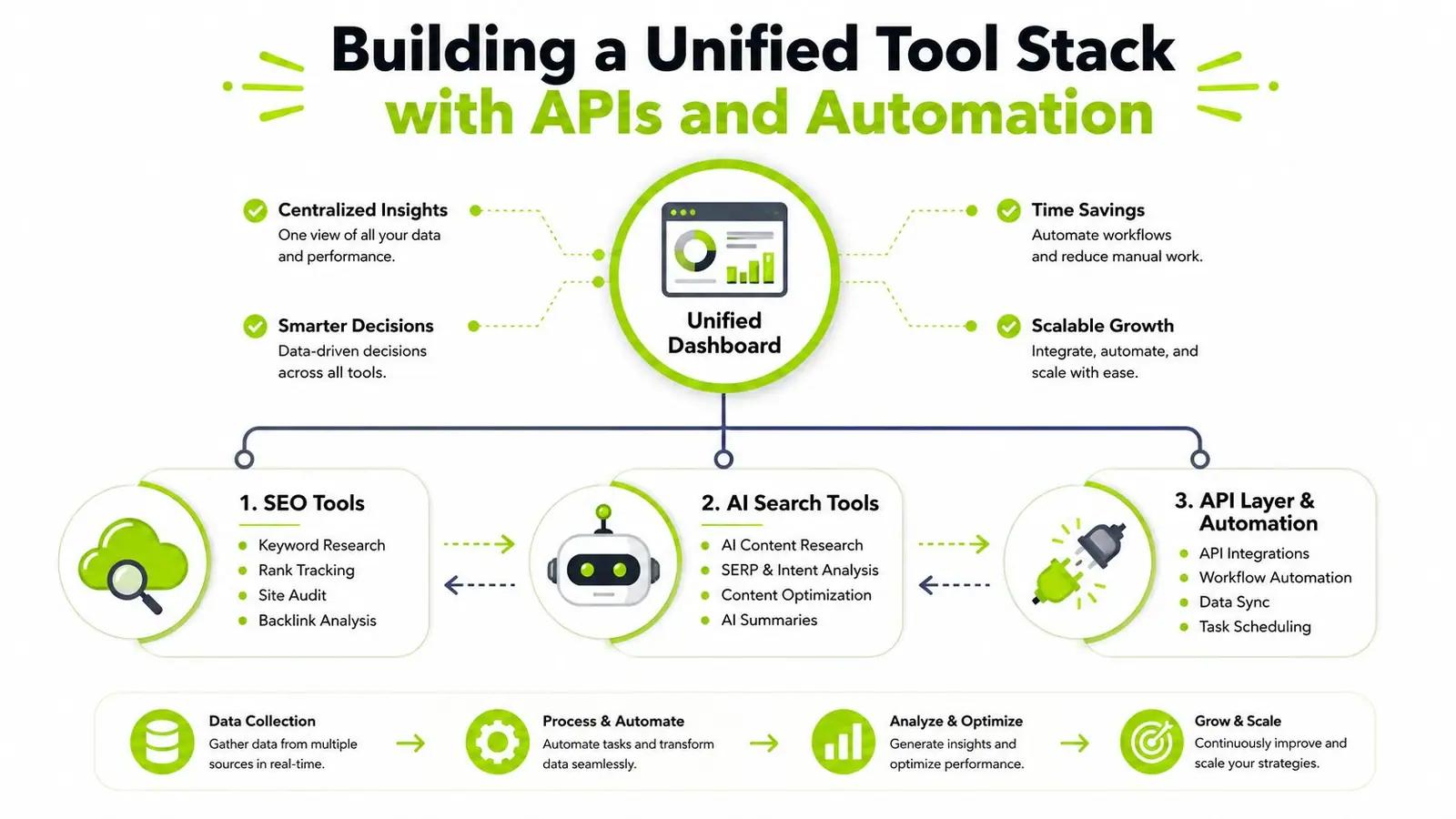
A better setup starts with one operational hub and connects the rest through APIs and rules. In practice, that means choosing a dashboard or platform that can hold SEO metrics, AI search visibility, and workflow signals in one place, then using automation to move only the events that matter between tools. Surnex is one example of that model, since it unifies AI visibility tracking with core SEO metrics and exposes an agent-ready API for teams that need to wire workflows into other systems.
What the stack should do
A useful stack doesn't try to replace everything. It reduces context switching and gives each tool a clear role. SEO tools can feed rankings, backlinks, and audits. AI search tools can track brand presence and citation patterns. The API layer handles alerts, syncs, and task creation.
That separation matters because not every integration needs to be deep. Sometimes the right move is to trigger a content review when AI Overview visibility changes. Sometimes it is to sync a backlink discovery into a content calendar. Sometimes it is to push a technical audit finding into the task system with ownership already assigned.
For teams working with large volumes of video or audio content, the TransClipper YouTube Transcript API is the kind of external service that can fit into a broader workflow without forcing a manual copy-paste step. The point is not the transcript itself, it is the ability to turn raw content into structured inputs for search or content operations.
Enterprise workflow guidance also supports this sequence, consolidate the process, standardize the remaining steps, then automate the stable pieces after pilot validation (Superhuman). That order reduces the risk of automating a messy process and freezing the mess in place.
For teams building data movement between systems, the internal guide on data pipeline automation is a useful companion because it shows how to move information reliably before trying to interpret it. If the stack cannot move clean data, the dashboard will not save it.
Designing Metrics and Dashboards That Drive Action
Most dashboards prioritize data volume over decision readiness. They tell you what happened, but not whether the workflow got better, worse, or merely moved the problem somewhere else. The best metrics for workflow optimization are operational, not decorative.
The core mistake is tracking outputs without tracking flow. Rankings, backlink totals, and content counts can be useful, but they don't show whether the team moved faster or handled handoffs better. If a dashboard does not reveal waiting, rework, or ownership gaps, it functions as a display case.
Metrics that matter more than volume
A useful workflow dashboard shows whether insight turned into action, and how cleanly that happened. That means measuring the time from signal to task, the number of times work bounced between teams, and the error rate in any automated step. It also means separating local gains from end-to-end throughput, because a faster content team can still be blocked by a slow approval chain.
| Metric Type | Vanity Metric Example | Workflow Health Metric | Why It Matters |
|---|---|---|---|
| Output | Total rankings tracked | Time from insight to action | Shows whether the team can move on data |
| Activity | Number of reports produced | Handoff completion rate | Reveals whether work arrives cleanly |
| Volume | Backlink count | Rework frequency | Helps expose wasted cycles |
| Visibility | Dashboard views | Approval delay | Shows where decisions stall |
A better dashboard also needs a feedback loop. Optimization requires continuous monitoring, analysis, and iteration after deployment so new bottlenecks do not replace the old ones. Teams often launch a cleaner process and never revisit whether the bottleneck shifted downstream.
Track the workflow, not just the result. If the metric cannot explain why a decision was delayed, it will not help you improve the process.
For reporting-heavy teams, the internal guide on SEO reporting dashboard is a practical fit because it reinforces the difference between a dashboard that informs and a dashboard that drives action. The dashboard should make the next step obvious, not just present a tidy summary.
Real-World Playbooks for Common SEO and AI Search Workflows
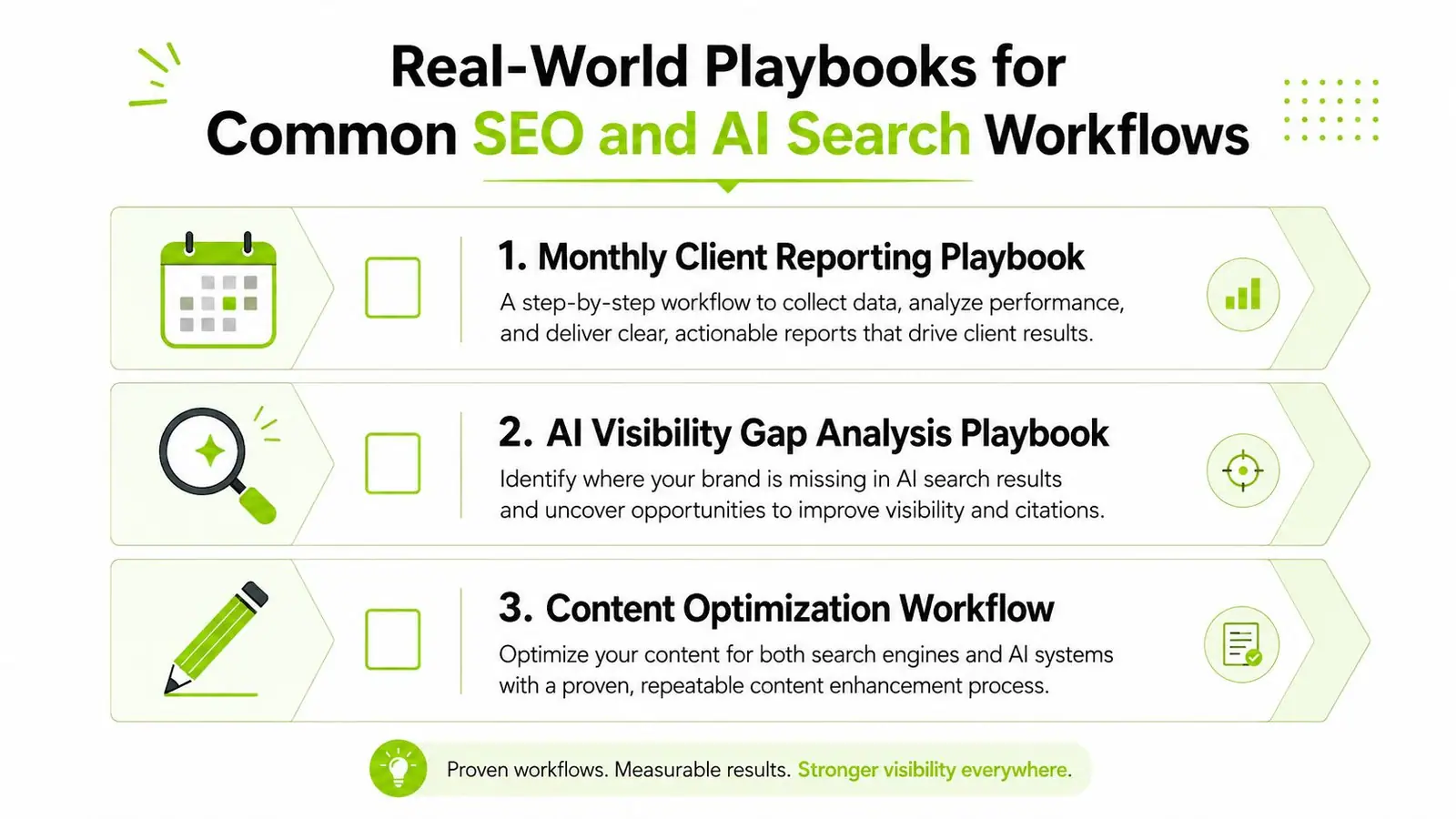
The workflows that hold up in real delivery are the ones a team can repeat without rebuilding them every month. In SEO and AI search, the same three jobs keep coming back, monthly client reporting, AI visibility gap analysis, and content opportunity prioritization. Each one fails in a different place, so the fix has to match the handoff gap, the measurement gap, or the decision gap.
A monthly client reporting flow is the easiest place to stabilize. The analyst pulls metrics from the unified platform, checks for anomalies, and drops a short summary into the reporting template. The account lead reviews the takeaways, adds context from the account, and sends the client a version that explains what changed and what needs action next. The important part is assembling the report from one system of record rather than stitching together three exports.
Content teams usually feel the AI visibility gap analysis workflow more sharply. A strategist checks where the brand appears, or does not appear, in AI-driven discovery, compares that with priority topics, and flags missing coverage or citation gaps. Those findings then move into the content calendar, where the editor decides whether to refresh an existing page, create a new asset, or adjust internal linking. That handoff matters because a gap analysis that never reaches editorial planning is just a note sitting in a spreadsheet.
The third workflow is content opportunity prioritization. An SEO lead reviews search demand, existing coverage, and technical constraints, then ranks the opportunities by business value and execution cost. The output should land directly in the production queue so the team can move from analysis to delivery without another round of manual sorting.
The video below is useful for teams that need a sharper view of how these pieces fit together in practice.
For teams that run SEO work like a client service operation, the internal guide on project management for SEO is a natural companion because it helps connect work assignment, visibility, and delivery timing. The best playbooks define who receives the next task, what data they need, and how they know it's ready.
Pitfalls to Avoid and Templates for Implementation
The biggest mistake teams make is automating before they stabilize the process. If ownership is unclear or the workflow keeps changing, automation just speeds up confusion. The second mistake is optimizing one team in isolation and creating a slower downstream bottleneck.
A stronger approach is to remove waste before you automate it. That includes unnecessary meetings, extra approvals, duplicate data entry, and non-decision-makers sitting in governance loops. Those are often the highest-value cuts because they reduce delay without adding another system to manage.
Here's a simple implementation template that works in practice:
- Baseline first: capture cycle time, wait time, errors, rework, and completion quality before changing anything.
- Pilot narrowly: test one workflow in one client account, one content stream, or one reporting motion.
- Assign a single owner: someone has to own the whole path, not just one step.
- Compare before and after: use the same measurement window and the same definitions, or the comparison won't mean much.
The clearest sign that a fix worked is not a prettier dashboard. It's when the same work moves through fewer handoffs, with less waiting and less rework, while downstream teams still have what they need. If a change looks efficient on paper but forces someone else to clean up the mess, it didn't really optimize anything.
If your SEO or AI search workflow feels stuck between insight and execution, Surnex can help you see where the handoff breaks and where the reporting loop loses momentum. Visit Surnex to explore a workflow built around unified AI visibility, SEO data, and agent-ready automation.