In Google Analytics 4, bounce rate is the percentage of sessions that were not engaged. If your report shows a 70% engagement rate, the matching bounce rate is 30%.
That answer already breaks the conventional advice. For years, people treated bounce rate like a universal health score. Lower was better, higher was worse, and every report seemed to need a bounce-rate comment. That logic came from the Universal Analytics era, and it doesn't hold up cleanly in GA4.
If you're asking what is a bounce rate in Google Analytics, the core issue isn't the definition alone. It's the operational change behind it. Agencies have to reset client expectations. In-house teams have to stop comparing old dashboards to new ones as if nothing changed. Reporting templates, SEO reviews, and landing-page audits all need a different lens now.
The old rules no longer apply. Bounce rate used to be a direct signal about single-page sessions. In GA4, it's a derived engagement metric. That sounds subtle, but in practice it changes what you report on, what you optimize, and what you should stop obsessing over.
Rethinking Your Obsession with Bounce Rate
A low bounce rate isn't the goal anymore. In many cases, it wasn't even the right goal before. Teams just had a simpler metric and built habits around it.
That habit still shows up in agency decks and monthly recaps. A client sees a high bounce rate and assumes the page failed. A manager sees a lower bounce rate and assumes the redesign worked. Both reactions can be wrong in GA4, because the metric now depends on whether the session qualifies as engaged under GA4's rules, not whether someone visited one page and left.
What breaks in reporting
The biggest reporting mistake is treating bounce rate as a clean trend line across platforms. It isn't. If your business used Universal Analytics and now uses GA4, your historical bounce-rate benchmarks don't transfer neatly. Analysts who keep old targets in place usually end up explaining noise instead of performance.
For agencies, this creates a workflow problem as much as an analytics problem. If your dashboards still put bounce rate near the top, clients will keep anchoring on it. That's one reason many teams now rebuild their reporting around engagement, conversions, and page intent instead of legacy vanity diagnostics. A more modern setup usually starts with a clearer SEO dashboard software stack that reflects how GA4 measures behavior.
Practical rule: If a metric requires a long disclaimer every month, it probably shouldn't lead the report.
What to focus on instead
Use bounce rate as a secondary diagnostic, not the headline. Ask better questions:
- Was the visit successful: Did the landing page help the user complete the intended action?
- Was the session meaningful: Did users stay, continue, or trigger a conversion event?
- Was the traffic qualified: Did the source send people who matched the page's purpose?
- Was the measurement trustworthy: Did your setup record engagement the way the business defines it?
Teams that make this shift usually have better conversations. The discussion moves away from "why is bounce rate high?" and toward "what counts as success on this page?" That's a much better question for SEO, content, and CRO work.
The Classic Definition of Bounce Rate
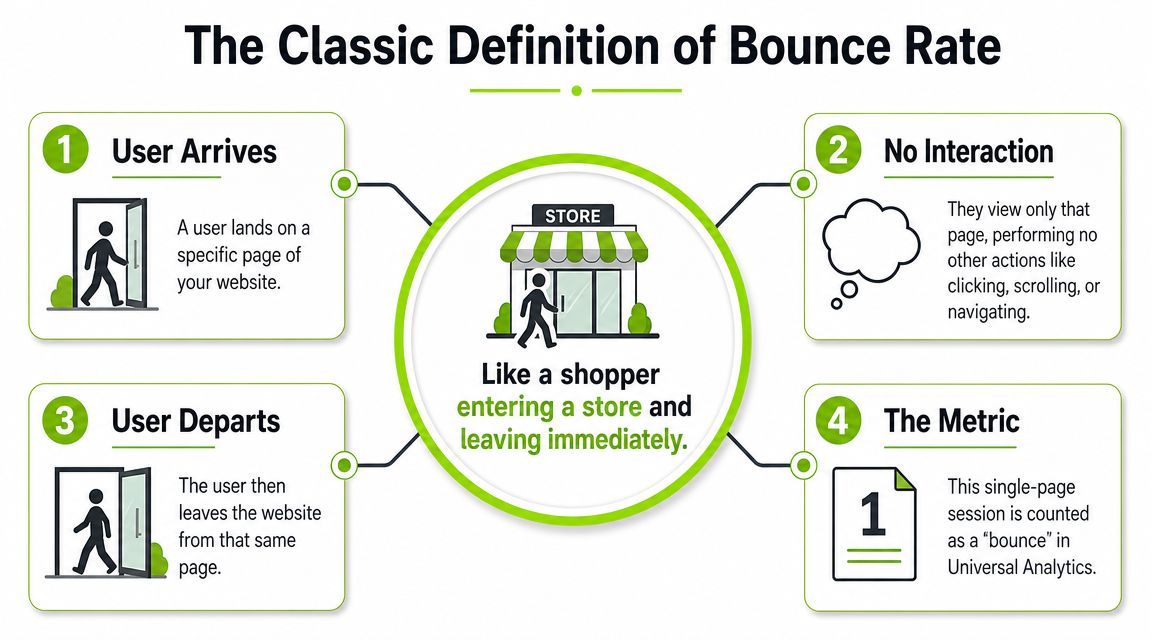
Before GA4 changed the meaning, bounce rate had a much narrower definition. In Universal Analytics, bounce rate was the percentage of all sessions in which the user viewed only one page and triggered only one Analytics request, which made it tightly connected to landing-page behavior and pageview depth, as explained in Yoast's overview of the Universal Analytics bounce-rate definition.
It's like someone walking into a store, glancing at the first display, and walking back out. They entered. They saw one thing. They didn't continue deeper.
Why the old definition felt intuitive
UA made bounce rate easy to explain. If someone landed on a blog post, pricing page, or homepage and never moved to another page, that session counted as a bounce. That gave marketers a quick way to judge whether an entry page pulled people further into the site.
It wasn't perfect, but it was simple. More pageviews usually meant more exploration. Fewer pageviews often meant the visit stopped early. For older site structures, that was good enough for a lot of reporting.
A bounce in Universal Analytics was basically a single-page visit with no second step recorded.
Where the old model fell short
The simplicity came with obvious blind spots. A person could read a full article, get the answer they needed, and leave satisfied. UA still counted that as a bounce. The tool wasn't measuring satisfaction. It was measuring whether another tracked request happened.
That's why the classic definition worked best as a rough directional metric, not a verdict. It was useful for spotting weak landing pages, thin content, or poor internal linking. It was less useful for pages designed to answer a question quickly or complete a single task.
A lot of old bounce-rate advice came from that world. The problem now is that many of those recommendations still circulate even though the metric itself changed.
How Bounce Rate Is Calculated in UA vs GA4
The most important thing to understand is that UA and GA4 don't calculate bounce rate the same way. If your reports changed after migration, that's expected.
In GA4, bounce rate is defined as the percentage of sessions that were not engaged, and GA4 treats it as the opposite of engagement rate. A session counts as engaged only if it lasts at least 10 seconds, includes more than one page view, or triggers a conversion event, which means a report with 70% engagement rate would show a 30% bounce rate, as described in Contentsquare's explanation of GA4 bounce rate and engagement rate.
Bounce Rate Showdown Universal Analytics vs. Google Analytics 4
| Metric | Universal Analytics (UA) | Google Analytics 4 (GA4) |
|---|---|---|
| Core definition | Single-page-session rate | Percentage of sessions that were not engaged |
| What avoids a bounce | Another Analytics request after the first page | Session meets engaged-session criteria |
| Main logic | Depth of page interaction | Quality of session engagement |
| Best use | Landing-page and navigation diagnosis | Supplemental engagement analysis |
| Historical comparison | Native to old UA benchmarks | Not directly comparable to UA benchmarks |
Why agencies see confusing numbers after migration
A page can perform the same real-world job and still show a different bounce rate across platforms. That's because the rules changed underneath the label.
In UA, a person who stayed on one article and left was usually a bounce. In GA4, that same visit may avoid being a bounce if the session lasts long enough or triggers a conversion event. That makes the number more behavior-aware, but it also breaks any lazy year-over-year comparison that mixes systems.
If you're managing client accounts, this is the point to explain early. Don't wait until someone asks why the bounce rate "got better" or "got worse." The answer may have nothing to do with the page itself.
For teams reviewing multiple platforms, it also helps to compare bounce rate alongside broader measurement models and attribution logic in tools beyond GA4. A practical starting point is this breakdown of web analytics competitors and reporting trade-offs.
What changes in day-to-day reporting
This shift affects reporting in a few concrete ways:
- Benchmarking changes: Old UA bounce-rate targets shouldn't be reused as if they're still calibrated.
- QA matters more: A conversion event setup can influence whether sessions count as engaged.
- Context matters more than ever: A page with strong intent match can still show a bounce if the session never meets GA4's engagement threshold.
- Executive summaries need translation: Stakeholders often hear "bounce rate" and think "people left immediately." In GA4, that's no longer a safe assumption.
Reporting habit: When presenting GA4 bounce rate, pair it with the page's purpose. Otherwise the number invites the wrong conclusion.
When Your Bounce Rate Is a Misleading Metric
A high bounce rate isn't automatically bad. Sometimes it means the page did its job fast.
A contact page is a good example. Someone lands there, grabs a phone number or email address, and leaves. A support article can work the same way. So can a blog post that answers a narrow question clearly enough that the visitor doesn't need a second click. Those visits may look shallow in a report, but they can still be successful.
Good outcomes that still look like bounces
Pages with single-task intent often create this confusion. Lead-gen pages, login pages, local info pages, and informational blog posts all need interpretation before judgment. If the user came for one thing and got it, a bounce doesn't necessarily indicate friction.
This is why page type matters so much. A bounce on a product comparison page might deserve scrutiny. A bounce on a glossary page might be normal. The metric only becomes useful when tied to the user's likely intent.
Tracking can distort the number
There's also a technical problem. Bounce rate can be skewed by implementation, not just behavior. Analytics Ninja notes that duplicated tags, cookie or session resets, and added interaction tracking can all push bounce rate up or down independently of real engagement, which means the metric can be technically correct while still misleading in analysis, as outlined in their guide to bounce-rate tracking pitfalls.
That matters a lot for agencies inheriting messy setups and for in-house teams with multiple plugins, tag-manager changes, and event configurations layered over time.
- Duplicated tags: These can change how sessions and interactions get recorded.
- Session resets: Cookie issues can make visits appear fragmented.
- Interaction events: Extra event tracking can reduce bounces without improving real user experience.
- Reporting assumptions: Some users expect bounce rate to appear everywhere by default, but GA4 reporting often requires customization.
If you're sending monthly stakeholder updates, this is where a disciplined SEO reporting framework matters. The report should explain whether a metric is decision-ready, not just whether it's available.
If your tracking setup is messy, bounce rate becomes a measurement artifact before it becomes a behavioral insight.
Meet Engagement Rate The New Standard
If bounce rate now sits in the background, engagement rate is the metric that deserves the spotlight in GA4.

Google's own GA4 documentation makes the relationship clear. Bounce rate = 100% − engagement rate, and bounce rate is treated as the percentage of sessions that were not engaged, which makes it a derived engagement-quality metric rather than a strict count of single-page sessions in Google's GA4 bounce-rate documentation.
Why this is better for teams
Engagement rate measures what people did, not what they failed to do. That's a better starting point for optimization because teams can work on the inputs.
If you run SEO or content for a brand, the questions become more useful. Did visitors stay long enough to suggest relevance? Did they continue to another page? Did they trigger a conversion event that matters to the business? Those are stronger signals than a generic fear of "bounces."
This also improves client communication. Instead of saying, "Bounce rate is high, but that might be okay," you can say, "Here's how many sessions met our engagement standard, and the reason that standard fits this page type."
How to explain the shift to stakeholders
Use plain language. Most clients don't need a lecture on analytics architecture. They need a sentence they can repeat internally.
"In GA4, we're measuring whether visits were engaged, not just whether someone stopped at one page."
That framing helps agency teams reset expectations without sounding evasive. It also connects naturally to broader goals like retention and repeat interaction. For marketers thinking beyond a single visit, this guide to building lasting user loyalty is useful because it shifts the discussion from isolated sessions to durable engagement patterns.
A short walkthrough can help if your team is onboarding people to GA4 concepts:
What to stop doing
Stop using bounce rate as the first KPI in an SEO review. Stop celebrating lower bounce rate without checking what changed in tracking or event setup. Stop carrying over UA-era benchmarks into GA4 decks.
Use bounce rate when it helps explain a page. Use engagement rate when you need to evaluate performance.
Actionable Ways to Improve User Engagement
The practical shift is simple. Don't optimize for a lower bounce rate in isolation. Optimize for more engaged sessions.
That changes the work. Instead of trying to manipulate a metric, you improve the conditions that make a visit useful. Better content, better UX, and cleaner next steps all support the behaviors GA4 recognizes as engaged.
Start with the page itself
The first fixes are usually on-page, not in the report.
- Match search intent closely: If the page promises one thing in search and delivers something else, people leave before the session becomes meaningful. Strong intent match keeps visitors reading and exploring.
- Lead with clarity: Put the answer, offer, or value proposition near the top. Visitors shouldn't have to decode what the page is for.
- Give the next click a job: Internal links, product paths, and related resources should feel like the natural next step, not decoration.
If you're improving organic landing pages, this guide on writing SEO content that matches intent is a practical place to tighten structure, relevance, and content flow.
Improve the session experience
A page can have good information and still lose engagement if the experience gets in the way.
-
Reduce friction early Slow layouts, intrusive elements, and cluttered intros often lose attention before the visit has a chance to become engaged.
-
Strengthen internal navigation Related articles, product links, category paths, and contextual CTAs help users take a second step when it's useful.
-
Track meaningful events only Don't add events just to make reports look healthier. Event tracking should represent real progress.
-
Use interactive elements carefully Video, calculators, demos, and expandable sections can help when they serve the user's task. They won't rescue weak messaging.
Optimization rule: If a page earns attention and offers a clear next action, engagement usually improves as a byproduct.
Test without gaming the metric
When teams start focusing on engagement, they often discover that the best changes are basic. Sharper intros. Better page layout. More relevant internal links. Cleaner CTAs. Fewer dead ends.
Testing still matters. If you're refining hero copy, CTA placement, or navigation paths, good A/B testing best practices help you avoid false wins and messy interpretations. The point isn't to force more clicks. It's to learn which version helps the right visitor move forward.
The best operational habit is to review pages by role:
- Informational pages: Did the visit show meaningful attention?
- Commercial pages: Did users move toward comparison, inquiry, or purchase?
- Utility pages: Did the page help users complete the task quickly?
- Funnel pages: Did users advance, or did friction stop them?
That approach gives agencies better client conversations and gives in-house teams better priorities. You're no longer asking how to "fix bounce rate." You're asking how to make the page more useful.
If your team needs a clearer way to track modern search performance across SEO and AI discovery, Surnex gives agencies and in-house teams one place to monitor visibility, rankings, content opportunities, and reporting workflows without juggling disconnected tools.