Monday morning is when weak rank data pipelines show themselves.
An account manager wants a client deck before standup. The BI dashboard is stale. Half the keyword set is mobile, half is desktop, and someone forgot that London and nationwide UK are not the same SERP. If you're pulling thousands of keywords across multiple domains, a website rank API isn't a nice-to-have. It's the difference between a reporting system and a spreadsheet habit that breaks every month.
I've seen teams buy the wrong API because they thought they were buying “rank.” What they were buying was one narrow measurement from one surface, in one locale, on one cadence. That mismatch gets expensive fast.
Why You Actually Need a Website Rank API
A website rank API is really a data collection layer for search visibility. A usable rank record is never just “position 3.” It's a tuple: keyword, engine, country, locale, device, time, and often result type. If you don't store those dimensions cleanly, your reporting starts lying the moment you expand to another market or compare desktop against mobile.
For agency work, the practical need is simple. You need rank data that can move through your stack without manual cleanup. That means a schema you control, historical records you can keep, and joins into analytics, Search Console, and client dashboards. If you switch vendors later, your warehouse should still make sense.
A lot of teams still treat rank tracking like a widget. It isn't. It's an ingestion problem, a normalization problem, and then a reporting problem.
What rank data needs to do in production
- Survive keyword and domain changes: Rebrands, migrations, and subdomain splits happen. Your system has to keep history attached to the right entity.
- Handle SERP changes: When layouts shift, your storage model can't assume every query is just ten blue links.
- Join with owned data: Rank alone is weak. It becomes useful when paired with clicks, landing pages, and conversion data.
- Power alerts and dashboards: Stakeholders want trend lines, exceptions, and drill-downs, not raw responses.
- Outlive the vendor: If your only history lives inside someone else's interface, you're renting visibility, not managing it.
Practical rule: Buy a rank API only after you can describe the table you want to store.
What a website rank API does not give you is equally important. It doesn't tell you traffic by itself. It doesn't explain why a page lost visibility. It doesn't answer AI citation questions unless the provider explicitly tracks those surfaces. It also doesn't replace a broader explanation of what rank tracking means in practice.
The Monday report test
If a tool can't support recurring pulls across large keyword sets, normalized by market and device, it won't hold up in agency reporting. The test I use is blunt: can this pipeline still work when client count grows, when one market underperforms, and when someone asks for a twelve-month comparison in a different locale?
If the answer is no, you're not buying rank data. You're buying future cleanup.
The Three Families of Rank APIs
Most rank API comparisons are organized by brand popularity or pricing page. That's not how teams should evaluate them. The better question is: what question does this API answer?
There are three families that matter.
| Family | Question Answered | Best For | Main Trade-Off |
|---|---|---|---|
| SERP-snapshot APIs | What does this query return right now in a given locale and device context? | Audits, QA, feature detection, one-off checks | You own repeat collection, history, and normalization |
| Rank-tracking APIs | Where does this domain rank across a managed keyword set over time? | Agency reporting, recurring monitoring, alerts | Less flexibility into raw SERP structure |
| SERP-data-platform APIs | How does rank fit alongside keyword, backlink, and competitor data? | In-house teams, warehouse integrations, broader SEO tooling | More fields, more cost, and more schema decisions |
Family one, raw SERP snapshots
These APIs usually take a keyword plus targeting inputs and return current search results as structured JSON or scraped output. They're useful when you need to inspect the page, spot feature ownership, or verify what a tracked number means.
For technical audits, I still like this family because it lets you inspect layout details that higher-level rank trackers may flatten away.
Family two, managed rank tracking
This is the category most agencies need. You upload keywords, define tracking context, and let the provider own collection cadence, storage, and position history. Your job becomes retrieval and analysis rather than SERP collection.
If you want a UI example of this model before you build API integrations, LocalHQ's rank tracker is a useful reference because it reflects the day-to-day reporting use case agencies care about.
Family three, broader SEO data platforms
Some APIs bundle rank with backlinks, keyword databases, and adjacent SEO metrics. These fit in-house teams that don't want separate vendors for every search dataset. The upside is unified retrieval. The downside is that you can end up paying for lots of surrounding data just to solve one reporting problem.
A good example of this broader category thinking is how teams evaluate APIs like those in this overview of the SE Ranking API, where rank data sits inside a wider SEO workflow rather than standing alone.
Raw SERP data answers “what happened on this result page?” Managed rank data answers “what changed for this domain over time?”
For the rest of this guide, the default mental model is family two. That's the category they mean when they search for a website rank API, even if they don't say it that clearly.
Anatomy of a Rank API Request and Response
A rank API gets easier to reason about when you split it into two paths. First, you define what should be tracked. Then you read the resulting positions back in a normalized format.
The exact endpoint names vary by vendor, but the request shape is usually familiar.
Example write path
This kind of call adds a keyword to a tracking campaign:
POST /v1/campaigns/{campaign_id}/keywords
{
  "keyword": "project management software",
  "domain": "example.com",
  "search_engine": "google",
  "location_code": "GB",
  "language_code": "en",
  "device_type": "desktop",
  "match_type": "exact",
  "depth": "organic",
  "track_serp_features": true
}
The important fields are the targeting controls. location_code and language_code should never be treated as optional if your reporting spans more than one market. One documented implementation uses ISO 3166-1 alpha-2 country codes in its source parameter to target a specific regional database, which is a useful pattern for location normalization in production systems, as shown in the SE Ranking API reference.
Example read path
A retrieval call usually looks more like this:
GET /v1/rankings?domain=example.com&keyword=project%20management%20software&location_code=GB&language_code=en&device_type=desktop&date=2026-09-01
And the response often follows this shape:
{
  "keyword": "project management software",
  "domain": "example.com",
  "search_engine": "google",
  "location_code": "GB",
  "language_code": "en",
  "device_type": "desktop",
  "position": 8,
  "url": "https://example.com/project-management/",
  "serp_features": ["featured_snippet", "people_also_ask"],
  "previous_position": 11,
  "delta": 3,
  "timestamp": "2026-09-01T06:00:00Z"
}
Fields teams misuse
A few fields cause trouble over and over:
- Delta: Don't trust vendor delta blindly if you ingest partial history or change match rules midstream. Recompute it from your own stored snapshots when accuracy matters.
- SERP features: A feature being present on the page is not the same as your domain owning it.
- Match type: Exact-domain and subdomain-inclusive matching produce different visibility stories. Pick one and keep it consistent.
- Depth: Some APIs report an organic slot only. Others include local or blended blocks. You need to know which one you're storing.
A null position usually means “not found in the tracked depth” or “not returned for that request context.” It should not be treated as the same thing as position 100. That distinction affects charting, alerting, and average calculations.
For developers evaluating payload design, this breakdown of a keyword position checker API is close to the level of structure you want before wiring anything into a dashboard.
Store the request context with the result row. Six months later, that's what lets you debug “wrong rank” complaints.
Why Google Search Console Is Not a Rank API
Every in-house team tries this at some point. They already have Search Console access, so they export query and position data and hope it can stand in for a real rank pipeline.
It can't.
Multiple current guides still make the distinction explicit: Google does not offer an API that returns a live public ranking for any domain. The official option works for verified properties and reports impression-weighted average position, not a point-in-time competitor rank, as explained in this breakdown of using the Google API for keyword position checks.
| Capability | Search Console | Rank API |
|---|---|---|
| Verified site performance reporting | Yes | Sometimes adjacent, but not core |
| Competitor visibility checks | No | Yes |
| Public SERP measurement | No | Yes |
| Point-in-time rank retrieval | No | Yes |
| Impression-weighted average position | Yes | Not the main purpose |
| Raw location and device-targeted checks for any domain | No | Yes |
Where substitution breaks
Search Console is tied to properties you control. That's useful for performance diagnostics, indexing issues, and ownership-level reporting. It doesn't answer “where does this competitor rank for this keyword in this locale right now?”
It also doesn't behave like a public SERP measurement layer. If you try to build alerts, competitor benchmarks, or exact snapshot comparisons on top of it, you'll run into the wrong shape of data.
Where it still belongs
Search Console still matters. It gives you verified-site reporting, search appearance data within Google's own framework, and operational signals that a third-party rank vendor can't provide.
The mistake isn't using Search Console. The mistake is using it for a job it was never built to do.
Authentication Patterns You Will See
Authentication is rarely the hard part technically. It becomes the hard part operationally when keys leak, tokens expire, or someone ships secrets into a front-end bundle.
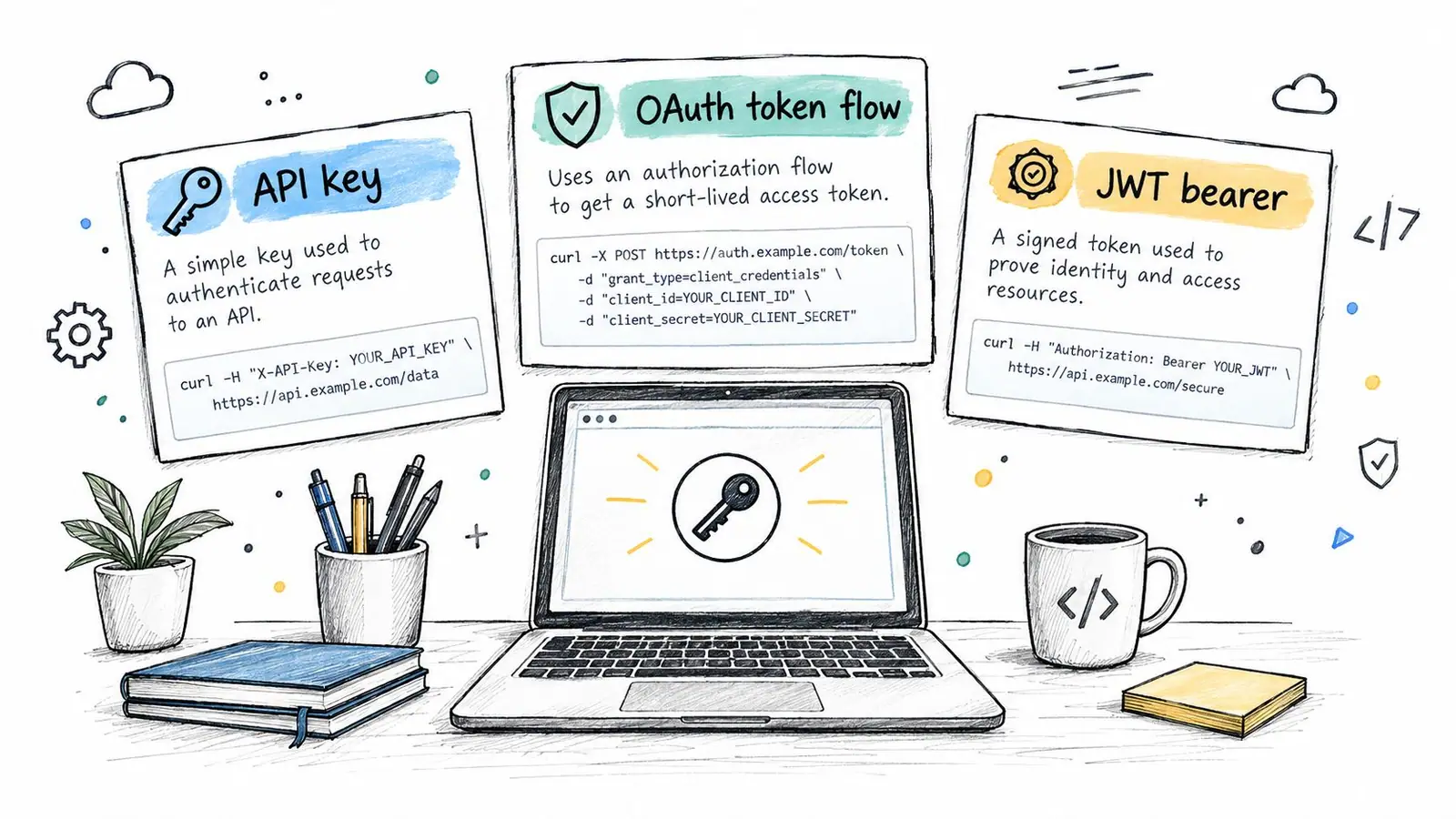
The three patterns you'll run into most often are API keys, OAuth, and service-account style credentials.
API key pattern
This is common with legacy SERP providers and simpler rank services.
GET /v1/rankings?keyword=crm+software
Headers:
  X-API-Key: YOUR_API_KEY
Don't put this in client-side JavaScript. A leaked key on a high-volume endpoint can become an ugly invoice long before anyone notices.
OAuth pattern
Enterprise platforms often use short-lived access tokens and refresh flows.
POST /oauth/token
{
  "client_id": "YOUR_CLIENT_ID",
  "client_secret": "YOUR_CLIENT_SECRET",
  "grant_type": "client_credentials"
}
Then attach the token:
GET /v1/rankings?campaign_id=abc123
Headers:
  Authorization: Bearer ACCESS_TOKEN
The failure point here is silent refresh failure in cron jobs. One broken token rotation can make your dashboard look “stable” when the data has stopped updating.
Service account pattern
You see this more often on Google-adjacent systems than true public rank APIs, but teams working across both stacks should recognize it.
POST /v1/query
Headers:
  Authorization: Bearer SERVICE_ACCOUNT_TOKEN
  Content-Type: application/json
If your team wants a clean reference for secure token handling and request signing patterns, this guide to a secure API authentication process is a practical complement to rank-specific docs.
For implementation hygiene, I treat rank credentials the same way I treat payment or transactional email credentials. Store them in a secrets manager, rotate them regularly, and never rely on a human remembering when a token needs attention. If you're reviewing tool options more broadly, a good starting point is this overview of the SEO tool API.
Historical Rank Data and Long-Term Trend APIs
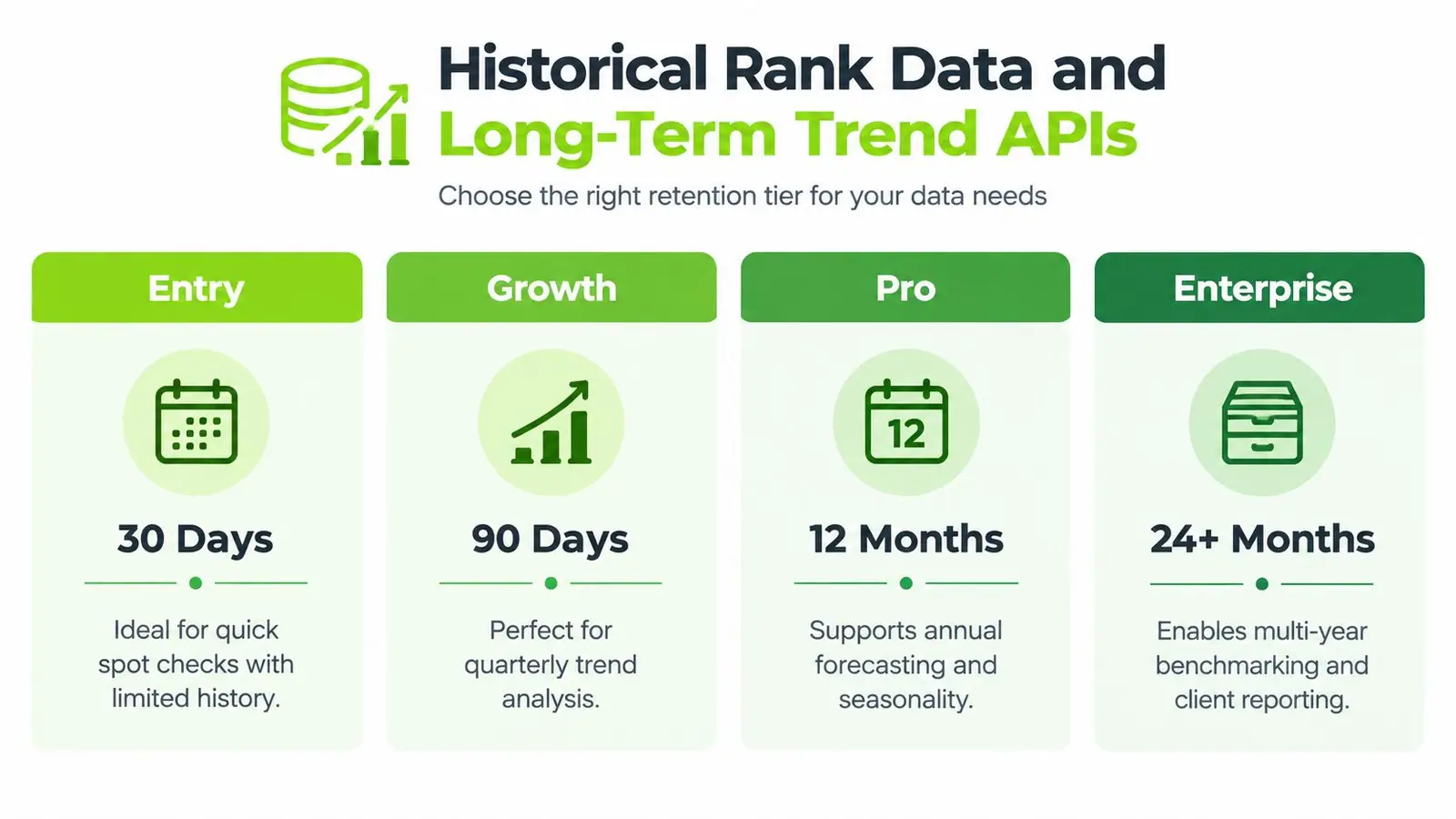
History depth changes what questions your team can answer. That's the buying decision.
Some providers still frame rank data like a current-state utility. Others now expose deeper archives built for trend work. Semrush documents that its domain and URL ranking reports provide live or historical keyword ranking data in regional databases, with monthly rankings available as far back as 2012–2016 depending on the database, and daily rankings for the last 31 days using the daily display option in its SEO overview reports API documentation. DataForSEO's historical rank overview documentation similarly states that historical ranking data is available from 2020-10-01 and is updated weekly, which shows how rank-history APIs now support longer-term analysis rather than only current checks.
What short history is good for
Short windows work when you only care about current movement. That's useful for campaign launches, page updates, or validating that new content entered the visible range after publication.
The mistake is expecting that same dataset to explain seasonality, market volatility, or recovery after a major search change.
What deeper history unlocks
Longer archives let you compare like with like. You can line up market-specific performance, inspect whether declines are temporary or structural, and preserve continuity through vendor or dashboard changes.
Historical rank matters less for checking today's number and more for preserving the meaning of trend lines.
The storage side nobody talks about
Once you start ingesting deeper histories, storage design changes. You stop thinking in terms of “latest rank” and start thinking in terms of snapshot tables, append-only history, retention policies, and how expensive reprocessing will be if the vendor changes one field.
That's why paying for deeper vendor-side retention often makes sense. Rebuilding years of normalized history after a switch sounds tidy in procurement meetings. In practice, it usually isn't.
Integrating Rank APIs at Scale
Rank pipelines fail at scale in predictable ways. Usually it isn't because the provider is bad. It's because the ingestion pattern assumes a happy path and production never behaves like that.
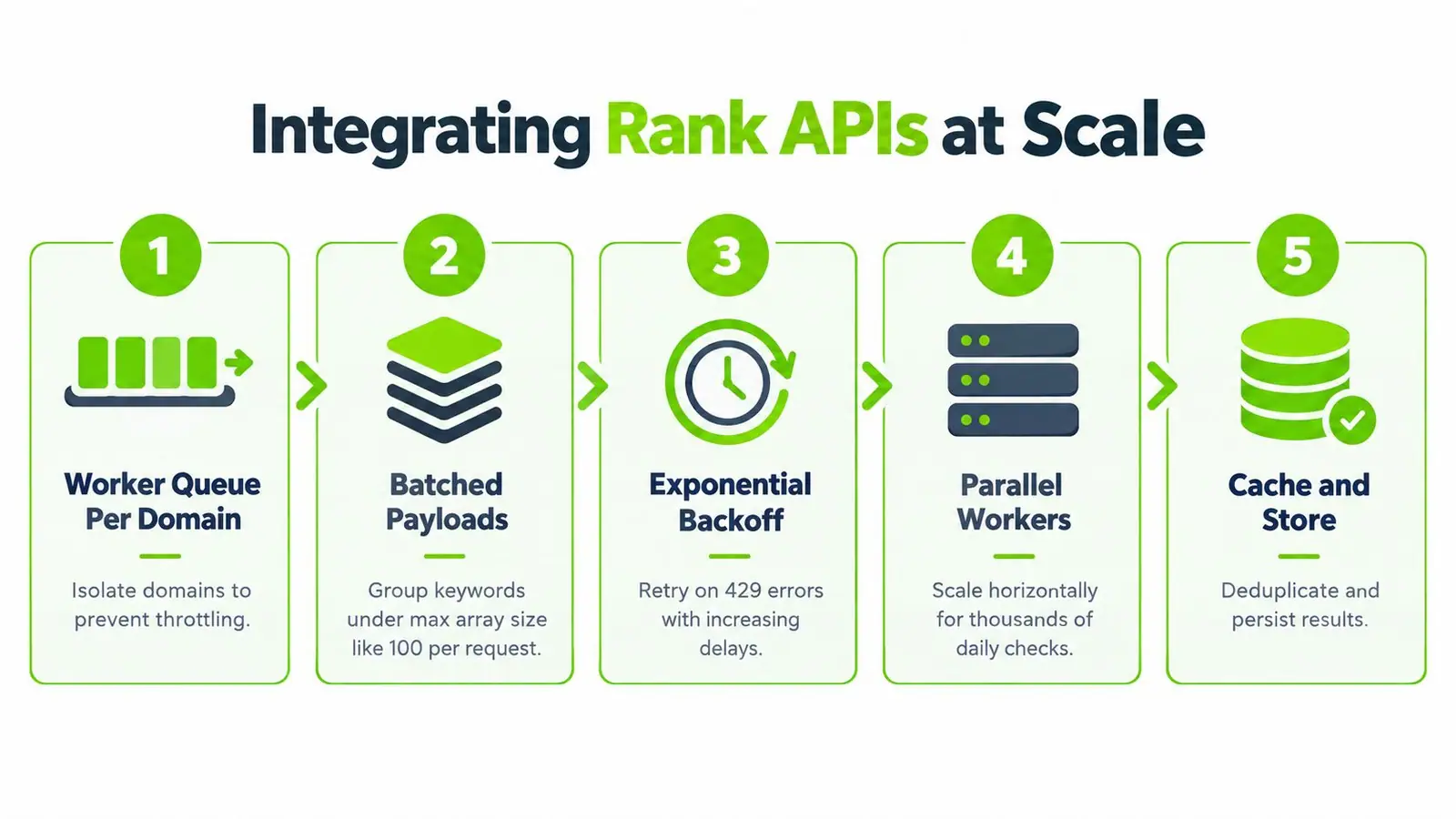
The reliable pattern is queue first, batch second, store third.
A workable ingestion design
I prefer one worker queue per domain or project group. That keeps failures isolated and makes it easier to throttle heavy accounts without blocking everyone else.
Then batch keywords under the provider's maximum accepted payload size. If the API supports arrays, use them. If it doesn't, parallelize carefully and expect retries.
- Backoff on rate limits: Use exponential retry on 429 and transient server errors.
- Cache repeated asks: If the same engine, location, and device request repeats inside your freshness window, collapse it.
- Write raw and normalized forms: Keep the parsed row for dashboards, but also retain enough raw payload to debug disputes later.
Industry guidance for production rank-tracking APIs consistently points in the same direction: treat rank data as a fresh, rate-limited dataset, use caching with TTLs aligned to refresh cadence, respect provider limits with token-bucket style controls, store historical pulls yourself, and manually validate samples against live searches in the target locale and device. That same guidance also warns that ranking alone is incomplete, and that joining rank with clicks and analytics is more useful than position data alone, as outlined in this guide to the best rank tracker API practices.
The operational pattern is easier to grasp when you see it mapped visually:
Storage that doesn't fight your dashboard
Use separate storage concerns for separate jobs:
- Current snapshot table: Fast reads for dashboards and alerts.
- Append-only history table: Every tracked pull, preserved with timestamp and request context.
- Materialized views or rollups: Small, fast aggregates for account summaries.
The quiet budget leaks
Most wasted spend comes from avoidable habits:
- Over-polling: Daily checks on static terms add cost without adding decisions.
- Duplicated variants: Mobile, desktop, and local variants burn credits fast if no one consumes the distinction.
- Empty successes: A 200 response with no rows still cost you a lookup.
- No freshness label: Users trust stale charts when the UI doesn't show the last successful update.
Instrument three things before launch: credit use by project, error rate by endpoint, and freshness on every visible rank value.
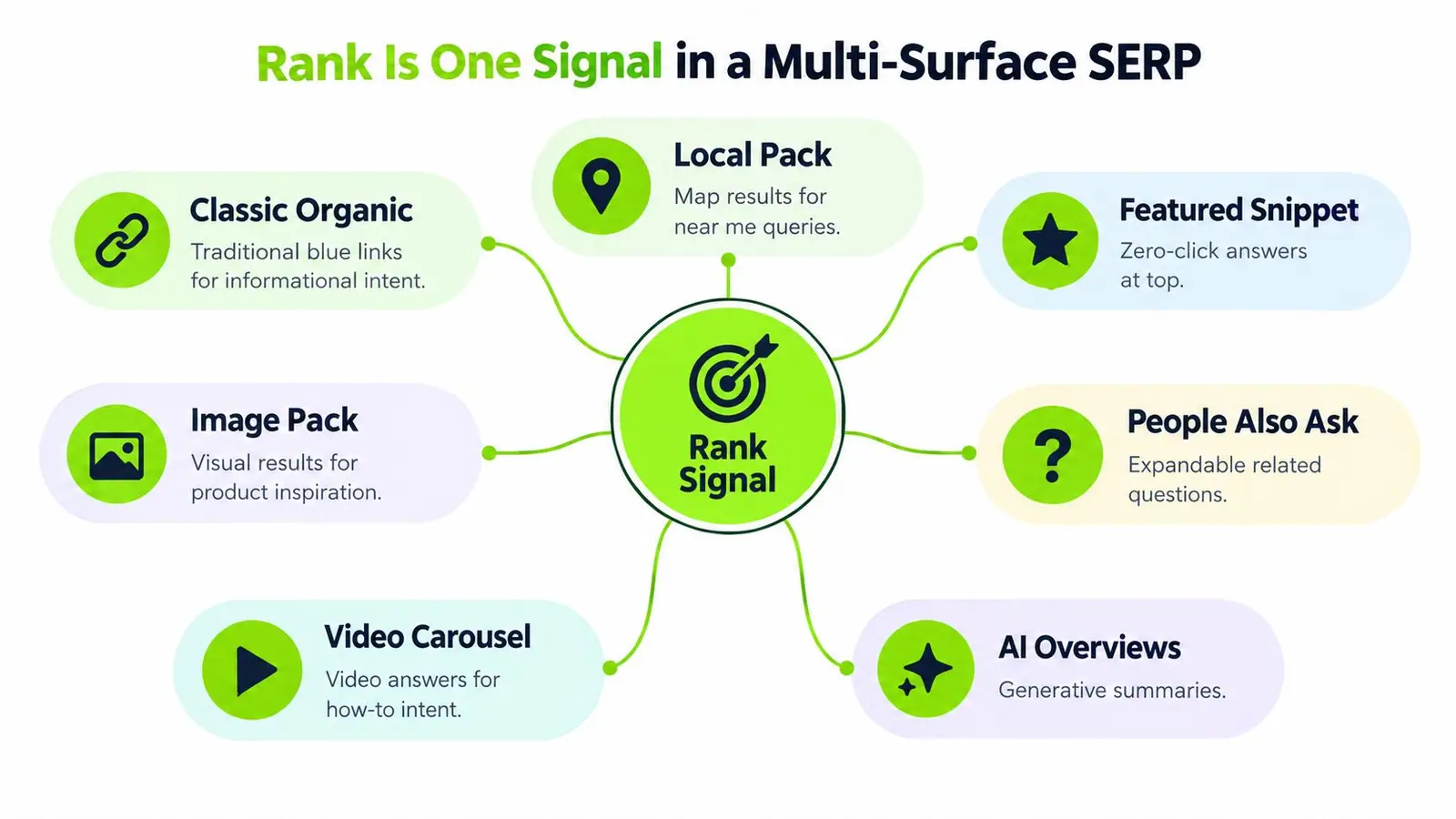
Rank Is One Signal in a Multi-Surface SERP
If your rank model only cares about organic position, you're measuring one layer of visibility and pretending it's the whole page.
That worked better when the result page was simpler. It works worse now. Search presence can show up in classic organic listings, local packs, snippets, image blocks, video carousels, People Also Ask, and AI-generated surfaces.
Why the single-number model breaks
Recent coverage of the SERP API market notes that it has split between traditional SERP scrapers and AI-native search APIs, which reflects the shift from one ranking surface to multiple discovery surfaces. It also notes that Google's Search Console documentation now counts clicks, impressions, and position for AI Overviews and AI Mode, reinforcing that modern visibility isn't just blue-link rank, as discussed in this guide to the best SERP API landscape.
That means a single average rank can hide the exact thing your team needs to diagnose. A brand might appear weak in classic organic while gaining visibility in another surface. Or the reverse. Without surface-level detail, both situations can collapse into one misleading number.
A better reporting model
I treat rank as one component inside a multi-surface visibility model:
- Organic position tells you conventional ranking.
- Feature ownership tells you whether the page controls prominent SERP elements.
- Surface coverage tells you where the brand appears across different result types.
- Trend deltas tell you whether presence is broadening or shrinking over time.
The useful question is often not “what's the rank?” but “where is the brand visible, and where is it missing?”
For agencies and in-house teams across multiple markets, this changes the reporting conversation. Instead of defending one number, you can diagnose visibility by engine, locale, device, and surface.
Common Failure Modes in Rank Data Pipelines
Most rank data issues don't arrive as outages. They arrive as believable wrong numbers.
One month, a client asks why UK rankings tanked. The answer is that someone's request defaulted back to a generic market profile. Another time, two vendors disagree on the same keyword because they measure from different collection environments. Both responses look valid. Your dashboard still ends up wrong.
The failure list worth checking first
- Geo defaults kicked in: Pin country and locale on every request. Never rely on vendor defaults.
- Personalized and neutral results got mixed: Keep your dataset source-consistent. Don't blend manually checked browser results into API-tracked rows.
- Timezone drift: Store vendor timestamp, ingestion timestamp, and reporting date separately.
- Wrong engine variant:
google.comand a country-specific Google property are different measurement contexts. - WWW mismatch: Canonicalize matching rules so
wwwand non-wwwdon't split the same domain story.
Structural failures
- Rate limits at month end: Reporting crunches hit the same endpoints at the same time. Queue earlier and stagger workload.
- Schema changes: Hash and monitor raw payload shape so field changes don't slide through without notice.
- Vendor disagreement: Keep a small manual validation set for disputed keywords.
- Null handling errors: Decide early how your system charts “not found,” and keep it distinct from low but valid positions.
The smallest fix is often the right one. Add country code to every row. Persist raw response metadata. Lock device in the request. Those simple controls catch more problems than elaborate post-hoc cleaning.
Choosing the Right Rank API for Your Use Case
Pick the API by the question you're trying to answer.
If you need fresh positions for a small keyword set, a pay-per-call SERP endpoint is often enough. If you manage recurring reporting across many clients, a rank-tracking API with built-in history and bulk endpoints usually saves more time than it costs. If you also need adjacent context such as backlinks, broader SEO workflows, or AI-surface monitoring, a platform approach can make more sense than chaining narrow tools together.
Programmatic rank APIs have also become more archive-friendly. Rank.to says rankings are updated daily, cover millions of domains worldwide, preserve daily history back to the first archived snapshot through its max range option, and support request windows such as 7, 90, 1095 days or 30d, 12w, 6m, and 3y. Top1m similarly exposes current rankings plus immutable daily archives and daily rank history endpoints, which shows the broader move toward date-queryable rank data in systems like Rank.to.
If AI-surface visibility is part of your evaluation, compare tools on that axis directly. This review of the AI search signals checker comparison is useful because it frames search visibility beyond standard organic rank alone. One option in that broader category is Surnex, which combines rank tracking with AI visibility, backlinks, and API access for teams that want fewer disconnected systems.
Buy on three criteria: freshness, history depth, and surface detail. Everything else is secondary if those don't match the job.
If you're building reporting around rank, AI visibility, and cross-market search performance, Surnex gives teams one place to track those signals without stitching together a separate dashboard for each surface. It's built for agencies, in-house teams, and developers who need API-ready search data they can operationalize. Take a look at Surnex if you want a cleaner way to manage modern search visibility.