
If you're still checking rankings by opening an incognito window, changing a city setting, and copying positions into a spreadsheet, you're already behind the shape of the SERP you're trying to measure. The result page isn't just ten blue links anymore. It includes local packs, videos, product blocks, People Also Ask, AI-generated summaries, and in some workflows, entirely separate AI answer surfaces.
That creates a practical problem. A single manual check might tell you where one URL appeared in one moment, but it won't give you a durable dataset you can trust across clients, markets, devices, and reporting cycles. A modern keyword position checker API solves that by turning search visibility into structured data you can store, compare, alert on, and ship into dashboards.
Why Manual Rank Checking Is No Longer Enough
Manual rank checking breaks first on consistency. Two people can search the same keyword and see meaningfully different result pages because the search engine adapts to device, geography, prior behavior, and the presence of richer SERP elements. If you're managing a handful of terms, that might be annoying. If you're running reporting across multiple clients or product lines, it becomes operationally useless.

A second problem is coverage. Manual checks usually focus on one engine, one device, and one snapshot in time. That leaves out the context teams need: whether a keyword triggered SERP features, whether a competitor owned the top visual real estate, and whether your brand appeared in an AI-generated answer at all. If you need a quick refresher on the basics, this explanation of what rank tracking is is a useful starting point.
What manual workflows miss
Most spreadsheet-driven rank checking fails in the same places:
- Location control slips because people change a market setting but don't standardize it.
- Device context disappears when desktop and mobile results get mixed together.
- SERP features go unrecorded because a plain rank column doesn't capture them.
- History gets fragmented when someone overwrites yesterday's export.
- QA becomes guesswork because nobody can trace how a number was collected.
Practical rule: If ranking data can't be reproduced by the same request parameters later, it isn't reporting data. It's an observation.
The API approach fixes this by making the check itself explicit. You define the keyword, engine, location, device, language, and retrieval method. Then you collect results on a schedule and store them as a time series. At that point, rank tracking stops being a manual task and becomes infrastructure.
Search visibility now needs observability
The shift that matters isn't just automation. It's observability. Teams need to know not only where they ranked, but what the result page looked like, what changed, and whether visibility happened through classic organic listings, a SERP feature, or an AI answer surface. That's the difference between explaining performance clearly and hand-waving through a client call.
What a Keyword Position Checker API Does
A keyword position checker API returns structured search visibility data that your own systems can consume. In practice, that means you send a request with inputs like keyword, engine, location, and device, and the API gives you machine-readable SERP data back, usually as JSON.
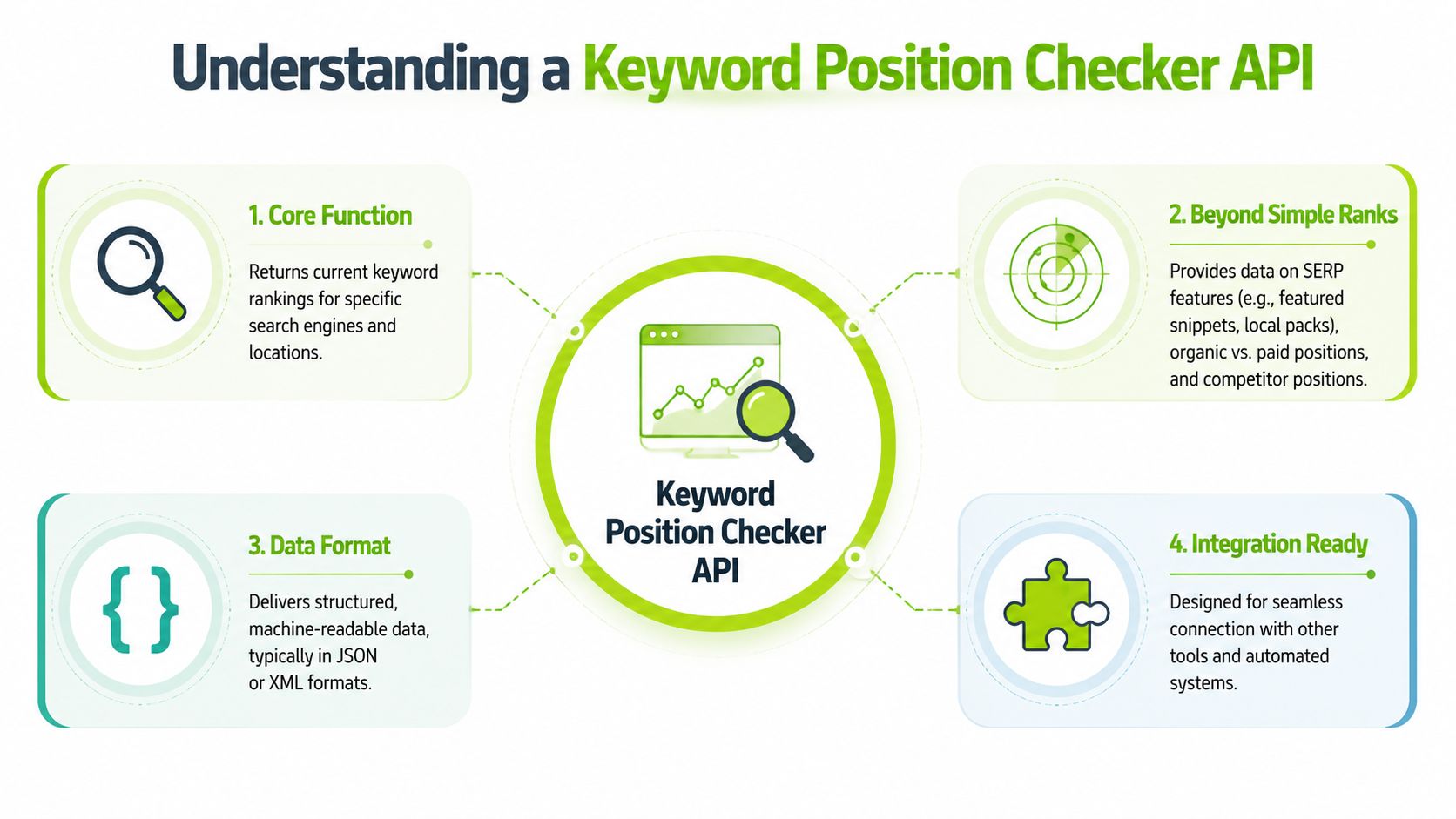
The important part is that the response shouldn't be treated as just a single ranking number. A production integration usually needs the ranking URL, result type, page-level context, and a record of which features were present on the SERP. SEO Review Tools states that its rank tracker API returns real-time ranking data in JSON and can power custom tools or spreadsheet workflows, which is exactly the kind of output shape developers need for downstream use in dashboards and internal systems (SEO Review Tools rank tracker API).
It measures more than blue-link rank
Modern tooling has moved far beyond one-engine, one-format rank checks. SE Ranking says its tracking covers Google, Bing, and YouTube, and also monitors AI visibility in ChatGPT, Perplexity, AI Overviews, AI Mode, and Gemini. It also says its SEO Ranking Checker can monitor 35+ SERP features, including AI Overviews (SE Ranking position tracking).
That matters because visibility now exists across multiple discovery surfaces. A keyword can produce:
- A standard organic result where your page ranks in the familiar list
- A SERP feature appearance such as a featured snippet, local pack, or video block
- An AI visibility event where your brand is cited, mentioned, or linked in a generated answer
If you're evaluating tools for local search workflows, it also helps to compare API-style tracking with products built around AI-powered local ranking analysis, especially when location precision matters more than national averages.
A quick visual overview helps before you start building:
Why the API matters more than the UI
A UI is for inspection. An API is for systems.
With the UI, an analyst can look up a keyword and inspect the result. With the API, an engineering or SEO team can:
- Schedule recurring collection
- Store full ranking history
- Enrich internal dashboards
- Trigger alerts when visibility changes
- Join SERP data with revenue, lead, or content data
The real upgrade isn't convenience. It's that the SERP becomes queryable data instead of a screenshot someone took at noon.
That's why teams building modern reporting stacks don't ask only, "What's our position?" They ask, "What exactly appeared, on which surface, under which conditions, and how did it change over time?"
Essential API Endpoints and Parameters
Most rank-tracking APIs use different names, but the endpoint patterns are similar. Once you've worked with a few of them, the structure becomes predictable. You request a check, retrieve results, inspect historical data, and monitor account usage.
Authoritas is a good example of what strong technical coverage looks like. It states that its rank tracker API tracks keywords from roughly position 1 through about 100, supports desktop and mobile, parses major Google universal SERP features, captures AI Overviews, and allows expanded-result retrieval for generative URLs and content (Authoritas keyword ranking API).
Real-time SERP retrieval
This is the endpoint most developers start with. You pass the search configuration and get back the latest result set.
Typical parameters include:
-
keywordThe exact query to check. Keep your input normalized. Don't let one workflow send singular terms while another sends plural variants unless that distinction is intentional. -
search_engineUsually Google, Bing, or another supported engine. Treat this as a required dimension in storage. Mixing engines in one table without labeling them causes reporting errors later. -
locationThe market context for the search. This might be a country, city, or another provider-specific geographic selector. -
deviceUsually desktop or mobile. Never infer device after the fact. Store it directly from the request. -
languageUseful for multilingual programs and international reporting. If your clients operate across regions, this becomes a core filter, not a nice-to-have.
Historical positions
This endpoint matters more than teams expect. A one-time check tells you almost nothing by itself. Historical retrieval lets you see whether a change is noise, trend, or a true event.
Look for APIs that support:
- date filtering
- retrieving prior positions for the same keyword set
- landing page history
- change fields that show movement since the prior collection
- SERP feature state for the stored date
If an API gives you daily storage or a date-range query, use it. Don't rely on ad hoc exports as your system of record.
Recheck or refresh endpoints
Some APIs separate "request a new check" from "retrieve stored results." That's a healthy design choice because fresh collection can be expensive and slow compared with reading from stored data.
Use recheck-style endpoints when:
- you need a fresh spot check for QA
- a stakeholder asks for an updated market after a release
- you're validating whether a major ranking shift is still present
- you're debugging a suspicious result in your own pipeline
Usage and quota endpoints
These aren't exciting, but they keep systems stable. If the provider exposes usage data, consume it. That lets you alert before your automation fails mid-cycle.
A lightweight pattern looks like this:
| Endpoint type | What it usually returns | Why it matters |
|---|---|---|
| Real-time SERP | current ranking and SERP data | powers dashboards and checks |
| Historical results | prior rankings across dates | trend analysis and reporting |
| Recheck job | refresh request status | controlled QA and on-demand pulls |
| Usage or credits | remaining allowance or request usage | cost control and scheduling |
Parameters that actually drive data quality
Teams often obsess over endpoint names and ignore parameter discipline. That's backwards. The same endpoint can produce useful data or garbage depending on how you set inputs.
Use a stable request model:
-
Lock your geography model Pick a level. Country for broad reporting, city for local programs. Don't mix the two in the same chart.
-
Separate mobile from desktop from day one Device segmentation isn't a later enhancement. It's a baseline data dimension.
-
Version your keyword lists If you add or remove tracked terms, store the effective date. Otherwise your visibility trendline becomes impossible to interpret.
-
Capture the full response, not just the rank Save result URLs, feature markers, and metadata. You'll need them when someone asks why a keyword "dropped" even though a different SERP feature crowded the page.
A ranking pipeline becomes reliable when request parameters are treated like schema, not user input you casually pass through.
Authentication Rate Limits and Error Handling
A working integration isn't the same as a resilient one. Most failed SERP API builds don't fail because the developer couldn't make a request. They fail because the team didn't plan for expiring credentials, throttling, retries, and partial data loss.
Authentication basics
Most providers use an API key, project token, or similar credential. Keep it out of client-side code, rotate it when staff changes, and inject it through your deployment environment rather than hardcoding it in scripts.
If you're evaluating an implementation approach for a specific provider, this overview of the SE Ranking API gives a practical example of the kind of integration surface teams usually work with.
A few rules hold up well in production:
- Store secrets server-side so browsers never see them.
- Scope access where possible if the provider supports project-level keys.
- Log request IDs, not secrets when troubleshooting.
- Fail loudly on auth errors because silent retries won't fix bad credentials.
Rate limits are a planning problem
Rate limits aren't an obstacle. They're part of the contract. Treat them as a scheduling input, not a surprise.
What works:
- queue requests instead of blasting them all at once
- spread collection windows across the day
- prioritize fresh checks for critical keyword sets
- cache stable reads where your workflow doesn't need a new check
What doesn't work is retrying instantly on every failure. That usually turns a temporary limit into a longer outage.
Error handling that keeps pipelines alive
Use HTTP status codes as signals, not just failures.
| Status code | What it usually means | Practical response |
|---|---|---|
401 | authentication failed | verify key, token scope, and environment config |
403 | request not allowed | check plan limits, permissions, or blocked resource |
429 | too many requests | back off, queue, and retry later |
500 | provider-side failure | retry with delay and capture request context |
Build for three classes of failure:
Transient failures
These are network hiccups, temporary provider errors, or short-lived timeouts. Retry them with exponential backoff and a cap. Don't retry forever.
Persistent request errors
These come from bad parameters, missing fields, invalid locations, or unsupported engines. Retries won't help. Validate before sending and quarantine bad jobs for review.
Partial data failures
These are the hardest ones. The request succeeds, but some expected fields are missing or inconsistent. That can happen when a provider changes response shape or when a SERP element isn't available for that check. Your parser should tolerate missing optional fields and flag schema drift quickly.
If your pipeline can't distinguish "no result found" from "request failed," your reporting will lie.
Sample Requests and Responses with Code Snippets
The easiest way to design your integration is to start with a generic request shape and map it to the provider you choose. The examples below use placeholder endpoints and credentials so you can focus on the mechanics: authenticated request in, JSON response out.
That output model matters because a production-grade keyword position checker API should expose data in a machine-readable format such as JSON and support direct ingestion into dashboards, spreadsheets, or internal workflows, which is how SEO Review Tools describes its rank tracker API output and usage pattern in custom tools and spreadsheets, as noted earlier.
If you're automating analysis in scripts or notebooks, this guide on Python for SEO is a useful companion for turning API responses into actual reporting jobs.
A basic cURL request
Start by testing outside your application.
curl -X GET "https://api.example.com/rankings?keyword=crm%20software&search_engine=google&location=United%20States&device=desktop&language=en" \
  -H "Authorization: Bearer YOUR_API_KEY" \
  -H "Accept: application/json"
This request does four useful things:
- sends a single keyword
- defines engine, location, device, and language
- passes auth in a header
- asks for JSON explicitly
Python example
Python is often the fastest path from proof of concept to scheduled job.
import requests

API_KEY = "YOUR_API_KEY"
BASE_URL = "https://api.example.com/rankings"

params = {
    "keyword": "crm software",
    "search_engine": "google",
    "location": "United States",
    "device": "desktop",
    "language": "en"
}

headers = {
    "Authorization": f"Bearer {API_KEY}",
    "Accept": "application/json"
}

response = requests.get(BASE_URL, params=params, headers=headers, timeout=30)
response.raise_for_status()

data = response.json()

print(data)
A few implementation notes:
timeoutprevents hung jobs from blocking your queueraise_for_status()forces bad responses into your error flowparamskeeps request inputs explicit and easy to log
JavaScript example
If you're building an internal dashboard or serverless worker, JavaScript is a common fit.
const API_KEY = "YOUR_API_KEY";
const url = new URL("https://api.example.com/rankings");

url.searchParams.set("keyword", "crm software");
url.searchParams.set("search_engine", "google");
url.searchParams.set("location", "United States");
url.searchParams.set("device", "desktop");
url.searchParams.set("language", "en");

async function fetchRankings() {
  const response = await fetch(url.toString(), {
    method: "GET",
    headers: {
      Authorization: `Bearer ${API_KEY}`,
      Accept: "application/json",
    },
  });

  if (!response.ok) {
    throw new Error(`API error: ${response.status}`);
  }

  const data = await response.json();
  console.log(data);
}

fetchRankings().catch(console.error);
Sample JSON response
A simplified response might look like this:
{
  "keyword": "crm software",
  "search_engine": "google",
  "location": "United States",
  "device": "desktop",
  "checked_at": "2026-01-12T09:00:00Z",
  "results": [
    {
      "position": 3,
      "type": "organic",
      "title": "Best CRM Software for Sales Teams",
      "url": "https://example.com/crm-software",
      "domain": "example.com",
      "serp_features": ["ai_overview", "people_also_ask"]
    }
  ]
}
How to read the response
Don't just print this data. Parse it into a schema you control.
keywordis the query you requested. Store it exactly as sent.search_engine,location, anddeviceare critical dimensions for segmentation.checked_atshould become part of your time-series key.resultsis usually an array because SERPs are multi-result by nature.positionis the visible slot reported by the provider for that result type.typehelps distinguish organic entries from other result categories.serp_featurestells you what else shaped the page.
Implementation note: Build your parser so unknown fields are ignored safely, but required fields trigger validation errors. That balance keeps the pipeline stable without hiding response changes.
A minimal internal schema
When teams move too fast, they store raw JSON only and regret it later. Raw JSON is useful, but reporting becomes painful without a normalized layer.
A practical starting schema:
| Field | Why keep it |
|---|---|
| keyword | primary search query |
| engine | separates Google, Bing, and other surfaces |
| location | preserves market context |
| device | keeps mobile and desktop distinct |
| checked_at | supports trends and alerts |
| url | ties visibility to landing pages |
| domain | supports competitor reporting |
| position | gives the direct rank value |
| result_type | distinguishes organic from other result classes |
| serp_features | preserves page context |
Store the raw payload too, but don't make analysts parse nested JSON every time they need a report.
Integrating API Data into Your Workflows
One API response is a check. A workflow is a system that keeps collecting, storing, and interpreting that data without someone babysitting it.
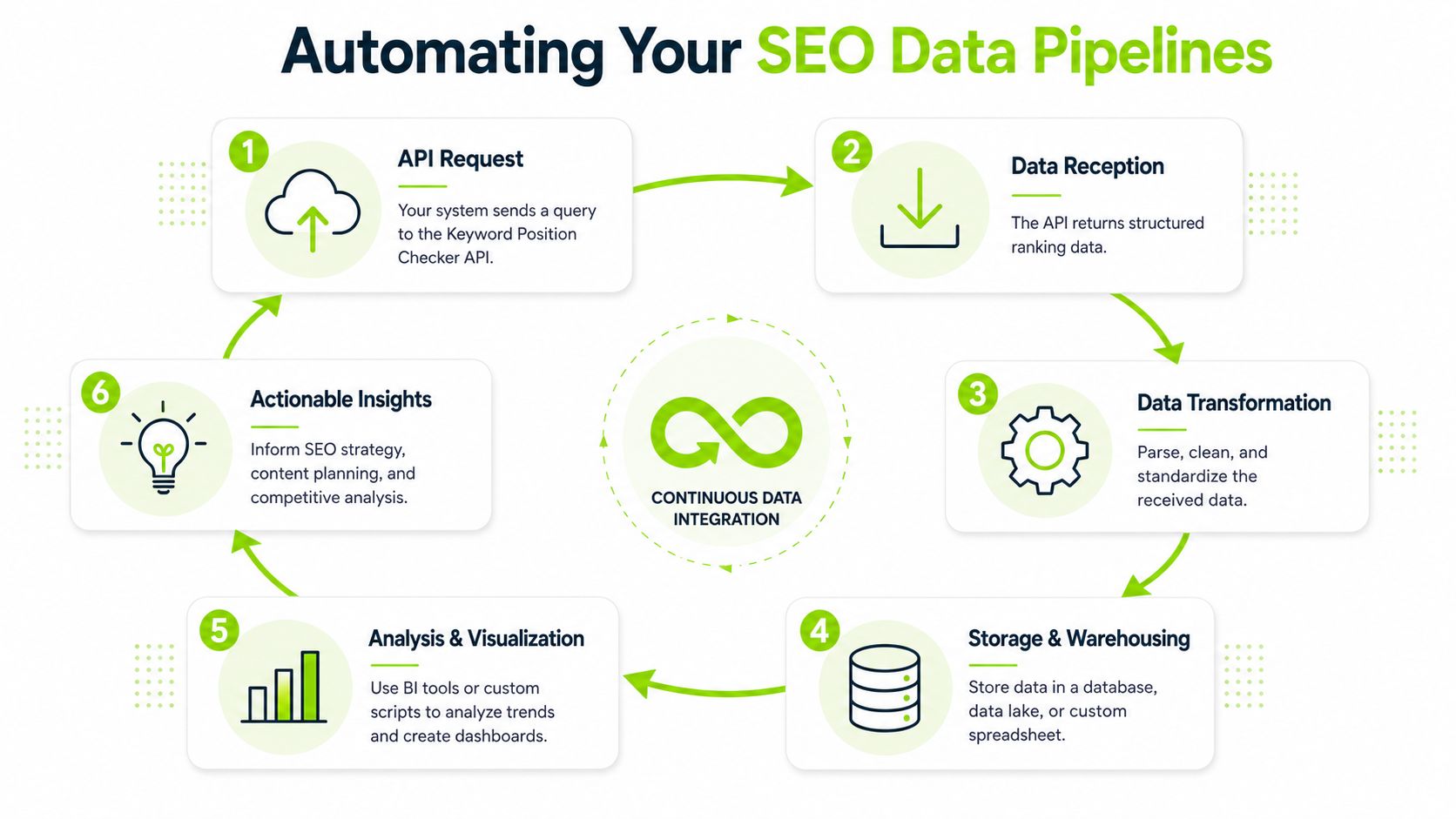
The simplest useful pipeline has five stages: request, receive, transform, store, and surface. Once you have that loop, the keyword position checker API stops being a lookup tool and becomes a reporting feed.
Common integration patterns
Some teams need only lightweight reporting. Others need a proper warehouse model.
A practical breakdown:
-
Google Sheets or similar spreadsheets Good for small teams, client spot reports, and operational visibility. Keep the schema simple and append rows rather than overwriting cells.
-
SQL databases Better when you need joins, historical queries, and controlled reporting logic. This is the right home for scheduled rank data once multiple teams depend on it.
-
BI tools Feed normalized tables into Looker Studio, Tableau, or your internal reporting layer. That's where SEO data becomes usable by account managers, directors, and product stakeholders.
Google Search Console can complement this setup. Outrank's 2026 guide says the Search Analytics query method can return query, page, country, device, date, hour, clicks, impressions, CTR, and average position, and that hourly data is new in 2026. The same guide notes that the UI queries table shows up to 1,000 rows, which is one reason teams use APIs or scripts for longer-term keyword history (Outrank guide to checking keyword position using Google API).
That matters because Search Console gives performance data from your own site, while a SERP API gives observable market position data from the result page. Used together, they tell a much fuller story.
Scheduling and reporting
You don't need a heavy platform to automate collection. A cron job, a serverless function, or a basic queue worker is enough if the job design is clean.
Keep the workflow disciplined:
- request rankings on a schedule
- validate the response
- transform to your schema
- write to storage
- refresh the dashboard or alert logic
For reporting design, this walkthrough on a keyword rankings and visibility report is useful because it shows how raw rank data becomes something stakeholders can read.
Good reporting pipelines separate collection time from presentation time. The API job gathers data. The dashboard reads clean, stored tables.
Practical Use Cases for Agencies and Product Teams
The same API can support very different workflows depending on who owns it. Agencies use it to scale repeatable reporting. Product teams use it to enrich internal systems and monitor discovery surfaces that affect acquisition.
Agency scenario
An agency with multiple clients usually has the same recurring headache: every account manager needs a ranking update, leadership wants trend reporting, and clients ask why a keyword "dropped" when the actual issue was a new SERP feature or an AI summary pushing classic results further down.
A useful agency pattern looks like this:
- pull rankings on a schedule by client, market, and device
- store competitor domains from the same SERP snapshot
- attach landing pages to each tracked term
- generate a dashboard view for account teams
- trigger alerts for unusual movement or disappearing visibility
This is also where a platform like Surnex can fit if a team wants rank tracking plus AI visibility and broader SEO metrics in one system, especially when the same workflow needs traditional rankings alongside AI search monitoring.
Product and engineering scenario
In-house teams usually care less about polished client reports and more about internal observability. They want to know whether important commercial pages are discoverable, whether brand mentions appear in AI-generated answers, and whether release changes align with shifts in search visibility.
Typical uses include:
- Internal SEO dashboards for product, content, and growth teams
- Content opportunity scoring by joining ranking data with conversions or engagement
- Search intent enrichment inside content planning tools
- Competitive monitoring for categories where search presentation changes quickly
A product team can also use rank data as a QA layer. If a migration ships and a set of target URLs disappears from expected SERPs, the API gives a cleaner signal than waiting for anecdotal reports from marketing.
Why these teams use the same data differently
Agencies optimize for repeatable communication. Product teams optimize for decision support.
That difference changes what gets built. Agencies care about branded dashboards, historical comparisons, and client-ready exports. Product teams care about event correlation, internal alerting, and clean schemas that fit the rest of their data stack.
The underlying API doesn't change. The surrounding workflow does.
Best Practices for Data Accuracy and Scalability
The hard part of a keyword position checker API isn't getting data. It's deciding what counts as trustworthy data and collecting only as much as your operation can support over time.
A lot of teams build noisy rank pipelines because they treat every fluctuation as meaningful and every fresh check as worth paying for. That approach creates expensive dashboards full of unstable interpretations.
Accuracy starts with controlled inputs
If you want trends you can defend, standardize the request conditions.
That means:
- Keep location consistent for the reporting line you're building
- Never blend devices in the same KPI unless you mean to
- Track AI visibility separately from traditional rank when the provider exposes both
- Document parameter choices so the team knows what the metric represents
Semrush's educational material highlights an issue many teams still under-explain: users increasingly need to reconcile traditional rank data with personalized results and AI-generated SERP elements, and modern tooling often separates Google rankings from AI-answer tracking because visibility can now mean organic rank, cited source, or brand mention in generated responses (Semrush keyword rank checker overview).
That's exactly why a single "average ranking" field often fails to describe what happened.
Scale by reducing waste, not by collecting everything
Many teams over-collect because they can. That usually leads to ballooning storage, wasted credits, and dashboards nobody trusts.
A better operating model:
| Decision area | What works | What usually fails |
|---|---|---|
| Check frequency | match cadence to business need | rechecking everything constantly |
| Storage design | keep normalized fields plus raw payload | storing only screenshots or raw blobs |
| Alerting | flag meaningful changes on priority sets | alerting on every movement |
| Segmentation | preserve engine, location, device, and result type | collapsing dimensions too early |
Treat rank tracking like observability data. Collect enough to explain change, not so much that the system becomes noise.
Build for change in the SERP itself
SERPs don't stand still. Providers add fields, AI elements evolve, and result layouts change. Your integration should expect that.
Three habits make a real difference:
- Schema monitoring so new or missing fields are noticed quickly
- Fallback parsing for optional result elements
- Versioned reporting logic so dashboards don't invisibly reinterpret old data under new rules
The teams that handle this well stop talking about rank tracking as a single metric. They treat it as a layered visibility model. Traditional position still matters. SERP features matter. AI appearance matters too. If your pipeline can't separate those layers, it won't explain search performance clearly when the page layout shifts.
Surnex helps agencies, in-house teams, and developers monitor traditional rankings alongside AI visibility across newer search experiences. If you're building workflows around a keyword position checker API and need one platform for search intelligence, reporting, and automation, you can learn more at Surnex.