Most advice on a google keyword position checker api starts in the wrong place. It assumes Google offers a clean, official endpoint for real-time rank checks. It doesn’t.
That mistake leads teams into bad architecture. They overfit to Google Search Console for a job it wasn’t designed to do, or they build fragile scraping jobs and discover later that maintenance, blocking, and data drift are costs. If you're building an internal SEO data pipeline, the first decision isn't which wrapper library to use. It's whether you need Google's free, limited performance data or a paid third-party SERP data layer built for large-scale rank tracking.
That distinction matters because rank tracking has two very different meanings in practice. One is performance data for your own verified properties. The other is a reproducible search result snapshot for a keyword, device, and location. Those are related, but they aren't the same system and they don't solve the same problem.
The Truth About a Google Keyword Position Checker API
Google has been explicit about the core limitation for a long time. In a Google Groups discussion, the answer was blunt: "There is no way to check keywords rankings through Google API" (Google Groups discussion on keyword rankings through Google API).
That’s still the reality. If you search for a google keyword position checker api, you’ll find a lot of content that dances around this point by pointing at Search Console API, Custom Search workarounds, or browser automation. None of those is an official direct API for real-time public keyword rankings.
What Google does provide
Google does give you useful data for owned properties through Search Console. That data is valuable for clicks, impressions, CTR, and average position on sites you control. For internal reporting, it’s often the right baseline because it’s free and tied to actual search performance.
But it doesn’t solve the public SERP tracking problem. It won’t give you exact competitor positions across arbitrary queries, reliable city-level snapshots, or the sort of reproducible ranking checks agencies need for multi-client monitoring.
Why the ecosystem exists
The reason third-party APIs exist is simple. Teams still need rank data that Google doesn’t expose directly.
Practical rule: If your use case includes competitor tracking, local SERP snapshots, or exact position checks across many keywords, you’re already outside the boundary of Google’s official tooling.
That’s why most production systems end up with one of two architectures:
- Google-only stack for owned-site performance reporting
- Hybrid stack where Search Console handles first-party metrics and a third-party SERP API handles rank snapshots, feature extraction, and competitor coverage
The rest of the implementation flows from that choice.
The API Landscape Official Tools vs Third-Party Services
The cleanest way to choose an API stack is to stop asking which tool is “best” and ask which data model matches the job.
Google’s own tools are strongest when you need performance truth for a property you control. Third-party SERP APIs are strongest when you need search result state at scale. Those are different operational needs, and trying to force one into the other usually creates reporting confusion.
Where Google’s tools fit
Search Console API is the obvious first stop for internal SEO pipelines. It’s free, it’s official, and it gives direct access to query, click, impression, CTR, and average position data for verified properties.
That makes it useful for:
- Owned domain reporting where you care about actual search performance
- Content diagnostics tied to pages and queries you already rank for
- Low-cost automation when you want regular exports into Sheets, BigQuery, or internal dashboards
Its limits are just as important:
- No competitor tracking
- No exact public rank snapshot
- No hyper-local reproducibility
- No full SERP structure for a query
Where third-party APIs fit
Third-party keyword position APIs emerged around 2010 to 2015 and now support daily updates across major search engines from any country, city, or language. Providers like DataForSEO report 99% accuracy, and agencies managing 1,000+ keywords can reduce manual checks by 90%, which matters because SERPs can fluctuate 20-30% weekly (RankActive overview of keyword position checker APIs).
That’s the architectural reason agencies buy them. They turn a volatile, location-sensitive, blocking-prone task into an API contract.
Decision framework
A simple comparison usually gets you to the right answer fast:
| Need | Google tools | Third-party SERP APIs |
|---|---|---|
| Your own site performance | Strong fit | Partial fit |
| Competitor rankings | Not suitable | Strong fit |
| Exact keyword position checks | Limited | Strong fit |
| Full SERP features | Limited | Strong fit |
| Cost control | Strong fit | Depends on volume |
| Large multi-client tracking | Limited | Strong fit |
Use Google’s tools when your main question is, “How did our verified site perform?”
Use a third-party provider when your main question is, “What did Google show for this keyword, in this place, on this device?”
A lot of teams don’t need to choose one side forever. They need a split architecture with Google for truth on owned assets and a SERP API for everything else.
Core Concepts of How Keyword Checker APIs Work
A third-party rank tracking API is not magic. It’s an abstraction over a messy collection problem.
At a high level, your application sends a request with a keyword and search context. The provider runs that search through its own infrastructure, captures the result page, parses it, and returns structured data. That returned data is usually much more useful than raw HTML because your code can work directly with fields like rank, URL, title, and SERP features.
The basic workflow
Most providers follow the same pipeline:
- Receive the request with keyword, location, device, and search engine settings.
- Dispatch the query through browsers, proxies, or headless infrastructure tuned for that market.
- Collect the SERP as rendered output or parsed page content.
- Extract structured elements such as organic results, ads, snippets, local packs, or image blocks.
- Return JSON that your application can store, compare, and analyze.
That’s why a proper SERP API is more than a rank checker. It’s a structured SERP capture service.
Terms that matter in implementation
A few concepts come up constantly when you build against these APIs:
- SERP snapshot means a stored representation of the result page at a given time and context.
- Geo-targeting means selecting a country, city, or more specific locale so the request matches the market you care about.
- Device targeting means requesting mobile or desktop results separately.
- Position matching means scanning returned URLs to determine where your target domain appears.
If you want a compact example of how keyword-focused API schemas are documented, Access keyword API documentation shows the kind of parameter-driven model developers should expect.
For teams planning broader operational workflows, it helps to think of rank tracking as one component inside a larger SEO data system, not a standalone script. A mature setup usually looks more like a pipeline such as rank tracking operations in an SEO suite, where data collection, storage, segmentation, and reporting are all separate concerns.
What works and what doesn’t
What works is treating the provider as a SERP acquisition layer and your application as the analysis layer. That split keeps your code simple.
What doesn’t work is assuming one rank number tells the whole story. Real pipelines usually store the full result payload because teams later need more than rank. They need titles, snippets, feature presence, and historical comparisons.
Anatomy of an API Request and Response
When you integrate a google keyword position checker api, the contract matters more than the marketing page. You need to know which parameters control search context, how deep results go, and what fields come back reliably.
Third-party providers generally expose RESTful GET or POST endpoints that return JSON payloads. Common parameters include api_key, q, location_code, device, and se, and responses usually contain fields like position, url, and title. Best practices also include rotating proxies to evade CAPTCHAs, with success rates often exceeding 95% with residential IP pools (SearchAPI rank tracking API documentation).
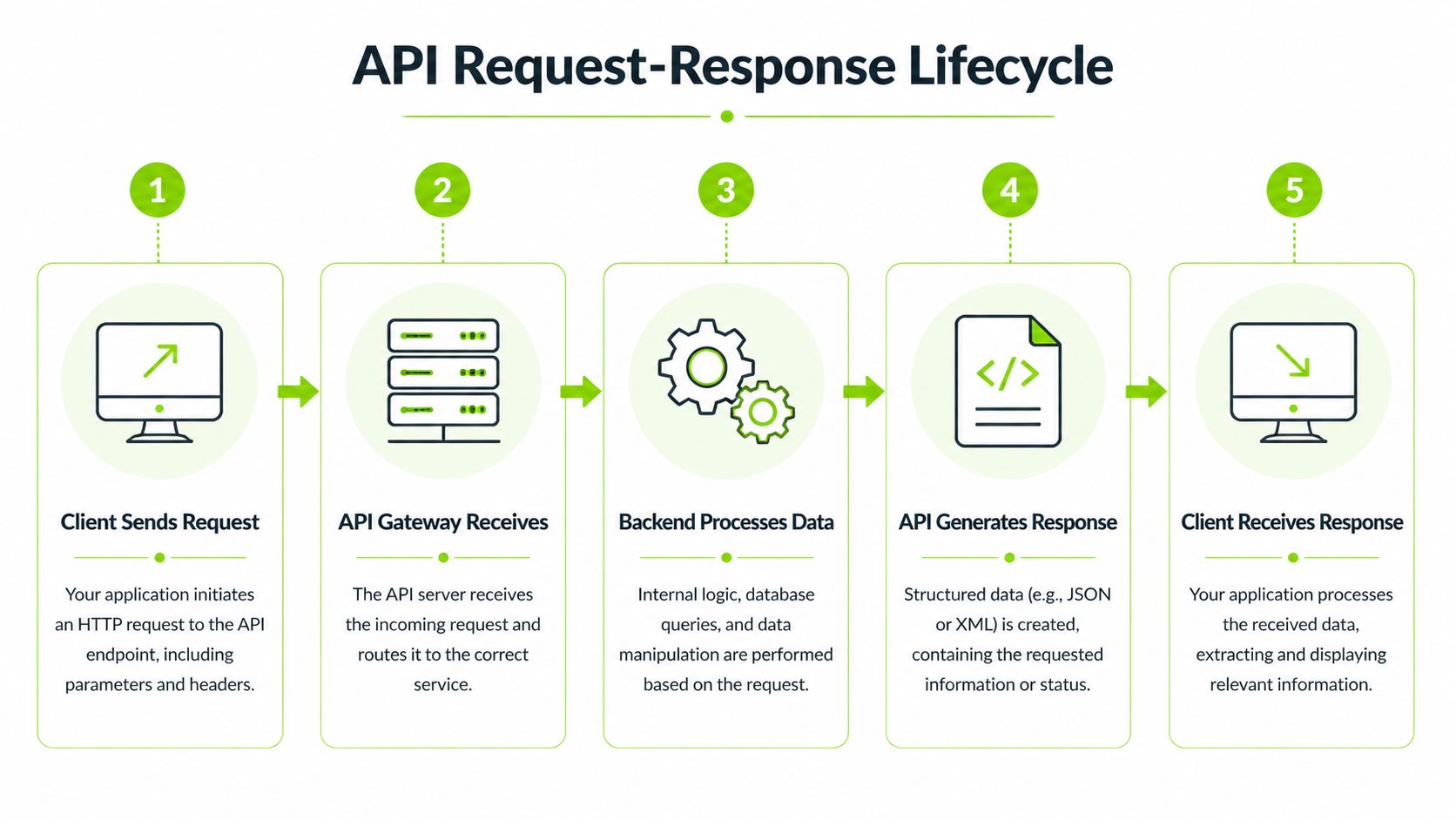
A simple lifecycle view helps before looking at code.
Example request shape
A typical request looks something like this:
{
  "api_key": "YOUR_KEY",
  "q": "enterprise seo platform",
  "location_code": "US-NY-10001",
  "device": "desktop",
  "se": "google.com",
  "page": 1,
  "depth": 100
}
The important fields do different jobs:
qcontrols the keyword or phrase to query.location_codefixes the market context. Without that, local data becomes noisy.devicematters because mobile and desktop SERPs often differ.sepicks the Google market, such asgoogle.comorgoogle.co.uk.depthdetermines how far into the SERP you want the provider to parse.
If you’re mapping rank data into a broader engineering stack, it helps to define this request layer as its own service contract. That keeps scraping concerns separate from storage, alerting, and dashboard logic, which is the same separation you’d want in a more complete SEO data tech stack.
Example response shape
The response usually arrives as a normalized JSON object:
{
  "status": "success",
  "organic_results": [
    {
      "position": 1,
      "url": "https://example.com/page-a",
      "title": "Example Page A",
      "snippet": "A short result description.",
      "rich_features": {
        "sitelinks": true
      }
    },
    {
      "position": 2,
      "url": "https://example.com/page-b",
      "title": "Example Page B",
      "snippet": "Another result description.",
      "rich_features": {}
    }
  ]
}
The fields you’ll use most often are straightforward:
positionis the rank slot returned by the provider.urlis what you match against your target domain or page set.titleandsnippetare useful for audits, not just reports.rich_featuresgives you a place to detect snippets, sitelinks, and other result embellishments.
The next layer of implementation is often easier to understand in video form before you build queueing and retries into your code.
Parsing strategy that holds up
Most fragile parsers fail because they try to do too much inline. A better pattern is:
- Parse the full response into a raw storage table.
- Extract domain matches into a normalized ranking table.
- Keep feature flags in a separate structure for downstream analysis.
That way, if a provider changes a nested field, you don’t have to rebuild your whole reporting layer.
Implementation Patterns for Scalable Tracking
A single API request is easy. A production tracker isn’t. The moment you move from a handful of terms to thousands of keywords across clients, the architecture starts to matter more than the endpoint.
The right pattern depends on volume, freshness requirements, and how much failure you can tolerate before reports break.
Synchronous polling
This is the simplest model. Your app sends a request and waits for the result.
It works well for small tooling, internal debugging, and one-off checks. It’s also easy to reason about because the request lifecycle is linear.
The downsides show up quickly:
- Long wait times under load
- Higher risk of client timeouts
- Poor fit for large batch jobs
Use it when the user is actively querying a small set of keywords and immediate feedback matters more than throughput.
Asynchronous batching
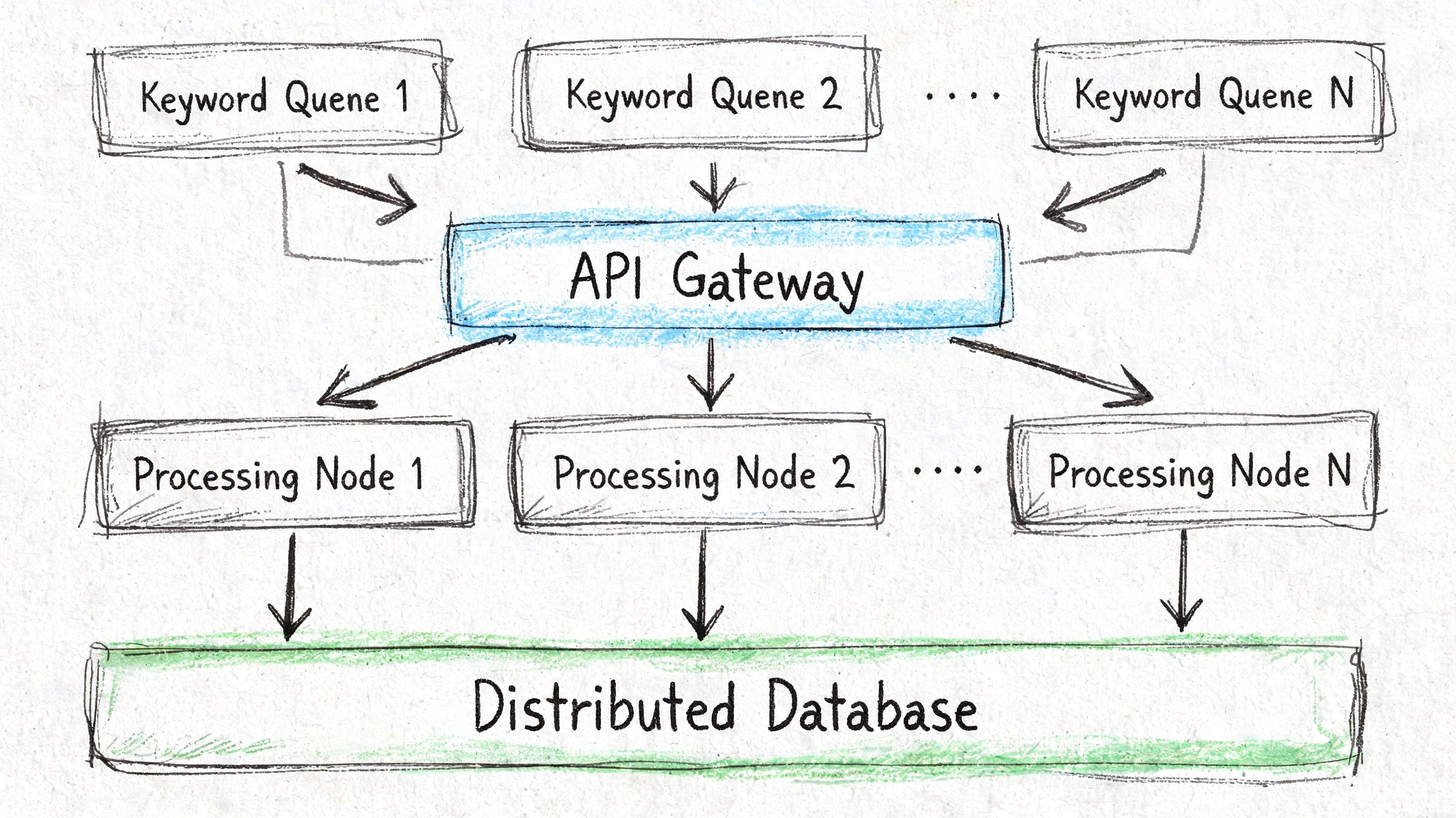
This is the pattern most serious teams end up with. You enqueue jobs, dispatch them in parallel, and process results as workers finish.
This model handles volume better because it separates submission from completion. It also lets you group keywords by market, device, or client so your infrastructure and billing become easier to control.
A good batch system usually includes:
- Queue partitioning by client or market
- Retry policy for transient failures
- Cache layer so repeated checks don’t trigger duplicate calls
- Result normalization before storage
For teams automating rank deltas and alerting, a workflow like rank monitoring and change tracking is a good mental model for how the data should move after collection.
Webhook callbacks
Webhook-based processing is cleaner when the provider supports deferred jobs. Instead of polling repeatedly, you submit work and the provider calls your endpoint when the results are ready.
That reduces waste and keeps your application from burning requests on status checks. It’s usually the best fit when your reports are scheduled, not interactive.
If your pipeline runs every day and nobody needs the answer in real time, webhooks are usually easier to scale than aggressive polling loops.
Choosing the right pattern
A quick rule of thumb helps:
| Pattern | Best for | Main trade-off |
|---|---|---|
| Synchronous polling | Small tools, debugging | Weak scalability |
| Async batching | Agency and enterprise tracking | More moving parts |
| Webhooks | Scheduled jobs, low waste pipelines | More integration work |
The mistake I see most often is teams starting with synchronous calls and never redesigning the pipeline. That works until a client adds another market, another device split, and another segment layer. Then every report becomes a queueing problem disguised as an API issue.
Navigating API Limitations and Technical Hurdles
SERP APIs fail in predictable ways. The trouble is that many teams treat those failures as exceptions when they should treat them as normal operating conditions.
Rate limits, partial failures, stale jobs, CAPTCHA defenses, and shifting response shapes are all part of production rank tracking. If your implementation assumes clean success every time, it will look stable in testing and break in real use.
Adoption of keyword checker APIs has driven strong efficiency gains, with 85% of agencies reporting 40-60% time savings on rank reporting. Tools like Apify, using SEMrush data, claim 98% accuracy and can be up to 70% cheaper for 50,000 checks per month. That automation matters because Google core updates can bring 25% SERP volatility (Outrank analysis of checking keyword position using Google API).
Handle failure classes differently
Don’t lump all errors into one retry bucket. Different failure types need different responses.
- Temporary server failures should trigger retry with backoff.
- Rate-limit responses should slow the caller, not just repeat the request.
- Malformed payloads should be quarantined for inspection.
- No-result jobs should be stored explicitly, because “no rank found” is still a valid outcome.
A resilient service usually has separate handling paths for transport failure, provider failure, and business-level failure.
Backoff beats brute force
Most unstable clients get into trouble by retrying too fast. That makes rate limits worse and raises the chance of provider blocking.
Use exponential backoff with jitter. It spreads retries over time and avoids the thundering herd problem when many workers fail at once. If you’re running large batches, token-bucket style request control is also worth implementing so one noisy client doesn’t consume all available throughput.
Proxy strategy matters even when you buy an API
Even when you use a managed provider, anti-blocking still affects your data quality. Some vendors have stronger routing than others, and you’ll see that difference first in local SERPs and difficult query classes.
In direct collection systems, the usual trade-off looks like this:
| Proxy type | Typical use | Trade-off |
|---|---|---|
| Datacenter | Fast, cheap collection | Easier to detect |
| Residential | Better authenticity | Higher cost |
| Mobile | Useful for difficult cases | More operational overhead |
If a provider can’t maintain stable collection in difficult markets, the issue often appears as missing ranks, strange URL gaps, or inconsistent feature extraction.
Protect data freshness
Rank data gets less useful when you can’t tell how old it is. Good pipelines keep the collection timestamp, request context, and provider job metadata with every result.
That gives you the ability to answer practical questions later:
- Was this rank collected before or after a deploy?
- Did mobile and desktop checks run at the same time?
- Did a stale response get mixed into the latest dashboard?
Keep timestamps and request context with the raw payload. Don’t rely on dashboard labels to reconstruct what happened later.
Build for drift, not perfection
Providers change field names. Google changes result layouts. Local packs appear and disappear. Rich results move around. None of this means the API is broken. It means the SERP is dynamic and your parser has to tolerate change.
Good defensive patterns include:
- Versioned schemas for normalized output
- Raw payload retention for replay
- Field-level null tolerance in downstream code
- Alerting on shape changes, not just hard failures
What doesn’t work is writing one brittle parser, assuming the response will stay constant, and discovering months later that your reports dropped a result type unnoticed.
Parsing and Utilizing SERP Feature Data
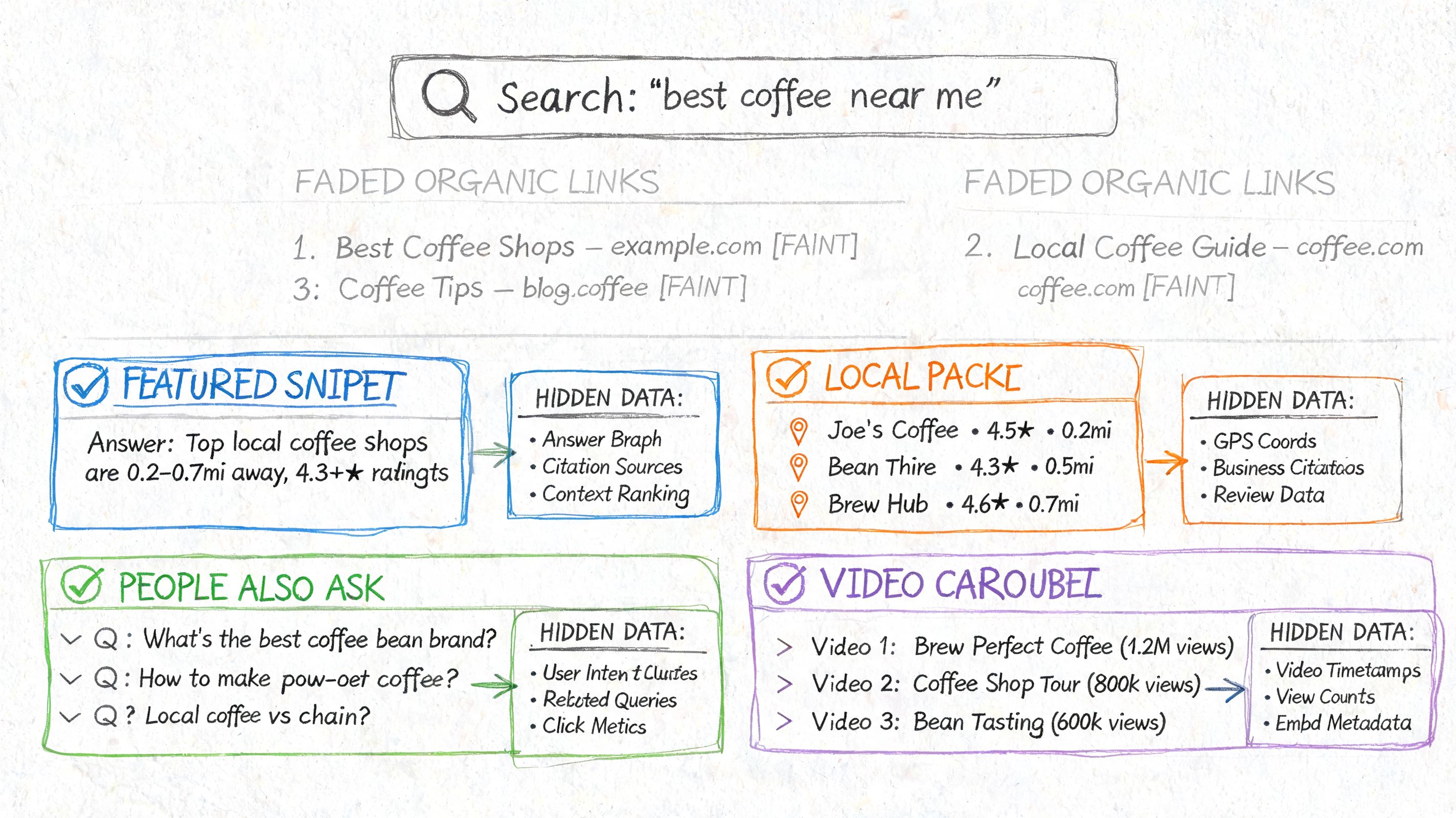
A rank number alone doesn’t explain visibility anymore. Modern SERPs include local packs, featured snippets, image blocks, shopping units, People Also Ask, and newer AI-driven elements. If your pipeline ignores those, your reporting will be accurate in a narrow sense and misleading in practice.
That’s why a strong google keyword position checker api should return more than position and url. It should describe the page layout well enough for your system to answer a better question: how visible was the brand inside the actual SERP composition?
Common feature groups to parse
Different providers name these objects differently, but the categories are consistent:
- Featured snippets usually appear as a highlighted answer block with a cited URL.
- People Also Ask is often a list structure with question and answer preview fields.
- Local packs tend to include business names, map positions, and review-related fields.
- Image or video blocks appear as carousel-style result sets.
- Shopping results are usually separate from organic listings and should not be mixed into organic position logic.
- AI-style answer surfaces often need their own visibility model because they don’t map cleanly to classic blue-link rank.
Why this changes SEO decisions
Feature data tells you whether a rank drop is a true visibility drop. A page can hold a strong organic position and still lose attention because the query now triggers a local pack, answer box, or AI surface above it.
That’s why I prefer storing two layers:
- Classical ranking state, which tracks where a URL appeared in the organic set.
- SERP composition state, which tracks what other result types competed for attention.
For keyword planning and content modeling, a broader research layer such as keyword research workflows in an SEO platform becomes more useful when it incorporates both.
Security matters in SERP data pipelines
Feature-rich payloads also mean more data moving through your systems, more endpoints, and more client-facing integrations. If you expose this data to dashboards, agents, or external apps, API hygiene matters. A practical reference on protecting your MarTech APIs is worth reading before you open internal SEO services to wider use.
A rank tracker becomes much more valuable when it explains the shape of the SERP, not just the slot where one URL landed.
A practical parsing rule
Don’t flatten every feature into one giant table. Keep feature families separate enough that you can evolve them independently. Local results, product results, and AI-style summaries don’t belong in the same analytic shape.
That separation keeps your reporting honest. It also prevents the common mistake of treating every visible element as if it were interchangeable with an organic rank.
How to Evaluate and Integrate a Third-Party API
Most API evaluations fail because the team only compares coverage and price. That’s not enough. For a rank tracking system, the better question is whether the provider’s operational model matches your reporting promises.
A cheap API that misses local nuance, changes schemas without warning, or struggles under burst traffic will cost more in engineering time than a more stable option.
The shortlist checklist
When I evaluate providers, I usually score them on these criteria first:
- Coverage quality. Can it handle the countries, languages, devices, and engines you need?
- Result depth. Does it stop at shallow rankings or support deeper extraction when needed?
- Schema clarity. Are the fields stable, predictable, and documented well enough for typed ingestion?
- Freshness controls. Can you tell when a result was collected?
- Failure behavior. Does the provider return useful error states, or just generic failures?
- Historical access. Can you replay or compare results over time without rebuilding the world?
Questions worth asking vendors
Some questions surface actual trade-offs fast:
| Question | Why it matters |
|---|---|
| How do you represent local and feature-rich SERPs? | Determines whether your reporting can stay accurate |
| How stable is the response schema? | Impacts ingestion maintenance |
| What happens on partial job failure? | Affects dashboard trust |
| How is data freshness exposed? | Needed for debugging and SLA review |
| How easy is bulk export? | Important for warehousing and BI |
If a vendor can’t answer those clearly, expect friction later.
Integration pattern that scales
A solid integration usually has four parts:
- Collector service that handles request submission and retries
- Raw storage layer for full provider payloads
- Normalizer that maps payloads into your internal ranking schema
- Serving layer for dashboards, alerts, and client exports
This keeps provider-specific logic away from product-facing code. It also makes migration easier if you need a second provider later.
What to avoid
Avoid hardwiring dashboard logic directly to a vendor’s nested JSON. That feels fast at the start and becomes painful when fields drift.
Also avoid choosing solely on unit price. A provider with better documentation, cleaner payloads, and steadier operations often wins on total engineering cost even if the invoice is higher.
The right API partner isn’t the one with the longest feature list. It’s the one your team can integrate once, trust, and operate without constant babysitting.
Understanding Legal Considerations and Google's Terms of Service
Legal risk sits underneath every rank tracking system, whether people acknowledge it or not. If a provider collects data from Google results through scraping, proxy networks, or browser automation, that collection method has compliance implications.
The baseline fact is straightforward. Google does not provide an official direct API for real-time keyword ranking checks, which is why the market relies on third-party collection. That reality is exactly what creates the legal gray area around automated queries to public SERPs.
What teams should examine
You don’t need to be a lawyer to ask better vendor questions. You do need to avoid treating compliance as someone else’s problem.
Ask providers:
- How is the data collected
- How do they handle blocking and anti-bot controls
- What terms govern API usage and data retention
- What happens if collection methods change
- Whether they offer documentation on sourcing and operational safeguards
A reputable provider should be able to explain its collection approach at a practical level, even if it doesn’t reveal proprietary details.
Reduce avoidable exposure
A few habits lower risk immediately:
- Prefer official Google data when owned-site reporting is enough
- Use third-party APIs instead of DIY scraping if you need public SERP tracking
- Keep provider contracts and documentation on file
- Review what you promise clients so your reporting language matches the underlying data model
This isn’t legal advice. It’s operational common sense. The less your team improvises around data sourcing, the easier it is to keep the system sustainable.
The safest architecture is usually the boring one. Use Google’s official tools where they fit. Use reputable vendors where they don’t. Don’t pretend those are the same thing.
Surnex gives agencies, in-house teams, and developers one place to track modern search performance across both traditional SEO and emerging AI visibility. If you’re trying to reduce tool sprawl, connect rank tracking with AI Overviews and LLM discovery, or build on an agent-ready API instead of stitching together separate systems, Surnex is worth a look.