Most advice about web page architecture still assumes that if a page is easy to crawl, it's done its job. That's outdated. A structure can be technically clean, follow a shallow click path, and still miss the newer gatekeepers of visibility, because AI-driven search doesn't just crawl pages, it extracts passages, identifies entities, and looks for citable fragments it can trust.
That shift matters because the architecture of a page now shapes more than indexation. It affects whether a system can understand what the page is about, where one idea ends and another begins, and which section deserves to be quoted or summarized. Traditional navigation still matters, but it's no longer the full brief.
Why Traditional Site Architecture Advice Falls Short
The old rules are familiar for a reason. Keep key pages close to the homepage, use breadcrumbs, avoid deep nesting, and make sure crawlers can reach everything. Those principles still help, but they were built for a web where ranking and discovery were mostly about page access, link flow, and hierarchy.
That is not the whole game anymore. Google's AI Overviews can answer some queries directly on the results page, which changes the value of a click and raises the bar for content that wants to be surfaced as a source. If an AI system can summarize the answer without sending the user through your navigation, then the page structure has to do more than help a crawler find the page. It has to make the page readable at passage level.
Crawlability is no longer enough
A page can be crawled and still be poorly understood. That happens when headings are messy, content is fragmented, or the page buries the answer under clutter. Humans can usually infer the point. Machines are less forgiving, especially when they need a clear source fragment to cite.
Practical rule: If a page can't be explained cleanly in one pass by a person skimming headings, it probably won't be easy for an AI system to extract with confidence.
Classic site architecture advice also tends to flatten the problem into navigation depth. The three-click rule gets repeated so often that it sounds universal, but large sites rarely fit neatly into that box. Enterprise catalogs, multilingual sections, and parameter-heavy filters need architecture that controls duplication and clarifies authority, not just low click depth.
That's the gap. Older advice optimizes for reach. Modern architecture has to optimize for reach, retrievability, and citation readiness at the same time.
What Web Page Architecture Actually Means
Think of web page architecture like a building blueprint. The architect decides where rooms go, which walls carry weight, how people move through the space, and which areas should stay open or private. On a web page, architecture does the same thing for content, it determines how information is organized, linked, labeled, and interpreted.
There's an important distinction between site architecture and page architecture. Site architecture is the relationship between pages, the overall map, categories, and pathways. Page architecture is the internal structure of a single page, the way its sections, headings, semantics, and supporting elements are arranged.
The modern web has always depended on a small set of structural technologies. Tim Berners-Lee proposed the World Wide Web at CERN on 12 March 1989, built the first browser and server by December 1990, and publicly announced the Web on 6 August 1991. The first live website went online in November 1992, and the early architecture was built on URL/URI, HTML, and HTTP. Those basics still define how pages are addressed, linked, and rendered across the open web history of web design.
The parts that matter inside the page
A standards-compliant page starts with <!doctype html>, sets a valid BCP 47 language on <html>, and places UTF-8 early in the document so browsers, screen readers, translators, and search engines parse it consistently specification guidance. The same specification recommends setting the viewport to the device width and never disabling user scaling, which affects both mobile behavior and accessibility.
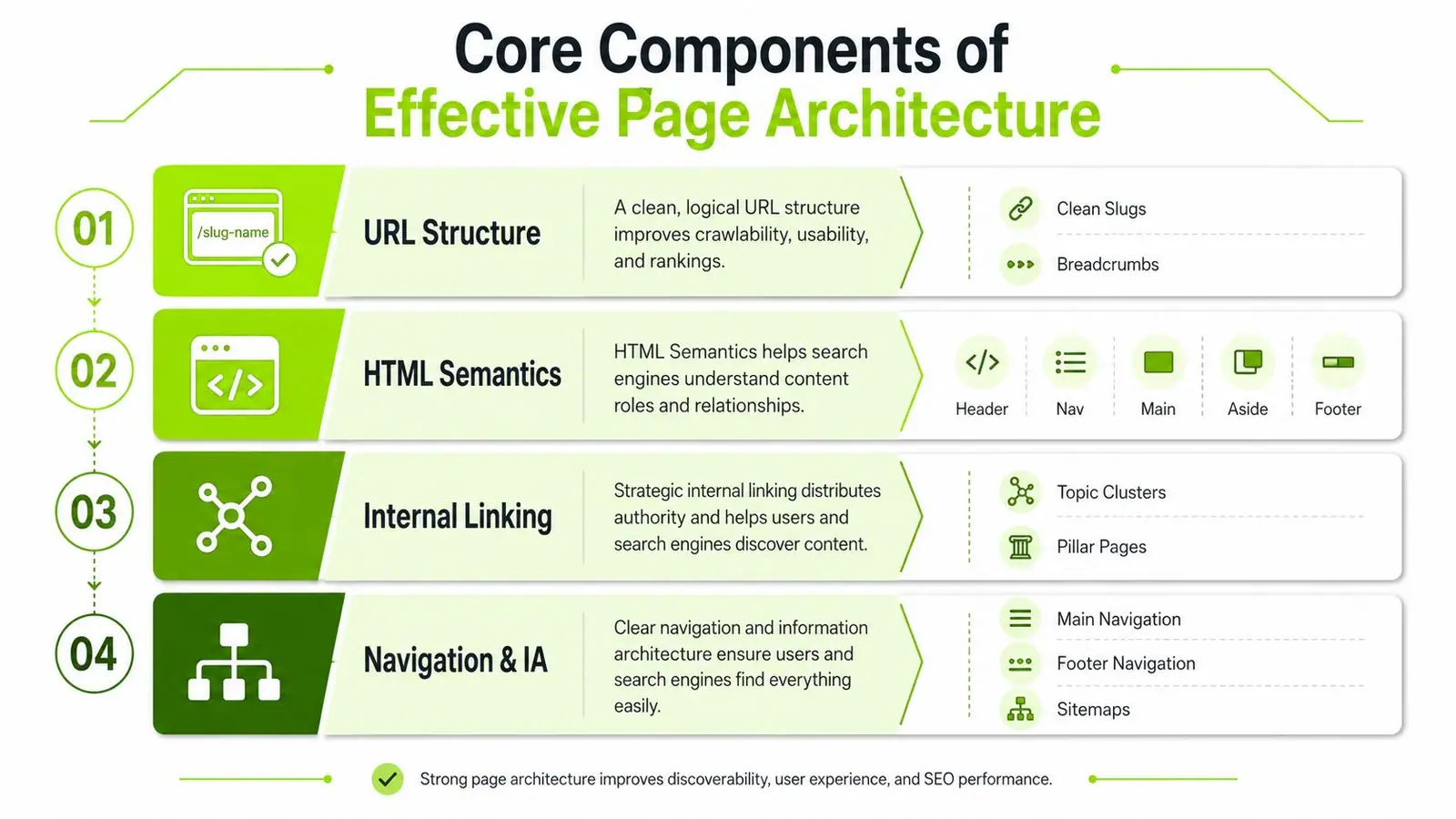
That's the technical base. The semantic base is just as important. A page should use one non-empty <title>, one <h1> near the top, a single <main> for primary content, and a heading outline that doesn't skip levels page structure guidance. When those pieces are in place, both humans and machines get a reliable hierarchy.
If you want a quick external reference on how teams should evaluate the stack around a site build, evaluate your tech stack effectively is a useful starting point. For breadcrumb placement and menu behavior, the practical details on breadcrumb navigation patterns are worth reviewing alongside your own templates.
The other way to think about architecture is this, the markup is the blueprint, but the layout is the lived experience. If the blueprint is vague, the page becomes harder to classify, and that affects both indexing and extraction.
Core Components of Effective Page Architecture
URLs and hierarchy
Clean URLs still matter because they give both users and machines a fast clue about content type and topical grouping. A good URL is descriptive without becoming verbose, and hierarchical without turning into a maze. It should reflect real information architecture, not just keyword stuffing dressed up as structure.
The same applies to headings. A page that jumps from an <h1> to a random <h4> breaks the logic of the document and makes the content feel patched together. That inconsistency hurts accessibility first, then it weakens the page's chance of being read as a coherent answer block.
Internal links and contextual signals
Internal links do more than distribute authority. They teach the system which pages belong together and which page should act as the center of a topic cluster. That's why contextual links inside body copy usually matter more than decorative footer links when the goal is topical clarity.
A page template should reinforce the page type instead of fighting it. Product pages, category pages, help articles, and editorial pages shouldn't all look identical in their structure, because the template itself is a signal. When the layout is consistent, the machine can infer the role of each section more easily.
Markup and performance
Schema markup helps search systems identify entities and relationships. In ecommerce, that can mean product, offer, review, and organization data, and the same principle applies to content pages that need clearer entity signals. If you want a practical example of that thinking in an ecommerce context, using schema for e-commerce SEO is a solid reference point.
Performance architecture belongs in the same conversation because rendering affects what gets seen and when. If key content loads late, is hidden behind heavy scripts, or depends on interaction to appear, you make extraction harder. I've audited enough enterprise sites to know that technical elegance on paper doesn't matter if the page is slow to render or the important copy arrives after the rest of the document is already parsed.
Performance metrics and rendering considerations belong in the same audit as headings and links, not as a separate afterthought. That's especially true on templates with rich media, filters, or layered scripts.
The most useful architecture is the one that tells the same story to users, crawlers, and AI systems without forcing any of them to guess.
Designing Architecture for AI Discovery and Citations
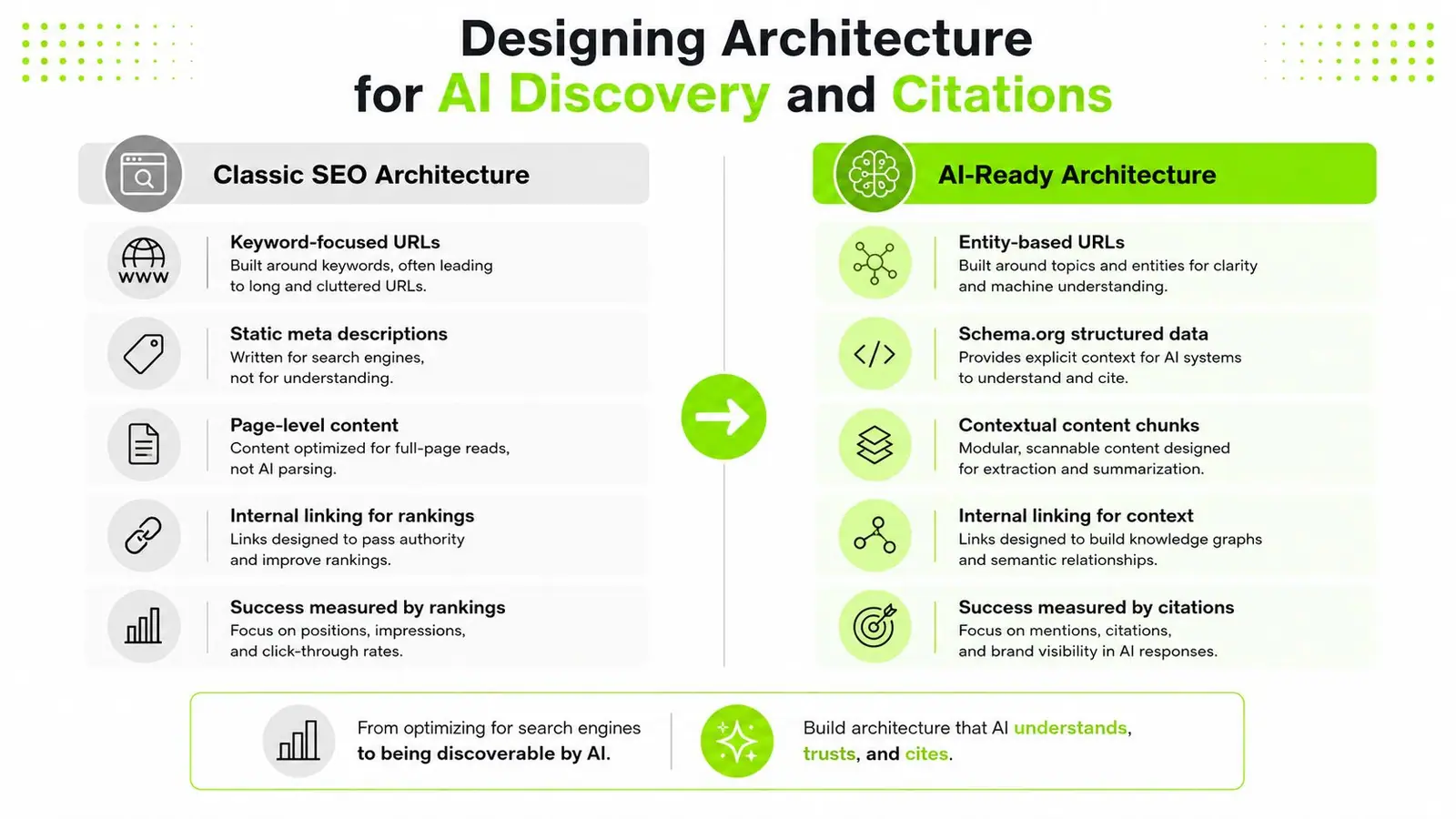
AI-led discovery rewards pages that can be quoted in fragments, not just crawled from top to bottom. That changes the architecture problem. A long article can perform well in classic search and still fail as a source for an AI answer if the ideas are not split into clean, retrievable units.
Entity clarity and passage retrievability
The page should signal its subject immediately. The title, opening paragraph, headings, and supporting references need to point at the same entity or concept. If a page drifts between topics, AI systems have a harder time deciding which fragment is the authoritative answer.
Passage-level retrievability matters just as much. A section should stand on its own without depending on hidden context from several screens above it. That does not mean every section needs to be short. It means each section needs a clear local answer, a direct heading, and enough nearby context for the fragment to make sense when pulled out of the page.
For teams validating whether their markup and content structure are ready for retrieval, validating structured data for AI readiness belongs in the same review as headings and copy blocks. Schema alone will not make a page citation-worthy, but clean data and clear sections make it easier for AI systems to interpret what the page is about and where the answer lives.
Canonical source and evidence nesting
Large sites often create duplicate answer fragments across category pages, guides, FAQs, and support documents. Canonical source discipline keeps that under control. One page should clearly own the answer, while supporting pages reinforce it instead of competing for the same query.
Evidence nesting is the part many teams miss. If supporting data, examples, or definitions sit too far away from the claim they support, they become harder to retrieve and easier to ignore. Keep the strongest proof near the point it supports, and do not force the reader or the machine to hunt for it.
For teams building or maintaining template-driven content, page-family planning, data-field auditing, publishing rules, internal linking, and review checkpoints need to operate as one system instead of separate tasks. Surnex's programmatic SEO guidance follows that workflow, and the same logic applies when the goal is AI readiness rather than just scale.
Scale without architectural collapse
Enterprise sites still have to balance shallow access with real-world complexity. A structure that is too flat creates bloated navigation, duplication, and weak topical grouping. A structure that is too deep buries important pages and makes crawl control harder.
That trade-off shows up most clearly with multilingual content, regional versions, and faceted navigation. The answer is usually not to flatten everything. Cleaner segmentation, stronger canonicalization, and tighter internal linking let the site scale without turning into a trap for users or crawlers.
The best architecture gives AI systems clear ownership, clear context, and a clean path from page-level intent to passage-level evidence.
Step-by-Step Architecture Audit Checklist
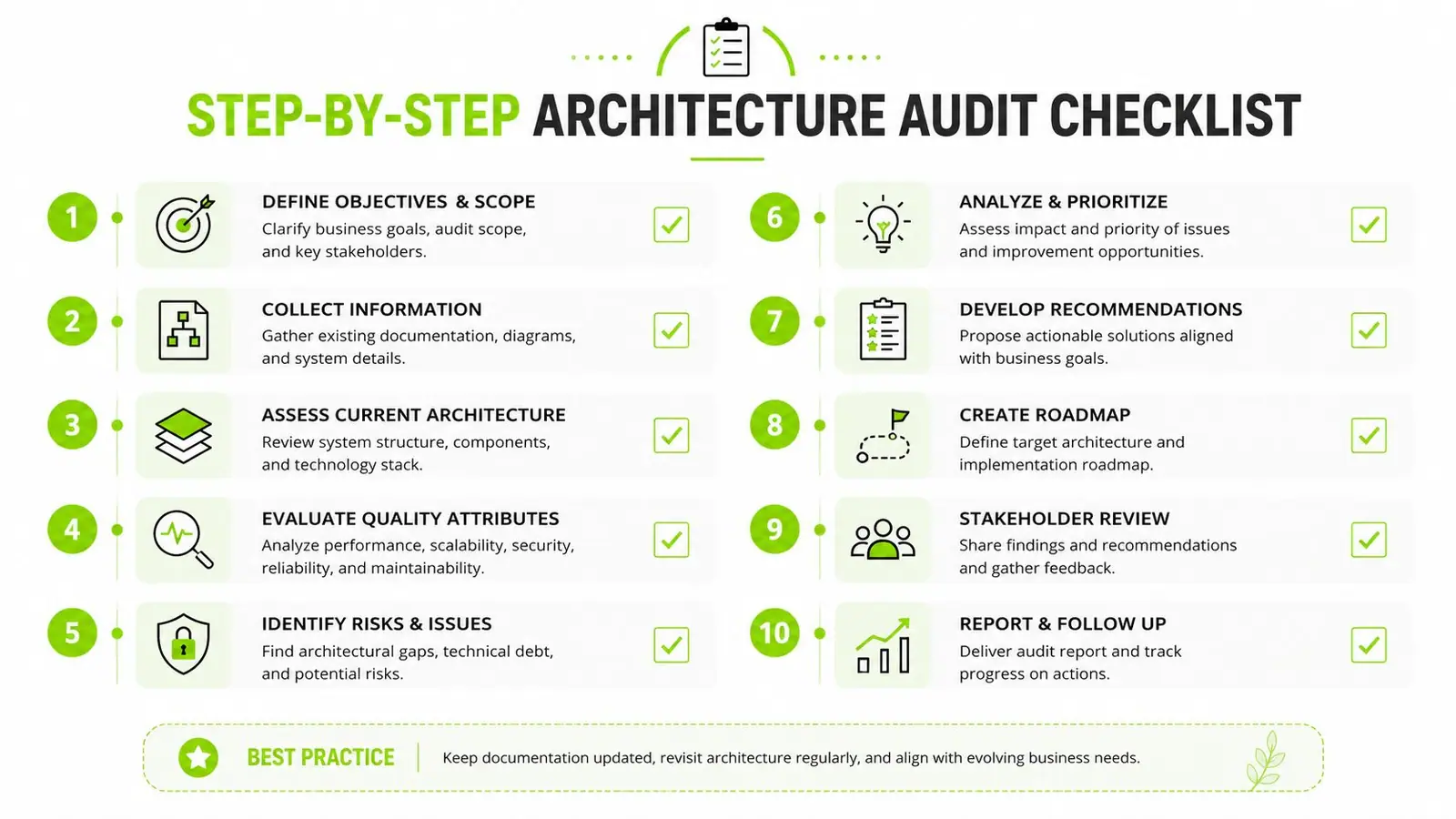
Start with the document foundation
Check the doctype, language declaration, UTF-8 placement, and viewport settings first. If those are wrong, every other layer sits on shaky ground. These are not glamorous fixes, but they prevent parsing problems that ripple into accessibility and rendering.
A standards check is also where teams catch the quiet failures. Missing language tags, encoding conflicts, or a viewport that blocks scaling can make a page behave inconsistently across browsers and assistive tech. Fixing those issues usually beats spending time on cosmetic tweaks.
Then inspect the semantic layer
Look for exactly one non-empty <title>, one visible <h1>, and a heading path that follows the logic of the page. Verify that <main> contains the primary content and that navigation, sidebars, and footers are marked in ways that make sense. If the page has no clear content spine, AI systems are more likely to treat it as noisy.
- Title clarity: Make sure the title describes the page's actual subject, not just the brand.
- Heading sequence: Confirm that sections progress naturally instead of jumping around.
- Main landmark: Verify that the core answer is inside
<main>, not buried in a wrapper.
Audit links, schema, and fragmentation risk
Find orphan pages and pages that sit too deep in the internal link graph. Then review anchor text distribution, because weak anchors force the site to do more work to explain relevance. After that, validate structured data coverage and make sure the same entity is described consistently across templates.
If you need a broader process for running that kind of review, how to do an SEO audit fits well alongside an architecture checklist. I'd use that as the operating frame, then add AI-specific checks for passage independence and citation signals.
Practical rule: A page that can't survive being excerpted on its own is not ready for AI discovery.
The last pass is simple to describe and hard to fake. Read the page as if only one section could be quoted. If the answer depends on surrounding fluff, weak headings, or hidden assumptions, the architecture needs work.
Real-World Architecture Examples and Outcomes
Ecommerce sites usually feel the pain of architecture first. Faceted filters can multiply URLs, weaken canonical control, and produce internal search combinations that nobody intended to index. The fix is rarely a single tag. It's tighter taxonomy, stronger template rules, and careful control over which variants deserve visibility.
SaaS documentation often needs the opposite approach. Product docs work better when they're organized by task, feature, and user intent instead of by internal department. A good doc page often wins by being narrowly focused and structured, because that makes it easier for support teams, users, and AI systems to extract a direct answer.
Editorial publishers face a different challenge. They need strong topical grouping without turning every article into a clone of the last one. Hub-and-spoke linking usually works when the pillar page owns the broad concept and the spokes handle subtopics with enough independence to stand alone in search results.
Local business sites are often simpler, but they're not exempt. A service page that buries location cues, contact details, and service distinctions under generic prose can underperform even when the business is legitimate and well reviewed. The best local architectures make service intent obvious and keep the path to conversion short.
The historical shift from table-heavy layouts to CSS-separated presentation made all of this possible. Once presentation and content were disentangled, teams could build cleaner semantic structures, reuse templates more intelligently, and create pages that made sense to both people and machines. That change is why page architecture still matters even when the consumption layer keeps changing.
Measuring Architecture Performance with KPIs and Tools
Architecture work needs measurement, or it turns into taste-based debate. Start with crawl depth distribution, indexation ratio, internal link flow, structured data validation, and Core Web Vitals. Those tell you whether the site is technically accessible, semantically coherent, and usable at scale.
Then add the newer signals. Track how often important pages show up in AI-led surfaces, how consistently the brand is represented in LLM responses, and whether the same answer fragment appears to be cited across multiple queries. That's where AI visibility starts to overlap with classic SEO.
For tooling, use crawl platforms, log file analysis, structured data testers, and performance reports together. No single tool gives the whole picture. For AI visibility tracking, Surnex monitors brand presence across AI search experiences alongside familiar SEO metrics, which helps teams see whether their architecture is surfacing in modern discovery paths.
The primary objective is a recurring health report. Baseline the site, review the same KPIs on a schedule, and watch for drift in depth, duplication, renderability, and citation readiness. Once architectural debt starts accumulating, it shows up first as inconsistency, not catastrophe.
If you want to see how your pages are appearing across AI search experiences and traditional SEO signals, take a look at Surnex. It tracks AI visibility alongside the metrics teams already use, so you can spot citation gaps, content issues, and architectural weaknesses before they turn into lost discovery.