Google rewrites title tags more often than many SEO teams realize. One analysis of 57,832 titles found that Google rewrote about 58% of them, while another widely cited study of 953,276 pages found Google used the exact title tag only 66.6% of the time. Search Engine Journal's summary and the Ahrefs title-tag study point to the same practical lesson: title tags SEO isn't about obeying a rigid character limit. It's about creating a clear, relevant source title that survives truncation, rewriting, and changing search experiences.
Why Title Tags Still Matter in Modern SEO
A title tag is the HTML title assigned to a webpage. It usually becomes the clickable headline in a Google result, the label in a browser tab, and the default name people see when they save or share a page. Google describes title links as a major way users decide which result to open, and recommends titles that are unique, clear, concise, and accurate in its official title-link documentation.
That makes the title tag one of the most controllable elements on a page. You choose the wording, the subject emphasis, the promise made to the searcher, and often the point at which your brand appears. A good title helps a reader understand the page before the click. A vague or inflated title creates uncertainty, even if the page itself is excellent.
Search engines use many signals to understand relevance, so a title tag isn't a guarantee of rankings. It does, however, provide an important topical signal and shapes the result users evaluate. When Google rewrites a title, it generally draws from the page's title, headings, visible text, links, and other context. Your original wording still gives Google a starting point.
Practical rule: Write for the result a searcher should see, but build the page so that Google's alternative title would still describe it accurately.
The source title also travels beyond classic search. It can label browser tabs, bookmarks, shared links, and previews generated by messaging or collaboration tools. Those surfaces may use other metadata in some situations, but a well-written title remains a useful default. That's why title tags deserve review during content production, technical audits, and page-template design, not just during keyword research.
What a Title Tag Actually Is
The title tag is the HTML <title> element inside the <head> of a webpage. A minimal example looks like this:
<head>
<title>Title Tags SEO: Length, Structure, and Best Practices</title>
</head>
Visitors usually don't see that exact element inside the page body. Instead, systems use it as a label for the document. The distinction matters because the title tag and H1 are different elements. The H1 is the main visible heading in the content area. It can be similar to the title tag, but it serves readers after they arrive, while the title tag often introduces the page before the click.
A useful analogy is a library book. The title tag is the wording on the spine and cover, helping someone identify the book on a shelf. The H1 is the prominent title printed inside the book once the reader opens it. If the spine says “Beginner Coffee Brewing Guide” but the first page says “Advanced Espresso Extraction,” the reader may wonder whether they picked up the wrong book.
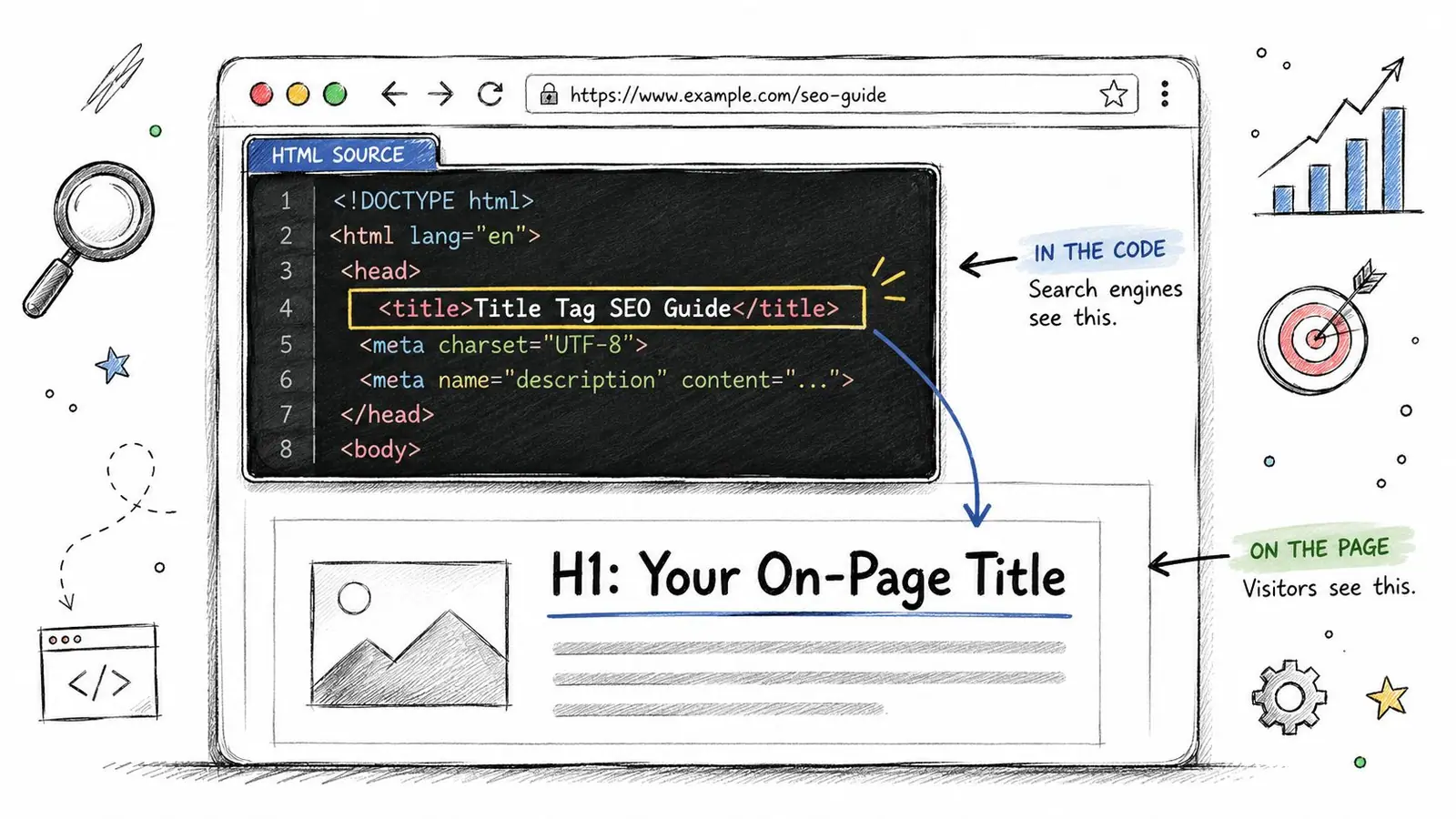
The same title can appear in several places:
- Search results: It commonly supplies the blue title link.
- Browser tabs: It identifies the open page when several tabs compete for attention.
- Bookmarks: It often becomes the saved page label.
- Shared previews: Messaging and social systems may use it when no more specific social title is supplied.
Don't confuse the title tag with og:title. The latter is a social-sharing field, while the title tag is the document's HTML title. For a broader explanation of how page-level metadata works, see this guide to what metadata means in SEO. A CMS may generate a title automatically from a post name, product name, or template variable, so every important page still needs a human review.
Title Tag Length and How Google Measures It
Google does not set a fixed character limit for the underlying <title> element. The title link shown in search is constrained by available display width, so pixels matter more than characters. SEO guidance often uses roughly 50 to 60 characters, or about 575 to 600 pixels, as a working range. This is a practical benchmark, not an official cap, as explained in Search Engine Journal's overview of title-tag length.
Character counts are only a rough shortcut. Wide glyphs, such as “W,” occupy more space than narrow glyphs, such as “i.” Capital letters, long words, punctuation, and brand names can therefore push a title beyond the visible area even when its character count looks reasonable. A title made mostly of narrow letters may display more of its text at the same count. Mobile results also have less horizontal room, although the exact space varies by device and layout.
A practical display benchmark
Put the page's main topic and intent near the beginning. If Google trims the ending, the visible portion should still identify the page accurately. Front-loading the topic supports clarity when the interface shortens the title. It is a communication choice, not a mechanical ranking trick.
| View | Pixel Limit | Character Range | Practical Rule |
|---|---|---|---|
| Desktop SERP | About 575 to 600 pixels | Roughly 50 to 60 characters | Put the topic and intent first |
| Mobile SERP | Device-dependent and generally tighter | Often fewer visible characters | Preview the opening phrase carefully |
| Underlying HTML | No fixed character limit | Can be longer | Keep it concise because display and rewriting still matter |
The typed title is a proposal, not a guaranteed search headline. Google may rewrite it when another part of the page better matches the query, when the wording is repetitive, or when the supplied title does not clearly describe the content. That makes page headings, visible copy, and structured page information part of the same message system. A carefully measured title still matters, because it gives Google a clear starting point and gives searchers a useful version when it is displayed as written.
A practical workflow is to draft the complete message, place the primary topic near the front, and remove filler. Use a SERP preview tool to inspect approximate pixel width on desktop and mobile. The Surnex guide to meta title length provides a useful pixel-based review instead of relying only on character totals.
Do not force every title into one identical shape. A short product name may leave room for a benefit and brand, while a long informational query may need a natural partial match rather than an awkward exact phrase. Choose the shortest wording that accurately communicates the page, then review what Google displays after publication.
How to Structure a High-Performing Title Tag
A reliable title has a readable order. Start with the primary topic, add a modifier that clarifies intent, and place the brand at the end when it helps recognition.
| Component | Purpose | Example |
|---|---|---|
| Primary keyword | States the page's central subject | Title Tags SEO |
| Secondary modifier | Explains format, audience, or benefit | Length and Best Practices |
| Brand | Builds recognition and distinguishes the result | Surnex |
For an educational article, “Title Tags SEO: Length, Structure, and Best Practices | Surnex” tells the reader what the page covers and who published it. For a product page, “Burr Coffee Grinders: Quiet Models for Home Brewing | BeanCraft” gives the category, a practical qualifier, and the brand. The structure changes by page type, but the information hierarchy stays clear.
Separators such as a pipe or hyphen can make the parts easier to scan. Consistency matters more than choosing one symbol as a universal rule. Keep capitalization readable, avoid all-caps styling, and don't add a brand if it pushes the meaningful part out of view. A recognizable brand can support trust, but it shouldn't bury the page topic.
The title-tag best-practices guide from Netco Design LLC offers additional context on writing titles that balance relevance, clarity, and display constraints. Use it as a reference, then adapt the pattern to your own search intent and brand voice.
Before and after structure
Overstuffed: Running Shoes Best Running Shoes Buy Running Shoes Cheap | SiteName
Improved: Best Running Shoes for Daily Training | SiteName
The second version uses the core topic once, adds a meaningful use case, and removes repetition. It doesn't try to rank for every variation in one line.
Vague: Our Latest Guide | SiteName
Improved: Title Tags SEO: Length and Rewrite Control | SiteName
The revised version gives both the searcher and the crawler a clear subject.
Too brand-heavy: SiteName Official Resource Center for All Your Marketing Questions
Improved: Content Brief Template for SEO Teams | SiteName
The brand remains visible, but the page's value comes first. For guidance on using keywords naturally throughout the page rather than packing them into one element, review how keywords fit into content.
Real Title Tag Examples Before and After
The strongest way to audit title tags is to compare the promise with the page. A title should identify the subject, match the visitor's goal, avoid repetition, and preserve its meaning when shortened.
| Page Type | Before (Weak) | After (Improved) | Why It Works | |
|---|---|---|---|---|
| Blog post | SEO Tips SEO Guide SEO Advice for Better SEO | `SEO Tips for Small Business Websites | GrowthDesk` | Removes repetition and identifies the audience |
| Product page | Coffee Maker Coffee Makers Best Coffee Maker Buy | `Automatic Coffee Makers for Home Brewing | BrewSupply` | States the product category and use context |
| Category page | `Products | BrewSupply` | `Pour-Over Coffee Equipment | BrewSupply` | Replaces a generic label with the category topic |
| Local service page | Welcome to Our Dental Clinic | `Emergency Dentist in Austin | Oak Street Dental` | Matches local service intent and names the location |
| Homepage | `Home | Company Name` | `Project Management Software for Remote Teams | TaskOrbit` | Explains the offer and intended audience |
Consider the blog example. “SEO Tips SEO Guide SEO Advice for Better SEO” repeats related phrases without telling the reader what kind of advice the page provides. The improved title gives the topic and audience in a compact form, so the click promise is easier to evaluate.
The coffee example fixes a different problem. Keyword stuffing creates an unnatural reading experience and gives Google several reasons to replace the title with wording pulled from the page. “Automatic Coffee Makers for Home Brewing” preserves the commercial subject while adding a useful context.
Local pages need special care because the service and location often define the search intent. “Welcome to Our Dental Clinic” could describe almost any page. “Emergency Dentist in Austin” identifies the service and geographic relevance immediately. The page must then deliver that experience, with matching headings, service details, contact information, and local context.
For a SaaS blog, a more specific example might be:
- Weak:
Customer Feedback - Improved:
Customer Feedback Tools for SaaS Teams | TaskOrbit
The revised title indicates whether the page is about a concept, a product category, or a business use case. Before publishing, score each title against four questions:
- Topic: Can a searcher name the page's subject from the title?
- Intent: Does the wording match learning, comparing, buying, or finding a local service?
- Clarity: Would a human read it naturally?
- Display: Would the opening still make sense if the ending disappeared?
Title Tags and AI-Driven Search Visibility
A title tag is no longer guaranteed to appear as the headline you wrote. Google may build a title link from the HTML title, visible headings, prominent text, anchor text, and other page signals. Research and industry summaries report rewrite rates ranging from 61.6% in a global 2022 dataset to 76.04% in Q1 2025, as summarized by Zyppy's research on Google title rewrites. The exact rate varies by dataset and search context, but the direction is clear: teams need to optimize the whole page, not only the title field.
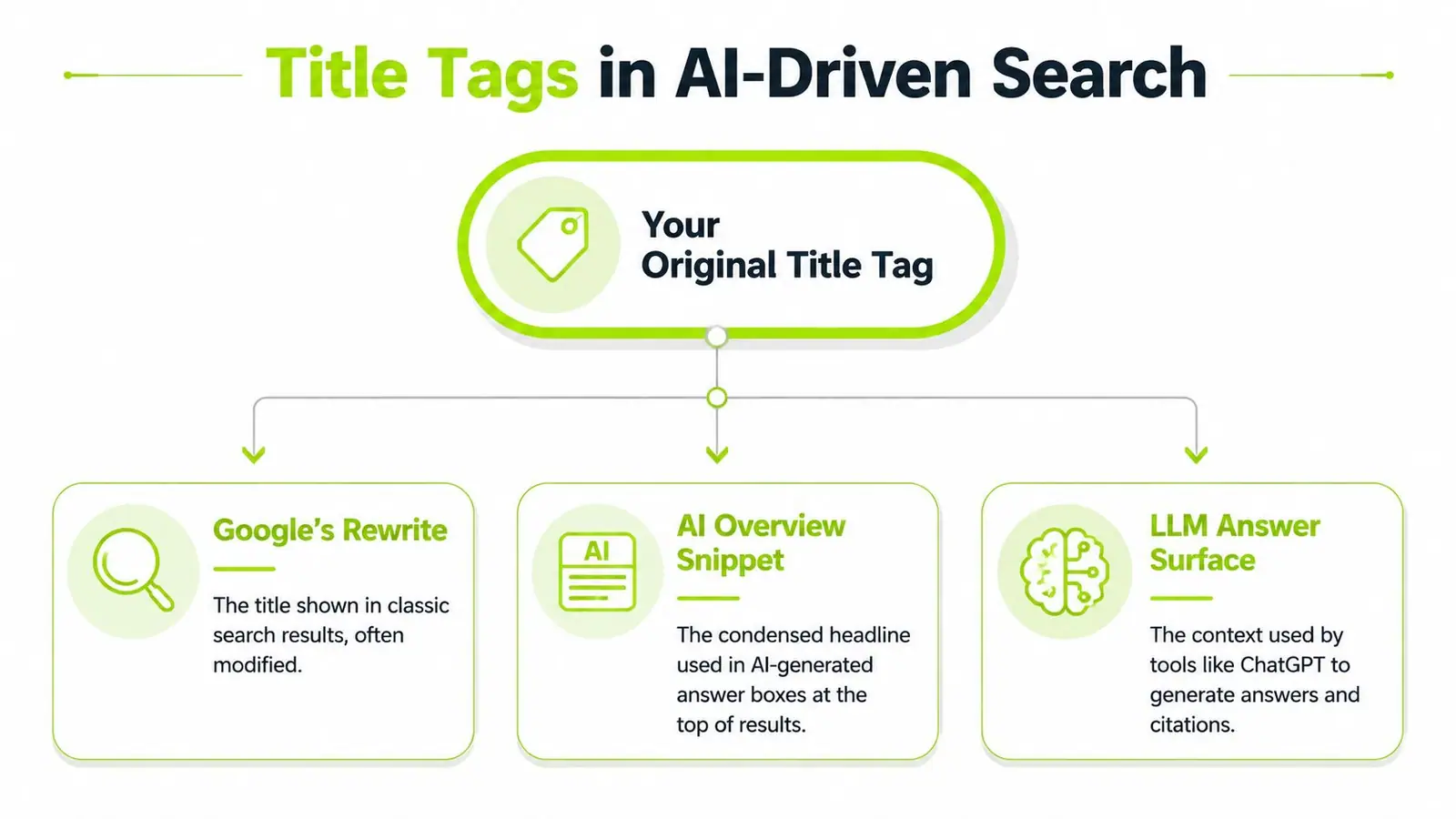
AI-generated search features add another layer. An AI Overview may condense a page into a passage with its own headline. An answer engine may paraphrase the subject before citing a source. An LLM may use the title as one contextual clue among the H1, opening paragraph, structured information, and visible content.
That doesn't make the original title irrelevant. It makes consistency more valuable. If your title says “Local SEO Audit Checklist” but the H1 discusses general digital marketing, a generated answer has conflicting signals to reconcile. If the title, H1, opening sentence, and supporting entities all point to the same subject, Google's rewrite or an AI summary has a better chance of remaining accurate.
A monitoring framework for teams
Start with a clear version of the title, then observe how search systems represent the page.
- Record the source: Save the current title, H1, opening copy, and target query.
- Check classic results: Search important queries on relevant devices and note whether Google preserves or changes the title.
- Inspect AI surfaces: Look for whether the page appears in AI-generated results and how its subject is described.
- Measure outcomes: Compare impressions, position, clicks, and CTR in Google Search Console after the page has been recrawled.
- Version deliberately: Change one meaningful element at a time and keep a record of the old and new wording.
Teams building a broader visibility process can pair this workflow with an actionable SEO strategy guide from Cyndra. For practical guidance on AI search representation, see how Google AI Overviews affect SEO. The objective isn't to prevent every rewrite. It's to make every likely rewrite faithful to the page and useful to the searcher.
Common Title Tag Mistakes to Avoid
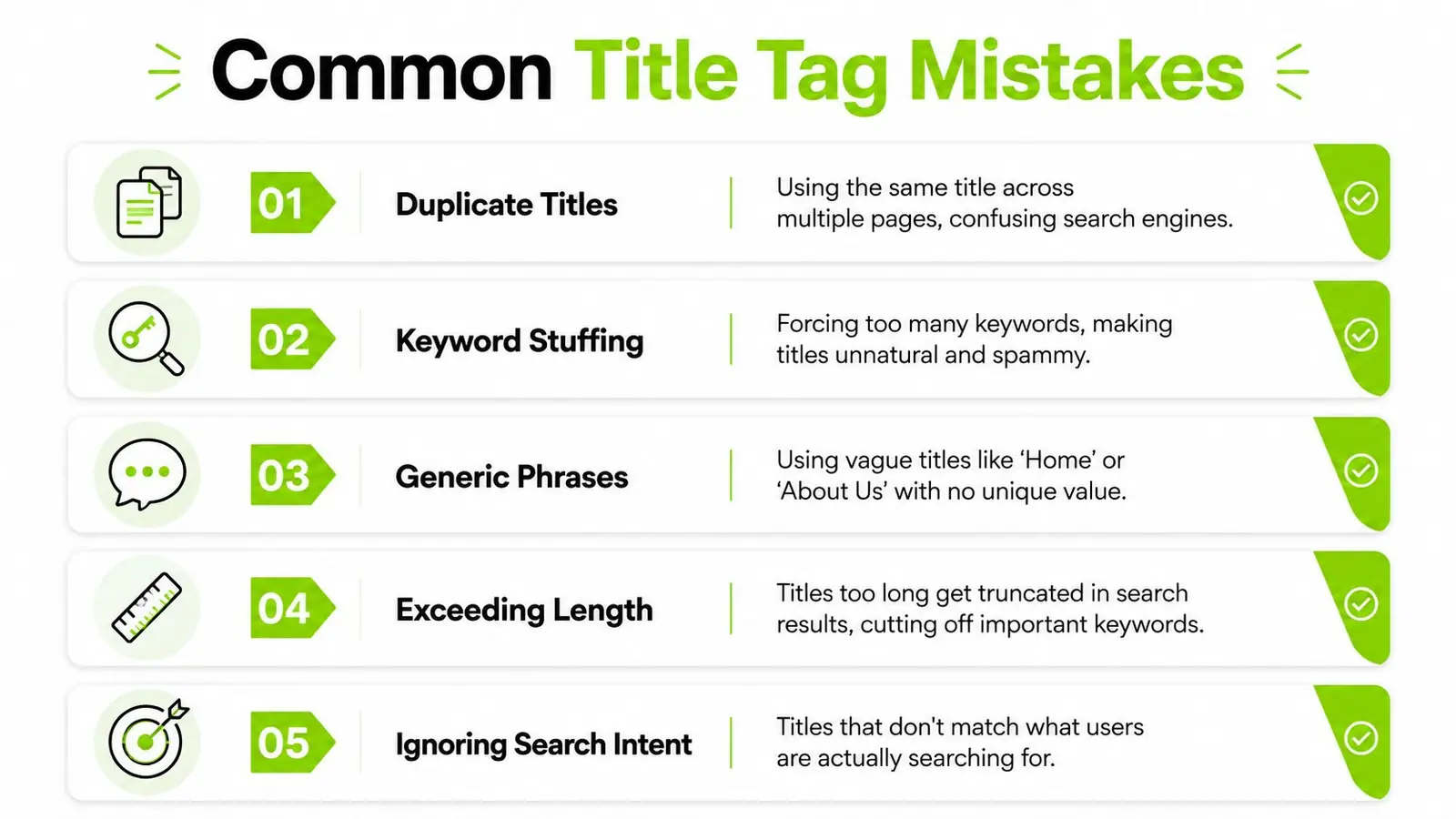
Most title-tag problems are easy to recognize once you know the pattern. They often come from templates, rushed publishing, or a writer trying to make one short line carry every possible keyword.
Duplicate titles
Several pages using the same title make it harder for users and search systems to distinguish their purposes. This commonly happens when a CMS applies a default title to product variants, service pages, or paginated content.
Fix: Give each indexable page a title tied to its unique topic, product, service, or location.
Keyword stuffing
Cheap Office Chairs Office Chairs Buy Office Chairs Online doesn't sound like a helpful result. Repetition can make the title look manipulative, and Google may replace it with text that better reflects the page.
Fix: Use the main topic once, then add one natural qualifier that explains intent or value.
Generic phrases
Titles such as Home, Welcome, or Untitled Document provide little information. They waste the most visible label on the page and give visitors no reason to distinguish the result from alternatives.
Fix: Name the business or page purpose, such as Family Law Services in Denver | Harper Legal.
Excessive length
An overlong title can be truncated before the important qualifier or brand appears. Worse, a sentence cut in the middle may leave the reader with an incomplete promise.
Fix: Keep the meaningful topic near the beginning and edit for practical display width, not an arbitrary character target.
Ignoring search intent
A title that calls a page a “complete guide” when it only contains a short definition creates a mismatch. A product title on an informational page, or an educational title on a purchase page, can attract the wrong visitors and disappoint the right ones.
Fix: Identify whether the searcher wants an answer, comparison, category, product, service, or destination, then label the page accordingly.
Use the following page-by-page check before publication:
- Unique: Does this title distinguish the URL from related pages?
- Accurate: Does the content deliver the stated subject and promise?
- Readable: Would a person understand it without decoding keywords?
- Focused: Is the primary topic near the front?
- Visible: Does the title remain meaningful on mobile and desktop previews?
- Aligned: Do the H1 and opening content support the same intent?
For a visual walkthrough of these issues, watch this title-tag SEO video:
Review high-value pages regularly, because Google can change the displayed title even when the HTML remains unchanged. A title audit should therefore capture both the wording your team publishes and the wording searchers encounter.
Surnex helps agencies and in-house teams monitor traditional SEO performance alongside brand visibility in Google AI Overviews and ChatGPT-driven discovery. Visit Surnex to track how your titles and pages appear across modern search surfaces, identify citation gaps, and manage optimization work from one platform.