50–60 characters is the practical length for a meta title in 2026, roughly 580–600 pixels on desktop. The primary constraint, however, is pixel width and Google rewrite risk, not a hard character cap.
The familiar rule is useful as a starting point, but it's no longer a reliable finish line. Google doesn't count characters when it decides how much of a title link to display. It renders the title within the available space, and the result changes with letter shapes, device width, search context, and whether Google replaces your wording altogether.
That distinction matters in everyday SEO work. A title can fit a character counter and still be cut off because it contains wide letters. Another can run longer yet remain visible because it uses narrower glyphs. Even a perfectly measured title may not survive if it's vague, repetitive, or poorly aligned with the page.
The practical job is therefore broader than keeping a title under 60 characters. You need to protect the primary topic, preserve the click-driving promise, and give Google as little reason as possible to rewrite the title.
Why the Old 60-Character Rule No Longer Holds
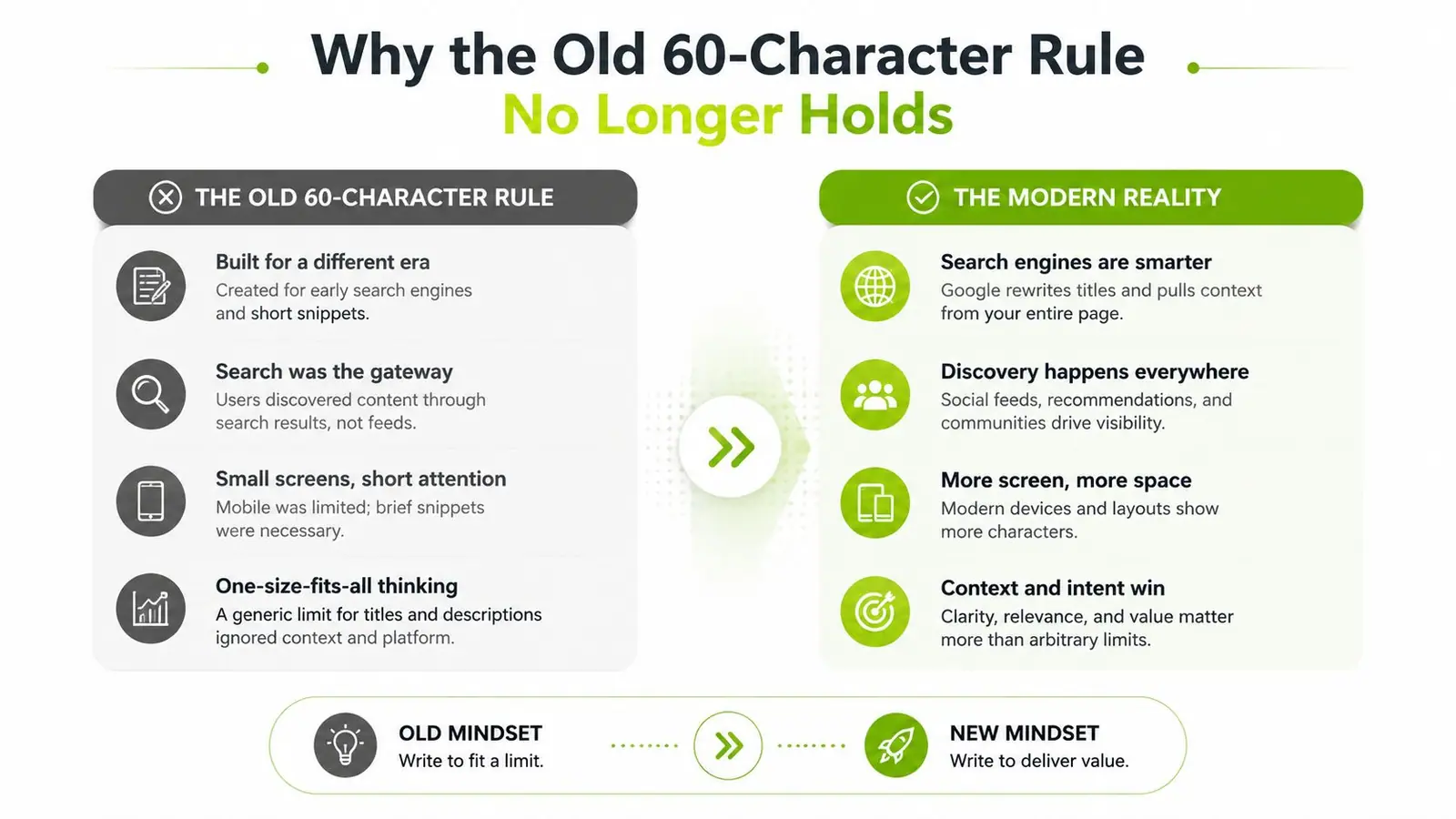
The old 50–60 character recommendation isn't useless, but treating it as a fixed Google limit is wrong. Google's documentation says the HTML title element has no fixed character limit. Google truncates the title link only as needed to fit the available device width, as explained in this guidance on effective meta titles.
Character count became popular because it was easy to measure and often approximated what desktop search results could display. The approximation still has value, but it hides the variable that determines visibility: pixel width. A title filled with wide letters such as “W” and “M” can consume more room than a title with the same count built around narrow letters such as “i” and “l”.
Character count is only a drafting shortcut
Consider two hypothetical titles with similar counts. “Wide Windows Web Design Workflows” uses broad glyphs and may reach the display boundary sooner. A longer phrase containing many narrow letters can occupy less space. The exact result depends on the rendered font and Google's layout, so a character counter can't tell you whether the final words will remain visible.
That's why current guidance places desktop title display around 580–600 pixels, while mobile results can sometimes show longer titles, often around 70–80 characters, depending on the device and result layout. Seobility's meta title guidance also identifies 51–55 characters as a practical range that may reduce Google rewriting.
Practical rule: Use 50–60 characters to draft, then validate the title by pixel width and by how well the visible opening communicates the page.
The second problem is rewrite risk. Independent measurements reported that unchanged titles averaged 44.47 characters, while rewritten titles averaged 62.58 characters, and titles over 70 characters were rewritten 99.9% of the time. The same research found the lowest rewrite rate in the 51–60 character range (industry analysis of Google title links). Length doesn't guarantee a rewrite, but excessive length makes it harder for Google to preserve your intended wording.
How Google Actually Measures Title Length
Google evaluates title links visually. The title exists in the HTML as text, but the search result must fit inside a rendered space whose width changes with the device and layout. That's why a character limit is a rough proxy rather than a technical rule.
A proportional font gives every glyph a different width. Spaces, punctuation, uppercase letters, and letter combinations all affect the total. A title with fewer characters can exceed the available width, while a longer title can remain intact if its characters occupy less horizontal space. Zyppy's explanation of meta title length makes the operational point clearly: teams should optimize for pixel width, front-loading the main keyword and brand before the visible cutoff.
A useful pixel-based comparison
The examples below illustrate the principle rather than provide a universal Google rendering guarantee. Actual display can vary by device, query, and Google's own interface adjustments.
| Title Example | Characters | Pixel Width | Desktop Display Status |
|---|---|---|---|
| Wide Windows Web Design Workflows for Modern Teams | 55 | 612px | Likely truncated |
| Minimal title writing guidelines for lean editorial teams | 62 | 574px | More likely to display fully |
A browser-based font measurement tool can estimate the width of a title before publication. Test the exact wording, including punctuation and spaces, rather than measuring only the keyword phrase. The estimate may differ slightly from Google's internal rendering, so leave practical room below the boundary instead of treating the result as exact.
What the measurement changes
A title's first words deserve the most protection. Put the primary query near the beginning, then add the clearest differentiator, such as audience, use case, or benefit. The metadata explained for SEO context is useful here because the title element is only one part of how search engines interpret and present a page.
The operational benchmark is simple: aim for roughly 580–600 pixels on desktop, use character count as an early drafting aid, and inspect the rendered result before publishing.
Truncation Across Desktop, Mobile, and AI Search
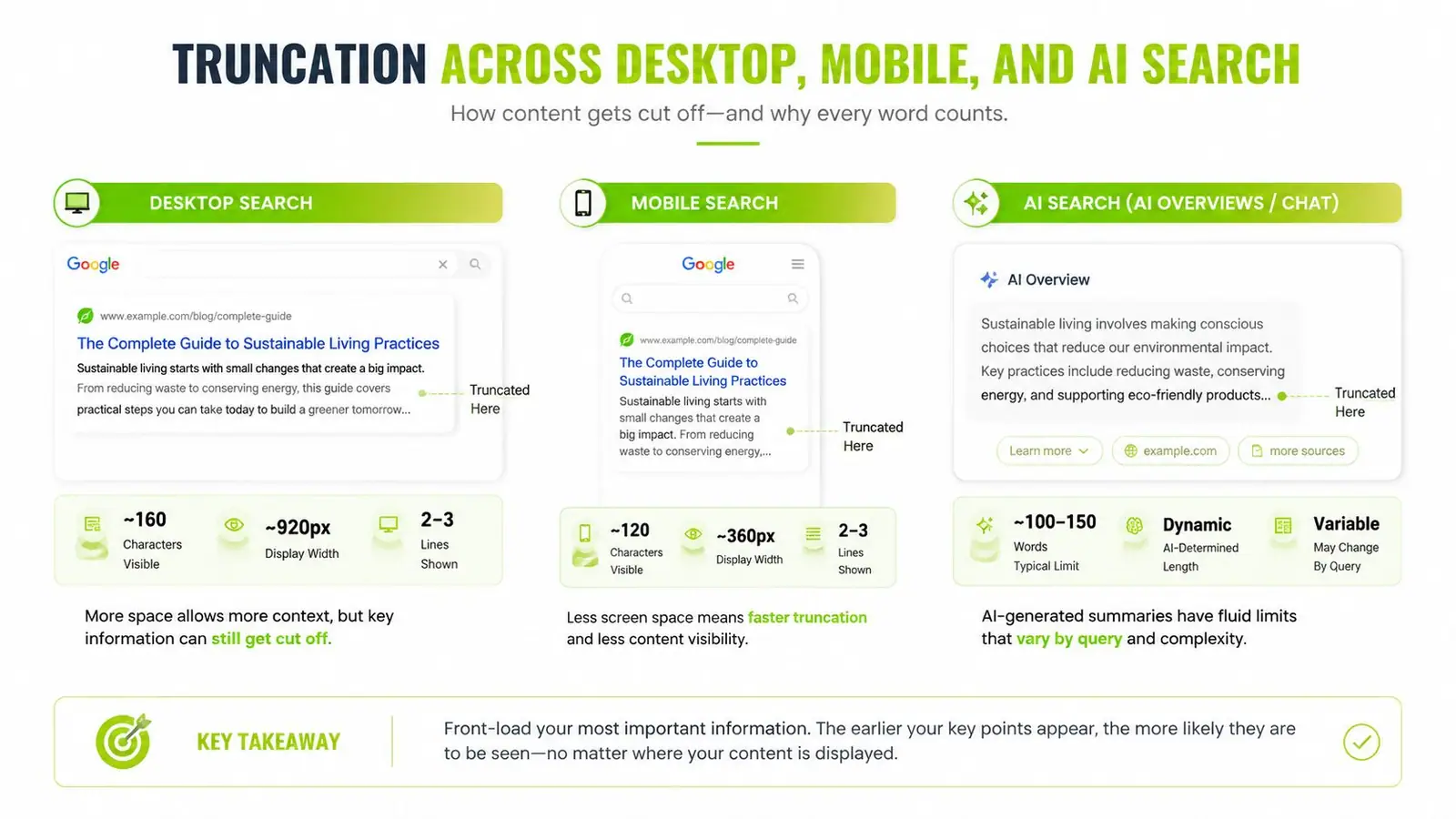
Search results do not use one fixed title layout. Desktop has more horizontal space, mobile prioritizes compact scanning, and AI-driven interfaces may summarize or reframe the page. The practical goal is not to hit a character target. It is to put the page's meaning where every format can retain it.
Desktop gives you room, not control
Desktop title links often display about 580–600 pixels before truncation, based on Seobility's measured guidance. That boundary changes with letter shapes, punctuation, query context, and the surrounding result layout. Two titles with the same character count can occupy very different widths.
Protect the first impression by placing the main topic and strongest distinction early. Audience, use case, or benefit usually deserves space before secondary context and branding.
Mobile changes what the searcher sees
Mobile results can wrap a title across lines, but the layout may still emphasize only the opening phrase during quick scanning. Line breaks can separate a qualifier from the topic, push the differentiator below the initial view, or make a long title look repetitive beside competing results. A complete desktop rendering therefore does not guarantee a clear mobile result.
Draft the opening so it communicates the page's subject without requiring the second line. Review the title at narrow and wide viewport sizes, paying attention to where the first natural break occurs rather than relying on character count alone.
Use a preview tool to optimize your page snippet before publication. It cannot reproduce every Google layout, but it can reveal weak openings, awkward breaks, and obvious clipping.
AI result formats add a separate presentation risk. In Google's search generative experience, a page title may appear in a card or summary, and Google may select or paraphrase text instead of displaying the title exactly.
- Desktop: Put the complete core message within the practical pixel boundary.
- Mobile: Make the opening readable before the title wraps.
- AI interfaces: Use precise wording that matches the page and its headings.
The Hidden Problem of Google Title Rewrites
Truncation is visible. Rewriting is harder to detect because Google may replace your authored title with another page signal. Google can draw from the H1, prominent on-page text, anchor text, or other sources when it decides the supplied title doesn't describe the document clearly enough.
Length contributes to that risk, but it isn't the whole explanation. A long title may be cut before its meaning is complete. A short title may be so generic that Google substitutes a more descriptive phrase. Keyword stuffing, repeated separators, excessive branding, and titles that don't align with the page heading can all weaken your control.
Length is a rewrite-risk problem
Recent industry reporting emphasizes that title optimization is increasingly about whether Google preserves the intended wording, not whether the title ends with an ellipsis. One 2026 source cited a 76% title-tag rewrite rate in Q1 2025 (SEO Pulse's coverage). That figure is specific to the source's reported analysis, so it shouldn't be treated as a universal rate for every site or query.
The more durable lesson is qualitative. Google is willing to rewrite titles when the supplied wording appears incomplete, repetitive, or inconsistent with the page. A character counter won't diagnose those problems.
A safer diagnostic model
The following table avoids pretending that every pixel range has a universal rewrite percentage. The available evidence supports directional risk, not a complete rate card for each category.
| Pixel Width Range | Rewrite Likelihood | Common Rewrite Source | Risk Level |
|---|---|---|---|
| Narrow or vague title | Can invite substitution | H1 or prominent page text | Medium |
| Around 580–600px | Lower operational risk when wording is clear | Usually the authored title | Lower |
| Above roughly 600px | Truncation and replacement become more likely | Shortened or rewritten title link | High |
Google Search Console won't give you a simple “rewrite happened” field for every impression. Diagnose indirectly by comparing the authored title with live results, inspecting high-impression pages, and checking whether the visible wording matches the page's H1 and intent. For teams watching AI-driven visibility as well as traditional results, Google AI Overviews SEO monitoring adds another place where the displayed wording may differ from the HTML title.
A self-sufficient title is specific enough to stand alone, concise enough to render cleanly, and closely aligned with the page's actual content.
Best Practices for Crafting Titles That Survive the SERP
Strong titles start with the searcher's need, not with a character counter. Draft the phrase that best identifies the page, then reduce wasted width while preserving meaning.
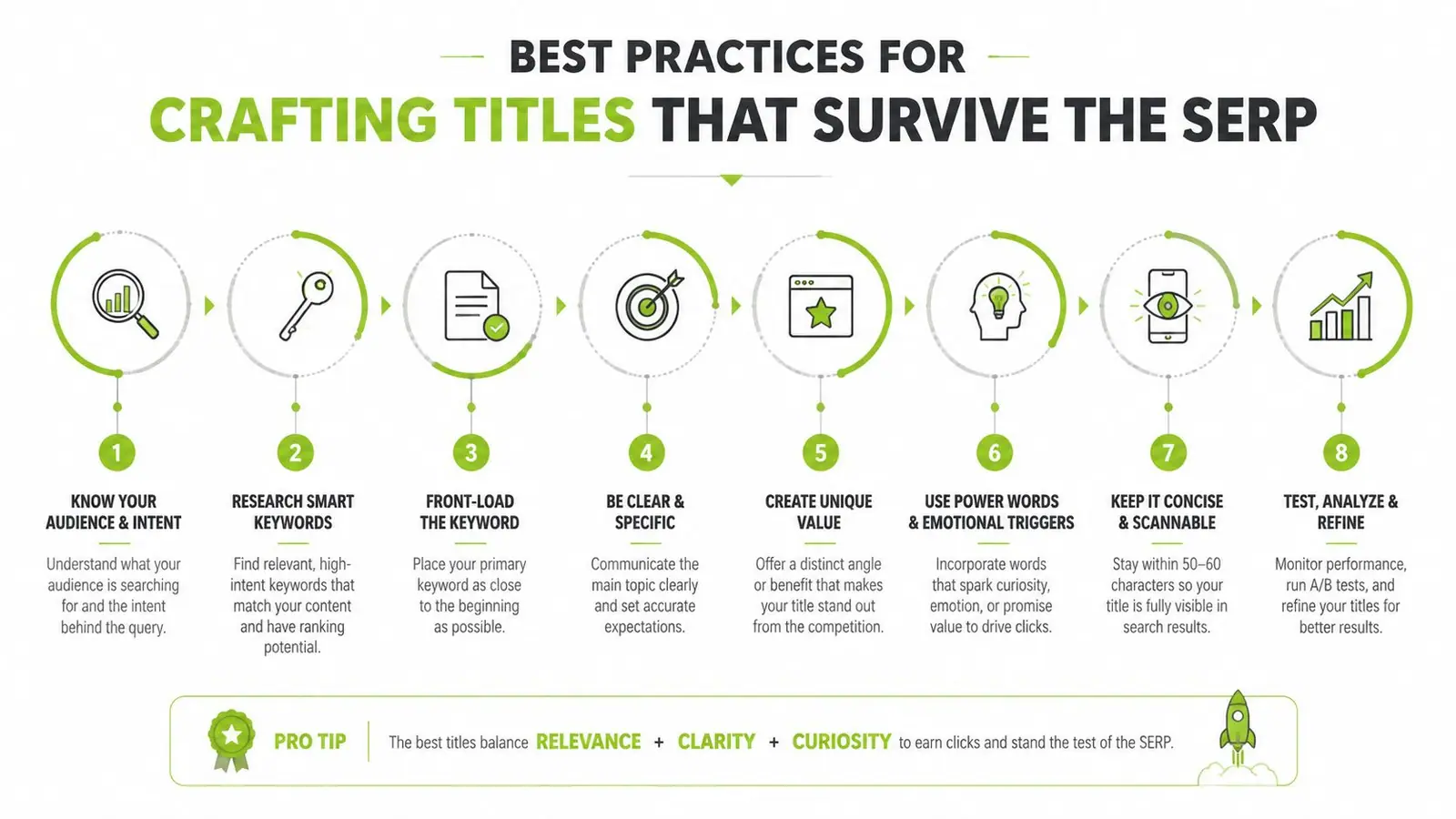
Build the title in the right order
-
Lead with the primary topic. Put the target phrase early enough that truncation won't remove the subject. The first visible words should tell users what the page covers.
-
Add one useful modifier. Choose an audience, format, use case, or outcome. “For Enterprise Teams” can clarify a title more effectively than another keyword variation.
-
Use one separator. A single hyphen or pipe creates a clean division. Stacking separators and keyword fragments makes the title wider and less natural.
-
Place the brand last in most cases. This protects the topic and value proposition. Move the brand forward only when brand recognition is itself the main reason users click.
Start with the practical 50–60 character baseline, then check whether the wording stays within approximately 580–600 pixels on desktop. Seobility's title research identifies 51–55 characters as a useful benchmark for reducing rewrite exposure, but the actual wording still matters more than the count alone.
Edit for clarity, not just compactness
Suppose a draft reads:
“Complete Length of Meta Title Guide for SEO Beginners and Marketing Teams | Brand”
It may communicate too many things at once. A tighter version could be:
“Meta Title Length Guide: Pixel Rules for SEO | Brand”
The shorter version preserves the topic, adds a concrete angle, and leaves the brand in a secondary position. Don't remove meaningful words merely to hit an arbitrary count. Remove repetition, generic adjectives, redundant branding, and modifiers that don't affect the click decision.
Editing test: If the title's final words disappear, can the visible opening still explain why the page deserves a click?
Check the title against the H1 and the opening copy. Google has more confidence in a title that accurately reflects the page than one engineered only to fit a display preview.
Tools and Workflows to Audit Titles at Scale
A sitewide title audit needs more than a column showing character counts. The useful workflow combines crawling, width estimation, manual review, and search performance data.
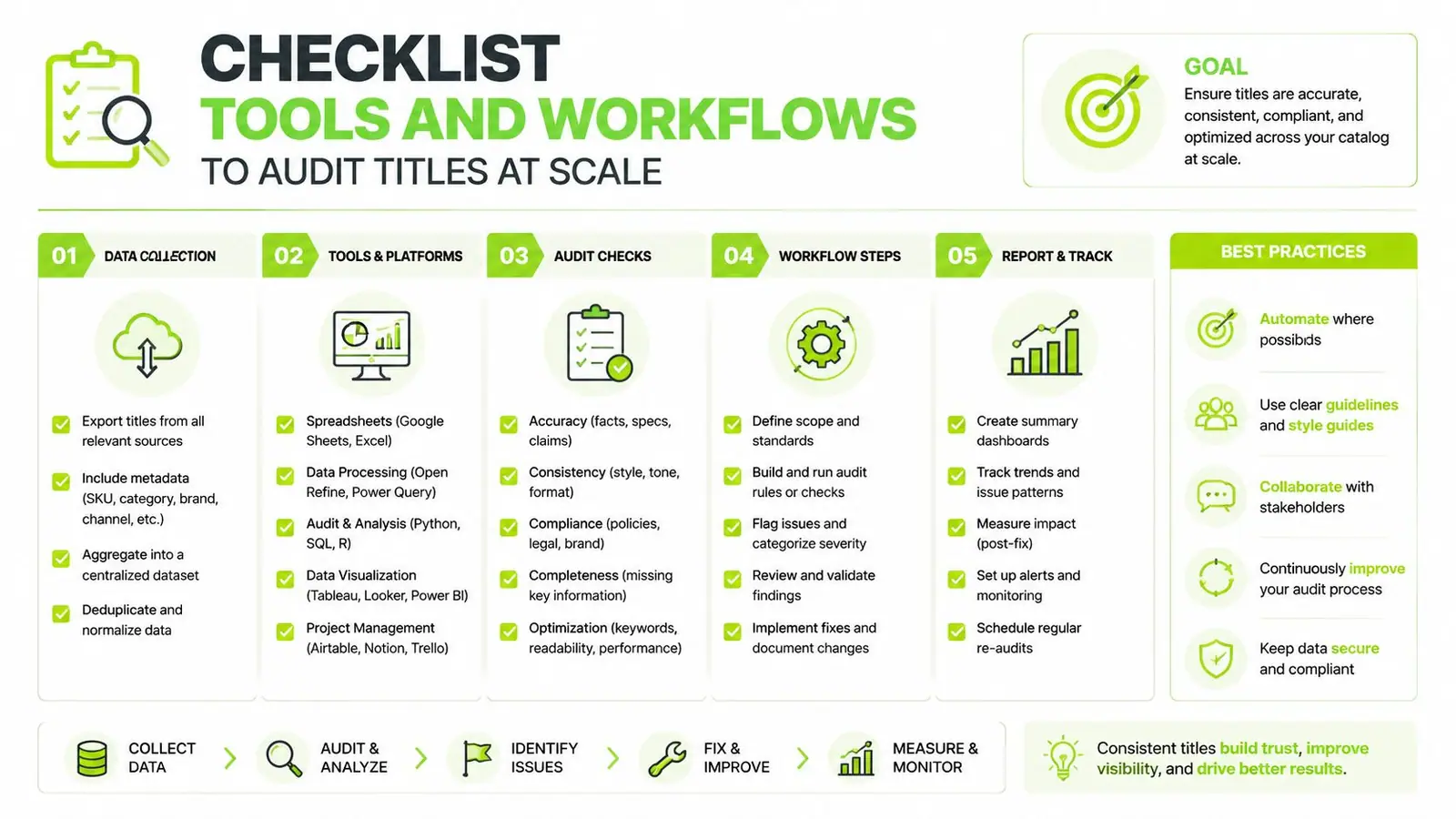
Start with a crawl in Screaming Frog or Sitebulb. Export the URL, title tag, character count, indexability status, H1, and relevant performance fields. If the crawler doesn't calculate pixel width, add a measurement step using a browser-based font tool or a spreadsheet approximation, then manually verify priority pages.
A practical audit sequence
- Filter wide titles first. Review titles above roughly 600 pixels because Google is more likely to truncate them at common desktop widths.
- Inspect unusually short titles. A short title isn't automatically safe. If it lacks a clear topic or differs sharply from the H1, it may invite a rewrite.
- Cross-reference Search Console. Prioritize pages with meaningful impressions and disappointing click-through performance. Compare the authored title with the title currently visible in live results.
- Group by template. Product, category, editorial, and location pages often share title logic. Fixing the template can be more efficient than editing every URL independently.
- Recheck after deployment. A title change is only a hypothesis until the rendered result matches the intended wording and performance stabilizes.
A Google Sheets or Looker Studio dashboard can flag titles by width estimate, missing primary terms, duplicate patterns, and brand placement. Regex can identify repeated separators or suffixes, while a pixel estimate helps prioritize titles that character counts misclassify.
For browser-based spot checks, a collection of SEO audit extensions for 2026 can speed up page inspection. Surnex can also bring traditional SEO metrics and visibility across AI search experiences into one monitoring workflow, including title-related performance context. Teams tracking the changing result may pair that work with an AI Overview tracker to compare conventional rankings with emerging search surfaces.
Use tools to find candidates, not to outsource judgment. A title that passes a pixel check can still be weak if it doesn't match intent or make the page's value obvious.
Putting It All Together for Real Campaigns
An e-commerce category page might use a title such as “Running Shoes for Trail Training, Lightweight Options | Brand.” The primary category appears first, the modifier adds useful context, and the brand stays out of the opening. A shorter version may be preferable if the brand suffix pushes the meaningful phrase beyond the visible area.
A B2B software page can make a different trade-off. If the product name and category are essential, the team may accept that a secondary benefit disappears on some mobile layouts while ensuring the core product phrase remains intact. Narrower wording can help, but it shouldn't produce an awkward title that fails to explain the offer.
The strongest campaigns treat the title as a monitored asset. Teams compare the authored title with live SERPs, review pages where Google changes the wording, and revise templates when repeated patterns create avoidable risk. They also test title variants against the page H1, search intent, and the device contexts that matter most to their audience.
A title doesn't need to display every word to succeed. It needs to show the topic, relevance, and reason to click before the available space runs out. The best length of meta title is therefore the shortest version that preserves meaning, fits the relevant pixel width, and gives Google no obvious reason to replace it.
Surnex helps agencies and in-house teams monitor traditional SEO performance alongside visibility in AI search experiences, so title changes can be evaluated in the context of rankings, snippets, and emerging result formats. Visit Surnex to see how you can bring title auditing and modern search visibility monitoring into a more unified workflow.