
Most advice about SEO in SPA stops too early. “Use SSR” isn't wrong, but it's incomplete. Teams ship server-rendered routes every day and still lose indexation because titles don't update, canonicals point to the shell URL, links aren't crawlable, or the server returns the wrong status code for route states.
SPAs aren't bad for SEO. Bad SPA implementations are bad for SEO.
That distinction matters because it changes the work from folklore into engineering. A single-page application loads once and updates the UI dynamically, which makes crawlability and indexing harder than on traditional multi-page sites. The standard fixes are well established: server-side rendering or prerendering, unique URLs, and dynamic title and meta updates for each view. That guidance exists because Google still depends on crawlable HTML and correct status codes, and SPA-specific basics like History API routing, JSON-LD, canonical tags, and proper 404 handling remain foundational for visibility, as summarized in SE Ranking's SPA SEO overview.
The interesting work starts after you accept that rendering is only one layer. Operations matter. Deployment details matter. Monitoring matters. And AI-driven discovery now matters too, especially if you care about visibility beyond classic blue links. If you're thinking about how that shifts reporting and diagnostics, AI search visibility has become part of the same workflow.
Why SPA SEO Is a Solvable Problem
The old claim that SPAs can't rank is outdated. Search engines have improved at processing JavaScript, and modern frameworks give developers multiple rendering options that didn't exist when hash-based routing and blank HTML shells were common production choices.
The core problem is simpler. Crawlers want stable, fetchable documents. SPAs often give them a shell, then ask JavaScript to do the rest. If the implementation is weak, the crawler sees too little, too late, or in the wrong form.
The conflict is technical, not philosophical
A browser used by a person can wait for hydration, API calls, client-side routing, and deferred UI updates. A crawler has a narrower job. It needs enough HTML, enough context, and correct signals to decide what a route is, whether it should be indexed, and how it relates to the rest of the site.
That's why “Google can render JavaScript now” isn't a complete answer. It can, but your outcome still depends on how you ship the app. If your route content appears only after a chain of client-side events, or if metadata updates happen too late or inconsistently, visibility gets unreliable.
Practical rule: Build public routes so they can stand on their own when fetched directly, not only after a user navigates through the app.
What actually works
The patterns that work are boring, which is good. Use real routes. Render indexable content into HTML before launch for pages that need discovery. Make sure each route has its own title, meta description, canonical, and internal links. Return a real 404 for missing content instead of serving a cheerful soft-404 inside a 200 shell.
A lot of teams overcomplicate this because they think SPA SEO requires abandoning the SPA. It doesn't. It requires splitting your application into two categories:
- Public discovery routes that need search visibility
- Private or utility routes that can stay client-heavy
That separation is where SEO in SPA becomes manageable. Once you stop treating every route the same, the architecture becomes much easier to reason about.
Choosing Your SPA Rendering Strategy
The rendering choice is the biggest SEO decision you'll make before writing route logic. Don't pick it based on framework hype. Pick it based on what kind of content must be discoverable, how often it changes, and what your infrastructure can support.
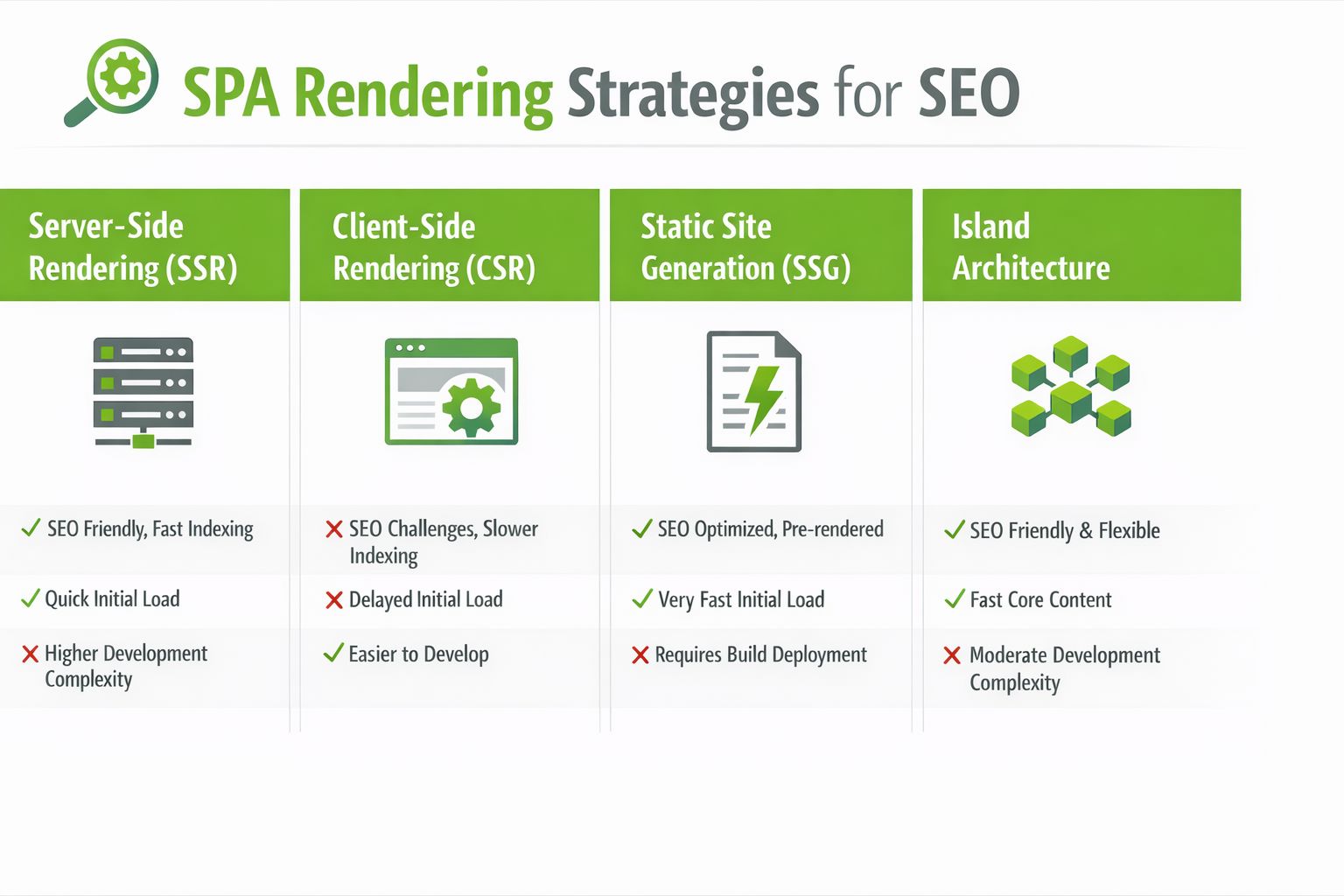
For SPAs, SEO depends on making client-rendered content crawlable and indexable. A practical workflow is to pair the app with prerendering or server-side rendering, then verify before launch that critical content, titles, and links are present in the rendered HTML, as described in this guidance on SPA rendering and validation.
The four options that matter
Not every SPA needs the same rendering model.
| Strategy | Best For | SEO Benefit | Main Drawback |
|---|---|---|---|
| SSR | Public routes with changing content | Sends crawlable HTML on request | Higher server complexity |
| SSG | Marketing pages, docs, blog-like content | Stable prebuilt HTML is easy to crawl | Rebuild flow can get awkward |
| Dynamic rendering | Legacy apps needing a stopgap | Gives bots rendered output without rewriting the whole app | Operationally fragile |
| Prerendering | Smaller sets of indexable routes in SPA apps | Simple way to expose rendered HTML | Route coverage can drift |
SSR is the default for serious public routes
If the route changes often and must rank, SSR is usually the cleanest answer. Product detail pages, city pages, service pages, editorial pages, and route combinations with real search demand usually belong here.
SSR gives you control over:
- HTML output at request time
- Status codes for live, moved, and missing routes
- Head tags per route
- Canonical decisions based on state
The cost is complexity. You need server runtime support, route-aware data fetching, cache strategy, and stronger observability. If your team can't maintain that, SSR becomes a source of regressions.
A good compromise is to SSR only the routes that need search visibility and leave account areas, dashboards, and post-login tools client-rendered.
Later in the section, this quick walkthrough is worth watching because it frames the trade-offs visually:
SSG and prerendering are better than many teams think
SSG works well when content changes on a publishing schedule rather than per request. It's ideal for landing pages, docs, case-study libraries, and many location pages if the content source is stable.
Prerendering fits teams that already have a client-heavy SPA but need search-safe HTML for a defined set of routes. It's especially useful when rebuilding the whole app into SSR would slow the team down for months.
What doesn't work well is pretending every route deserves prerendering. Filter pages, endless parameter combinations, and thin route variants usually create more index management problems than gains.
Dynamic rendering is a transition tool, not an endpoint
I still see dynamic rendering used to patch older apps. It can help when the alternative is “nothing gets rendered for bots,” but it adds another moving part and another failure mode. If you use it, treat it as temporary.
If your production setup has one rendering path for users and another for crawlers, monitor both. They drift.
My decision rule
Use this simple rule set:
- SSR for high-value, changing, public routes
- SSG for stable content collections
- Prerendering for a limited SEO surface in an otherwise client-heavy app
- Dynamic rendering only when you're buying time to migrate
That's usually enough to keep architecture decisions honest.
Core SEO Implementation for Any SPA
Once the rendering model is set, the universal SPA SEO work begins. Here, many projects fail, because teams assume rendering solved everything.
It didn't.
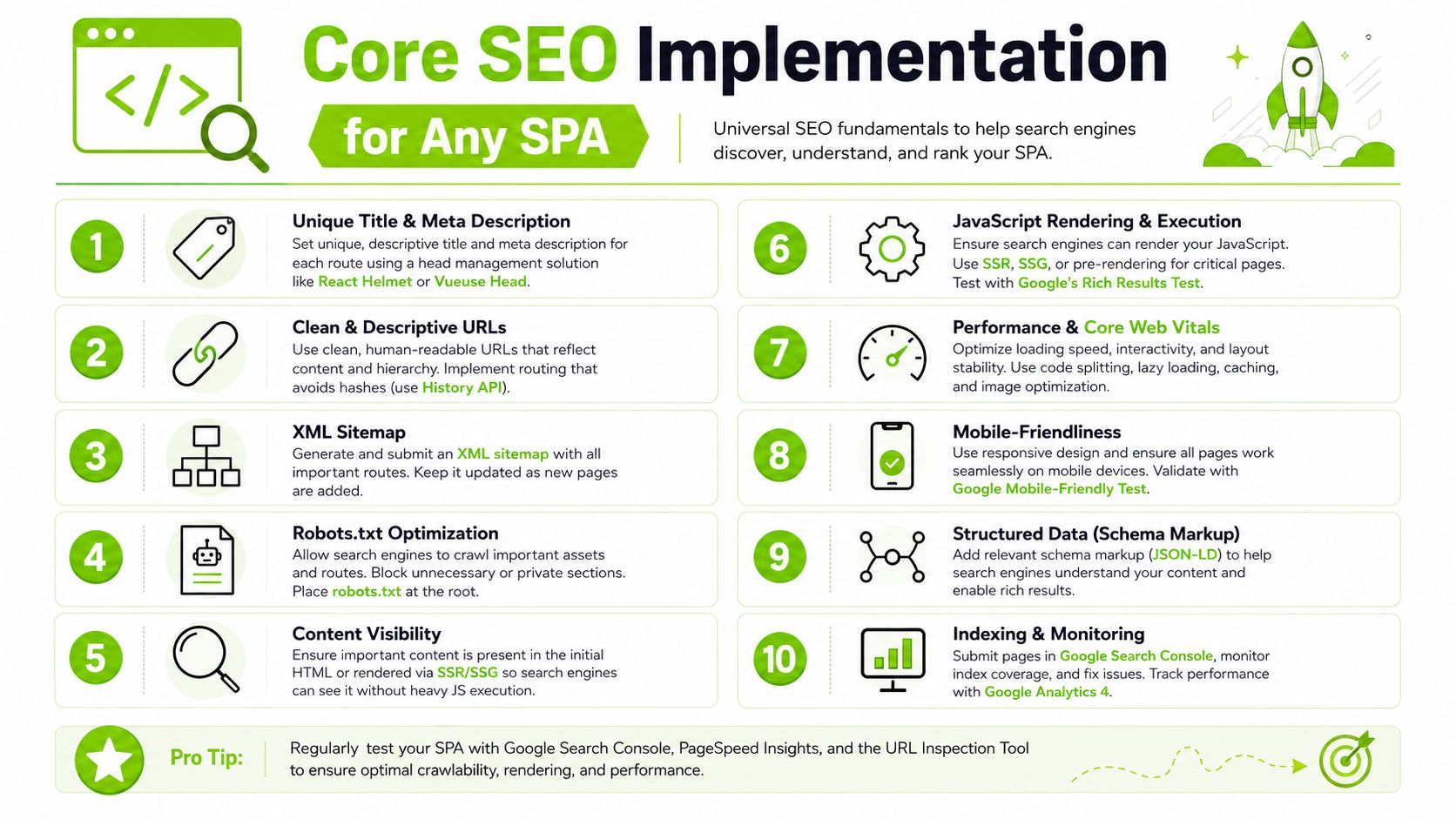
Route metadata has to be route-aware
Every indexable route needs its own head state. That includes:
- Title tags that match the route topic
- Meta descriptions that reflect that route, not the app shell
- Canonical tags that point to the preferred URL
- Robots directives when a route shouldn't be indexed
A simple route config often works better than scattered per-component overrides.
const routeSeo = {
  "/services/seo-audit": {
    title: "SEO Audit Services",
    description: "Technical and content-focused SEO audit services.",
    canonical: "https://example.com/services/seo-audit",
  },
};
Then map this in your router or layout layer so the head updates on route resolution, not after a delayed side effect.
URLs and links must behave like real web pages
Use the History API and clean path-based URLs. Avoid hash routes for any content you expect to rank. Also make sure the server can resolve direct requests to inner routes without breaking.
Internal linking is where I still see basic mistakes:
- A styled
divwith anonClickis not a crawlable link. - A button that calls
navigate()is not a strong substitute for an anchor. - Links hidden behind interaction-heavy widgets often become weak discovery paths.
Use real anchors with href, even if your framework intercepts navigation client-side.
<a href="/services/local-seo">Local SEO</a>
Crawlers discover sites through HTML relationships. If your route graph only exists inside event handlers, don't expect consistent discovery.
Canonicals, structured data, and image context
Canonical mistakes are common in SPAs because teams stamp one canonical into the shell and forget about it. That turns distinct routes into duplicates by signal, even when the visible content differs.
Structured data also needs route awareness. Inject JSON-LD per route where it helps search engines interpret the page. For service businesses, the cleanest architecture is to map each core service to a dedicated, keyword-targeted page instead of forcing multiple intents into one URL. The practical workflow is service inventory, keyword research, page and URL design, on-page optimization, then content expansion, as outlined in this practical service-page architecture guide.
A strong technical checklist also includes crawlability checks, redirect hygiene, and rendering validation. If you want a compact reference that complements SPA-specific work, UPQODE's technical SEO guide is a useful baseline.
A short implementation checklist
- Head management: Update title, meta, canonical, and robots on every route change.
- Direct access: Load any important route directly in a fresh tab and confirm it resolves correctly.
- Anchor links: Use semantic
<a href="">links for internal navigation paths you want crawled. - Structured data: Inject JSON-LD only where it matches the route entity.
- Sitemaps: Keep route discovery aligned with your sitemap strategy. This practical guide on how to find a sitemap on a website helps when auditing implementations across multiple clients.
Framework-Specific SEO Patterns
General SEO advice is easy to agree with and hard to ship. Framework details decide whether your implementation stays clean or becomes a patchwork of head updates, duplicate fetches, and route bugs.
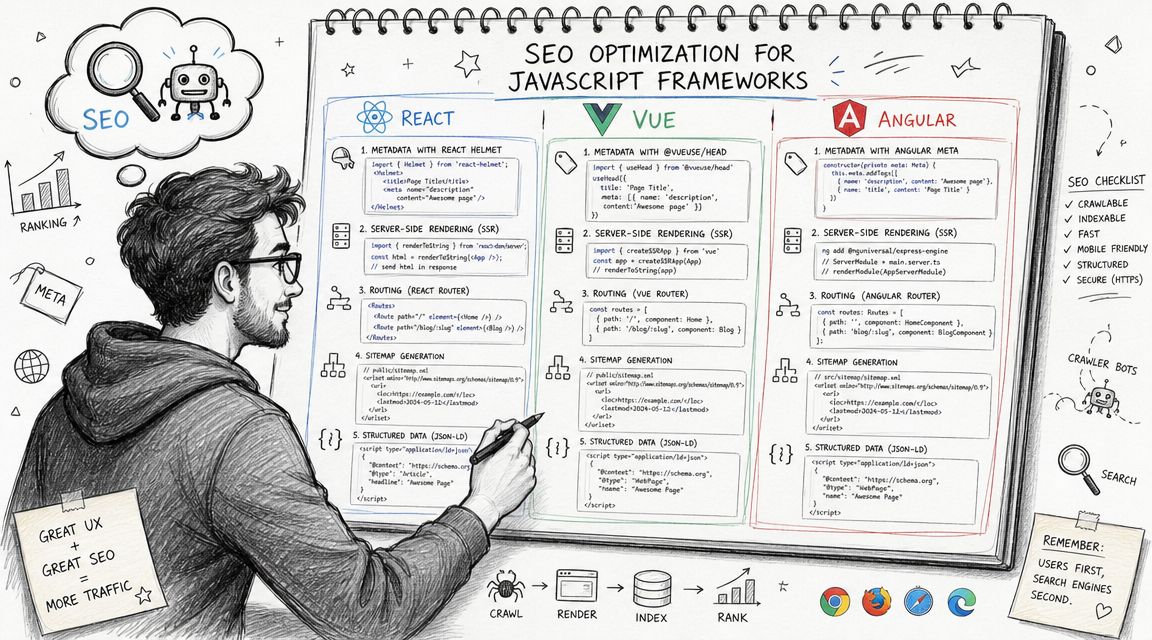
React patterns that hold up in production
If you're on React and SEO matters, a meta-framework is usually the right move. Next.js gives you route-aware rendering, metadata handling, and easier status-code control than a pure client-rendered React SPA.
For smaller React apps that remain client-heavy, teams often use head libraries such as React Helmet. That can work for light cases, but I wouldn't build an SEO-sensitive content surface around delayed client-only metadata if I had a choice.
My preference in React is:
- Use server components or SSR for public pages
- Keep account areas client-heavy
- Separate SEO route config from UI component logic
That separation reduces the classic problem where marketing wants metadata changes but has to touch product code to ship them.
If your React app is growing fast, architecture matters beyond SEO too. This article on custom development for scalable React is useful because it lines up with the same concerns: routing discipline, maintainability, and clear separation of concerns.
Vue and Nuxt are usually straightforward
For Vue teams, Nuxt tends to make SPA SEO easier because it bakes route-aware rendering and head management into the normal workflow. Public pages can be rendered on the server or generated ahead of time, while app sections stay interactive and client-driven.
The practical pattern is simple:
- Put public content into Nuxt pages with route-based metadata.
- Fetch content in a way that resolves before the HTML response for indexable pages.
- Keep client-only widgets isolated so they don't become prerequisites for understanding the page.
Vue teams get into trouble when they treat the whole app as one hydration target and let all meaningful copy arrive after mount.
Angular needs stricter discipline
Angular can be SEO-friendly, but it's less forgiving if you leave everything to the client. Angular Universal is the usual path when the app has public routes that need crawlable HTML.
The implementation points I care about most in Angular are:
- Universal rendering for indexable routes
- Title and meta updates through Angular's head services
- Explicit route status handling
- Avoiding route content that depends on post-render interaction
Angular apps also benefit from a route matrix maintained outside the codebase. A shared sheet or config document listing route, canonical, indexability, rendering mode, and owner prevents a lot of launch mistakes.
Don't let framework defaults decide your SEO architecture. Frameworks optimize for developer experience first. Search requirements need explicit decisions.
Validating Deploying and Monitoring Your SPA
A technically correct build can still fail after deployment. That's why SPA SEO has to be treated as an operational system, not a launch task.
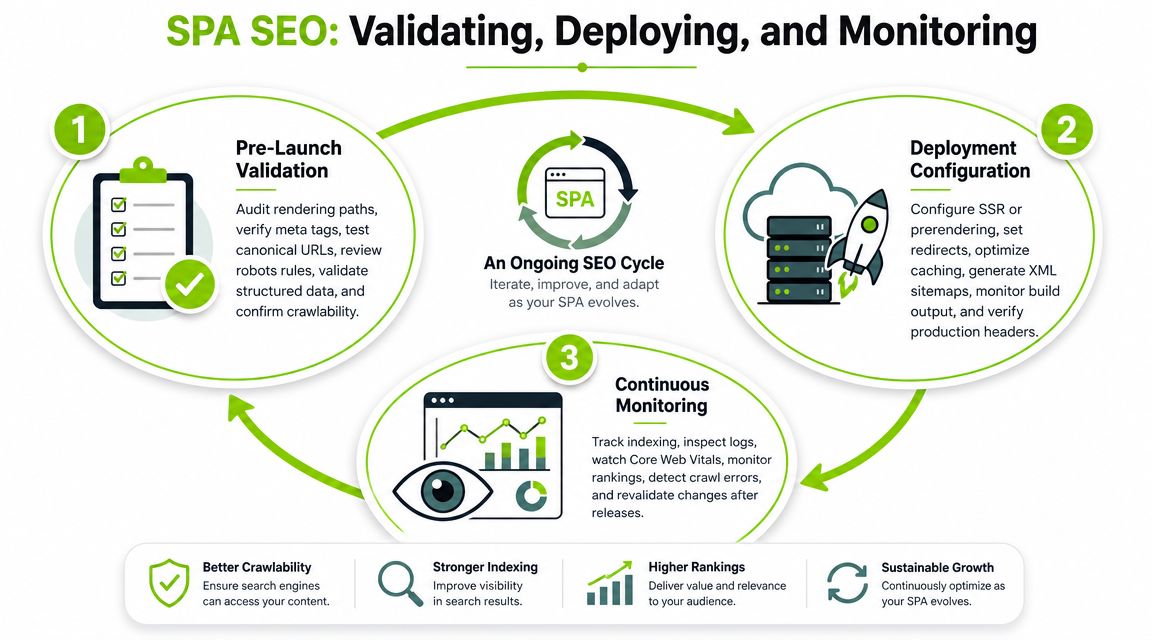
Validate the rendered output before release
Don't trust local navigation. Test direct route fetches, rendered HTML, and status codes on a preview environment that matches production.
I check these every time:
- Rendered HTML contains the key route copy
- Title and canonical match the requested URL
- Primary internal links appear in HTML
- Missing routes return an actual 404
- No stale shell metadata leaks across routes
A frequent gap in SPA SEO is inconsistent indexing of JavaScript-rendered views after Google's rendered-page pipeline, not merely whether SSR or prerendering exists. Teams need a route-by-route framework for deciding what must be server-rendered and what can remain client-only, especially on large SPAs, as explained in this analysis of why SPAs still struggle with SEO.
Deployment details affect search outcomes
A good app can be undone by hosting rules. Catch-all rewrites are necessary for client-side routing, but they also create soft-404 problems if every unknown URL resolves with a 200. SSR deployments need cache rules that don't freeze stale metadata. Prerendered deployments need route inventories so new pages aren't invisible by omission.
I like to maintain a deployment checklist with:
- Routing behavior by environment
- Expected status codes
- Canonical host rules
- Robots behavior
- Sitemap generation ownership
That checklist is usually more useful than another abstract SEO doc.
Monitoring now includes AI search visibility
Traditional monitoring still matters. Check indexed pages, rendered output, crawl anomalies, internal link coverage, and route-level discoverability. But search visibility now extends beyond classic results.
Teams should also track whether public pages are appearing in AI-generated summaries and discovery flows, and whether the brand is being cited consistently. That doesn't replace technical SEO. It adds a second observation layer for modern search surfaces. For broader process work, this guide on how to do an SEO audit fits well into SPA validation cycles.
One practical option for combined monitoring is Surnex, which tracks AI visibility alongside rankings, backlinks, audits, and reporting workflows. In agency and in-house environments, that kind of combined view helps when a route looks healthy in technical checks but underperforms in newer search experiences.
Troubleshooting Common SPA SEO Issues
Most SPA SEO issues look mysterious until you inspect the route as a document instead of as an app screen.
What to do when a route won't index
Start by fetching the route directly and checking the returned HTML. If the meaningful content isn't there, or the route depends on client-side data after mount, the crawler may be seeing a thin version.
Then check whether the route should even be indexable. I've seen teams accidentally canonicalize dozens of useful routes to one parent URL, or leave them out of internal navigation entirely.
What to do when titles don't update
This usually comes from head state being tied to component lifecycle in the wrong place. The app changes routes, the content changes, but the title remains from the previous route or from the shell.
Fix it by moving metadata responsibility up to the route layer. Don't let nested widgets decide page identity.
What to do when internal links aren't being discovered
Audit the HTML, not just the visual UI. If your nav or cards use click handlers without anchors, crawlers get a much weaker map of the site.
This is one of the easiest wins in SEO in SPA. Replace pseudo-links with semantic anchors and make sure the href points to the canonical route.
What to do when everything returns 200
That's usually a server fallback problem. The SPA loads, the branded 404 component appears, and everyone assumes it's fine. It isn't. Search engines need the HTTP response to match the route state.
If you're debugging caching behavior at the same time, understanding 304 Not Modified helps because stale responses can make route validation look inconsistent across environments.
What to do when hydration breaks the route
Hydration mismatches can wipe out content, duplicate nodes, or leave metadata in a bad state. If a route looks fine in view-source but broken after scripts run, don't treat that as only a UX bug. It can damage search visibility too.
The fix is usually to reduce client-side divergence. Keep server-rendered output and client-rendered output structurally aligned, especially on public routes.
Surnex helps teams manage modern search visibility without splitting the work across separate tools. If you need one workflow for technical SEO, audits, rankings, backlinks, and AI search tracking, Surnex is built for that operating model.