You're probably looking at a 304 in DevTools, a crawler log, or an SEO platform right now and wondering whether it's a problem. Sometimes it shows up beside CSS, JavaScript, images, or even HTML. Sometimes a stakeholder asks why a page “didn't return 200.” That's where confusion starts.
A 304 not modified response usually isn't an error. It's the server telling the client, “Use the copy you already have. Nothing changed.” That's good for speed. It can also be good for crawl efficiency. But if caching rules are wrong, the same mechanism can hide updates from crawlers, keep stale content alive, or break custom API workflows.
That's why 304s matter to both developers and technical SEOs. You're not just looking at a browser optimization. You're looking at a signal that affects performance, revalidation, indexation patterns, and the freshness of what search systems and AI systems see.
What Is a 304 Not Modified Response
A 304 not modified response is an HTTP status code used during cache validation. It tells the client that the requested resource hasn't changed since the client last stored it locally, so the client should reuse its cached copy.
The key point is that a 304 response does not include the full file again. The browser, crawler, or API client already has a previous copy and wants to know whether that copy is still valid. If it is, the server sends back 304 instead of sending the whole resource again.
That's why people often misread it. They see a status code that isn't 200 and assume something failed. But a 304 usually means the caching conversation worked as intended.
Why you see 304s so often
You'll often see 304s on assets that don't change often:
- CSS files that define a site's layout
- JavaScript files that power interactions
- Images like logos, icons, and shared design assets
These are ideal candidates for cache reuse. A browser that already has them cached doesn't need a full download every time a page loads.
Simple rule: A 304 is a validation response, not a content delivery response.
Why SEOs should care
For a developer, 304 means less bandwidth and less repeated transfer. For a technical SEO, it means something else too. It tells you whether bots are rechecking a URL or reusing a known version. That distinction matters when you're trying to confirm whether an update was fetched.
It also matters when debugging odd crawl behavior. If a page was cached in a broken state, later 304 responses can keep that stale state in circulation until the server sends a fresh full response with a new validator. That's where a performance feature turns into a visibility problem.
How HTTP Caching and Conditional Requests Work
Caching is easier to understand if you think like a librarian. You don't ask the librarian to hand you a full new copy of the same book every day. You ask whether a newer edition exists. If not, you keep reading the copy you already have.
That's what a browser does with cached resources.
The first request
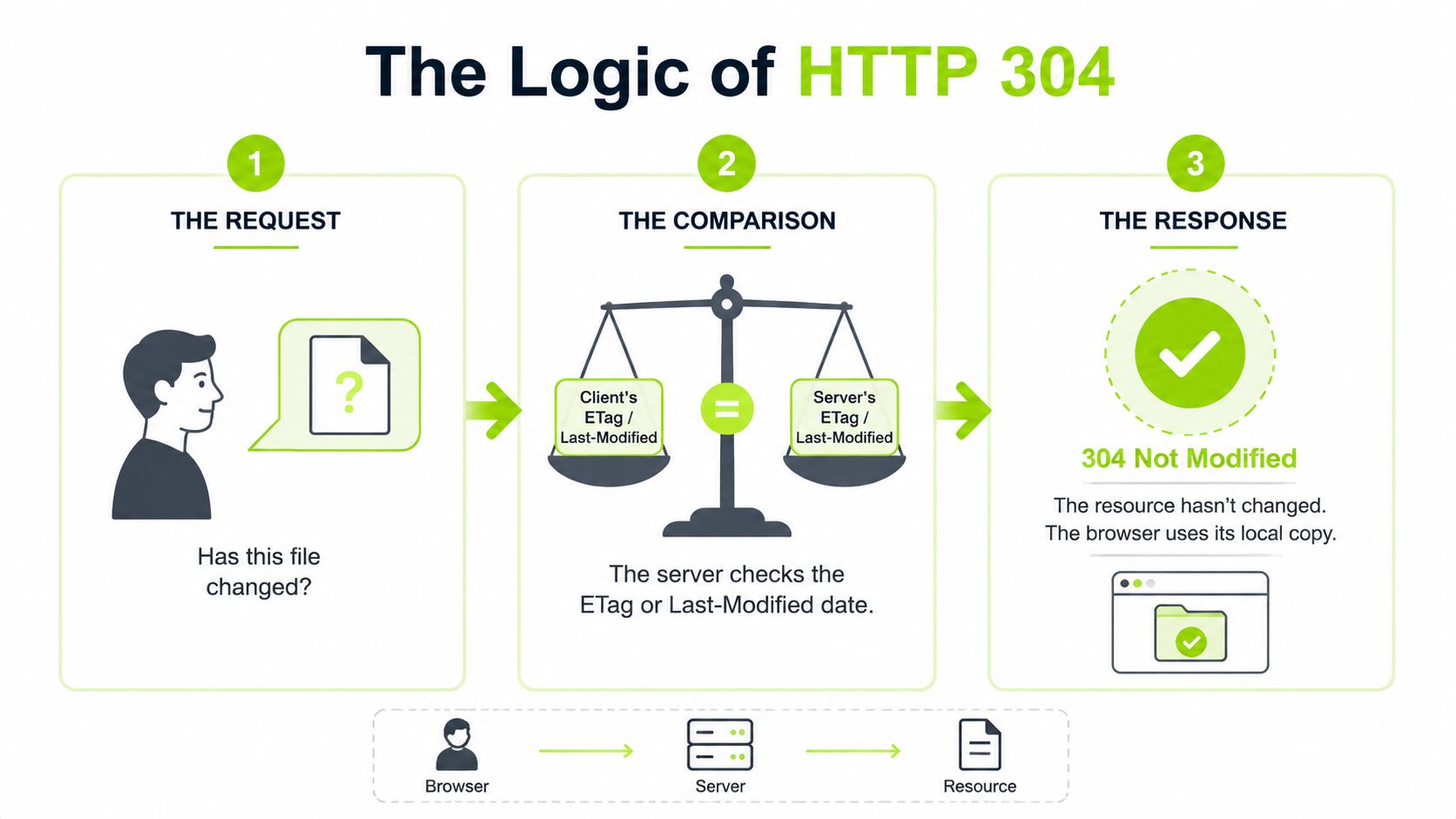
On the first visit, the client asks for a resource and the server usually returns 200 OK with the full body. Along with that body, the server may send metadata that helps with later validation.
Two headers matter most:
- ETag: a version identifier for that specific resource
- Last-Modified: a timestamp showing when the resource last changed
The client stores both the file and those validators in cache.
The next request
On a later visit, the client can make a conditional request instead of asking for the full file blindly. It does that with request headers such as:
- If-None-Match, which sends the previously stored ETag
- If-Modified-Since, which sends the stored modification date
The server compares those values to the current version of the resource. If the values still match, the resource hasn't changed.
According to Microsoft's explanation of HTTP 304 and IIS output caching, the server then returns 304 not modified with zero message body transmission, avoiding a full resend. On high-traffic sites, the bandwidth savings from this pattern can reach terabytes monthly.
What the exchange looks like
| Step | Client says | Server checks | Result |
|---|---|---|---|
| First fetch | “Send me /app.css” | Current file | 200 with full file |
| Later fetch | “My ETag is abc123. Still current?” | Compares current ETag | 304 if unchanged |
| After an update | “My ETag is abc123” | Sees new version | 200 with updated file |
Where people get mixed up
A lot of teams treat cache headers as one setting. They're not. They're a policy system.
- Cache-Control decides how caches should behave.
- ETag and Last-Modified help revalidate.
- The client and server both participate in the decision.
If you want a practical breakdown of optimizing cache-control no-cache headers, that guide is useful because it focuses on the difference between “don't store this” and “store it, but revalidate before reuse.” Those are not the same thing, and many caching mistakes come from treating them as identical.
Why this matters in real work
If you're reviewing a stack for technical SEO, the question isn't just “does caching exist?” It's whether the right resources are cached with the right validation behavior. Static files should usually revalidate cleanly. Dynamic content needs more care.
Teams auditing that relationship across frameworks, rendering setups, and hosting layers often need a broader view of the delivery stack, especially when frontend behavior, crawlability, and cache rules all overlap. A technical stack review using tools like Surnex Tech Stack can help map those dependencies before you start changing headers blindly.
The SEO Impact of 304 Not Modified Responses
A common SEO scenario looks like this. Your team updates title tags, product copy, or pricing on a high-value page. The page is live, QA looks fine, but Google keeps showing the older version for days. One possible reason sits below the HTML itself. The server keeps telling crawlers, "nothing changed."
For search engines, a 304 response shapes how recrawl decisions happen. A correct 304 helps bots avoid downloading the same unchanged resource again. That saves bandwidth and server work. A wrong 304 does the opposite of what you want. It teaches crawlers to spend less attention on URLs that have changed.
Crawl budget and revalidation
Crawl budget is easiest to understand as a search engine's time and request allowance for your site. If you run a small brochure site, you may never notice a problem. If you manage an ecommerce catalog, a publisher, or a large multi-location site, small cache mistakes can affect how quickly new content gets discovered and refreshed in search.
A validator works like a timestamp check on a warehouse shipment. If the label says the box is unchanged, the inspector moves on. If that label is wrong, the inspector skips inventory that needs review. The same thing happens when HTML changes but the server still returns a 304 because the ETag or Last-Modified value did not update correctly.
That has a direct SEO cost. Updated pages may be recrawled more slowly, snippets can stay stale, and important changes on revenue pages may take longer to affect rankings or search appearance.
Where SEO teams usually get caught
The pattern shows up most often on pages that look dynamic to a user but stable to the cache layer.
Common examples include:
- Product pages where price, stock, shipping, or offer details change without triggering a new validator
- Category pages where inventory and internal linking shift often, but cached HTML still appears unchanged
- Editorial pages where meaningful copy edits happen after publication, yet the origin or CDN keeps serving revalidation signals tied to the old version
- JavaScript-rendered pages where the template updates, but the cache policy only reflects a shell file and misses content-level changes
The practical rule is simple. If a page drives traffic, leads, sales, or brand messaging, your cache policy has to reflect how often that page really changes.
AI search raises the stakes
This matters beyond classic crawling.
AI search systems, answer engines, and retrieval pipelines often rely on fetched content, cached copies, feeds, or API responses that may lag behind the current page version. If your site keeps signaling "not modified" when important content has changed, stale data can spread into summaries, shopping answers, support responses, and downstream tools that reuse your content.
For agencies and in-house teams, that turns a caching issue into a visibility and data integrity issue. An outdated heading in search results is annoying. An outdated offer, policy, product spec, or brand statement reused by AI systems is harder to detect and harder to correct.
A useful way to frame the risk is by page type:
| URL type | Main risk from bad 304 behavior | Likely impact |
|---|---|---|
| Static asset | Unnecessary full fetches or weak cache efficiency | Slower repeat loads |
| Evergreen article | Meaningful edits are recognized late | Slower snippet and ranking refresh |
| Dynamic commercial page | Fresh content appears unchanged | Lost visibility, wrong pricing, stale offers |
| API-backed or AI-cited page | Old content keeps getting reused | Outdated answers and weaker data trust |
What to watch in audits
Status codes alone do not tell the full story. You need to compare the server's cache signals against what changed on the page.
Start with four questions:
- Which templates return 304 most often
- Do important pages return a fresh 200 after a real edit
- Do ETag or Last-Modified values change when body content, structured data, or key template elements change
- Do stale snippets, cached SERP copies, AI answers, or API outputs line up with an old page version
This is one reason performance and SEO audits should not live in separate silos. A fast repeat visit is good. A fast repeat visit to stale HTML is not. Teams that combine crawl data, server behavior, and web vitals reporting get a clearer view of whether caching is helping visibility or hiding updates that search engines and AI systems need to see.
How to Diagnose Caching and 304 Issues
The fastest way to stop guessing is to inspect a real request. You want to see the request headers, the response headers, and whether the server behavior matches the type of resource you're testing.
Start in the browser. Then confirm with command line tools. Then look at logs.
Use Chrome DevTools first
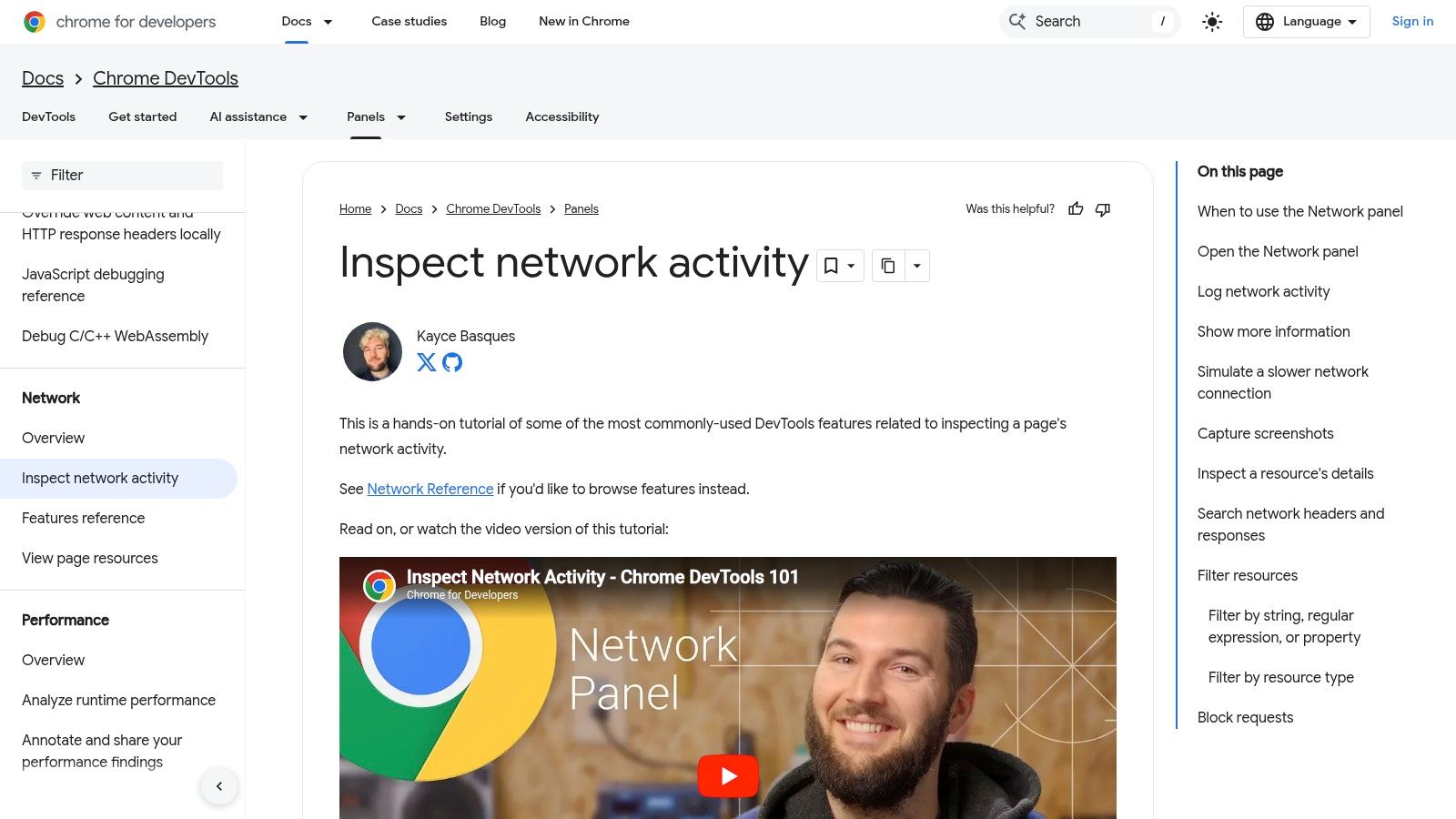
Open Chrome DevTools, go to the Network tab, and reload the page.
Click any request with a 304 status. Then inspect:
- Request Headers for
If-None-MatchorIf-Modified-Since - Response Headers for
ETag,Last-Modified, andCache-Control - Resource type so you know whether you're looking at HTML, CSS, JS, or an image
This tells you whether the client sent a conditional request and what validator the server used to decide on 304.
A few practical checks help:
- Static file returns 304 repeatedly. Usually fine.
- Important HTML page returns 304 after a recent edit. Needs investigation.
- No ETag or Last-Modified present. Revalidation logic may be incomplete or handled upstream.
- Conflicting cache headers. Often a CDN and origin are disagreeing.
Reproduce it with cURL
Browsers can hide details through automatic cache behavior. cURL gives you a clean way to test the server directly.
Use one request to fetch the resource and note the validator. Then make a second request that includes either the previous ETag in If-None-Match or the previous timestamp in If-Modified-Since.
What you're checking is simple:
- If the resource is unchanged, a 304 makes sense.
- If you know the resource changed and still get 304, the validator is likely wrong.
- If a resource that never changes always returns 200, you're missing a caching opportunity.
Practical rule: Don't trust a single browser reload. Validate the same URL with a manual conditional request.
Read server logs like an SEO, not just an admin
Server logs show patterns that DevTools can't. They help answer questions like:
- Are bots getting 304s on the same URLs repeatedly?
- Do updated templates ever trigger a fresh 200?
- Are only static assets returning 304, or is key HTML doing it too?
SEO crawlers and workflow tools become useful in this context. A sitewide technical review using something like a technical site audit workflow can help surface groups of URLs that behave the same way, which is far more useful than examining isolated examples one by one.
A simple diagnosis path
| Tool | Best for | What to verify |
|---|---|---|
| Chrome DevTools | Quick page-level inspection | Header behavior on live reload |
| cURL | Controlled manual testing | Whether conditional requests return the expected status |
| Access logs | Bot and crawler patterns | Repeated validation and stale URL behavior |
| Site crawler | Template-level auditing | Which page classes show risky cache patterns |
If you work in both SEO and development, this layered approach saves time. DevTools tells you what happened. cURL tells you whether it's reproducible. Logs tell you whether it matters at scale.
Common Causes and Fixes for 304 Problems
Most 304 problems aren't caused by the status code itself. They come from bad cache policy, weak validators, or mismatched behavior across origin servers, CDNs, and applications.
When a 304 looks wrong, there's usually a specific reason behind it.
Dynamic pages cached like static files
This is common on sites with aggressive CDN rules. A page that changes often keeps returning 304 because the validator doesn't reflect meaningful content changes.
Fix: shorten cache lifetimes for dynamic HTML, or force more reliable revalidation logic. Product pages, inventory pages, pricing pages, and time-sensitive landing pages usually need stricter freshness handling than CSS or logo files.
ETags that don't reflect the real version
In load-balanced environments, one server may generate validators differently than another. That creates inconsistent behavior. You may see needless 200 responses, or worse, 304 responses on content that should have changed.
Fix: generate ETags from the actual content version or deploy version, not from server-specific quirks. If you can't guarantee consistency, rely on a cleaner validation strategy rather than shipping unstable validators.
CDN and origin settings that conflict
A CDN may override headers from the application layer. The app thinks it's serving one cache policy. The edge serves another.
Fix: compare the headers sent by the origin with the headers the client receives. If they differ, your debugging needs to happen at the cache layer that wins, not the one you expected to win.
The stale cache trap
This is the one technical SEOs should remember. If a server returns a broken 200 OK and a crawler caches it, later 304 responses can keep that broken state alive. As explained in http.dev's 304 reference, the crawler may stop rechecking the URL and won't discover the fixed version until it gets a fresh 200 with a new ETag.
That means a temporary publishing bug can persist longer than expected if cache validation keeps confirming the old broken state.
Serve a clean fresh 200 after a fix. Don't assume the crawler will recover on its own if validators still point to the old version.
A problem and fix summary
-
Symptom: updated page still looks old to bots Likely cause: validators didn't change Fix: regenerate ETag or reset validation state after publish
-
Symptom: same URL behaves differently across requests Likely cause: inconsistent validator generation across servers Fix: standardize cache logic at the application or edge layer
-
Symptom: crawler keeps seeing broken content after a fix Likely cause: stale cached 200 followed by repeated 304s Fix: force a new full response with updated validation metadata
Best Practices for Agencies and Developer Teams
The best 304 strategy isn't “cache everything hard” or “disable caching when SEO gets nervous.” It's a shared policy. Developers, SEOs, and analytics teams need the same answer to one question: which resources should stay stable, and which ones must prove freshness quickly?
Use different rules for different content
A clean policy usually looks like this:
- Static assets get long-lived caching with reliable validators.
- Frequently updated HTML gets shorter validation windows or stricter revalidation.
- Critical commercial pages get extra checks after publishing so the team confirms bots can receive a fresh 200 when needed.
This helps speed and freshness work together instead of fighting each other.
Treat 304 as a real application concern
Programmatic clients often mishandle 304s. In browsers, cache reuse feels automatic. In scripts, scrapers, and API integrations, an unhandled 304 can look like an empty response and break the pipeline.
According to Airbrake's 304 guide, Node.js developers have reported up to 30 percent data loss in ranking trackers when 304 responses aren't handled correctly. The same source notes that properly using headers such as If-None-Match in API requests can cut latency by 35 percent.
That matters for agencies building internal reporting tools and for developers wiring SEO data into custom dashboards.
Build one workflow for both teams
A practical team habit is to pair content releases with cache validation checks:
- Publish the change.
- Verify the live response headers.
- Confirm the URL can return a fresh 200 when expected.
- Monitor whether crawlers start seeing the new version.
For agencies managing many client environments, standardized operating procedures matter as much as technical correctness. A shared delivery model for web development agencies helps when SEO teams and dev teams need one consistent approach to cache rules, audits, and release verification.
Frequently Asked Questions About 304 Not Modified
Is 304 not modified an error
No. A 304 is usually a normal cache validation response. It means the client already has a stored copy and the server confirmed that copy is still current.
Is 304 a redirect
No. It's easy to confuse it with redirects because it sits in the 3xx range, but a 304 does not tell the client to go to a different URL. It tells the client to reuse a local cached version of the same resource.
How is 304 different from 301 and 302
A 301 or 302 changes where the client should request content. A 304 keeps the same URL and confirms the existing cached copy is still valid. Redirects change location. Cache validation confirms freshness.
Why do I get 304 in DevTools after editing a page
Usually because the browser is still making a conditional request and the server's validator didn't change the way you expected. That can happen if the page output changed visually but the cache layer still considers the resource unchanged.
Check the ETag, Last-Modified value, and any CDN behavior before assuming the browser is wrong.
Can I force a fresh copy instead of a 304
Yes. In practice, developers often use a hard reload in the browser, disable cache in DevTools during debugging, or test with a modified request that bypasses local cache behavior. The goal is to make the server return a fresh 200 so you can verify the current response body and headers directly.
Should I worry about 304s on every URL
Not on every URL. Worry about 304s when they appear on pages that should have been updated, when bots keep seeing stale content, or when your API client treats 304 like an empty failure instead of a valid cached state.
Surnex helps agencies, in-house teams, and developers track how technical issues like caching and stale content connect to visibility across traditional search and AI search. If you need one place to monitor rankings, audits, AI Overviews, and emerging LLM discovery, explore Surnex.