
Over 60% of Google searches now happen on mobile according to one source, while another puts mobile at 58% of Google searches and about 60% of all website traffic. That's why mobile site SEO isn't a side task anymore. Google's mobile-first indexing means the mobile version of your site is the primary basis for crawling and ranking, so weak smartphone experience can hold back an otherwise strong site on desktop, as noted in these mobile search and indexing benchmarks.
At agency level, that changes how you audit, prioritize, and report. A mobile SEO audit isn't just about speed scores. It's about making sure Google can crawl the right version, users can effectively use it on a phone, and clients can see how those fixes connect to leads, visits, and revenue.
Aligning Your Site with Mobile-First Indexing
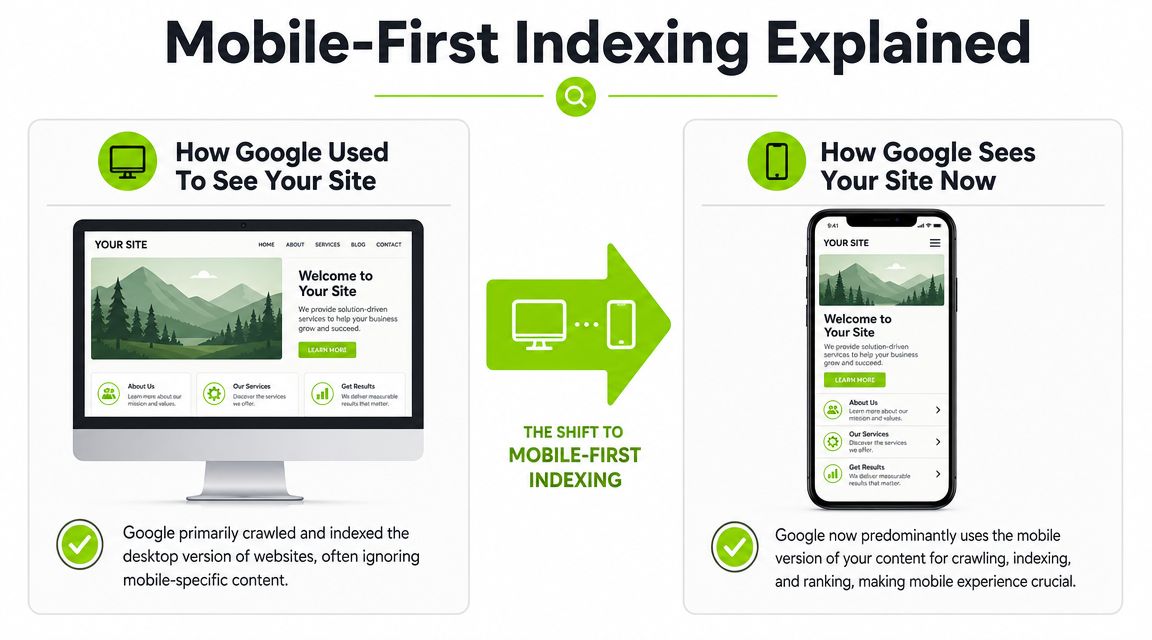
Google no longer treats mobile as the secondary experience. For a major client, the first question isn't “How fast is the site?” It's “What version of this site is Google indexing?”
Start by identifying the site setup
You'll usually find one of three mobile configurations.
| Setup | What it looks like | Main advantage | Main risk |
|---|---|---|---|
| Responsive design | Same URL and same core HTML across devices, layout adapts with CSS | Simplest to maintain | Can still fail if mobile layout is poorly implemented |
| Dynamic serving | Same URL, but server returns different HTML by device | More control over mobile output | Higher implementation risk, requires proper device handling |
| Separate mobile URLs | Desktop and mobile live on different URLs | Can support very custom mobile experiences | More complexity, more opportunities for mismatch and indexing errors |
For responsive builds, confirm the viewport is correctly set with meta name="viewport" content="width=device-width, initial-scale=1.0". Without that, even a well-designed layout can render badly on phones.
For dynamic serving, check whether the server returns the Vary HTTP header so crawlers and caches can distinguish device-specific responses. If that header is missing, debugging gets messy fast.
What usually works best
Responsive design is usually the cleanest foundation for mobile site SEO because it reduces duplication, avoids split signals, and keeps maintenance sane. That doesn't mean it's automatically correct. I've audited plenty of “responsive” sites that still shipped desktop-sized navigation, oversized banners, and hidden mobile content.
Practical rule: If the mobile version removes meaningful content, weakens internal linking, or changes structured elements too aggressively, rankings can drift because Google is evaluating the mobile experience first.
Separate mobile sites are where teams often inherit technical debt. You have to validate parity across content, metadata, canonicals, hreflang logic, and internal links. If the client also runs a JavaScript-heavy frontend, review rendering behavior early. This is especially important on frameworks discussed in this SPA SEO guide, where mobile rendering problems often hide behind “works on my device” assumptions.
What to confirm before touching performance
Before anyone starts compressing images or minifying files, verify these basics:
- Content parity: The mobile page needs the core content, internal links, titles, and structured elements that matter for search.
- Crawlability: Googlebot must be able to fetch mobile assets, not just the HTML shell.
- Indexing signals: Canonicals, alternates, and hreflang logic need to match the mobile setup in use.
- UX integrity: Navigation, forms, and key conversion paths must work on real phones, not only in browser emulation.
If that foundation is off, speed work helps less than people expect.
Your Mobile SEO Audit Workflow
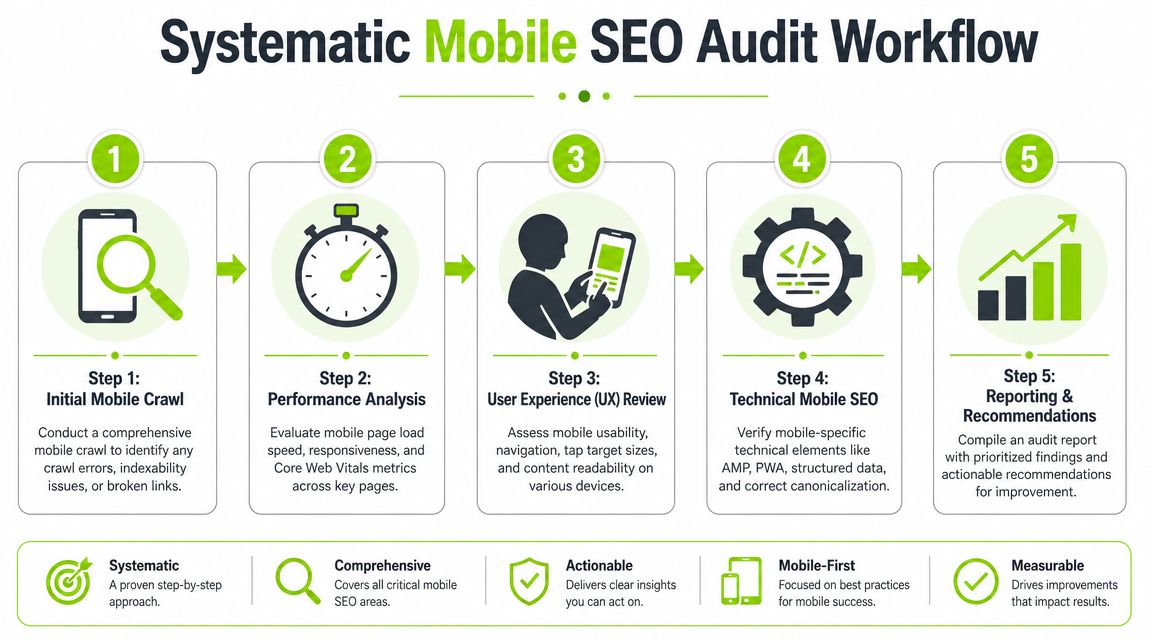
A good mobile audit is layered. Don't jump straight from a PageSpeed score to a dev ticket. Start broad, then narrow down until you know exactly what's broken, where, and why.
Use a three-tool sequence
A practical workflow is to validate with Lighthouse during development, then cross-check with Google PageSpeed Insights for real-user performance data and WebPageTest for deeper device and network diagnostics, as recommended in this mobile-friendly SEO workflow.
Each tool answers a different question:
- Lighthouse tells you how the page behaves in a controlled test.
- PageSpeed Insights tells you whether real users are having a problem.
- WebPageTest helps isolate the cause on specific devices and network conditions.
If you only use one tool, you'll miss context. A page can look acceptable in Lighthouse and still perform poorly for actual users on mid-range phones.
Run the audit in this order
Crawl key templates first
Before performance testing, crawl the site as Google would. Focus on templates that drive the account: homepage, category pages, service pages, location pages, product pages, blog templates, and forms.
Use the crawl to flag:
- Indexation issues: Pages blocked from crawling, noindex mistakes, broken canonicals.
- Mobile parity problems: Missing content blocks or stripped internal links on smaller breakpoints.
- Template inconsistency: One page type might be clean while another ships heavy scripts or broken layout rules.
If the team needs a broader framework, this SEO audit process is a useful companion.
Test representative pages, not random URLs
Pick a short list of URLs that reflects business value and template diversity. For enterprise sites, that means revenue pages first, not just the homepage.
Then check for mobile bottlenecks such as:
- Heavy images: Oversized hero banners and product images are still the most common waste.
- Asset bloat: CSS and JavaScript bundles often carry desktop assumptions into mobile delivery.
- Excessive requests: Too many third-party tags, fonts, trackers, and widgets slow interaction.
- Server delay: If the first response is sluggish, every later fix has less room to help.
What to look for on mobile
Core Web Vitals matter here, but don't treat them like a scoreboard. Treat them like diagnostics. On mobile, poor Largest Contentful Paint usually points to image weight, slow server response, or render-blocking resources. Poor Interaction to Next Paint often means JavaScript is doing too much. Poor Cumulative Layout Shift usually comes from unstable media slots, injected banners, or delayed font and UI rendering.
Pages fail on mobile for ordinary reasons. Giant images, too many scripts, and layout instability still cause most of the damage.
Validate on real devices
Emulation is useful, but it's not enough. Mobile issues often show up as layout reflow, unreadable text, or tap areas that feel fine with a mouse and fail on an actual phone.
A simple field routine works well:
- Open the page on at least one iPhone and one Android device
- Test on strong and weaker connections
- Try core actions, such as menu use, filter selection, form submission, and checkout steps
- Watch for friction, not just errors
That workflow gives you findings you can prioritize, defend, and hand off without guesswork.
Optimizing for Mobile Usability and Accessibility
A page can load fast and still fail mobile users. That's the mistake a lot of teams make. They improve speed metrics, leave the interface cramped or unstable, and wonder why engagement doesn't improve.
Usability is part of mobile site SEO because bad mobile interactions create friction at the exact moment the user wants to act. On a desktop, a slightly small button is annoying. On a phone, it can make the page effectively unusable.
The baseline standards that matter
For mobile usability, a widely used benchmark is a 44×44 CSS pixel minimum touch target size, and body text should stay around 16px or larger for readability on compact screens, based on this mobile usability guidance.
Those aren't cosmetic preferences. They affect whether users can find their way, tap, read, and convert without zooming or misfiring.
Here's where I see the biggest gains during audits:
- Navigation spacing: Menu items, filters, and tabbed controls often sit too close together.
- CTA sizing: Buttons may look fine visually but fail in practice because the touch area is too small.
- Body copy: Desktop typography often gets scaled down too aggressively on phones.
- Overlays and pop-ups: Intrusive elements block content and interrupt simple tasks.
Why speed-only thinking fails
Clients often ask for “mobile speed improvements” when the actual problem is interaction quality. If users can't find the menu, read the text, or dismiss an overlay, shaving file weight won't fix the core experience.
A mobile page doesn't need to feel identical to desktop. It needs to feel easier to use under tighter constraints.
That usually means rewriting parts of the interface, not just optimizing assets.
Common fixes that actually help
- Shorter paragraphs: Dense copy becomes oppressive on narrow screens. Break ideas up earlier.
- Clearer headings and bullets: Mobile readers scan first. Structure helps them decide whether to continue.
- Less aggressive pop-ups: Keep email capture, promos, and cookie patterns from overwhelming the first screen.
- Cleaner reflow: Navigation, cards, forms, and tables must adapt without horizontal scrolling or clipped text.
For teams working with local brands, I've found this guide for Charlotte businesses useful because it frames mobile optimization around practical business outcomes rather than design theory.
What to review by hand
I don't trust automated checks alone for UX. A manual pass still catches the issues that reports miss.
Review these on actual devices:
| Element | What to inspect | Failure pattern |
|---|---|---|
| Menus | Open, close, nested items, sticky behavior | Overlapping layers, trapped scroll, tiny tap areas |
| Forms | Field spacing, keyboard behavior, submit flow | Inputs hidden by keyboard, cramped labels, hard-to-hit submit buttons |
| Content blocks | Readability and scanability | Long text walls, weak hierarchy, awkward image cropping |
| Interstitials | Timing and dismissibility | Pop-ups that obscure content or CTA paths |
The highest-yield sequence is simple. Verify the responsive layout, confirm navigation and buttons reflow cleanly, remove intrusive pop-ups, then use Search Console mobile usability reporting and PageSpeed Insights to prioritize the page-level issues with the biggest business impact.
Advanced Mobile Technical SEO Checklist
Once the basics are stable, the next layer is technical precision. Here, enterprise sites, ecommerce builds, multi-location brands, and JavaScript-heavy platforms usually separate into two groups. The first group keeps a clean mobile stack. The second leaks visibility through rendering gaps, duplicate signals, and weak local page implementation.

Mobile SEO matters even more on local and high-intent journeys. One roundup reports that nearly 70% of local search queries come from a mobile device, 76% of people who search locally on a smartphone visit the business within 24 hours, and 28% make a purchase after that search, according to this SEO statistics roundup.
That's why advanced mobile work isn't academic. It affects location pages, product detail pages, and service pages where intent is close to action.
Check structured data on the mobile output
Don't assume structured data exists just because the desktop page has it. Confirm that the mobile-rendered page exposes the same important entities and page types.
Focus on page types that need strong context:
- Local pages: Business details, service areas, and location identity need to be clear.
- Product pages: Product information should survive mobile rendering and component swaps.
- Editorial content: Article and FAQ-style content often loses supporting blocks in mobile templates.
If a client uses dynamic serving or a JavaScript framework, test what Googlebot mobile receives. Schema in source code, rendered code, and live page templates can differ more than people expect.
Clean up canonical and language logic
Mobile-specific duplication often comes from URL strategy, not content quality. If a site still runs separate mobile URLs, review canonicals and alternates carefully. If it runs international sections, inspect hreflang on mobile URLs too.
A short checklist helps:
- Canonical consistency: Mobile pages shouldn't contradict the site's intended primary version.
- Alternate relationships: Separate desktop and mobile URLs need clean bidirectional mapping.
- Hreflang parity: Language and regional references must line up with the version users and crawlers receive.
- Internal links: Mobile navigation shouldn't point users into the wrong locale or device version.
Audit rendering, not just HTML
A lot of mobile SEO losses come from deferred or blocked rendering. The HTML may look fine in a crawl, while the actual mobile experience hides critical content until scripts run.
Watch for these patterns:
| Technical issue | What it does to mobile SEO | What to inspect |
|---|---|---|
| Client-side rendering delays | Slows content discovery and weakens visible primary content | Rendered HTML, blocked resources, hydration timing |
| Conditional mobile components | Removes or delays important content on phones | Accordions, tabs, lazy modules, app-install prompts |
| Third-party tag weight | Delays interaction and visible completion | Tag managers, chat widgets, A/B tools, consent layers |
| Template fragmentation | Causes page-type inconsistency | Category vs product vs location page behavior |
The video below is a good supplement if your team needs a refresher on mobile-oriented technical review and implementation patterns.
If critical text, links, reviews, pricing, or location details appear only after heavy script execution, treat that as an SEO issue, not just a frontend issue.
For local businesses, this matters even more. Mobile users often want quick answers, directions, hours, or immediate service details. If those elements are buried behind scripts, tabs, or app-like interactions, the page can rank below weaker competitors with simpler implementation.
Monitoring Mobile Traffic and Setting Up Alerts
After launch, the job changes from fixing to watching. Mobile traffic now accounts for roughly 60%+ of global web traffic in many benchmark analyses by 2025, which makes mobile behavior central to how sites perform, as discussed in this mobile behavior analysis.
That's why monitoring can't stop at rankings. You need to isolate mobile behavior, compare it over time, and catch failures before a client does.
Segment mobile data on purpose
In GA4, create comparisons or reports that separate mobile, tablet, and desktop traffic. Don't lump them together and call it good. Mobile users often behave differently across landing pages, forms, and local intent paths.
Track these dimensions together:
- Landing page
- Device category
- Primary channel
- Conversion event
- Engagement trend
This lets you spot patterns like a single mobile template underperforming while desktop remains stable.
Build a lightweight alerting system
You don't need elaborate automation to make this useful. Start with a practical set of watches in analytics and Search Console.
Alerts worth setting
- Mobile organic landing page drops: Flag sudden declines on revenue-driving pages.
- Mobile conversion decline: Watch form starts, lead submits, purchases, or calls by device category.
- CTR shifts on mobile queries: Search Console can surface title, snippet, or intent mismatches.
- Usability issue spikes: New mobile rendering or layout problems should trigger review quickly.
If your team wants a simple way to operationalize that habit, this guide on managing Google alerts is a helpful starting point for setting notification routines.
What to review every reporting cycle
Use a recurring review process instead of ad hoc checks.
| Review area | What to compare | Why it matters |
|---|---|---|
| Mobile landing pages | Traffic, engagement, conversions | Finds template or page-group issues early |
| Search Console performance | Clicks, impressions, CTR by mobile queries | Shows visibility and SERP response |
| Usability reports | New errors and affected pages | Catches rollout regressions |
| Key journeys | Manual checks on forms, menus, local actions | Validates real-world experience |
Organizations often under-monitor post-release mobile changes. A new banner, consent layer, third-party tool, or redesign tweak can subtly break phones while desktop keeps working. That's why I always keep one manual check in the process. Open the top mobile landing pages on real devices every cycle and complete the actions that matter most.
Building Agency Reports That Showcase Mobile SEO Value
The technical work only matters if clients understand why it mattered. Many agencies often lose the room at this stage. They send over screenshots of PageSpeed, a few crawl fixes, maybe a note about tap targets, and assume the client will connect that to business value on their own.
They won't.
Good reporting for mobile site SEO translates engineering and UX work into a before-and-after business story. The report should show what changed, why it mattered on mobile, and what that means for visibility, engagement, and outcomes the client cares about.
Build reports around chains, not isolated metrics
A useful mobile report follows one clear chain:
Issue identified → fix implemented → metric improved → business effect
For example:
| Issue | Fix | SEO or UX effect | Client-facing outcome |
|---|---|---|---|
| Heavy mobile hero media | Compressed and resized assets | Faster visible loading on priority pages | More users reach core content and CTA |
| Cramped navigation and buttons | Improved reflow and touch targets | Better mobile usability | Fewer drop-offs in mobile journeys |
| Missing mobile content blocks | Restored parity on key templates | Stronger crawl and indexing alignment | Better visibility on important pages |
| Broken location page experience | Simplified page structure and local actions | Better fit for mobile local intent | More calls, visits, and lead actions |
That structure keeps the conversation concrete. Clients don't need every technical nuance. They need to understand what your team changed and why the change should matter to their pipeline.
Separate executive view from practitioner view
Agencies usually make one of two mistakes. They either over-summarize and hide the work, or they overload the client with raw SEO detail. The better approach is a two-layer report.
Executive summary
Keep this part short and commercial:
- What changed on mobile
- Which page groups were affected
- Whether visibility, engagement, or conversions improved
- Where risk still remains
Working appendix
Put the deeper material here:
- audit findings
- template-level notes
- page examples
- before-and-after screenshots
- open development items
- validation notes from tools and manual QA
That split helps account managers, SEO leads, and client stakeholders all use the same report without talking past each other.
Show page groups, not only sitewide averages
Sitewide averages blur the underlying performance. A homepage score can improve while lead-driving service pages still struggle. Report by page group instead:
- Core commercial pages
- Location pages
- Product or category templates
- Editorial or resource content
- Checkout or lead-gen paths
This makes mobile SEO reporting easier to defend. It also makes prioritization clearer for the next sprint.
Clients trust reports more when they can trace a fix to a specific template and then to a visible business outcome.
Tie mobile findings to client priorities
The same mobile improvements should be framed differently based on account type.
For a local brand, emphasize direction requests, calls, and location page usability. For ecommerce, focus on category navigation, product page interaction, and checkout friction. For B2B lead generation, highlight mobile form completion, service-page engagement, and top landing page performance.
Don't report “improved mobile UX” as a generic win. Report the specific pathway that got easier.
A better reporting narrative
Here's the kind of language clients respond to:
-
Instead of: “We improved mobile performance across the site.”
-
Say: “We reduced friction on your highest-value mobile landing pages by compressing image-heavy sections, simplifying mobile navigation, and fixing layout instability that interfered with calls to action.”
-
Instead of: “Core Web Vitals improved.”
-
Say: “Your mobile pages now present the main content more reliably and respond more cleanly during user interaction, which supports both search visibility and mobile conversion paths.”
Keep the report operational
The best agency reports don't end with a summary. They create the next set of actions. Close each report with three buckets:
- Completed fixes
- Observed impact
- Next mobile priorities
That keeps mobile SEO from becoming a one-off project. It becomes an ongoing performance program with visible progress.
If you want examples of how to package technical work into something clients can read and reuse, this piece on branded SEO reporting is worth reviewing.
If your team needs a simpler way to track rankings, audits, backlinks, and emerging AI search visibility in one place, take a look at Surnex. It's built for agencies and in-house teams that want cleaner reporting, less tool sprawl, and a clearer view of how search performance is changing.