You've probably seen 304 Not Modified in Chrome DevTools, a server log, or an SEO crawl report and wondered whether it's good, bad, or something to fix.
In most cases, it's good. Very good.
A response code 304 means the browser or crawler asked, “Has this file changed since the last time I saw it?” and the server replied, “No, use the copy you already have.” That small exchange is one of the reasons repeat visits feel fast, static assets don't need to be downloaded again, and search crawlers don't waste effort reprocessing unchanged resources.
For developers, 304s sit right in the middle of performance engineering. For technical SEOs, they matter because they affect crawl efficiency, site speed, and how cleanly search systems can revisit your content. For teams thinking about AI-driven discovery, they matter for the same reason. Faster, leaner delivery makes your site easier to fetch and validate.
An Introduction to Web Efficiency
A user opens your site on a phone during a commute. On the first visit, the browser has to fetch the page, stylesheet, logo, fonts, and a handful of images. A few hours later, that same user comes back. If your caching is set up well, the second visit should feel lighter because the browser can reuse files it already stored and only verify whether they are still current.
That verification step is one of the quiet systems behind web performance.
A 304 Not Modified response tells the browser, crawler, or other client, "your saved copy is still valid." The server sends confirmation instead of resending the entire file. It is similar to checking whether a document has changed before downloading it again. If nothing changed, you keep the local copy and skip the transfer.
This has real performance effects. Fewer bytes over the network can help repeat views feel faster, reduce work on the server, and make static assets cheaper to deliver. It also connects to outcomes teams care about higher up the stack. Reused assets can support stronger Core Web Vitals on return visits, especially when render-blocking files such as CSS and fonts do not need a full download again. The same pattern also helps search engines and AI retrieval systems revisit content more efficiently because unchanged resources can be validated instead of fetched from scratch.
Practical Effects of Caching
Caching works a bit like a shipping checklist. The browser does not ask for every box to be sent again. It asks, "Do I still have the current version?" If the answer is yes, the server replies with a small confirmation. If the answer is no, the server sends a fresh file.
When that loop is working correctly, you usually get four benefits:
- Less network transfer for unchanged assets such as CSS, JavaScript, images, and fonts
- Faster repeat visits because the browser can reuse local files
- Lower server overhead because the origin does not need to send the same payload repeatedly
- More efficient crawling because bots can spend less effort re-fetching unchanged resources
For technical SEO, that last point is easy to underestimate. A crawler that can confirm "nothing changed" quickly can spend more of its time on new pages, updated pages, and important resources. For sites with many URLs, that efficiency supports crawl budget. For publishers and ecommerce teams, it also helps keep frequently requested assets easy to access for systems that summarize, cite, or retrieve content for AI-driven search experiences.
A simple rule helps here. If repeat visits still download the same static files in full, your cache validation probably needs attention.
The useful mental model is a version check. The client says, "I have copy X." The server answers with either "keep using it" or "here is the new one." That small exchange is the foundation for the 304 behavior you see in DevTools, logs, and crawl reports.
What Is a 304 Not Modified Response
At the simplest level, 304 Not Modified is a response a server sends when a client makes a conditional request and the resource hasn't changed.
A library analogy works well here. You ask a librarian whether the copy of a book you borrowed last week is still the latest edition. If it is, the librarian doesn't walk to the shelf, hand you the same book, and make you carry it home again. They just confirm that your current copy is still valid.
The browser does the same thing with cached files.
What the browser is really asking
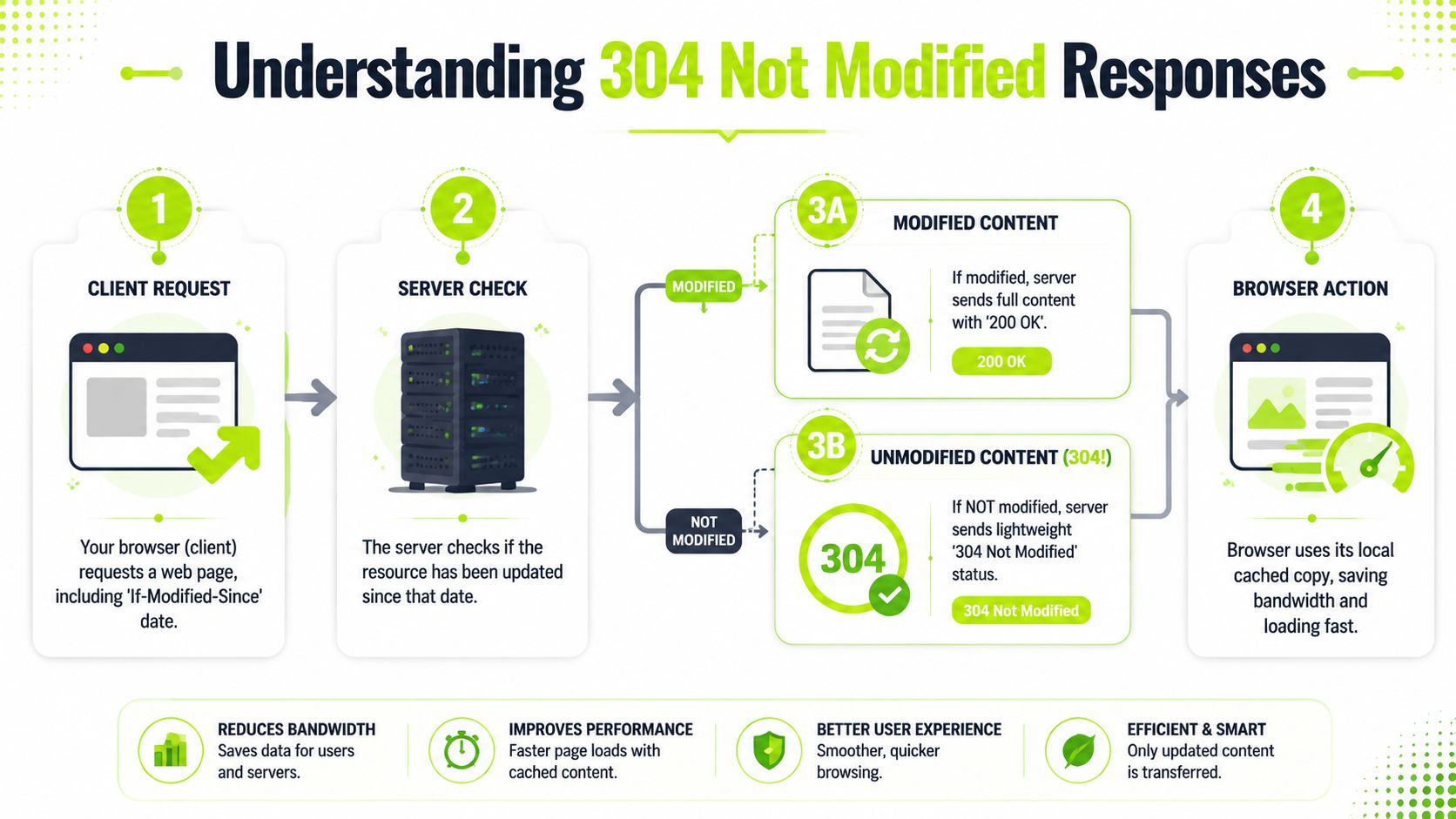
When a cached file is due for validation, the browser sends a request that includes one of these ideas:
- “I have the version from this date.”
- “I have the version identified by this tag.”
If the server agrees that nothing changed, it responds with 304 Not Modified.
If the file did change, the server returns a normal 200 OK with the new file body.
What 304 is not
304 often confuses people because it lives in the 3xx range, the same class as redirects. But in daily debugging, it's better to think of it as a cache validation success, not as a redirect problem and not as an application error.
It also doesn't mean the resource failed to load. The resource loads from cache.
A key technical detail matters here. RFC 7232 says a 304 response must never contain a message body. That's the whole point. The server sends headers only, which is why cached assets can see 90 to 95% smaller response sizes in benchmark analyses when conditional requests work properly (RFC 7232).
Why this feels fast to users
The page feels faster because the browser already has the bytes. It doesn't need to wait for a full CSS file, image, or script to travel across the network again.
That directly affects the rendering path:
- CSS can be reused sooner
- images don't need another full transfer
- JavaScript assets can validate without full payload delivery
A 304 is the server choosing confirmation over retransmission.
That's why response code 304 is more than a protocol detail. It's a core part of how repeat visits become snappy instead of sluggish.
The Mechanics of Conditional Requests
A conditional request is the browser asking, "Do I need the file again, or is my saved copy still good?" That question is what creates a 304.
The browser cannot ask that question unless it already has a validator from an earlier response. In practice, that validator is usually a timestamp or an ETag. If you want a second reference point after reading this section, this guide to 304 Not Modified behavior pairs well with real request logs.
Date-based validation
Date-based validation works like checking the "last updated" time on a document.
On the first response, the server sends a Last-Modified header:
HTTP/1.1 200 OK
Last-Modified: Tue, 25 Jun 2024 10:00:00 GMT
Cache-Control: public, max-age=3600
Later, the browser requests the same file and includes If-Modified-Since:
GET /styles.css HTTP/1.1
If-Modified-Since: Tue, 25 Jun 2024 10:00:00 GMT
If the file has not changed after that time, the server can answer with:
HTTP/1.1 304 Not Modified
This approach is simple and readable. It often works well for static files on a single origin.
ETag-based validation
ETag validation works like checking a version ID instead of a clock.
The server first sends a response like this:
HTTP/1.1 200 OK
ETag: "abc123"
Cache-Control: public, max-age=3600
On the next request, the browser sends that value back with If-None-Match:
GET /styles.css HTTP/1.1
If-None-Match: "abc123"
If the current version still matches, the server returns:
HTTP/1.1 304 Not Modified
ETag: "abc123"
ETags are often more precise than timestamps because they check the specific version of the response, not just the last known modification time.
Side-by-side comparison
| Method | Request header | Response header | Best use |
|---|---|---|---|
| Date-based | If-Modified-Since | Last-Modified | Simple static assets |
| Tag-based | If-None-Match | ETag | More precise validation |
Both patterns have been part of HTTP for a long time. The important point is practical, not historical. A good 304 flow cuts repeat transfers, which means fewer bytes over the network, faster repeat views, and less work for crawlers that revisit unchanged resources.
That connects directly to performance work. If returning visitors can validate CSS, fonts, images, and JavaScript instead of downloading them again, the browser gets to rendering sooner. That supports the conditions behind strong Core Web Vitals, especially when layout, styling, and script execution depend on cacheable assets.
It also matters for search systems. Search crawlers spend fewer resources re-fetching unchanged files, and that helps preserve crawl budget for pages that changed. The same efficiency helps AI-driven search experiences and retrieval systems access stable content with less overhead.
Where people usually get confused
Cache-Control and validators solve different parts of the problem.
Cache-Control tells the browser how long it can reuse a response before checking back. ETag and Last-Modified help the server answer the later check. One decides when to ask. The other decides how to answer.
So the usual flow looks like this:
- The server sends a file with caching headers.
- The browser stores that file.
- After the cache lifetime expires, or when the browser chooses to revalidate, it sends
If-Modified-SinceorIf-None-Match. - The server responds with
304 Not Modifiedor200 OK.
That distinction clears up a lot of debugging.
A file can be cached without producing a 304 right away. A 304 only appears when the browser comes back and asks the server to confirm the copy it already has.
Which validator should you prefer
Use ETags when you want exact version checks, especially in apps where content can change without a clean timestamp signal.
Use Last-Modified when your setup is simple and your static assets map cleanly to file modification times.
Use both when your platform handles them consistently.
The right choice depends on how you build and deploy assets. A single server serving brochure pages has different validation needs than an application spread across multiple servers or a CDN.
Viewing 304 Responses in Action
The easiest way to understand response code 304 is to watch it happen.
Start with your browser. Open DevTools, go to the Network tab, and make sure Disable cache is unchecked. Then load a page, and refresh it once or twice.
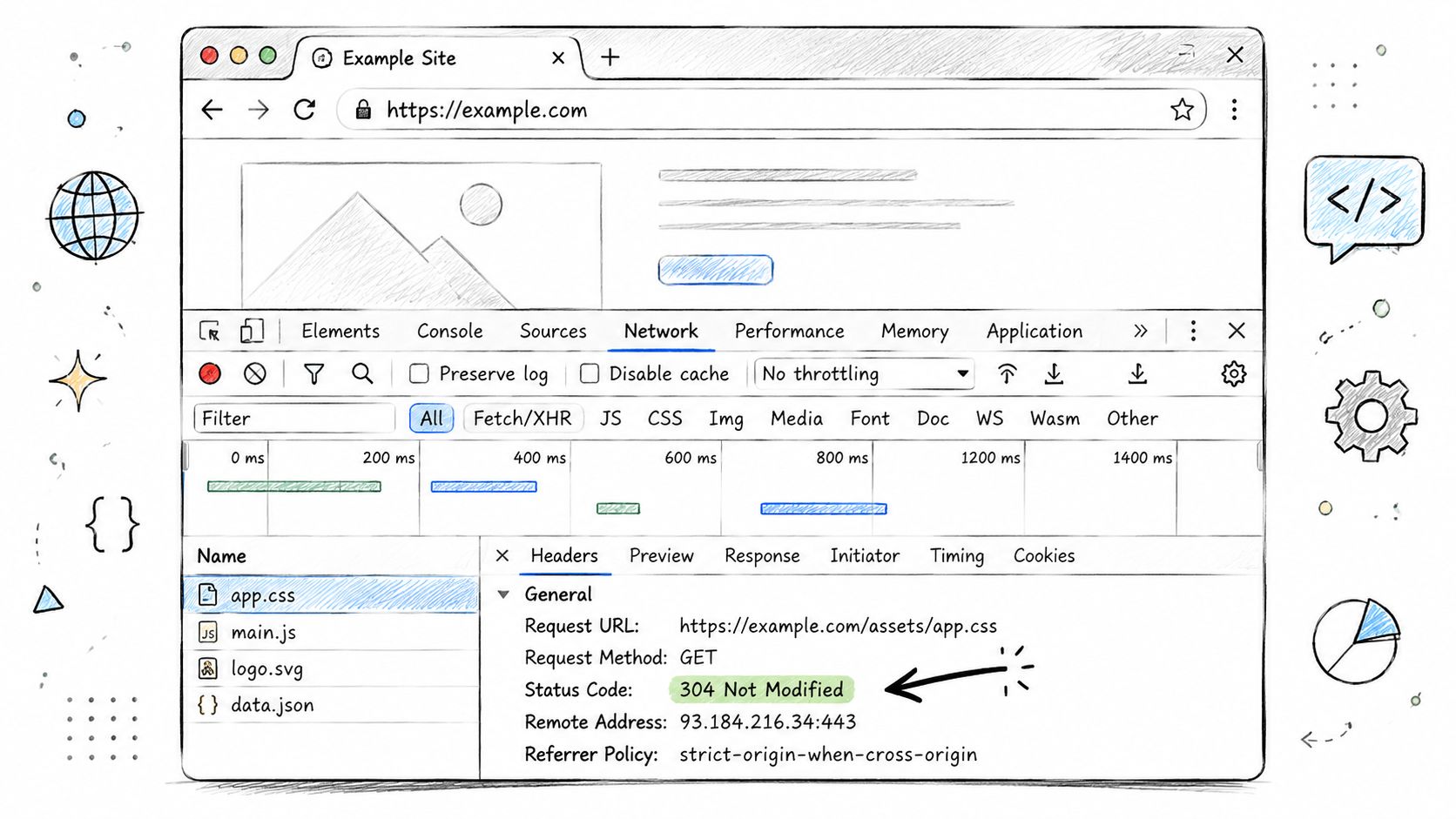
You'll usually see static assets such as CSS, JavaScript, fonts, or images show a 304 in the Status column. In many cases, the browser will also indicate that the file came from memory cache or disk cache.
How to inspect one request
Click any asset and look at two places:
- Request headers, where you may see
If-Modified-SinceorIf-None-Match - Response headers, where you may see
ETag,Last-Modified,Cache-Control, orExpires
That header exchange is the whole story.
If you work with SEO reports, this is also a useful way to compare browser behavior with crawler behavior. For related context on how stored content can appear in search systems, Surnex has a practical post on cached Google results.
Reproducing it with curl
DevTools is visual, but curl makes the exchange explicit.
First, request headers only:
curl -I https://example.com/styles.css
If the server sends a validator, you might get something like:
HTTP/2 200
etag: "abc123"
last-modified: Tue, 25 Jun 2024 10:00:00 GMT
cache-control: public, max-age=3600
Now send a conditional request:
curl -I -H 'If-None-Match: "abc123"' https://example.com/styles.css
If nothing changed, the response should be:
HTTP/2 304
etag: "abc123"
Here's a walkthrough if you want a visual companion while testing:
What to watch for
When you test, focus on three checks:
- Validator present: The original
200 OKshould includeETagorLast-Modified. - Conditional request sent: The repeat request should include
If-None-MatchorIf-Modified-Since. - No body on 304: The response should only validate, not resend the file.
If one of those is missing, your cache validation flow isn't complete yet.
Configuring Your Server to Send 304s
A server won't produce useful 304 responses by accident. You need the right caching headers and validators in place.
The good news is that common web servers already support this well for static assets.

What your server needs to provide
At minimum, you want to think about these headers:
Cache-Controldecides caching policy.Expiresgives an absolute freshness deadline.ETagidentifies a specific version of a resource.Last-Modifiedrecords when the resource last changed.
A clean setup usually means long-lived caching for versioned static assets and reliable validators for revalidation.
Nginx example
For Nginx, a common pattern is to give static assets a longer cache lifetime:
location ~* \.(css|js|jpg|jpeg|png|gif|svg|webp|woff|woff2)$ {
    expires 1M;
    add_header Cache-Control "public";
}
What this does:
expires 1M;tells clients the asset can be cached for a monthCache-Control: publicallows shared caches to store it when appropriate
Nginx commonly handles ETags by default for static files, which helps it answer If-None-Match requests correctly if the asset hasn't changed.
Apache example
On Apache, you'll often use mod_expires and mod_headers:
<IfModule mod_expires.c>
  ExpiresActive On
  ExpiresByType text/css "access plus 1 month"
  ExpiresByType application/javascript "access plus 1 month"
  ExpiresByType image/png "access plus 1 month"
  ExpiresByType image/jpeg "access plus 1 month"
  ExpiresByType image/svg+xml "access plus 1 month"
  ExpiresByType font/woff2 "access plus 1 month"
</IfModule>

<IfModule mod_headers.c>
  <FilesMatch "\.(css|js|jpg|jpeg|png|gif|svg|webp|woff|woff2)$">
    Header set Cache-Control "public"
  </FilesMatch>
</IfModule>
This setup tells browsers to keep static files for a longer period, after which they can validate them rather than fully redownload them.
Implementation note: Cache assets aggressively only when your deployment process can safely publish new versions. Fingerprinted filenames make this much easier.
A simple policy that works well
Generally, this is a sensible starting point:
- Versioned static files such as
app.4f3a2.cssget long cache lifetimes - HTML documents get shorter-lived caching or revalidation-friendly settings
- Validators stay enabled so unchanged resources can return 304
That balance matters. You want browsers to trust stable assets, but you don't want users stuck on outdated files after a release.
Troubleshooting Common 304 Issues
A 304 problem usually shows up right after a release or during a log review.
The pattern is familiar. You ship a change, refresh the page, and the old CSS is still there. Or you open your waterfall chart and see repeat requests coming back as 200 OK with full payloads. In both cases, the browser and server are failing the same simple handshake: “Has this file changed since last time?”
That handshake matters beyond developer convenience. Broken revalidation adds repeat transfer work, which can slow return visits and make performance metrics harder to improve. It also creates extra noise for crawlers, which is why cache behavior often shows up during technical SEO reviews and in AI search readiness work, where fast, stable retrieval matters.
Scenario one, stale CSS after a deploy
You update a stylesheet, hard refresh, and the design still looks old.
Start by separating two possibilities. The browser may be correctly reusing a file because your cache policy says it is still fresh. Or the browser may be asking the server to validate the file, and the server is incorrectly answering 304 Not Modified even though the file changed.
Check DevTools first. Open the Network panel, click the CSS file, and look at:
- the response status
- the request URL
Cache-ControlETagLast-Modified
If the file contents changed but the URL stayed the same, a long freshness window can keep the browser from even asking the server. If the browser does revalidate and still gets 304, your validator is probably stale. A CDN can also serve an older copy while the origin has the new one.
For a wider reference on debugging status code problems across analytics, proxies, and delivery layers, Trackingplan's error troubleshooting is a useful companion.
Scenario two, repeat requests keep getting 200
This is the opposite failure.
The browser is saying, “I already have a copy. Tell me if it changed.” The server keeps replying with the whole file instead of a lightweight 304. That usually means the server cannot trust the validator it sees, or it never sent a usable validator in the first place.
Common causes include:
- missing
ETagorLast-Modified - validators that change on every request
Cache-Controldirectives that block useful revalidation- multiple origin servers generating different validators for the same asset
The multi-server case causes a lot of confusion. Server A sends one ETag. The next request hits Server B, which generates a different ETag for the exact same file. From the browser's point of view, the file looks new, so it gets another 200 OK and downloads everything again.
That wastes bandwidth and can make repeat visits feel heavier than they should. On pages with large CSS, JavaScript, fonts, or images, those unnecessary transfers can work against the same rendering speed improvements Core Web Vitals teams are trying to protect.
Scenario three, crawler traffic feels heavier than expected
This usually appears in server logs before anyone notices it in the browser.
Google's crawl budget documentation explains that proper caching helps Googlebot avoid refetching unchanged resources, which reduces unnecessary server work and helps crawlers spend effort more efficiently (Google crawl budget guidance). If validators are missing or unstable, bots have less chance to reuse what they already know.
For SEO, that is not just a server hygiene issue. More redundant fetching can mean less efficient crawling across large sites. For AI-driven search systems that depend on fast retrieval and fresh content signals, inconsistent cache validation can also make your technical foundation less reliable. If you are reviewing this as part of a broader site assessment, pair it with a structured technical SEO audit process so cache behavior is checked alongside rendering, indexing, and internal linking.
A practical debugging checklist
Work through the request like a conversation between client and server:
- Check the first
200 OKresponse. Did it includeETagorLast-Modified? - Check the next request. Did the client send
If-None-MatchorIf-Modified-Since? - Check the reply. If nothing changed, does the server return
304? If something changed, does it return a fresh200? - Check the asset URL. If the file changed, was the filename or version updated?
- Check intermediary layers. CDNs, reverse proxies, and application frameworks can override cache headers.
- Check consistency across servers. The same resource needs the same validator everywhere.
A good rule helps here. If the file changed, the validator must change too. If the file did not change, the validator should stay stable. That is what lets browsers, crawlers, and performance tooling all agree on what can be safely reused.
The Impact of 304 on SEO and AI Search
A crawler comes back to your site, asks, "Has this file changed?", and your server answers, "No, use the copy you already have." That short exchange is what a good 304 Not Modified response does. Instead of sending the whole resource again, the server sends a small confirmation. The crawler saves bandwidth, the browser saves time, and your infrastructure avoids work it does not need to repeat.
For SEO, that efficiency adds up across thousands or millions of requests. Google treats 304 as a valid freshness check, and its guidance notes that the response should preserve relevant caching headers such as Cache-Control, ETag, and Expires so crawlers can evaluate reuse correctly (Google HTTP status code guidance).

Why Core Web Vitals teams should care
A 304 will not solve every performance problem. It will not shrink heavy JavaScript or stop layout shifts on its own. What it does is remove unnecessary transfer on repeat visits, which gives the browser less to download before it can spend time parsing, painting, and responding to user input.
That shows up in the same performance chain that affects Core Web Vitals. If repeat views and repeat asset loads are lighter, the browser can reach rendering work sooner. On real sites, that supports faster perceived loading and reduces wasted network activity, especially for CSS, JavaScript, images, and fonts that rarely change.
So 304 is not just a caching detail. It is part of performance engineering.
Why AI-driven discovery raises the stakes
AI search systems still rely on fetching, validating, and interpreting web content efficiently. If your pages and supporting assets send clear cache validators, those systems can confirm freshness without pulling the same bytes again and again. That creates a cleaner technical foundation for visibility in retrieval-heavy search products, answer engines, and summarization workflows.
A 304 does not earn a citation by itself. It helps remove friction from the systems that need to revisit your content, confirm what changed, and decide what to surface. If your team is planning for those discovery channels, this guide to SEO for AI search connects the technical layer to content visibility more directly.
For teams setting priorities, Refact's technical SEO guide is useful because it places caching alongside crawlability, rendering, and site architecture.
A healthy 304 pattern shows operational discipline. Stable assets are reused, crawlers get clear freshness signals, and bandwidth is not spent retransmitting files that have not changed.
That is good engineering, and it supports stronger search performance across both traditional SEO and AI-driven discovery.