You're probably looking at an endpoint right now that returns “access denied,” and the debate isn't theoretical. Should the API send 401 or 403? If you pick the wrong one, your frontend may show the wrong message, your mobile app may retry when it shouldn't, your crawler rules may block pages you meant to expose, and your logs will tell a misleading story.
That's why 401 vs 403 matters more than most status code articles admit. This isn't just about semantic purity. It affects login flows, automated clients, SEO behavior, support tickets, and how quickly another developer can debug your system.
A lot of teams collapse both into “not allowed.” That shortcut works until it doesn't. The difference is whether the client failed to prove identity or proved identity and still lacks permission. Once you treat those as separate operational states, the right response code becomes much easier to choose.
| Scenario | Correct Code | What It Means | What Client Should Do |
|---|---|---|---|
| No token, expired token, invalid credentials | 401 | Identity is missing or failed verification | Authenticate again |
| Logged-in user lacks role or policy permission | 403 | Identity is known, access is refused | Stop and request different privileges |
| Browser needs auth challenge | 401 | Server must tell client how to authenticate | Use WWW-Authenticate |
| Authenticated user hits admin-only route | 403 | Retrying same credentials won't help | Don't auto-retry |
The Core Distinction Authentication vs Authorization
The practical decision starts with one question: what failed first?
If the server can't trust who the client is, that's an authentication problem. If the server knows who the client is but won't allow the action, that's an authorization problem. In HTTP access control, 401 is the authentication failure state and the response must include a WWW-Authenticate header, while 403 is the authorization failure state where the server understood the request but refuses it even when credentials are present, as described in Permit's explanation of 401 and 403.
Think of a building with badge access.
A visitor at the front door who hasn't shown a badge yet is a 401 case. Security says, “I need proof of identity.” An employee who badged in successfully but tries to enter the finance floor without clearance is a 403 case. Security knows exactly who they are. The answer is still no.
The quick mental model
Use these two checks in order:
-
Who are you? If the request has no valid identity, return 401.
-
What are you allowed to do? If the request has valid identity but insufficient rights, return 403.
That order matters. Teams often skip straight to permission checks and send 403 for anonymous users. That makes the response less useful to browsers, SDKs, and API consumers because it hides the fact that the proper fix is to sign in.
Practical rule: If the client can recover by logging in again or sending valid credentials, it's a 401. If a privilege change is required, it's a 403.
Why this matters outside backend code
This distinction shapes real product behavior. A SPA deciding whether to open a login modal needs a different signal from a dashboard deciding whether to show “contact your administrator.” Monitoring systems also depend on the difference. Repeated 401s often point to session expiry, token refresh bugs, or broken auth middleware. Repeated 403s usually point to policy mismatches, role mapping mistakes, or business rules doing exactly what they were configured to do.
If you're tightening your login and token flows, this guide on authentication best practices for apps is useful background. And if your team also works with search data or crawler-facing integrations, this API-focused SEO workflow reference helps connect backend response behavior to downstream reporting systems.
HTTP 401 Unauthorized In-Depth
A 401 Unauthorized response is badly named. In practice, it means unauthenticated.
The server isn't saying, “You're banned.” It's saying, “I can't accept this request until you prove who you are.” That's why a 401 is less like a rejection and more like a challenge.
Why the WWW-Authenticate header matters
The most important implementation detail is the response header. A valid 401 response needs WWW-Authenticate. Without it, many clients lose the clue they need to recover correctly.
Common patterns look like this:
- Basic auth challenge:
WWW-Authenticate: Basic realm="admin" - Bearer token challenge:
WWW-Authenticate: Bearer realm="api" - Digest auth challenge:
WWW-Authenticate: Digest realm="private"
The exact scheme depends on your auth model, but the point stays the same. The server must tell the client what kind of authentication is expected.
What a healthy 401 flow looks like
A correct 401 cycle usually works like this:
- Client requests a protected resource.
- Server sees no credentials, expired credentials, or invalid credentials.
- Server returns 401 plus
WWW-Authenticate. - Client re-authenticates or refreshes credentials.
- Client retries the request.
That recoverability is the key difference from 403. A good API client can automate part of this. A browser can prompt for credentials in some setups. A mobile app can refresh a token. A frontend can redirect to sign-in.
A 401 should tell the client how to recover, not just that access failed.
When 401 is the right call
Typical examples include:
- Missing bearer token: The
Authorizationheader was never sent. - Expired session or token: Identity existed, but it's no longer valid.
- Malformed credentials: The token format is wrong or unreadable.
- Bad username or password: Basic auth validation failed.
What doesn't belong here is a role problem. If the token is valid and the user is authenticated, don't send 401 just because they aren't an admin. That turns a policy issue into an identity issue and confuses every client integrating with you.
A useful implementation habit is to treat 401 as part of the auth protocol, not just a status code. It's one of the few responses where the server is expected to give the client a clear next move.
HTTP 403 Forbidden In-Depth
A 403 Forbidden response means the server has enough information to identify the client and still refuses the request.
This is a policy decision, not a login failure. The server understood the request. The credentials, if provided, were accepted. Access is blocked because the client doesn't have the required rights for that resource or action.
What 403 usually represents
In production systems, 403 often maps to rules like these:
- Role restrictions: A standard user tries to access
/admin/users. - Feature entitlements: The account exists, but the plan doesn't include that capability.
- Account state rules: A suspended user is blocked from creating content.
- Region or compliance policy: The system deliberately denies access based on organizational rules.
In all of those cases, re-entering the same password or resending the same token won't help. The identity isn't the problem.
What clients should do after a 403
Clients should usually stop, not retry.
That has major UX implications. Your frontend shouldn't pop a login form for a 403. It should show something closer to “You don't have permission to perform this action.” Your job queue shouldn't hammer the same endpoint. Your SDK shouldn't automatically refresh a token and pretend that might solve the problem.
Here's the practical split:
| Response | Safe Automatic Next Step |
|---|---|
| 401 | Refresh credentials or ask user to sign in |
| 403 | Surface permission error and halt retry loop |
Where teams get 403 wrong
A lot of APIs return 403 for every blocked request because it sounds more definitive. That creates downstream confusion. The browser doesn't know it should re-authenticate. The frontend shows the wrong message. Support gets tickets from users who were logged out.
If the same user with the same privileges will keep failing, 403 is right. If fresh credentials could fix it, it isn't.
This distinction also matters when you're hardening infrastructure and access rules in live systems. Teams working on securing production environments usually discover quickly that clear separation between identity failures and permission failures makes incident review much easier. It reduces noisy alerts and makes access-control logs far more actionable.
Side-by-Side Comparison at a Glance
When developers ask about 401 vs 403, they usually don't need more theory. They need a fast decision framework they can use while wiring middleware, reviewing logs, or fixing a frontend bug.
This is that framework.
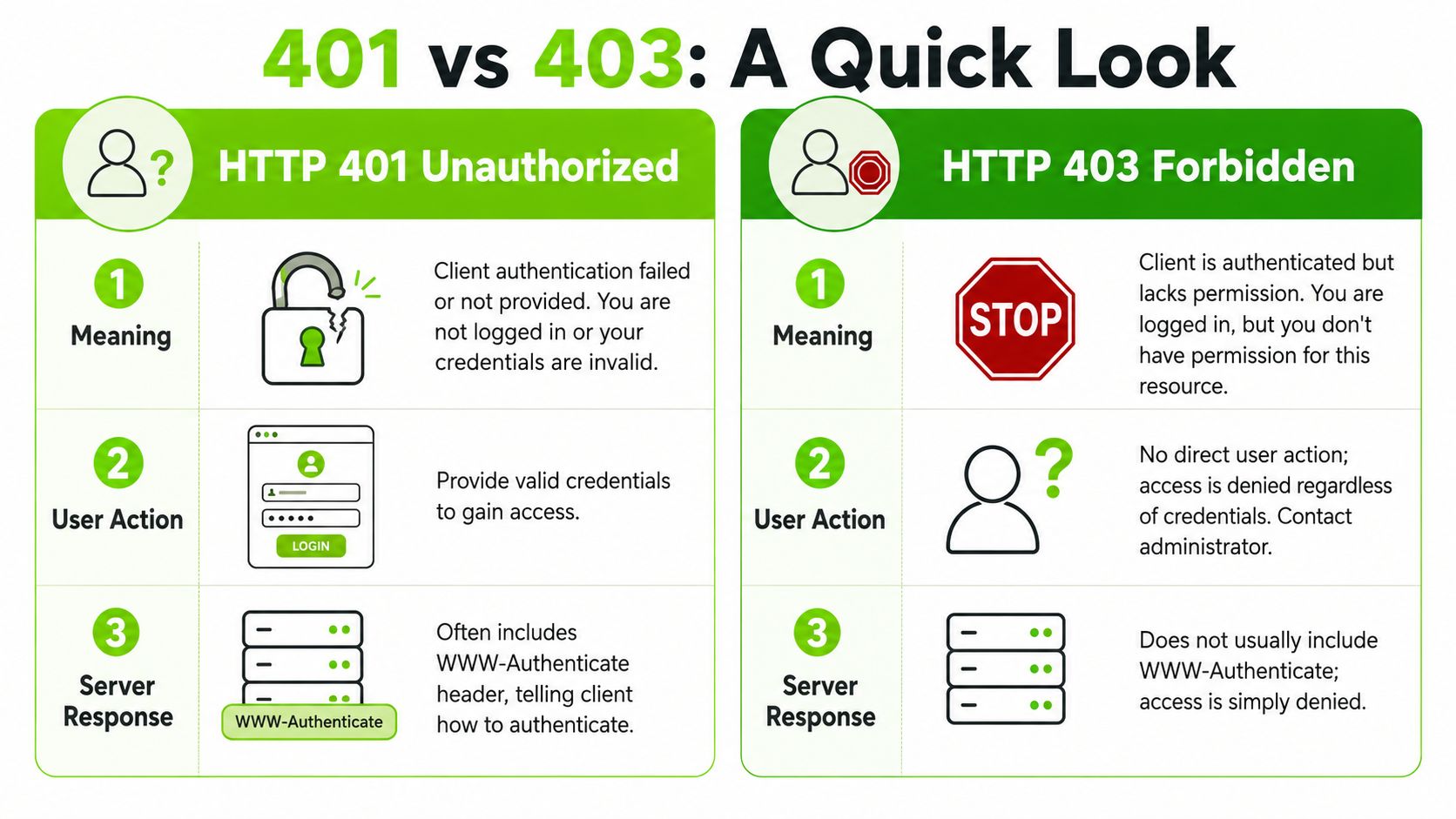
Practical comparison table
| Decision Point | 401 Unauthorized | 403 Forbidden |
|---|---|---|
| Core problem | Identity is missing, invalid, or expired | Identity is known, but permission is insufficient |
| Server message | “Prove who you are” | “I know who you are, but you can't do this” |
| Client next step | Re-authenticate | Stop or request broader access |
| Retry behavior | Reasonable after new credentials | Not useful without privilege change |
| Header expectation | Include WWW-Authenticate | No equivalent challenge header is typically used |
| Good UI response | Redirect to login or refresh token | Show access denied or contact admin |
| Simple analogy | Locked lobby door | Staff-only room beyond the lobby |
A quick visual explanation can help if you're sharing this with product or SEO teammates instead of only backend engineers.
Fast decision test
Use this short test before you return either code:
- No usable identity on the request? Return 401.
- Usable identity exists, but policy denies access? Return 403.
- Need the client to attempt auth again? That's 401.
- Need the client to stop and escalate permissions? That's 403.
The benefit of this split is consistency. Once your API, frontend, and support team all interpret these codes the same way, odd access bugs become much easier to diagnose.
Implementation and Code Examples
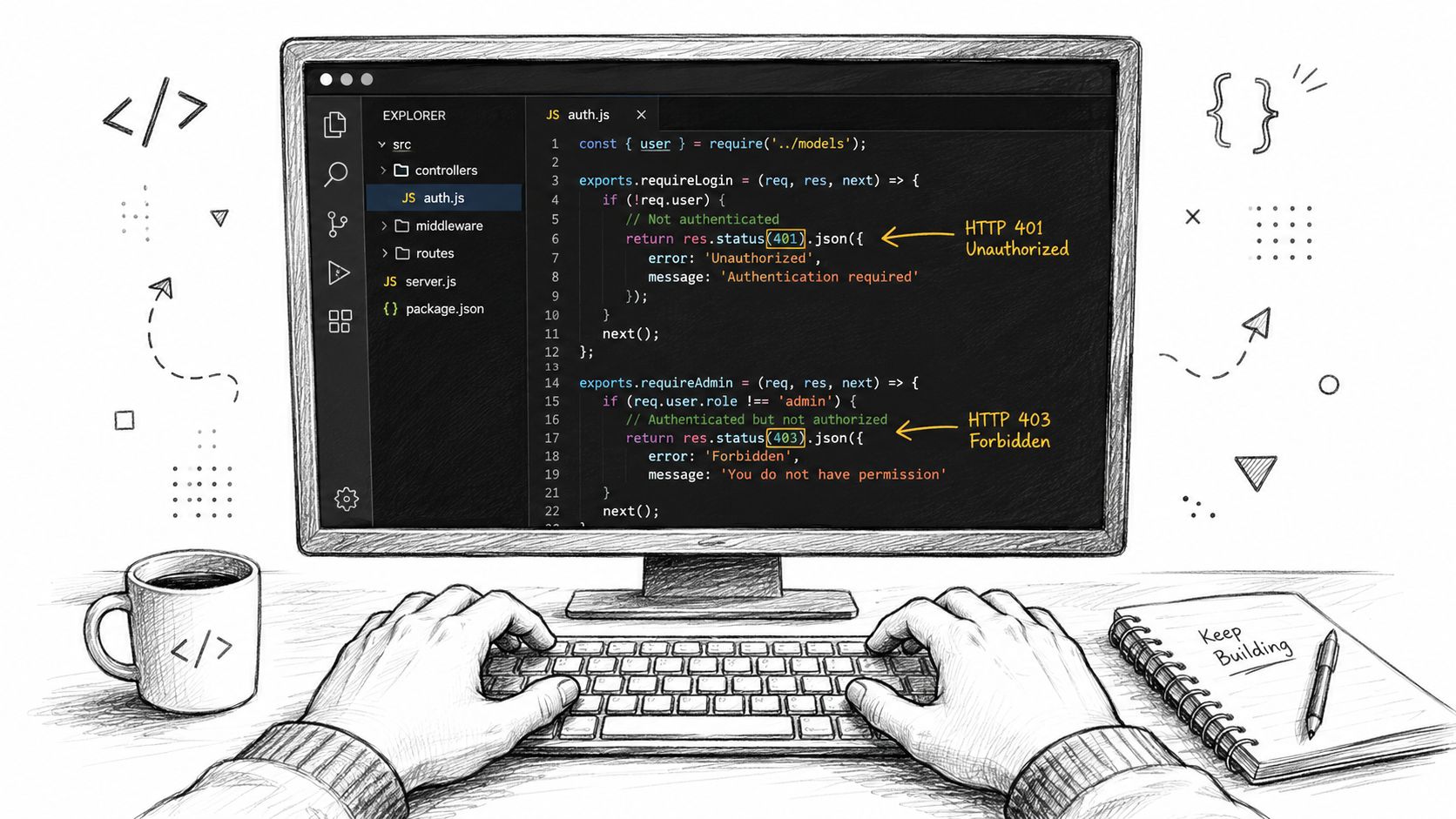
The cleanest implementation pattern is simple: authenticate first, authorize second. In code, that often looks like one gate for identity and a second gate for permissions.
If you collapse them into one generic “access denied” branch, you lose useful behavior for clients and you make your API harder to integrate with.
Express.js example
Here's a straightforward Express middleware flow:
function requireAuth(req, res, next) {
  const authHeader = req.get("Authorization");

  if (!authHeader) {
    res.set("WWW-Authenticate", 'Bearer realm="api"');
    return res.status(401).json({ error: "Authentication required" });
  }

  const user = validateBearerToken(authHeader);

  if (!user) {
    res.set("WWW-Authenticate", 'Bearer realm="api"');
    return res.status(401).json({ error: "Invalid or expired token" });
  }

  req.user = user;
  next();
}

function requireAdmin(req, res, next) {
  if (!req.user || req.user.role !== "admin") {
    return res.status(403).json({ error: "Forbidden" });
  }

  next();
}

app.get("/admin/reports", requireAuth, requireAdmin, (req, res) => {
  res.json({ ok: true });
});
What works well here is the ordering. requireAuth decides whether the request has a valid identity. requireAdmin only runs after that identity exists.
Django example
In Django, the same principle applies even if the syntax changes:
from django.http import JsonResponse

def admin_reports(request):
    if not request.user.is_authenticated:
        response = JsonResponse({"error": "Authentication required"}, status=401)
        response["WWW-Authenticate"] = 'Bearer realm="api"'
        return response

    if not request.user.is_staff:
        return JsonResponse({"error": "Forbidden"}, status=403)

    return JsonResponse({"ok": True})
This pattern is easy to reason about because each branch answers one question only.
Build order: first establish identity, then evaluate permissions, then execute the action.
A few implementation details that save time
- Keep error bodies distinct: Even if both bodies are JSON, make the message reflect the specific issue.
- Don't omit the challenge header on 401: Some clients depend on it.
- Map write operations carefully: Teams often get access control wrong on update endpoints, especially partial updates. If your team is also clarifying method semantics, Goptimise explains PUT vs PATCH in a way that pairs well with access-control reviews.
- Test with various clients: Browser, SPA, mobile app, and script behavior can differ.
If you're building API-driven marketing or search workflows, it also helps to compare your auth handling with other integration-heavy endpoints such as SEO tool APIs, where machine clients need predictable recovery behavior.
SEO and Web Crawler Impact
401 vs 403 is no longer a backend-only topic.
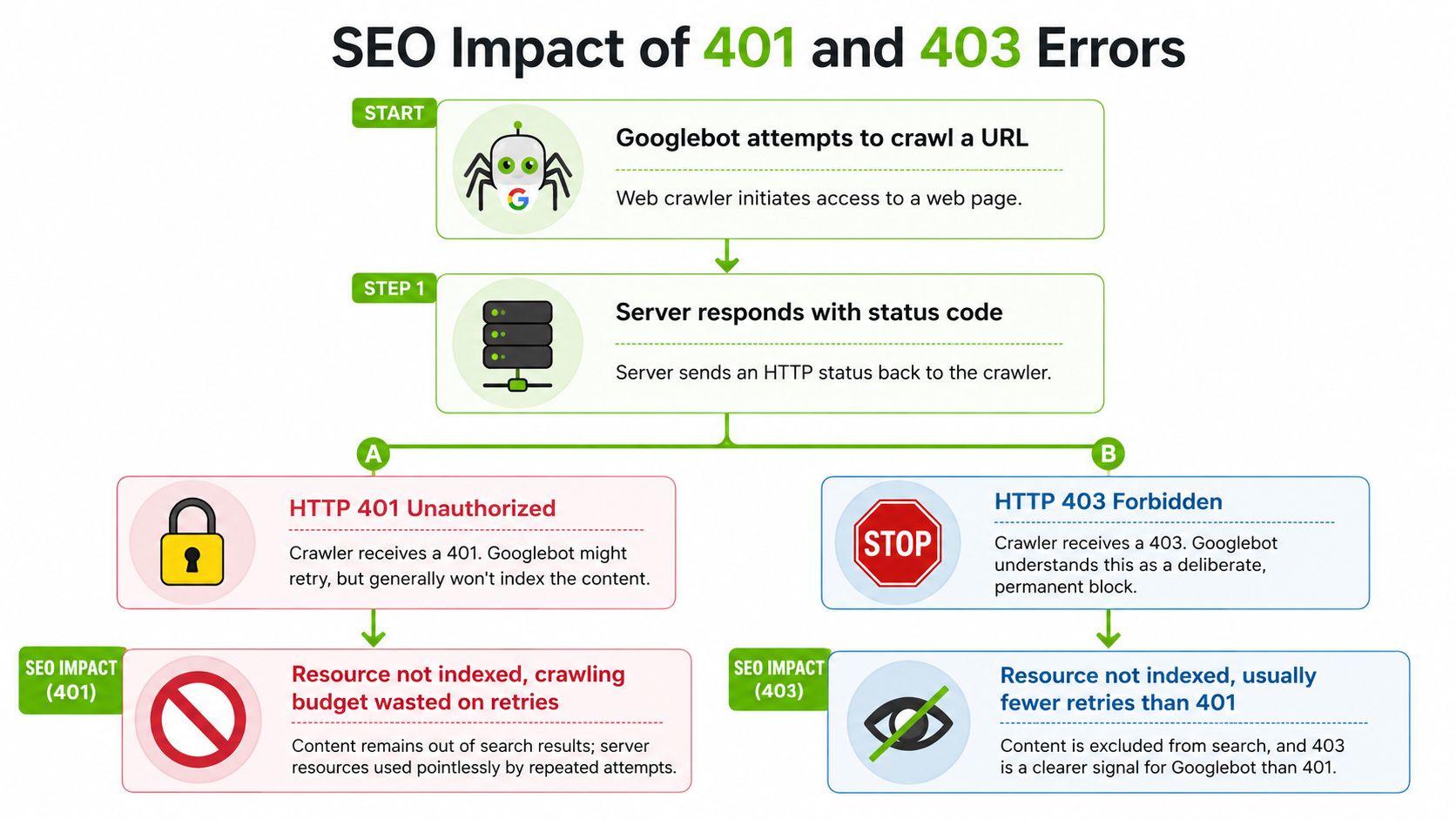
Search crawlers, site auditors, preview bots, feed consumers, and client-side automation all react to these codes differently. If you send the wrong one, you don't just create a technical mismatch. You can create indexing issues, broken previews, and bad reporting for teams who never touch your auth middleware.
What crawlers infer
A crawler that gets 401 sees a protected resource that requires valid credentials. A crawler that gets 403 sees a deliberate refusal. In both cases, the page isn't available for normal crawling, but the signals are different.
That difference matters when a protected staging route accidentally leaks into internal links, when a CDN rule blocks a bot class too aggressively, or when a JavaScript app fetches page data from an API that returns auth errors the crawler can't resolve.
Operational SEO consequences
Here are the common failure patterns:
- Protected content exposed by public links: If public pages link to URLs that answer with 401 or 403, crawlers spend effort discovering resources they still can't access.
- Wrong code on expired sessions: If a frontend API returns 403 for an expired token, the app may fail to trigger re-auth and render a broken shell for users and testing bots.
- Bot controls too broad: Security rules sometimes deny legitimate crawlers with 403 when the underlying issue is missing allowlist logic.
- False access-denied templates: Some CMS stacks render a branded error page with a
200 OK. That's often worse than either 401 or 403 because the crawler receives mixed signals.
A status code is part of your search-facing architecture. Crawlers don't see your intent. They only see the HTTP response.
Why this affects client-side UX too
SPAs and headless frontends often treat API status codes as routing signals. A 401 can trigger token refresh, login redirect, or a signed-out state. A 403 should usually render a permissions boundary. If those are reversed, users get loops, blank states, or “forbidden” messages when they only needed to log in again.
For teams auditing how caches and crawlers react to response handling, this explanation of 304 Not Modified is useful context because it shows the same broader truth: status codes aren't just protocol details. They directly shape crawl behavior, rendering workflows, and resource efficiency.
Common Pitfalls and Debugging Tips
Most 401 vs 403 bugs aren't deep protocol mysteries. They're usually one of a few repeated implementation mistakes.
The fix starts with auditing your flow in order: identify user, validate session, evaluate policy, then return the most specific response possible.
Common mistakes to look for
| Anti-pattern | Why It's Wrong | Better Choice |
|---|---|---|
| Anonymous user gets 403 | Hides the fact that auth is required | Return 401 |
| Authenticated user lacking role gets 401 | Suggests re-login could fix a policy issue | Return 403 |
401 without WWW-Authenticate | Breaks the HTTP challenge behavior | Add the header |
| Generic “access denied” for all failures | Frontend can't react correctly | Separate auth from permission checks |
A debugging checklist that works
- Check middleware order: If permission logic runs before auth logic, your API will often return the wrong code.
- Inspect raw responses: Don't trust only framework wrappers. Verify status, headers, and body in the actual HTTP response.
- Test expired credentials separately: Missing token, malformed token, and expired token often take different paths.
- Review frontend handlers: Make sure 401 triggers sign-in behavior and 403 triggers permission messaging.
- Look at crawler-facing routes: Admin pages should be blocked intentionally. Public marketing pages shouldn't depend on private APIs that fail closed.
A simple rule for debugging logs
When you see a burst of 401s, start with identity plumbing. Look at session expiry, token refresh, cookie handling, or missing auth headers.
When you see a burst of 403s, start with policy plumbing. Look at roles, ACL rules, feature flags, account status, WAF behavior, or route-level authorization checks.
If users fix the issue by logging in again, you likely mislabeled a 401. If support has to change permissions, you likely mislabeled a 403.
One more thing trips teams up: caches, proxies, and external tools may preserve or surface older access states longer than expected. If your team is validating how blocked or changed URLs appear outside the live app, Google cached search behavior is worth reviewing because it helps explain why people may still encounter stale representations of content after your access rules change.
If your team needs a clearer view of how technical decisions affect search visibility, automation, and reporting, Surnex brings AI search tracking, core SEO workflows, and developer-friendly APIs into one platform. It's built for agencies, in-house teams, and engineers who need to connect backend behavior with modern search outcomes.