You launched the site. The pages are live. Search Console is verified. Then you search Google for your brand, service page, or latest article and find nothing.
That's the point where it's common to confuse being published with being indexable.
Google has to discover a URL, crawl it, process it, decide it's worth keeping, and only then make it eligible to appear in search. In 2026, that last step is where many sites fail. A sitemap and a request in Search Console still matter. They just don't guarantee anything anymore.
Why Getting Indexed Is Your First SEO Hurdle
You publish a page, request indexing in Search Console, and wait. A week later, the URL still does not appear for a brand search, and the page is absent from the Indexing report. That is a common 2026 SEO problem.
The first hurdle is understanding the gap between crawlable and indexed.
Crawling means Googlebot reached the URL and fetched it.
Indexing means Google decided the page deserves a place in its searchable systems.
That decision is selective. A crawled page can still be left out if it is blocked, too similar to other URLs, weakly connected through internal links, or too thin to justify storage. I see teams lose time here because they treat “Request Indexing” like a command. Google treats it as a suggestion, then applies quality and duplication filters before anything reaches the index.
Google's own documentation explains that submission helps discovery, but inclusion is not guaranteed because Google still evaluates content quality, canonicals, and overall usefulness before indexing a page. That is the part many publishing workflows ignore. If you need to confirm the basics before you submit anything, start with a clean XML sitemap and make sure you can find a sitemap on a website quickly.
One more change matters in 2026. Search visibility no longer maps cleanly to “indexed page equals traffic.” Google can reference brands, products, facts, and page-level information inside AI Overviews even when a URL has weak traditional visibility. I think of that as implicit indexing. Google has processed enough of the page or entity to use it in AI-generated answers, but that does not mean the URL is strongly indexed, eligible to rank well, or likely to earn clicks. Many guides miss this distinction, and it leads marketers to overestimate how visible their content really is.
So the working question is not just, “How do I get this page crawled?” It is, “Why should Google keep this page, and where can it surface if it does?”
If a site is “not showing up,” the cause usually falls into one of three buckets. The URL is not indexed. The URL is indexed but uncompetitive. Or Google is showing your business in other surfaces while your target page still has little organic visibility. If you are sorting through that broader diagnosis, this guide to fix Google visibility issues helps separate local, technical, and indexing causes.
That is why indexing comes before every other SEO win. If Google does not keep the page, rankings, snippets, and clicks never enter the conversation.
Prepare Your Site for Googlebot's Welcome Visit
Before submitting anything, make the site easy to crawl. Googlebot doesn't need a beautiful site architecture diagram. It needs a structure that makes sense in HTML and links.
Build a crawl path that makes obvious sense
Every important page should be reachable through normal internal navigation. If a page only exists in your CMS, in a paid ad, or buried in a filter state, Google may treat it like an afterthought.
Google's crawling systems prioritize pages that are reachable through internal links and backlinks, and pages with 3+ internal links are indexed 3.2 times faster than isolated pages, according to Ahrefs' analysis of Google indexing patterns. That aligns with what shows up in audits. Orphan pages and weakly linked pages routinely sit outside the index.
Use a structure like this:
- Homepage to hub pages: Link from the homepage to your main service, product, category, or resource hubs.
- Hub pages to detail pages: Each hub should point to the URLs you want indexed.
- Contextual links inside content: Blog posts, guides, and case pages should link naturally to related commercial or support pages.
- Footer and utility links sparingly: They help discovery, but they shouldn't be your only path.
A good internal linking setup does two jobs. It helps Google find URLs, and it tells Google which pages matter.
Remove dead ends before Google finds them
The pages most likely to get ignored are usually the ones no one connected properly.
Check for:
- Orphan pages: URLs with no internal links pointing to them.
- Thin archive pages: Tag pages, filtered views, or empty category pages that add little value.
- Broken internal links: If your navigation points to redirects or errors, you're wasting crawl attention.
- Duplicative URL variations: Parameter-heavy pages and alternate paths often create noise.
If you need a fast refresher on common sitemap locations before auditing crawl paths, this guide on how to find a sitemap on a website is useful.
A strong site structure is less about “SEO best practice” and more about reducing ambiguity. Google indexes clear sites faster than confusing ones.
Make pages easy to fetch and render
Speed isn't a direct indexing button, but slow, heavy pages create friction for crawling and rendering. That matters more on larger sites and JavaScript-heavy builds.
Focus on the basics:
| Area | What to check |
|---|---|
| Templates | Keep core content visible without requiring multiple scripts to fire |
| Media | Compress oversized images and avoid decorative bloat above the fold |
| Scripts | Remove unnecessary third-party tools that delay page rendering |
| Mobile | Make sure mobile templates expose the same core content and links |
If your templates are sluggish, this practical guide on how to speed up website load times is a solid place to tighten performance before submission.
Googlebot's first visit should feel boring. Clear navigation. Crawlable links. Fast enough templates. No mystery routes. That's what gets pages discovered and processed without unnecessary delay.
Actively Submit Your Site to Google for Faster Indexing
A common 2026 scenario looks like this. A team publishes a page, submits the sitemap, clicks Request Indexing, and assumes the job is done. Two weeks later, the URL is still missing from search, or it appears in Search Console but gets no meaningful visibility. Submission gets a page into Google's workflow. It does not get that page accepted, stored, or surfaced.
Submit an XML sitemap first
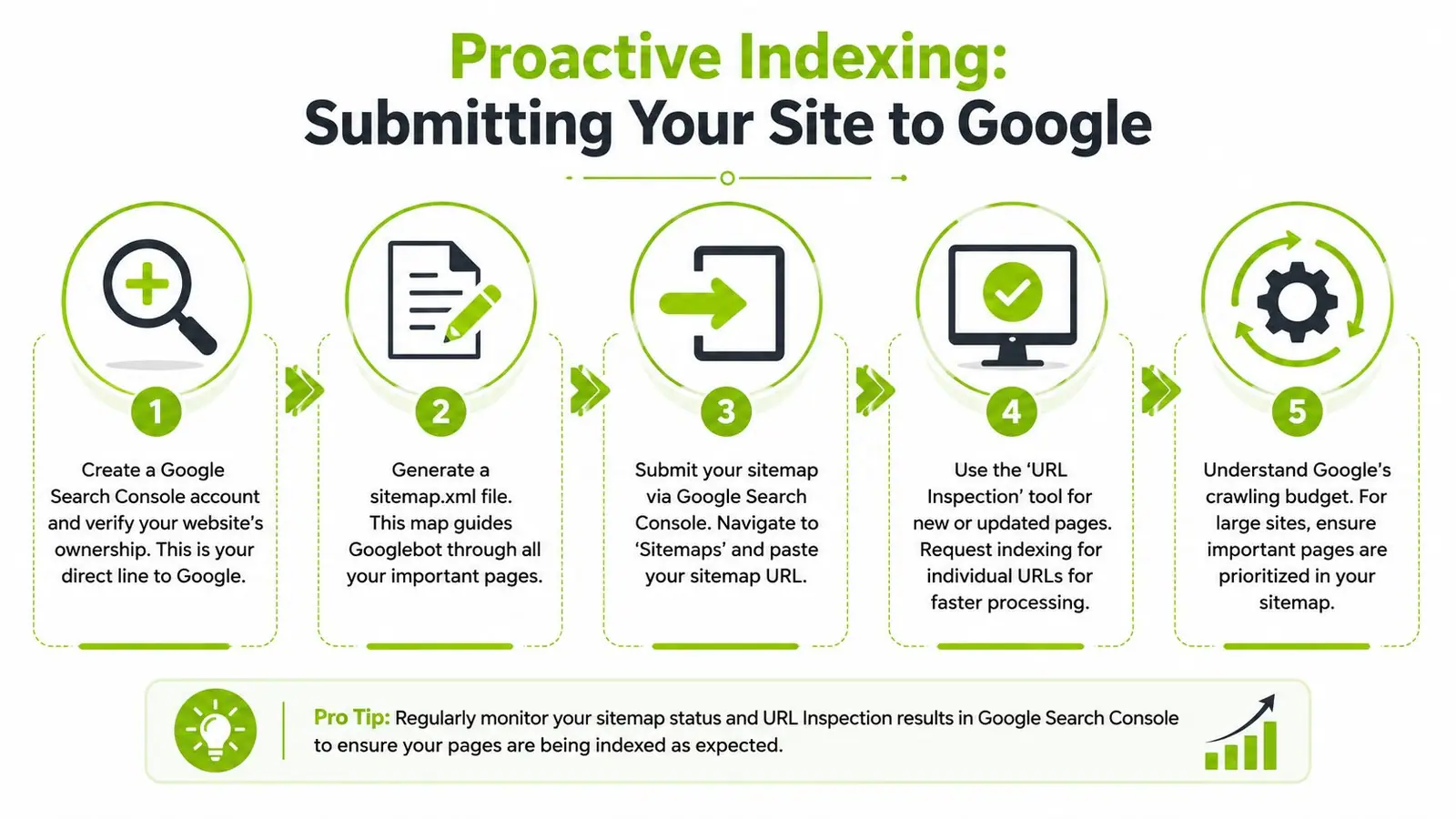
Your XML sitemap is still the cleanest way to hand Google a curated URL list. Google's own documentation recommends submitting a sitemap when you want to help Google discover important URLs, especially on newer sites, larger sites, or sites with pages that are not well linked internally yet, as explained in Google Search Central's sitemap guidance.
The keyword is curated.
A sitemap should contain only canonical, indexable, live URLs that you want in search. If it includes redirects, duplicate variants, parameter URLs, thin utilities, or pages you would never report on in an SEO dashboard, Google has to sort through noise before it reaches the pages that matter.
A simple review process works well:
-
Generate the sitemap
Use your CMS, platform, or SEO plugin to createsitemap.xml. -
Spot-check the URLs
Confirm the pages load, use the preferred canonical version, and are worth indexing. -
Verify the property in Search Console
Use the correct domain or URL-prefix property before submission. -
Submit the sitemap in Search Console
Open Sitemaps, enter the sitemap URL, and submit it. -
Watch for mismatches
If submitted URLs are excluded, investigate why those pages were included in the sitemap in the first place.
On larger sites, I also review server behavior before and after submission. Clean status handling matters. If Googlebot keeps hitting unchanged pages and getting mixed signals, crawl attention gets wasted. This explainer on 304 Not Modified responses and crawl efficiency is a useful reference if your team needs to tighten that part of the setup.
Use URL Inspection for pages with real business value
The URL Inspection tool is best used selectively. It makes sense for a new service page, a money page that was materially updated, or a time-sensitive asset that needs a faster recrawl.
The workflow is straightforward:
- Paste the exact URL into URL Inspection
- Confirm Google can fetch the page
- Review the live test if needed
- Click Request Indexing
Use it for pages that deserve priority. Do not turn it into a ritual for every blog post and tag page.
Google can accept the request and still decline to index the page. That gap matters more now because indexing is filtered harder than many teams expect. Pages with shallow copy, weak differentiation, or no clear reason to exist often land in states like Discovered, currently not indexed or Crawled, currently not indexed. Up North Media's indexing guide gives a solid breakdown of what those statuses usually mean in practice.
Submission gets you considered. Quality gets you kept.
This is the part many indexing guides skip.
Google does not treat indexing as a simple fetch-and-file process anymore. It evaluates whether a page is worth storing and revisiting. If five near-identical pages target the same intent, Google may crawl them and keep none of them. If a page adds original information, resolves an intent cleanly, and is supported by internal links, sitemap inclusion and manual submission tend to work much better.
There is also a second layer of visibility to account for in 2026. Some pages influence search presence without becoming strong classic blue-link performers. Google can extract facts, summaries, and entity relationships for AI-generated results even when a page is not driving much traditional ranking traffic. I treat that as implicit indexing. The page is being processed and used, but not always rewarded with the type of visibility older SEO playbooks assumed. That is one reason Search Console submission data and actual search impact can drift apart.
What to do, and what to stop doing
Good use of active submission
- Submit a clean XML sitemap
- Request indexing for high-priority URLs
- Resubmit after meaningful updates, not cosmetic edits
- Keep sitemap entries aligned with the pages you want indexed and measured
Low-value behavior
- Re-requesting indexing every day on the same weak URL
- Submitting pages with no internal links or no clear search intent
- Sending Google large batches of thin pages because they exist in the CMS
- Treating sitemap submission as proof that a page deserves to be indexed
Active submission helps discovery and queueing. It does not override content quality filters, duplication problems, or weak page value. That is the operating reality now.
Fixing Technical Issues That Block Google from Indexing
A common 2026 scenario looks like this. The URL is live, included in the sitemap, manually submitted in Search Console, and still absent from search. At that point, the problem is rarely "Google has not seen it." Google has usually seen it. The page failed a technical check, a quality threshold, or both.
Start with the directives that override indexing
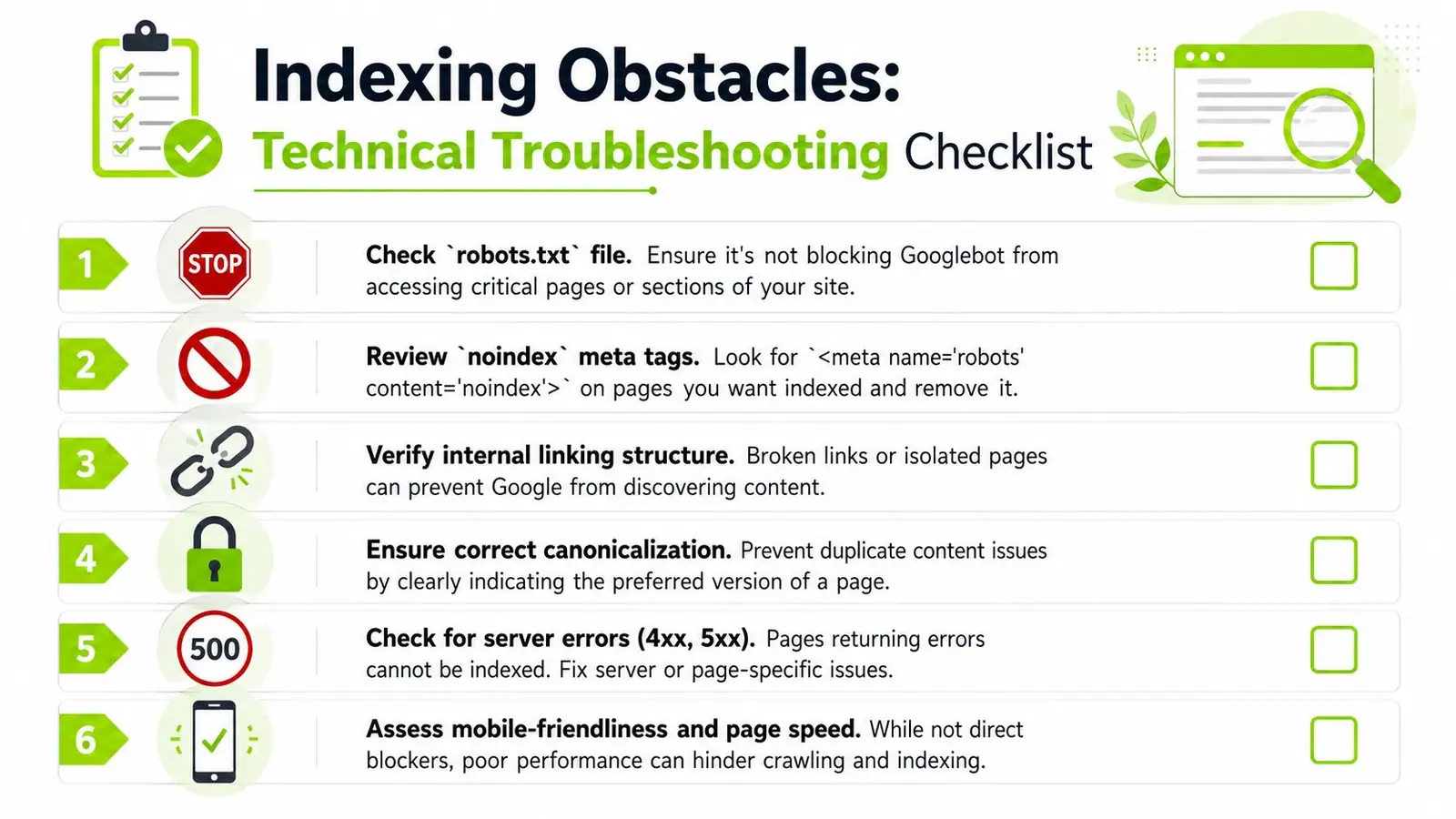
Indexing gets blocked fast by bad instructions. I still see teams request indexing on URLs that are disallowed in robots.txt, carry a noindex tag, or point canonically to another page. Google is not ignoring those pages. It is following the signals the site sends.
Check the basics first:
robots.txtrules: Confirm important folders, templates, and parameter patterns are crawlable.- Meta robots tags: Remove
noindexfrom pages meant to appear in search. - X-Robots-Tag headers: Audit server-level rules, especially on PDFs, faceted URLs, and CMS-generated assets.
- Environment leaks: Staging directives, password walls, and blanket disallows still get pushed live more often than teams admit.
If Google is obeying your instructions, fix the configuration before doing anything else.
Use Search Console to isolate the failure point
Search Console is useful when you read the status as a diagnosis, not a scorecard. The wording tells you where the process stopped.
| Status | What it usually means |
|---|---|
| Blocked by robots.txt | Google was told not to crawl the URL |
| Excluded by noindex | The page is live but not eligible for indexing |
| Alternate page with proper canonical | Google selected a different version |
| Crawled, currently not indexed | Google fetched it and did not keep it |
| Discovered, currently not indexed | Google knows the URL exists but has not spent crawl resources on it yet |
That last pair matters. "Discovered" usually points to crawl prioritization, internal linking, or site-scale bloat. "Crawled" usually points to duplication, weak value, or conflicting signals after fetch. For a practical troubleshooting angle on that exact status, Up North Media's indexing guide is worth reviewing.
If server responses are muddying your tests, this explainer on 304 Not Modified is useful for separating normal cache validation from a real indexing blocker.
Fix canonical, status code, and internal signal conflicts
A page can be indexable in theory and still lose because the technical signals disagree.
Review these areas together, not one by one:
- Canonical tags: Self-reference the canonical on unique pages. Point elsewhere only when the duplicate relationship is intentional.
- Status codes: Any URL you want indexed should return a clean
200 OK. - Redirect chains: Update internal links and sitemap entries to the final destination, not an old redirected URL.
- Protocol and host consistency: Pick one version of the site and align canonicals, internal links, hreflang, and sitemap entries to it.
- JavaScript rendering dependencies: If core content or indexation directives appear only after render, test what Googlebot receives.
Template errors are expensive. One bad canonical rule or a faulty header directive can suppress hundreds of URLs before anyone notices.
Technical cleanup gets a page eligible. It does not make it index-worthy.
This is the gap many indexing guides still miss. In 2026, requesting indexing and achieving indexing are different outcomes.
Google can crawl a page, process it, extract entities from it, and still decide it does not deserve a stable place in the traditional index. I see this on repetitive service pages, local doorway variations, thin ecommerce collections, and AI-assisted copy that says the same thing with slightly different headings. Some of those pages may still contribute signals to broader search systems, including AI-generated summaries. That is a form of implicit indexing, but it is not the visibility many website owners expect.
The practical question is simple: if this URL disappeared, would anything useful be lost from the site?
Pages usually fail that test for predictable reasons:
- They overlap heavily with other pages on the domain
- They add no first-hand detail, proof, or clear differentiation
- They target a keyword variant instead of a distinct intent
- They sit orphaned or weakly linked, so the site itself does not signal importance
I would fix a page like this by adding original specifics. Show the process. Include pricing logic, constraints, examples, proof points, comparison criteria, and internal links from relevant category or service hubs. If two pages serve the same intent, merge them. If a location page has nothing unique beyond the city name, it should not exist.
Google indexes pages it expects to retrieve again because they help answer searches. That standard is stricter now, even when the page has already been discovered and submitted.
Using Advanced Strategies for High-Priority Content
For most sites, Search Console and a clean sitemap are enough. But some teams handle content that can't wait around for normal discovery cycles. That's where advanced indexing methods and edge-case handling matter.
Use the Indexing API when the content is eligible
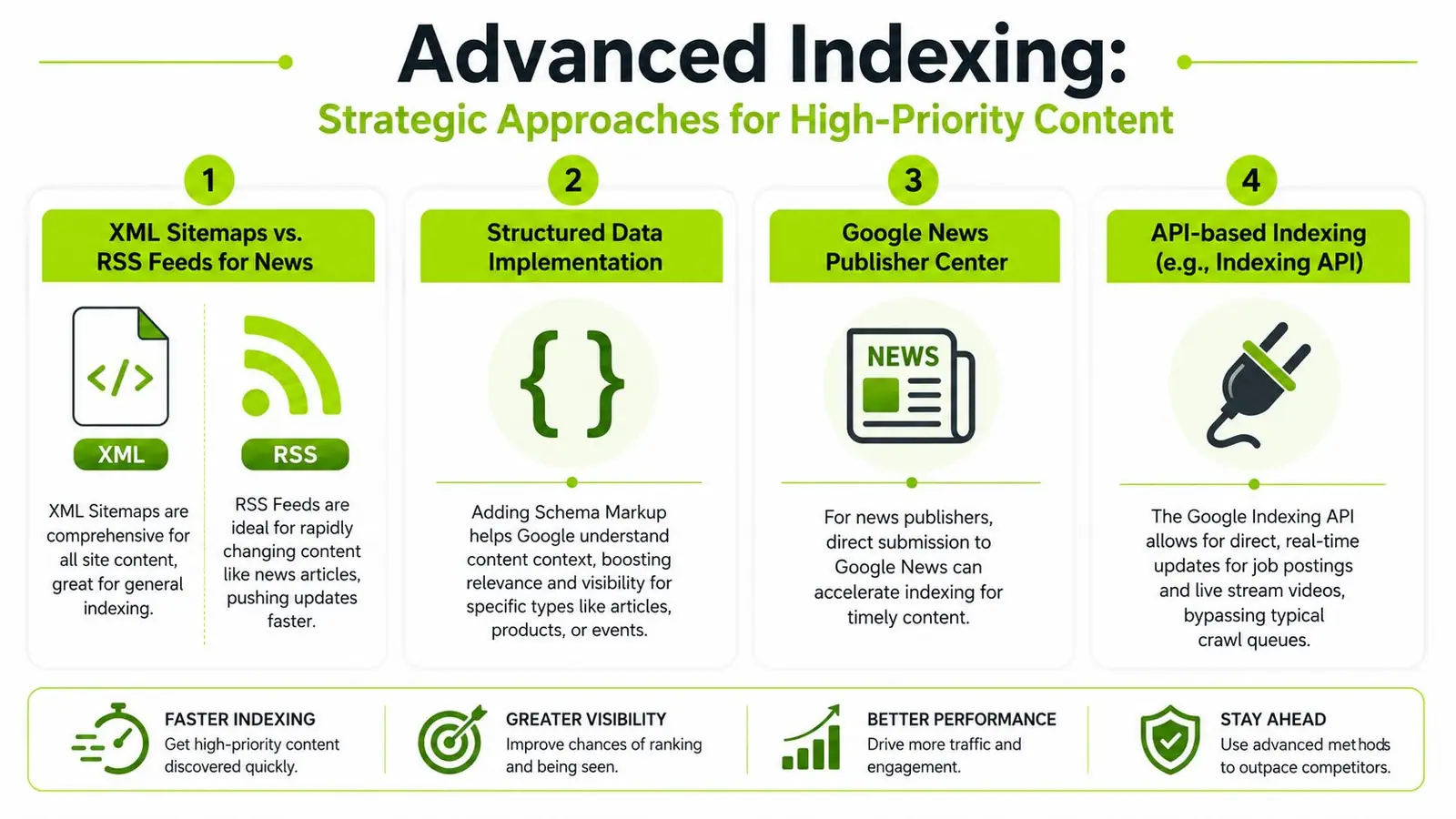
Google's Indexing API is the fastest official route for certain content types, especially time-sensitive updates such as job postings or live stream pages.
According to the technical summary published by Indexly on Google indexing workflows, Google's Indexing API can process eligible content “much faster than standard crawling methods,” often achieving indexing times under 30 minutes compared to several days for organic discovery.
That speed comes with limits. This is not a universal shortcut for every blog post and service page on your site.
Use it when:
- You publish content types Google explicitly supports for this method
- Your team can handle service account setup and API integration
- The page returns a normal live status and isn't blocked by indexing directives
Don't use it as a replacement for basic site hygiene. If the page is thin or blocked, faster submission won't save it.
Handle JavaScript, pagination, and faceted URLs carefully
Advanced indexing work is often less about acceleration and more about containment.
Three common trouble spots:
JavaScript-heavy pages
If core content and links only appear after complex rendering, Google may process the page inconsistently. Make sure primary content, navigation, and metadata are available in a crawl-friendly form.
Pagination
Paginated archives can be useful for discovery, but they shouldn't compete with stronger hub or category pages. Keep the intent clear. Don't let page 7 of an archive become the version Google treats as most important.
Faceted navigation
Filtered category combinations can explode into thousands of URL variants. Most of those don't deserve indexing. Decide which filtered views have standalone search value and keep the rest controlled through your internal linking and indexing logic.
Structured data helps Google understand the page faster
Structured data doesn't force indexing, but it can reduce ambiguity. It helps Google interpret the page type and content context more quickly, which is useful on large or complex sites.
That becomes even more relevant as search shifts toward AI-mediated visibility. If you're tracking how those surfaces work, this overview of Google AI Overviews SEO is a helpful companion to traditional indexing work.
A mature indexing process treats advanced methods as selective tools. Use the API for eligible urgent content. Tighten rendering on JavaScript pages. Control URL sprawl. Help Google understand what each page is for. That's how high-priority URLs move faster without creating a bigger index mess elsewhere.
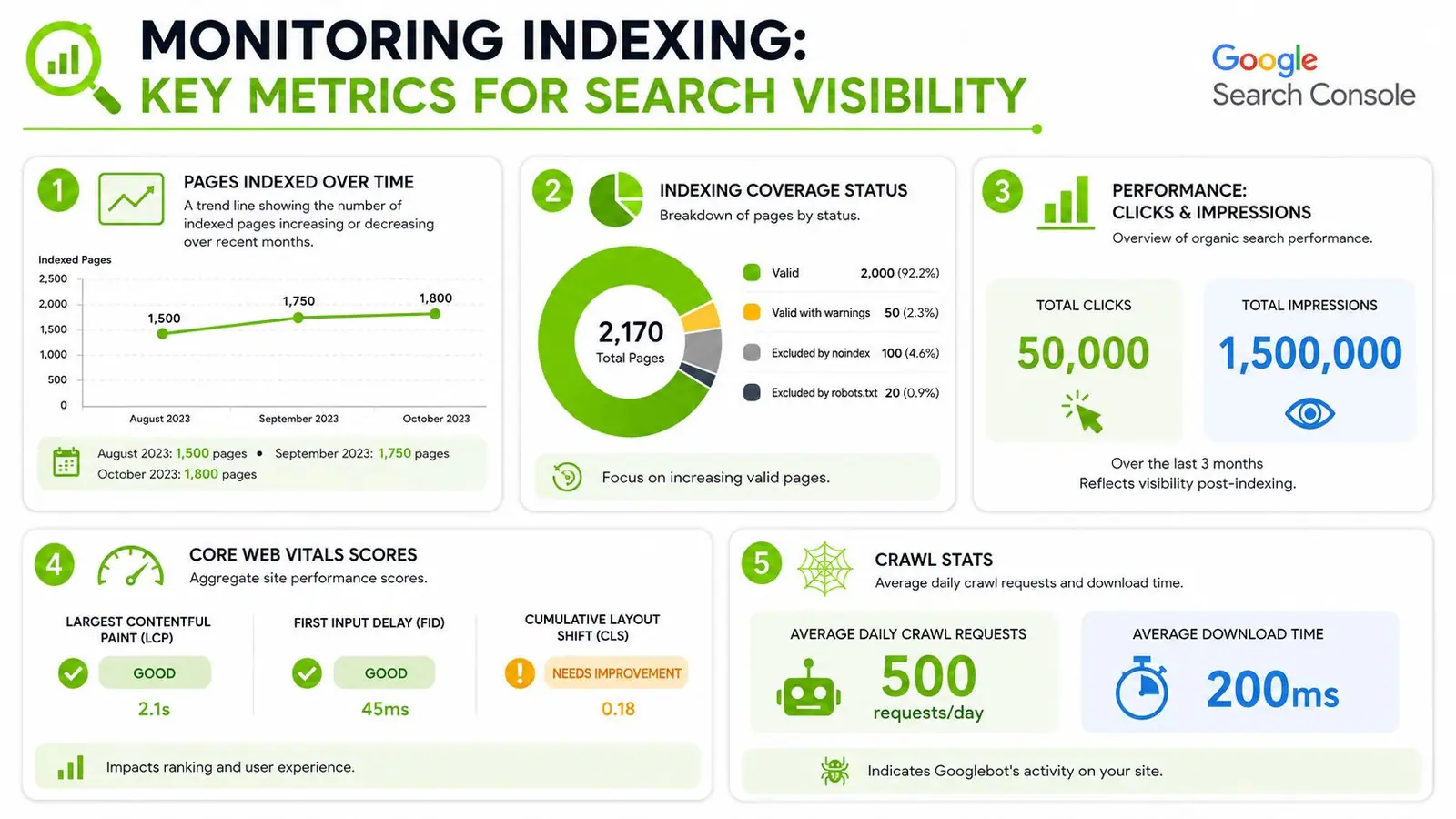
How to Monitor Indexing and Evolving Search Visibility
A common 2026 scenario looks like this. Search Console shows a URL as indexed, but it gets no meaningful impressions. Another page is not driving blue-link clicks, yet the brand starts showing up in AI-generated answers around the topic. That gap is why indexing checks alone no longer tell the full story.
Indexing is still the first gate. It just is not the final scoreboard.
Watch for indexing drift, not isolated URL problems
Healthy sites gain and lose indexed pages over time. That part is normal. What matters is whether the pattern matches intentional changes on the site or whether Google is losing confidence in a section.
Search Console is strongest when you review it by template, directory, and page type.
Focus on four checks:
- Page indexing trends: Are indexed pages growing in the sections you care about, or are important folders flattening out while low-value URLs get picked up?
- Excluded URL patterns: Are the same groups of pages repeatedly showing as duplicate, crawled but not indexed, or blocked by directives that should not be there?
- Sitemap mismatches: Are the URLs you submit the same URLs Google chooses to keep, or is Google selecting different canonicals than your team expects?
- Crawl activity on priority sections: Are product, service, and editorial hubs getting revisited often enough to support updates and new launches?
For reporting workflows that tie indexing health to actual search outcomes, this guide to a keyword rankings and visibility report is useful.
One warning from practice. Do not spend all week checking individual pages unless they drive revenue or support a critical campaign. Indexing problems usually show up first as a pattern across a template, taxonomy, or content cluster.
Search visibility now includes pages Google may use without ranking traditionally
This is the blind spot in many indexing guides. A page can be crawlable and technically indexable, yet still fail to earn useful visibility because Google's quality systems do not see enough originality, trust signals, or query fit. The opposite can happen too. Your brand, product, or insight can be cited in AI-generated search features even when the page is not winning a strong classic ranking.
Google explains that AI features in Search can generate responses by pulling together information from multiple sources in its overview of AI Overviews and AI Mode in Search. That means monitoring has to cover two layers. First, whether important URLs are getting indexed and retained. Second, whether your brand is appearing in AI-mediated discovery at all.
That creates a more realistic operating model:
| Traditional indexing check | 2026 visibility check |
|---|---|
| Is the URL indexed? | Is the topic, brand, or page being cited in AI-generated results? |
| Does the page rank for target terms? | Does Google surface the brand in AI Overviews, follow-up prompts, or entity-driven discovery? |
| Are clicks and impressions growing? | Is search visibility expanding even where classic rankings are weak? |
I treat this as implicit indexing. Google may not reward a page with strong blue-link visibility, but it can still use the information, entities, and supporting signals behind that page to answer a search. If you only monitor indexed counts and keyword positions, you miss part of what users now see first.
Teams that handle this well track both retention and presence. Retention means good pages stay indexed after launch. Presence means the brand shows up where search behavior is shifting, including AI Overviews and adjacent search experiences.
Surnex helps agencies, in-house teams, and developers track both sides of modern search: classic SEO performance and emerging AI visibility. If you need a clearer view of rankings, indexing health, backlink signals, and how your brand surfaces in AI Overviews and LLM-driven discovery, Surnex gives you one place to monitor it without juggling multiple tools.