96% of ecommerce sites don't include contextual search snippets, according to Baymard's research on search snippets. That number changes how ecommerce site search should be discussed.
Site search is often still treated as a retrieval problem. Can the engine find the right SKU, handle a typo, and apply filters fast enough? Those things matter. But they aren't the full job anymore. Shoppers also need to understand why a product appeared, especially when queries are broad, ambiguous, or phrased like natural language.
That gap gets expensive fast. A shopper searches for "lightweight winter jacket for travel," sees a grid of products, and has to guess which result matched "lightweight," which one matched "travel," and which one only matched "jacket." If the search experience feels opaque, trust drops. If trust drops, the shopper starts over, changes sites, or goes back to Google.
Modern ecommerce site search has to do two things well. It has to retrieve relevant products. Then it has to make relevance legible.
Why Your Ecommerce Site Search Is Your Best Salesperson
The clearest number in ecommerce site search is this: visitors who use on-site search are 2–3 times more likely to make a purchase than non-search users, and 87% of consumers start their product searches online, as summarized in Mailmodo's ecommerce site search statistics.
That makes the search bar one of the strongest signals of purchase intent on the site.
A category browser may still be exploring. A searcher usually isn't. They often know the product type, the use case, the problem they need solved, or the exact brand they want. When search works, it shortens the distance between intent and checkout. When it fails, it frustrates the most valuable visitor on the page.
Search isn't navigation
Teams often design search like a convenience feature. They obsess over header placement, icon style, and whether the box expands on click. Those choices matter, but they don't define performance. Search is closer to a digital sales associate than a navigation aid.
A good salesperson doesn't just point toward an aisle. They interpret the request. They resolve ambiguity. They narrow options without adding friction. Ecommerce site search has to do the same thing across thousands of SKUs and many query styles.
Practical rule: Treat every search query like a direct expression of commercial intent, not a UI event.
Where poor search loses revenue
The common failure modes are predictable:
- Exact-match logic breaks quickly: Shoppers type "couch" while the catalog says "sofa." The engine should bridge that gap without making the user do the translation.
- Results overload the user: Returning too many loosely related products can be almost as bad as returning none.
- The interface hides confidence: If the page doesn't show why an item matched, shoppers have to infer relevance themselves.
- Mobile friction gets ignored: On small screens, weak autocomplete and clumsy filters increase the effort required to buy.
The highest-intent traffic on your site doesn't need more persuasion. It needs less friction.
That is why ecommerce site search deserves the same attention teams give paid acquisition, product detail pages, and checkout flows. It directly shapes revenue, but it also exposes how effectively the catalog, taxonomy, and merchandising logic work.
The Core Features of High-Converting Search
A strong search stack works like an engine. One broken part hurts the whole system. Relevance, filtering, autocomplete, typo handling, personalization, and mobile UX aren't separate nice-to-haves. They work together.
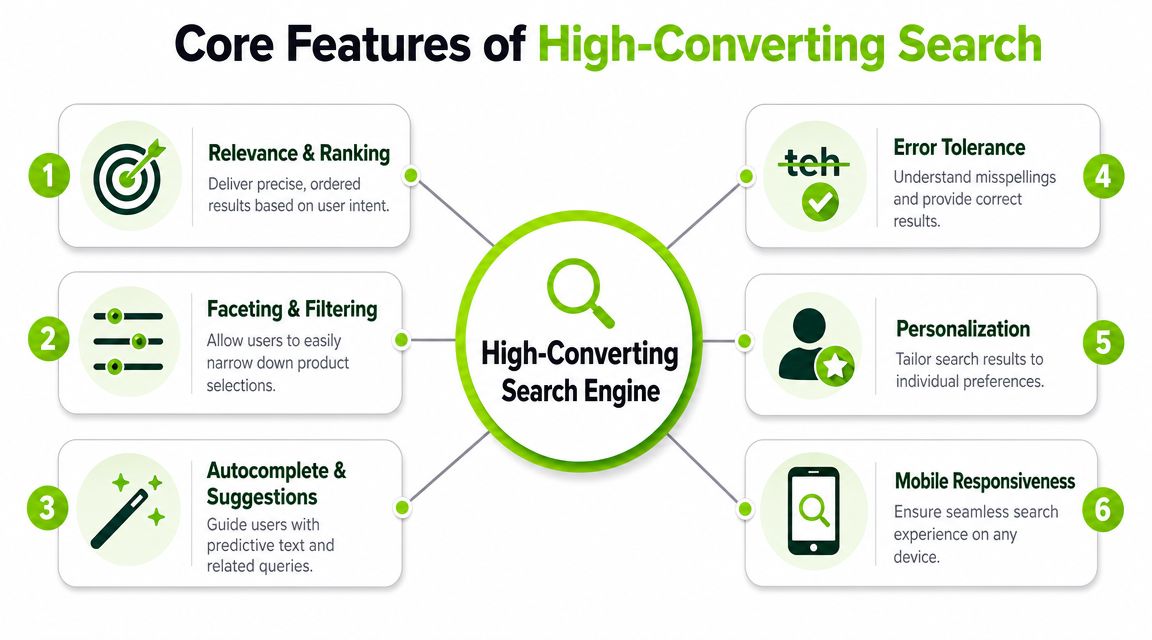
The first mistake many teams make is buying software based on feature checkboxes. The better question is simpler: does the engine reduce decision effort for the shopper?
Relevance and ranking drive the whole experience
The most important principle comes from Salesforce's guide to ecommerce site search: high-performing ecommerce search treats relevance as a ranking problem, not a keyword-matching problem.
That distinction matters. Keyword matching can find documents. Ranking decides which products deserve the first screen.
A modern engine should combine:
- Synonym management: "Sneakers" and "trainers" shouldn't produce different universes.
- Typo tolerance: Misspellings are routine, especially on mobile.
- Behavioral signals: Clicks, add-to-cart patterns, and purchases help the engine learn what users meant.
- Autocomplete and suggestions: The best search experiences guide the query before the results page even loads.
If you're comparing search products, a useful companion read is this take on non-AI search engine trade-offs, especially if you're deciding how much classical retrieval still matters in a hybrid stack.
Filters should narrow choices, not create work
Faceted navigation is where many search experiences fall apart. Teams add every possible attribute, then wonder why users don't use filters well.
Good facets reflect buying decisions. Bad facets reflect internal data structure.
Use filters that help people answer practical questions such as:
- Fit and compatibility: size, dimensions, model compatibility
- Commercial constraints: price, availability, shipping speed
- Preference signals: brand, color, material, finish
- Use-case narrowing: indoor/outdoor, travel, professional, beginner
A filter set should help shoppers move from "show me everything" to "show me what I can buy confidently."
Autocomplete should do more than predict text
Autocomplete isn't just a speed feature. It's a query-shaping layer.
When someone types "wireless head...", the interface can suggest product types, popular brands, or high-confidence completions. That reduces spelling variance and nudges the visitor toward terms the engine can serve well. The best implementations also mix query suggestions with product suggestions, category suggestions, and sometimes helpful content such as buying guides or FAQs.
Shoppers often reveal uncertainty in the search box before they reveal it anywhere else. Autocomplete is the first chance to reduce that uncertainty.
Error tolerance saves intent
Typos, singular-plural variations, punctuation issues, and messy phrasing are not edge cases. They're normal traffic.
An engine that fails on "nik ar max," "magsafe walet," or "blue t shirt mens" isn't exposing user error. It's exposing weak query handling. Error tolerance should be built into the retrieval layer, not patched with endless manual rules after the fact.
Personalization needs restraint
Personalization can improve relevance, but it can also overfit. If someone bought black dress shoes once, that doesn't mean every future query should over-prioritize black formalwear.
Use personalization carefully:
- Good use: reordering equal candidates based on recent category interest or brand preference
- Bad use: overriding obvious query intent with historical behavior
- Best use: applying light ranking influence while preserving strong lexical or semantic relevance
Mobile search is its own product
Mobile search isn't a shrunk desktop search. It needs its own decisions around spacing, keyboard behavior, filter access, tap targets, and suggestion density.
Shorter visible space means the first few results matter more. So do concise labels, forgiving query parsing, and filters that don't trap users in hard-to-exit overlays. If the search experience breaks under thumb use, the technology underneath doesn't matter much.
How AI Is Redefining Ecommerce Search
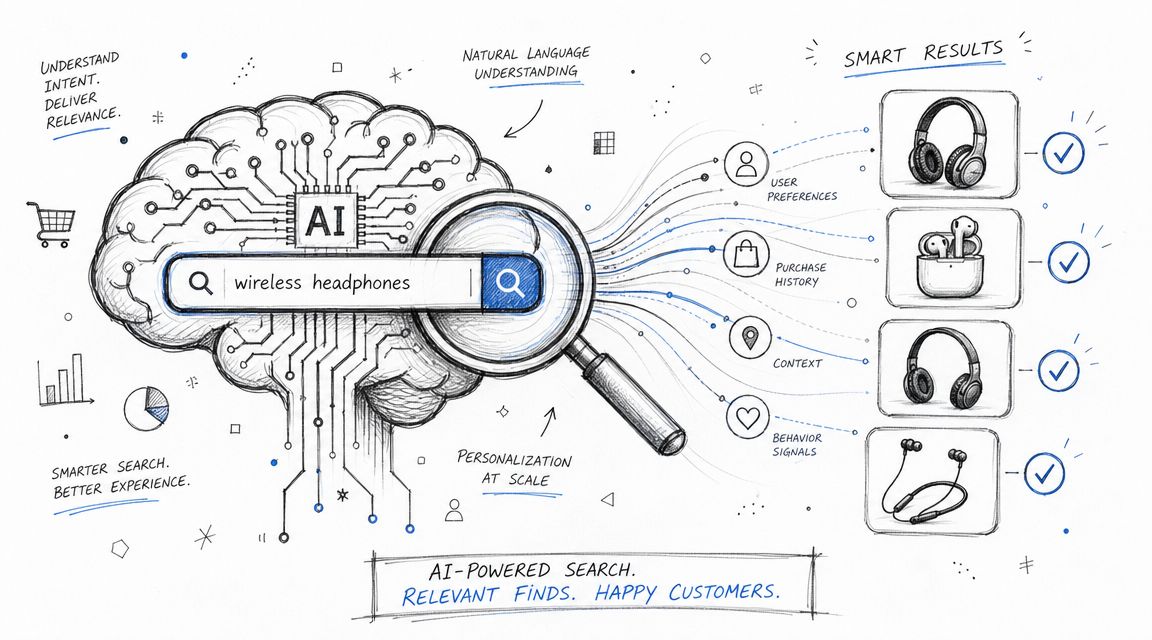
Search interfaces now sit inside a much broader discovery shift. According to Elementor's ecommerce statistics roundup, worldwide retail ecommerce sales are projected to reach $6.42 trillion in 2025, and by January 2025, Google's AI Overview boxes were appearing in 30% of search results. That combination raises the bar for what happens after the click.
If more shoppers arrive from AI-shaped discovery, the on-site experience has to absorb looser, more conversational intent and turn it into confident product discovery.
AI changes query understanding first
The practical impact of AI in ecommerce site search isn't magic. It's better interpretation.
Classical search systems are good at matching terms and sorting candidates. AI layers improve the handling of messier queries, such as:
- "running shoes for bad knees"
- "gift for someone who likes minimalist kitchen stuff"
- "dress like this but less formal"
- "wireless headphones for office calls and gym"
Those queries mix product type, use case, preference, and subjective language. Keyword-only systems struggle because the user isn't speaking in catalog syntax.
AI helps by improving:
- Natural language understanding: parsing modifiers, constraints, and intent
- Semantic retrieval: finding conceptually similar products even when exact words don't match
- Hybrid ranking: combining lexical precision with broader meaning
- Visual discovery: supporting image-based paths for style, shape, or design-led categories
For teams building around emerging AI workflows, this overview of best LLM optimization options for AI visibility tools is useful context because it frames how external AI visibility and on-site understanding are starting to converge.
AI still needs product discipline
The biggest mistake is assuming AI replaces search design. It doesn't. It amplifies whatever structure already exists.
If your catalog data is inconsistent, attribute coverage is weak, and category logic is messy, AI won't rescue the experience. It may even make weak logic look smarter than it is. That creates a trust problem.
A practical way to think about modern search is this:
| Layer | What it should do |
|---|---|
| Query understanding | Interpret messy, natural language requests |
| Retrieval | Pull relevant candidates from the catalog |
| Ranking | Prioritize items likely to satisfy the request |
| Explanation | Show why the result belongs on the page |
That last row is the one many teams still skip.
Explanation becomes more important as AI gets better
When search feels more "intelligent," users ask fewer questions about whether the system found something. They ask more questions about whether they should trust it.
That is why explainability matters. If a result appears because it matches waterproof material, carry-on dimensions, and customer behavior from similar searches, the interface should expose enough of that logic to make the decision feel grounded.
A broader guide to ecommerce AI is helpful here because it shows how AI use cases in commerce go beyond search and into recommendations, support, and automation. The common thread is the same. Users accept AI much faster when the system's output feels understandable.
A useful demo of how conversational search is changing interface expectations is below.
Choosing Your Implementation Path
Once the feature set is clear, the next decision is architectural. Organizations typically face three paths: buy a hosted SaaS product, build on an open-source engine such as Elasticsearch or OpenSearch, or create a deeper in-house system around custom services and ranking logic.
The right choice usually depends less on ambition and more on operating model.
The principle that should guide the decision
The constant across all three paths is this: search quality depends on relevance design. As noted earlier from Salesforce, the best systems combine synonyms, typo tolerance, and behavioral signals. That principle matters more than the logo on the vendor slide.
If the implementation path doesn't let your team tune ranking and maintain relevance over time, it won't stay good for long.
Side-by-side trade-offs
| Criterion | Hosted SaaS (e.g., Algolia, Syte) | Open-Source (e.g., Elasticsearch, OpenSearch) | In-House Build |
|---|---|---|---|
| Speed to launch | Fastest. Good for teams that need production search quickly. | Moderate. You still need setup, schema design, and frontend work. | Slowest. Best only when search is a strategic product capability. |
| Operational overhead | Lowest. Vendor handles much of the infrastructure burden. | Medium to high. Your team owns deployment, scaling, and maintenance. | Highest. Engineering owns everything from indexing to ranking services. |
| Customization | Strong, but within the product's boundaries. | High. You can shape indexing, ranking, and integrations deeply. | Highest in theory. Also easiest to overcomplicate. |
| Merchandising control | Usually strong and business-user friendly. | Often requires custom tooling for non-technical users. | Depends on what you build. Internal users may wait a long time for simple controls. |
| Total cost profile | Predictable at first, but usage pricing can become a factor at scale. | Lower license cost, higher engineering cost. | Highest long-term commitment if you need reliability and iteration. |
| Best fit | Mid-market brands, agencies, lean in-house teams | Technically capable teams with custom needs | Large organizations with unusual requirements and strong engineering depth |
When hosted SaaS makes sense
Hosted search products are often the right answer when the business needs improvement now. They're especially practical for teams running Shopify, BigCommerce, Magento, or headless storefronts where merchandising and speed to market matter more than custom retrieval research.
You trade some control for faster execution.
That trade is usually worth it when:
- The catalog is large but conventional: apparel, beauty, electronics, home goods
- Business users need control: merchandising teams want to boost, bury, and tune without engineering tickets
- Internal engineering capacity is limited: search isn't the only roadmap priority
- You need vendor support: implementation guidance matters when the team lacks search specialists
When open-source is the better choice
Open-source engines fit organizations that want meaningful control but don't want to build every primitive from scratch. Elasticsearch and OpenSearch can form a strong base, especially when teams need custom indexing logic, specific integrations, or deeper analytics pipelines.
They also come with hidden obligations. Relevance tuning, synonyms, typo handling, index design, infrastructure scaling, and business-facing tooling don't arrive finished.
Architect's test: If your team can manage a search cluster but can't support ongoing relevance operations, open-source may still be the wrong choice.
For JavaScript-heavy storefronts, this also intersects with crawlability and rendering concerns. Teams replacing or rebuilding search on dynamic storefronts should keep technical SEO in view. This article on SEO in SPA environments is a useful reminder that frontend architecture decisions often leak into discoverability and usability.
When in-house is justified
An in-house build makes sense only when search is part of the company's differentiation. That usually means unusual product structures, deep personalization requirements, highly specific ranking goals, or tight coupling with proprietary commerce logic.
Examples include:
- complex B2B catalogs with compatibility logic
- marketplaces with unique supply dynamics
- verticals where search is tied to configuration, bundles, or regulated constraints
Teams tend to overestimate their need for this path. They imagine control. They inherit maintenance.
The practical question isn't "Can we build search?" It's "Do we want to operate search as a product for years?"
Measuring What Matters Search KPIs and Analytics
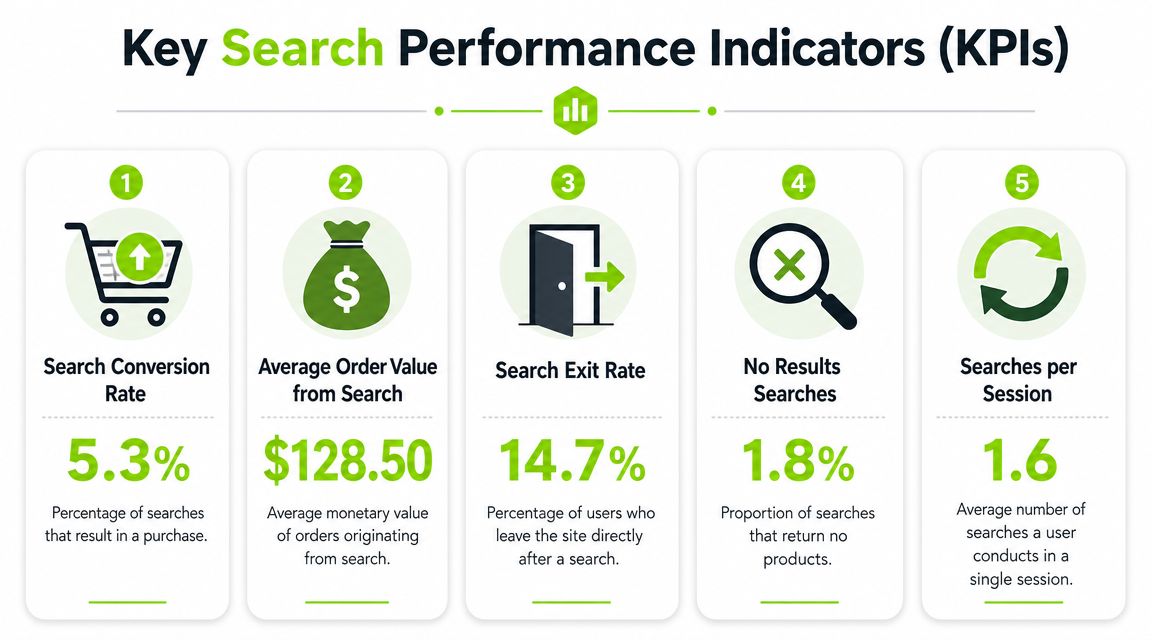
Search analytics shouldn't live in a dashboard that nobody acts on. The useful model is simpler: every query is feedback about demand, relevance, content quality, and friction.
That aligns with Syte's guidance on measuring ecommerce site search effectiveness, which recommends tracking zero-result searches, search exit rate, and revenue from search so teams can keep adjusting ranking, merchandising, and filters.
Start with failure signals
The fastest way to improve search is to study where it breaks.
Three reports matter first:
- Zero-result queries: These reveal missing synonyms, weak indexing, bad normalization, or actual catalog gaps.
- High-exit searches: If users leave after certain queries, the engine may be returning irrelevant items or overwhelming result sets.
- Repeated reformulations: If a user performs a search and then searches again with slightly different wording, the first result set probably didn't answer the need.
These reports are operational, not just analytical. They give teams direct work to do.
Then look at commercial outcomes
Once basic failure modes are visible, connect search behavior to business metrics.
Useful KPIs include:
| KPI | Why it matters | What teams usually do with it |
|---|---|---|
| Click-through rate from results | Tests whether ranking feels relevant enough to earn a click | Tune ranking rules, titles, thumbnails, and snippet clarity |
| Search exit rate | Shows where the experience creates dead ends | Improve matching, fallback logic, and filtering |
| Revenue from search visits | Connects search quality to commercial value | Prioritize query classes with clear buying intent |
| Most common queries | Reveals customer language and demand concentration | Improve taxonomy, landing pages, and merchandising |
| Most common no-result queries | Exposes gaps directly | Add synonyms, create redirects, or expand inventory |
Build a weekly optimization loop
Teams get more value from a lightweight routine than from a perfect measurement framework.
A practical weekly loop looks like this:
- Review top no-result searches
- Inspect high-volume queries with weak engagement
- Check whether filters helped or trapped users
- Tune synonyms, boosts, and facet order
- Document what changed so future shifts can be explained
Search becomes a business intelligence asset. Query logs tell you how shoppers describe products, which terms don't map cleanly to the catalog, and where merchandising assumptions are out of sync with real demand.
Search analytics are one of the few places where customers state their intent in their own words.
Don't isolate search from the catalog team
If search issues stay trapped with engineering or SEO, progress slows. Merchandisers, product data owners, and UX teams need the same visibility.
A zero-result query might point to a missing synonym. It might also reveal a naming problem in product data, a missing attribute, or a category structure that made sense internally but not to shoppers. The data only becomes useful when the right team can act on it.
Integrating Search with Your SEO and AI Visibility Strategy
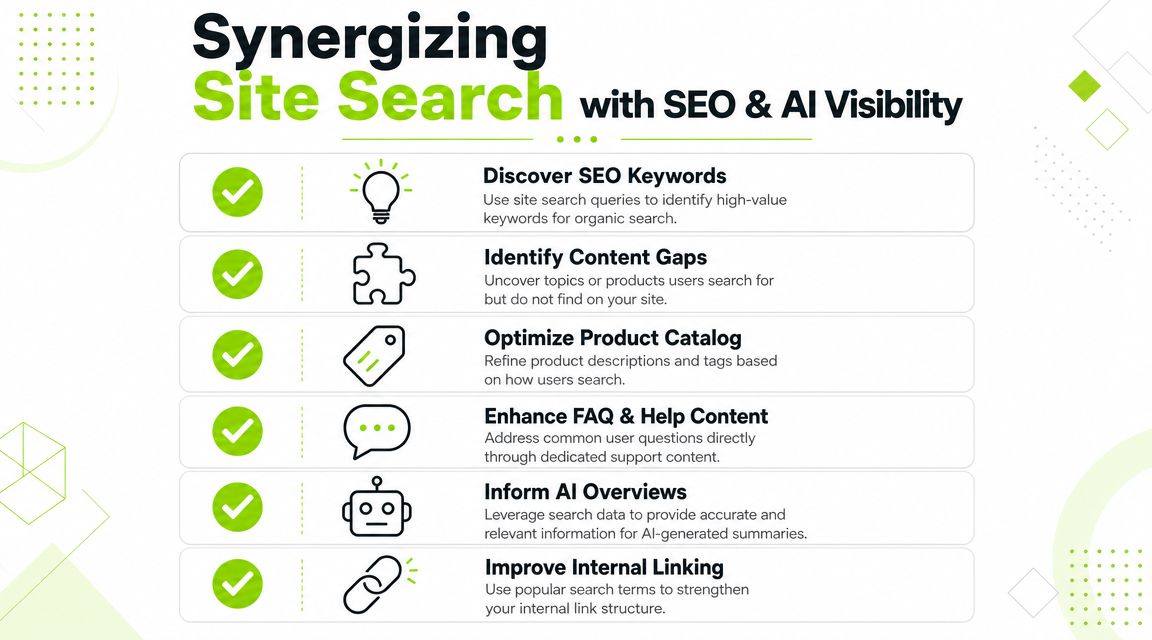
Internal search data is one of the cleanest demand signals most ecommerce teams already own. People type the exact words they use for products, problems, specs, and comparisons. That language should influence SEO, content, navigation, and even structured product naming.
Search and SEO are often managed separately. They shouldn't be.
Use internal queries as market language
Internal search logs can improve external discovery in several ways:
- Keyword research gets sharper: Searchers often use modifiers and phrases your category pages don't reflect.
- Content gaps surface quickly: Repeated informational queries can justify buying guides, comparison pages, or FAQ content.
- Product titles can improve: If customers consistently use different language than your catalog, your naming needs work.
- Internal linking gets smarter: High-demand concepts from search logs often deserve stronger navigational support.
This is also where AI visibility work starts to overlap with onsite behavior. Teams thinking about discovery beyond classic blue links may find these Generative Engine Optimization strategies useful because they frame how content structure and clarity affect AI-mediated discovery.
Keep the handoff from Google to site search coherent
A weak handoff is common. A shopper lands on a category or product page from Google, doesn't immediately see the match they expected, and moves to site search to recover. If the internal results then use different terminology, different product grouping, or confusing ranking, the journey breaks.
That means SEO and site search should align on:
- taxonomy language
- primary attributes
- query intent classes
- landing page to result page continuity
If the external promise is "compact carry-on luggage," the internal search experience should clearly reinforce what "compact" and "carry-on" mean in the result set.
Explainability is now part of visibility
This is the underserved piece. Baymard found that 96% of ecommerce sites don't use contextual search snippets, as noted earlier in the opening section. That gap matters even more when AI systems shape how users think about search.
Search snippets help answer questions such as:
- Why did this product appear?
- Which part of my query did it match?
- How is this different from the item next to it?
That kind of explanation builds trust faster than another round of ranking tweaks alone.
A simple implementation might surface matched attributes, short relevance cues, or concise snippets pulled from product copy. A better one adapts explanations to query type. For a compatibility query, show model support. For a material query, show material evidence. For a style query, show descriptive language that grounds the match.
For teams adapting broader search programs, this perspective on SEO for AI search is useful because it treats explainability as part of discoverability rather than as a separate UX concern.
The Ultimate Evaluation Checklist for Your Search Solution
Most vendor demos look impressive because they use clean data, ideal queries, and well-staged merchandising. Real evaluation starts when you test the ugly stuff. Ambiguous queries. Misspellings. Thin product data. Mobile filters. Mixed-intent searches.
A useful audit doesn't ask whether a solution has AI. It asks whether the system helps shoppers buy with less uncertainty.
Questions to ask about retrieval and ranking
Start with the foundation.
- Can the engine handle synonyms without heavy manual intervention? Test "sofa" versus "couch," "hoodie" versus "sweatshirt," and brand abbreviations.
- How does typo tolerance behave under messy input? Good systems recover gracefully without flooding the page with irrelevant products.
- Can ranking blend lexical relevance with behavior? Exact matches still matter, but so do click and purchase patterns.
- Does the platform return useful fallback results instead of dead ends? Zero-result pages should be rare and recoverable.
- Can the team tune ranking by query type? High-intent product queries and broad exploratory queries shouldn't be handled identically.
Questions to ask about intent and commercial logic
Many evaluations remain too shallow. The more advanced standard comes from the idea, noted in CS-Cart's review of ecommerce search engines, that modern platforms can separate browsing behavior from commercially strong queries in real time.
Ask directly:
- Does the system distinguish exploratory searches from buy-now searches?
- Can merchandising rules vary by intent class?
- Can the engine prioritize compatible, in-stock, or margin-sensitive items without destroying relevance?
- How are broad natural-language queries interpreted?
- What evidence does the platform expose when it decides one product outranks another?
If a vendor can't answer those questions clearly, the intelligence layer may be thinner than the marketing suggests.
The best search platforms don't just rank products. They help teams express business priorities without making results feel manipulated.
Questions to ask about UX and explanation
A search engine can be technically strong and still underperform because the interface hides too much.
Use this checklist during demos or audits:
-
Search box visibility Is the search entry point easy to find on desktop and mobile?
-
Autocomplete quality Does it guide users with sensible suggestions, products, and categories?
-
Filter usability Are the facets tied to real shopping decisions, and do they work well on mobile?
-
Result explanation Can shoppers see why a product appeared through matched attributes, snippets, or other cues?
-
Recovery paths If the query is weak or unmatched, does the interface offer alternatives?
-
Speed perception Does the experience feel immediate, especially during typing and refinement?
Questions to ask about operations and ownership
Even strong search programs fail when nobody can maintain them.
Review the operating layer:
| Evaluation area | What to ask |
|---|---|
| Analytics | Can non-technical teams review queries, exits, and no-result patterns easily? |
| Merchandising controls | Can business users boost, bury, and pin results without code deployments? |
| Synonym management | Is there a clean workflow for adding and testing synonyms? |
| Indexing | How quickly do inventory, pricing, and catalog changes appear in search? |
| Governance | Who can change relevance rules, and is there versioning or rollback? |
What usually separates good from bad decisions
A practical buying process includes live testing against your own catalog and query logs. Don't rely on canned vendor examples. Use internal terms, seasonal products, compatibility-heavy searches, and common misspellings from your real traffic.
Also check whether the solution helps different teams do their jobs:
- Merchandisers need control without engineering bottlenecks.
- SEO teams need access to query language and content gaps.
- Developers need stable APIs, indexing clarity, and debugging visibility.
- Leadership needs a credible path from search improvement to revenue impact.
The right ecommerce site search solution isn't the one with the longest feature page. It's the one your team can operate, explain, and improve continuously.
If your team needs a clearer view of how on-site search, SEO, and AI discovery fit together, Surnex gives agencies, in-house teams, and developers one place to track modern search visibility, monitor AI-driven discovery, and connect emerging search behavior with practical optimization work.