Most advice on how to analyze log files is behind the underlying problem.
It still treats logs as a Googlebot-only dataset, useful for crawl budget checks, redirect cleanup, and technical SEO diagnostics. That work still matters. But if your process stops there, you're only measuring one part of machine access to your site while search behavior is shifting toward AI-assisted discovery.
The gap is practical, not theoretical. Teams now care about how brands appear in AI-generated answers, AI Overviews, and chat-style search journeys. Yet most log workflows never separate AI agents from other crawlers, never compare their behavior to content priorities, and never connect crawl patterns to visibility work. If you're already thinking about using AI in SEO, your log workflow needs to catch up.
Why Your Log Analysis Strategy Is Already Outdated
Traditional SEO log analysis taught people to ask a narrow set of questions. Is Googlebot reaching key pages? Are status codes clean? Are faceted URLs wasting crawl budget? Those are still valid questions, but they're no longer enough.
A major blind spot sits in plain sight. Most existing content on analyzing log files focuses on reactive troubleshooting and security, not on proactive AI visibility work. That gap matters because a 2025 to 2026 projection says 68% of enterprises now track AI visibility as a core metric according to this industry discussion on AI visibility and log analysis. If teams track AI visibility but their logs only monitor traditional search bots, their measurement model is incomplete.
Googlebot Is No Longer the Whole Story
Search traffic used to be the main prize. Now discovery happens across search engines, answer engines, assistants, and LLM interfaces. A page can be technically crawlable for Google and still perform poorly in AI-driven discovery if AI agents hit the wrong URLs, waste requests on duplicate paths, or avoid important resources because of response issues.
That changes the reason you analyze log files. You're not only trying to diagnose crawl inefficiency. You're trying to understand which machines access your content, how they move through page types, and whether your infrastructure helps or blocks downstream visibility.
Practical rule: If your crawler reports only mention Googlebot, your log analysis is incomplete.
Old Workflows Miss New Crawl Patterns
The outdated workflow usually looks like this:
- Export logs once: Someone grabs a sample after a problem appears.
- Filter for Googlebot only: Everything else gets ignored or grouped as generic bot traffic.
- Review obvious errors: Teams look for 404s, 5xx responses, and redirect loops.
- Stop before strategy: Nobody asks whether bot behavior lines up with business priorities or AI discovery goals.
That approach can still catch technical failures. It won't tell you whether new AI agents are repeatedly requesting thin pages, parameter-heavy URLs, or low-value endpoints while your core commercial and editorial pages get less attention than expected.
The better model is broader. Treat logs as a behavioral dataset for machine access across both search and AI environments. Once you do that, the same raw files become useful for technical SEO, observability, and AI visibility planning.
From Raw Logs to Actionable Data
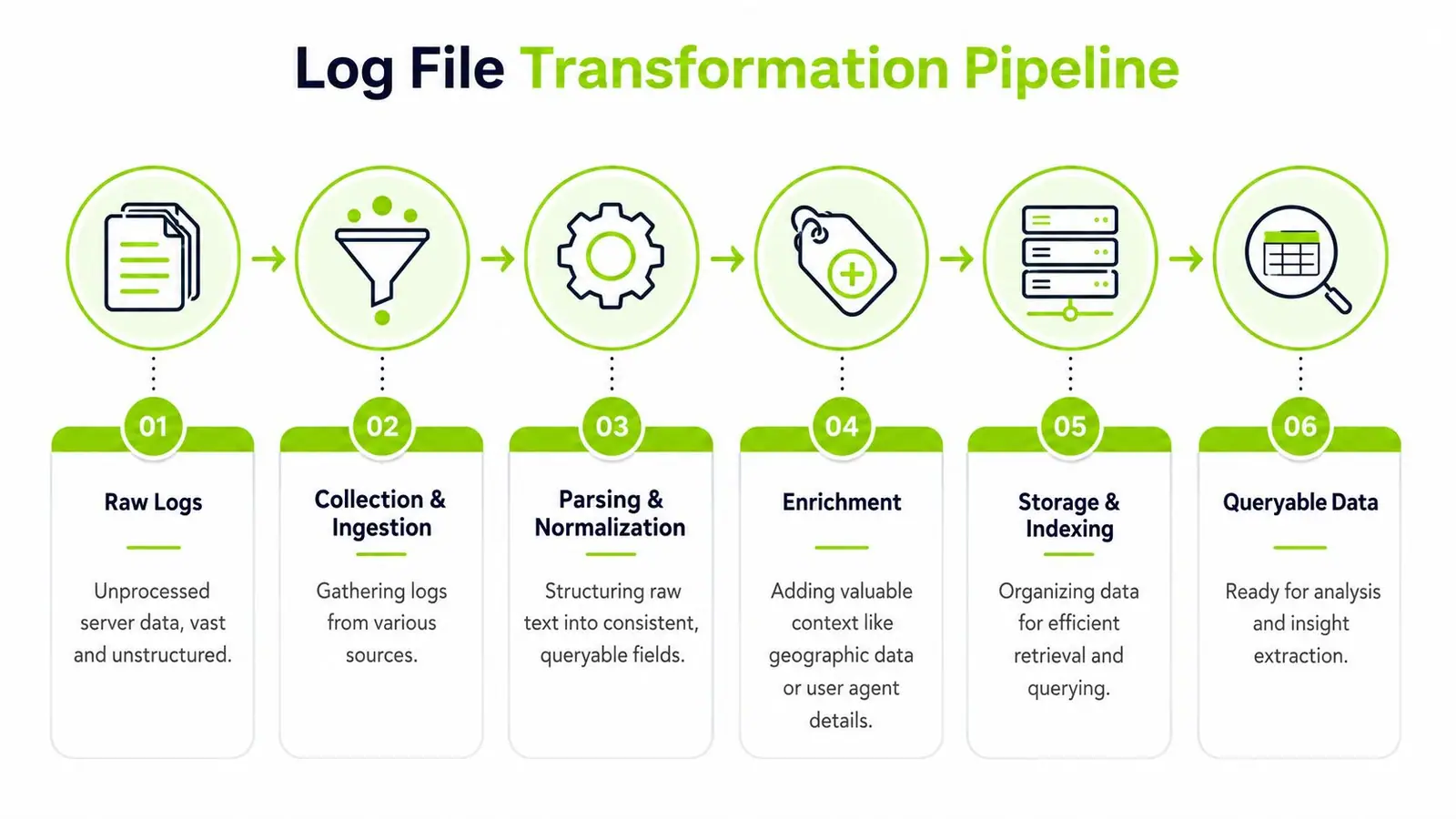
Raw logs do not become useful because you exported them. They become useful when every request is shaped into a record you can trust in SQL, dashboards, and bot classification rules.
Start With Complete, Consistent Inputs
The first failure point is collection. SEO teams often pull a few server log files, while the full crawl story is split across origin logs, CDN logs, and cloud exports. That gap matters. If Googlebot gets cached at the edge and an AI agent hits origin directly, partial logs produce the wrong crawl picture.
In practice, useful inputs usually come from three sources:
- Web server logs: Apache and Nginx access logs still give the cleanest view of origin requests.
- CDN or edge logs: Cloudflare, Fastly, and similar platforms show what reached the edge, including blocked or cached requests.
- Cloud storage exports: AWS, GCP, and other cloud setups often push logs into buckets for scheduled processing.
Consistency matters more than source. If log rotation changes without warning, timestamps use mixed time zones, or a provider drops user-agent fields in one export path, the analysis starts with missing evidence.
Build a Pipeline You Can Reuse
Ad hoc parsing works for a one-off incident. It fails when you need month-over-month crawl patterns, bot segmentation, or AI agent monitoring across several properties.
A repeatable pipeline has four parts:
- Collect and centralize logs from every layer that can see crawler activity.
- Parse and normalize fields into a standard schema.
- Store records in a system built for querying large datasets.
- Analyze with SQL, notebooks, dashboards, and alerts.
Normalization is the part teams skip, and it is usually the part that breaks reporting. If one source calls the field cs-uri-stem, another uses path, and a third stores full URLs with parameters attached, every query turns into cleanup work before you can answer the actual SEO question.
For repeated log analysis, a practical stack looks like this:
- Collection: scheduled exports, bucket syncs, or streaming ingestion
- Parsing: Python, Logstash, Fluent Bit, or cloud-native transforms
- Storage: BigQuery, ClickHouse, Elasticsearch, or OpenSearch
- Analysis: SQL, Looker Studio, Kibana, notebooks, and alerting rules
Teams that want cleaner joins between log data, crawl data, and business reporting should also define the schema early. The article on data modeling for SEO reporting covers that side well.
Structured Fields Beat Free-Text Logs
Free-text logs are readable to humans and annoying for analysis. Structured records are easier to validate, easier to query, and easier to extend when you start tracking AI agents alongside search crawlers.
JSON usually makes life easier because each request can carry explicit keys instead of forcing the parser to infer meaning from position. Even if the original logs are not JSON, the normalized output should be.
A useful record should include fields such as:
| Field | Why it matters |
|---|---|
timestamp | Supports time-based trend analysis |
request_path | Groups requests by page, template, or section |
status_code | Identifies crawl waste and access problems |
response_time_ms | Shows where bots hit slow infrastructure |
user_agent | Supports crawler classification |
referer | Helps with edge-case investigations |
ip_address | Needed for verification and bot validation |
bot_family | Your processed label for Googlebot, Bingbot, ChatGPT-related agents, and others |
That last field matters more than it used to. If you want to connect logs to AI visibility in Surnex, you need a schema that can separate search crawlers from AI agents, internal fetchers, and junk bot traffic without rewriting your queries every month.
Clean records change the job. You stop fighting file formats and start answering crawl, indexation, and AI discovery questions.
Pick Tools Based on Volume and Repeatability
Small samples still fit in grep, awk, or a quick Python notebook. I use those all the time for spot checks. They are not enough for ongoing analysis across multiple domains, long retention windows, or bot segmentation that needs to survive handoffs between SEO, engineering, and data teams.
Tools that hold up in practice:
- Python with Pandas: Good for testing parsing logic and validating crawler labels.
- Logstash or Fluent Bit: Good for repeatable transforms across messy inputs.
- BigQuery: Good for large datasets and fast SQL across clients or environments.
- Elasticsearch or OpenSearch: Good for operational exploration when teams want filtering and dashboards.
- ClickHouse: Good when cost and query speed both matter at scale.
As Splunk's overview of log analysis notes, many large organizations generate over 10 terabytes of log data daily. The exact number matters less than the planning lesson. Even mid-size sites hit a point where manual exports and local spreadsheets slow the work down, hide patterns, and make recurring SEO analysis harder than it needs to be.
Filtering Bots and Identifying Crawlers
Bot filtering breaks down fast if the only rule is user_agent LIKE '%Googlebot%'.
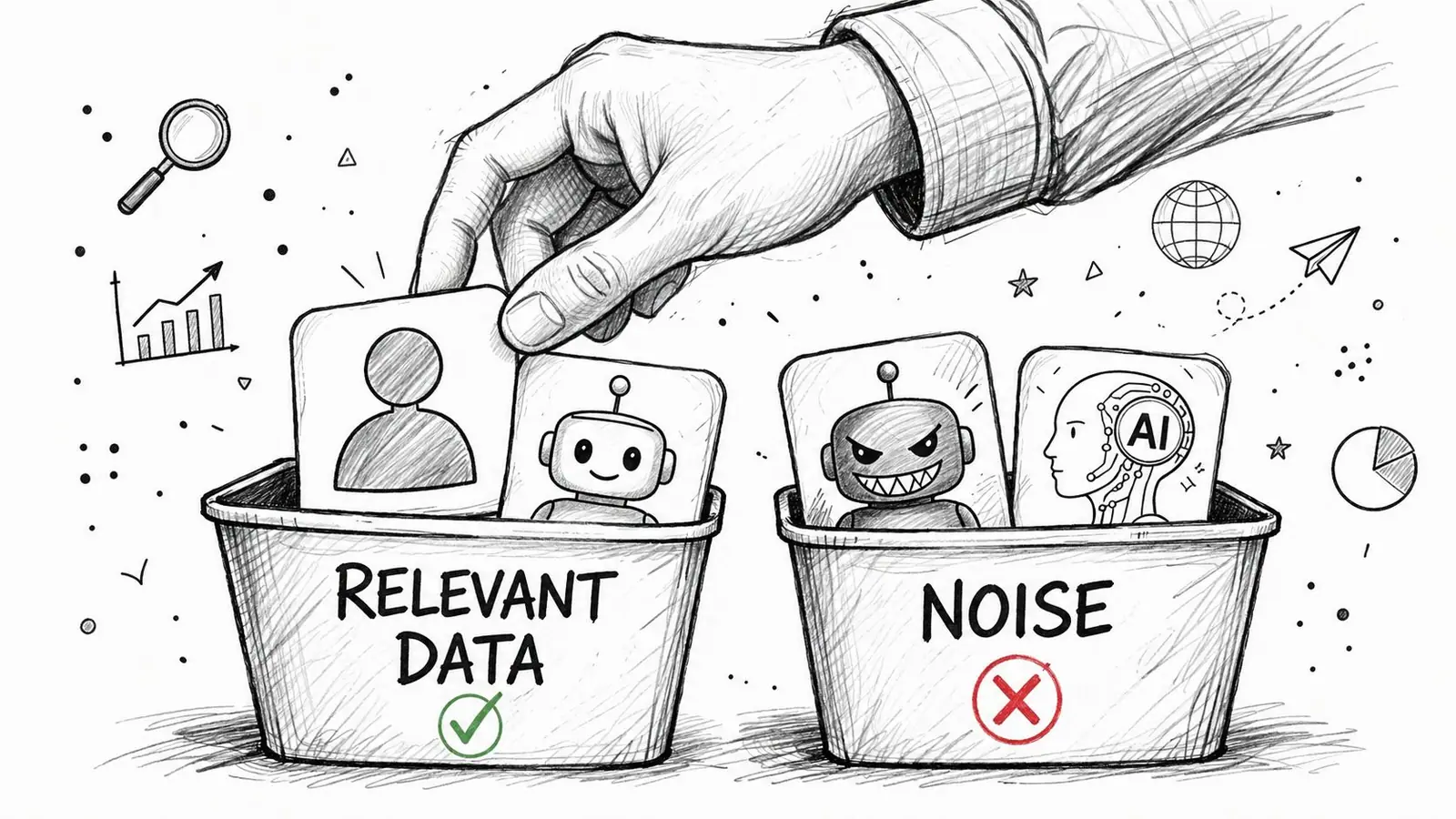
That shortcut misses the traffic that now affects both search visibility and AI discovery. If GPTBot, ClaudeBot, Perplexity-related agents, internal renderers, uptime monitors, and junk scrapers all sit in the same bucket, the analysis stops being useful. Crawl reports look inflated, server waste gets misread, and teams miss which content is being fetched for AI retrieval or citation systems.
User-Agent Strings Are a Starting Point
A workable crawler dataset usually starts with four groups:
- Real users
- Verified search bots
- Claimed bots that may not be authentic
- AI agents and other automated systems
Those groups serve different decisions. Search bot traffic helps answer crawl budget, rendering, and indexation questions. AI agent traffic helps answer whether your content is even reachable to the systems that influence AI answers and product visibility in platforms like Surnex. Mixed together, both views get worse.
The issue is growing more critical. Conductor's discussion of log file analysis gaps reflects how often log workflows still center on classic Googlebot checks while newer agent categories get ignored.
Verify Important Bots Instead of Trusting Labels
A user-agent string is a claim, not proof.
For reporting that influences SEO decisions, verify the bots that matter. Reverse DNS checks are still the baseline for Googlebot and other major search crawlers. Then compare that result with request behavior. Claimed Googlebot traffic that hits thousands of parameterized URLs per minute from suspicious networks is not Googlebot in any way that should shape strategy.
I use a simple confidence model:
| Confidence level | What it means |
|---|---|
| High | Claimed bot, verified through host validation, request pattern makes sense |
| Medium | Claimed bot, no verification yet, behavior looks plausible |
| Low | Claimed bot with suspicious frequency or inconsistent request behavior |
| Unknown | Generic automation with unclear identity |
That framework keeps teams from treating every bot label as equally trustworthy. It also prevents a common mistake. Analysts spend weeks debating crawl budget while fake bot traffic is doing damage.
Build a Taxonomy That Matches the Decisions You Need to Make
Generic bot buckets are too broad for modern SEO work. The labels should map to actions.
A practical schema looks like this:
- Search engine crawlers: Googlebot, Bingbot, and other engines tied to indexation
- AI agents: GPTBot, ClaudeBot, and other LLM-related crawlers or fetchers
- SEO tool crawlers: Auditing and competitive intelligence tools
- Monitoring and uptime agents: Internal checks, CDN probes, vendor monitors
- Internal fetchers and preview systems: QA tools, staging checks, link unfurlers, app integrations
- Suspicious automation: Unverified or clearly low-value bot traffic
The extra separation between AI agents and search engine crawlers matters. They do not behave the same way, and they do not support the same business goal. A page ignored by Googlebot is one problem. A page blocked or rarely fetched by AI agents is a different one, especially if that page supports product comparisons, definitions, or topic coverage that should surface in AI-generated answers. Teams working on AI discovery should pair log data with content targeting; a focused keyword list for AI search and SEO planning becomes useful, because you can compare what agents crawl against the topics you want associated with your brand.
If your team is actively adapting content for LLM-driven surfaces, this guide to enhancing AI search visibility complements the log-side work.
Start With Filters That Expose Waste and Opportunity
I start with a few cuts that usually reveal the true story quickly:
- Requests by bot family and day: Shows new crawler activity, drop-offs, and unstable patterns
- Top requested paths by crawler: Surfaces wasted fetches on faceted URLs, feeds, archives, and low-value parameters
- Status codes by crawler: Finds crawler-specific failures that never appear in user monitoring
- Response time by crawler: Exposes infrastructure weak points under sustained automation
- Method and path combinations: Helps catch HEAD-heavy monitors, API probes, or misclassified internal traffic
These first-pass views are where AI crawl analysis becomes practical instead of theoretical. If GPTBot or another AI agent only touches boilerplate pages, repeatedly hits blocked resources, or never reaches your highest-value commercial or reference content, that is not just a log anomaly. It is a visibility problem.
The goal is not to count bots. The goal is to separate the automated traffic worth serving from the traffic wasting server time, obscuring reports, or missing the pages that matter.
Key Queries for SEO and AI Insights
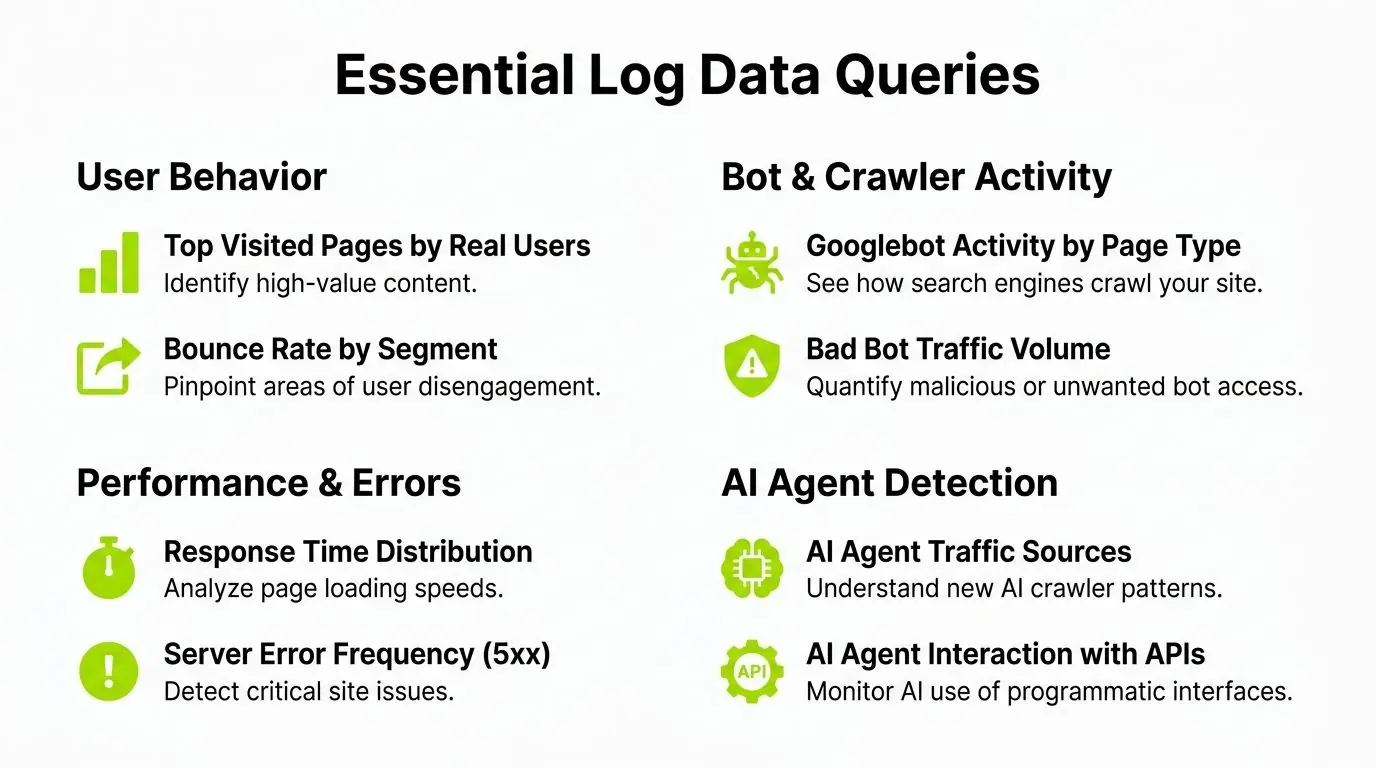
At this point, log analysis stops being a storage exercise and starts producing decisions.
Use the Right Time Window
For SEO-focused crawling analysis, the past 30 days is the standard baseline for identifying crawling issues, according to this log file analysis guide from Semrush. That's long enough to catch persistent patterns without burying current problems under old behavior.
I still review longer windows for trend work, but the first pass should stay recent.
Query Crawl Frequency by Page Type
A basic but valuable question is whether your important pages get crawler attention in proportion to their role.
SELECT
  bot_family,
  page_type,
  COUNT(*) AS crawl_hits
FROM logs
WHERE event_date >= DATE_SUB(CURRENT_DATE(), INTERVAL 30 DAY)
GROUP BY bot_family, page_type
ORDER BY crawl_hits DESC;
This query is more useful than a raw URL list because it shows how bots allocate attention across templates. Category pages, product pages, articles, author pages, search result URLs, and parameter variants should not all receive the same share of requests.
Semrush notes that sorting by crawl frequency helps SEO teams identify which pages receive the most bot attention. That makes it easier to redirect crawl resources toward high-value content and away from duplicate or low-priority URLs.
Find Crawl Waste Fast
Crawl waste usually shows up in repetitive requests to URLs that don't help search performance or AI discovery. Common examples include internal search pages, session-based paths, parameter combinations, old pagination variants, and duplicate archives.
A simple query pattern:
SELECT
  bot_family,
  request_path,
  COUNT(*) AS hits
FROM logs
WHERE event_date >= DATE_SUB(CURRENT_DATE(), INTERVAL 30 DAY)
  AND is_low_value_url = TRUE
GROUP BY bot_family, request_path
ORDER BY hits DESC
LIMIT 100;
If AI agents spend time on low-value paths, that doesn't automatically mean harm. But it does tell you your information architecture may be sending weak signals about what matters.
Check Response Time Distribution
Log analysis isn't only about where bots go. It's also about what they experience.
Semrush states that a high percentage of requests should complete under 200ms for efficient crawling. That makes response time distribution one of the best technical views in the whole dataset.
SELECT
  bot_family,
  CASE
    WHEN response_time_ms < 200 THEN 'under_200ms'
    WHEN response_time_ms <= 500 THEN '200_to_500ms'
    ELSE 'over_500ms'
  END AS speed_bucket,
  COUNT(*) AS requests
FROM logs
WHERE event_date >= DATE_SUB(CURRENT_DATE(), INTERVAL 30 DAY)
GROUP BY bot_family, speed_bucket
ORDER BY bot_family, requests DESC;
Averages can hide the underlying issue. Buckets show whether slow requests are occasional or structural.
If critical page types are routinely slow for bots, don't call it a content problem first. Fix delivery and render paths before changing the editorial plan.
Compare Bot Crawls With Human Value
One of my favorite checks is comparing machine attention with business importance. A page may attract heavy crawling but little user value. Another may drive conversions or strong engagement while bots barely revisit it.
That comparison becomes more useful when paired with keyword targeting work. If a page cluster matters commercially, it should align with the topics and entities your team is prioritizing in content and technical SEO. For that planning layer, this resource on how to build a keyword list is a practical complement to log data.
A simple comparison query:
SELECT
  l.request_path,
  COUNT(*) AS bot_hits,
  ANY_VALUE(u.business_priority) AS business_priority
FROM logs l
LEFT JOIN url_metadata u
  ON l.request_path = u.request_path
WHERE l.event_date >= DATE_SUB(CURRENT_DATE(), INTERVAL 30 DAY)
  AND l.bot_family IN ('googlebot', 'gptbot', 'claudebot')
GROUP BY l.request_path
ORDER BY bot_hits DESC;
The gap to look for is obvious. High bot activity on weak pages, low bot activity on strategic pages.
Query AI Agents as Their Own Segment
Don't treat AI agents as a footnote under "other bots." Give them their own report set.
SELECT
  bot_family,
  page_type,
  status_code,
  COUNT(*) AS requests
FROM logs
WHERE event_date >= DATE_SUB(CURRENT_DATE(), INTERVAL 30 DAY)
  AND bot_category = 'ai_agent'
GROUP BY bot_family, page_type, status_code
ORDER BY requests DESC;
This lets you answer practical questions:
- Are AI agents repeatedly hitting documentation, blog posts, or product pages?
- Do they encounter more redirects than search bots?
- Are they over-requesting low-value areas of the site?
- Do they avoid the pages where your brand should be cited?
If you're aligning technical work with answer-engine outcomes, it also helps to pair your log review with a broader guide to enhancing AI search visibility. Logs tell you what agents request. Visibility work explains whether that access translates into discoverability and citation value.
Automating and Scaling Your Analysis
Manual log reviews break down fast once you manage more than one site, more than one bot class, or more than one release cycle. What worked for monthly SEO audits does not hold up when Googlebot, GPTBot, ClaudeBot, and internal rendering changes all hit the same property in the same week.
The goal is simple. Turn logs into an operating system for crawl visibility, not a folder of raw files that only gets opened after traffic drops.
Move From Manual Reviews to Scheduled Monitoring
The shift is operational. Ingestion, classification, reporting, and alerting need to run on a schedule, with the same rules every time, or trend lines become unreliable.
A setup that scales usually includes these parts:
- Scheduled ingestion: Load fresh logs daily, hourly, or near real time, based on site size and release frequency.
- Persistent bot classification: Apply one maintained ruleset for Googlebot, Bingbot, commercial SEO crawlers, and AI agents such as GPTBot and ClaudeBot.
- Standard dashboards: Track crawl volume, status codes, latency, and path patterns by bot family.
- Alerting tied to exceptions: Flag missing crawler activity, spikes in 5xx responses, redirect loops, or sudden attention on low-value paths.
I prefer keeping this in the same reporting layer as the rest of technical monitoring, because SEO issues rarely stay isolated. A bad deploy that slows product pages for users often slows crawlers too. Teams building that workflow can use automated SEO monitoring as a practical model for combining visibility checks with ongoing operational reporting.
Build Dashboards Around Decisions
A useful dashboard supports a decision someone can act on this week. If nobody knows what to do after seeing the chart, it is decoration.
For SEO and AI visibility work, these views consistently pay off:
| Dashboard view | Why it matters |
|---|---|
| Bot requests by day | Catches crawl drops after releases, robots changes, or CDN issues |
| Status codes by bot family | Separates Googlebot failures from AI agent failures |
| Response time buckets by page type | Shows where crawl efficiency is being wasted |
| Top low-value URLs by bot | Identifies crawl waste before it affects strategic sections |
| AI agent activity by section | Shows whether LLM crawlers are reaching pages that should shape citations and answers |
| Crawl share on priority templates | Confirms whether important page groups are actually getting crawler attention |
That last point matters in Surnex work. If AI agents spend time on support pages, tag archives, or expired content while your core commercial pages get little attention, the technical problem is not only crawl allocation. It is a visibility problem upstream of AI discovery and downstream citation value.
Use Trace IDs and Smarter Retention
Scale creates a different class of failure. Requests pass through CDNs, edge rules, app servers, APIs, and feature flags. A crawler can receive a 200, a delayed response, or a malformed render depending on which path the request took.
Trace IDs make those failures diagnosable. Retention tiers keep the system affordable enough to query regularly instead of only during incidents. As noted in this ScienceDirect reference on log analysis, storage strategy and cross-service tracing have a direct effect on cost, query speed, and incident investigation.
That matters for SEO because crawler-facing issues are often intermittent. It matters for AI agents for the same reason, with one extra complication. Many teams still do not monitor those agents separately, so they miss recurring problems on the exact pages they want cited or summarized.
A practical retention model looks like this:
- Hot storage: Recent logs for daily reporting, alerting, and active debugging
- Warm storage: Mid-term history for trend analysis, release comparisons, and bot behavior shifts
- Cold storage: Long-term archives for audits, seasonality review, and compliance needs
Add trace IDs early. Retrofitting them during an indexing or AI visibility issue wastes time you will not get back.
Here's a walkthrough worth watching if you're moving from manual analysis toward more operational SEO workflows:
Keep the Stack Boring
The best log pipeline is usually the one nobody needs to talk about in weekly meetings. It runs every day, preserves the fields analysts need, and makes it easy to compare Googlebot, search crawlers, and AI agents without rebuilding the dataset each time.
That usually means a smaller stack, stricter schemas, versioned bot rules, and clear ownership between SEO, engineering, and data teams. Fancy architecture does not fix inconsistent parsing. Clean inputs and repeatable jobs do.
Common Pitfalls and Proactive Strategies
Bad log analysis usually fails long before the dashboard. The break happens in collection, parsing, or bot classification, then the reporting layer hides the mistake behind tidy charts.
I see the same pattern across client setups. A team trusts aggregated bot traffic, misses a parsing rule for a CDN edge case, and ends up treating Googlebot, commercial crawlers, and AI agents as one bucket. That is how real crawl waste gets dismissed as normal activity, and how pages that should be visible in search or cited by AI systems fall out of reach.
What Breaks Most Projects
Normalization failures still cause more damage than most SEO teams expect. If timestamps shift between servers, query strings are handled inconsistently, or URL variants are not consolidated, the output stops being reliable. Crawl frequency looks inflated. Status code trends get distorted. AI agent activity becomes almost impossible to compare week over week.
The next problem is weak crawler identification. Basic user-agent filtering is not enough anymore. Googlebot verification still matters, but it is only part of the job. Teams also need rules for AI agents, scraper traffic, and fetchers that identify poorly or change behavior often. If those are grouped under "other bots," you lose the ability to answer practical questions like these:
- Are AI agents reaching documentation, product pages, and pricing content, or wasting requests on parameters and utility URLs?
- Are answer-focused pages returning clean 200 responses to AI crawlers while search bots hit redirects or soft 404s?
- Did a release change affect all crawlers, or only the agents that matter for AI visibility in Surnex?
Context gets missed too. A spike in crawl volume might signal a site change, a cache issue, a redirect loop, or a fresh wave of interest from AI retrieval systems. Without deployment history and page-type segmentation, teams chase the wrong problem.
What Actually Helps
Start with page intent, not raw volume. Split logs by templates or business purpose: revenue pages, editorial content, support docs, faceted URLs, internal search, and low-value utility paths. That framing makes the SEO decision clearer. It also shows whether AI agents are spending time on pages worth summarizing, quoting, or citing.
Keep bot rules versioned. User agents change. Verification methods change. Vendor lists go stale. A rule set that worked six months ago can hide new AI crawlers today.
I also recommend a separate reporting view for AI agents. Do not bury them inside generic bot traffic. Track request counts, unique URLs hit, status codes, render-heavy paths, and first-hit latency by agent family. That gives teams a clean way to measure whether AI-facing content is accessible, stable, and easy to retrieve.
A few habits improve outcomes fast:
- Check anomalies against releases and infrastructure changes: Crawl issues often start with deploys, CDN rules, or origin instability.
- Review wasted crawl paths every month: Parameters, duplicate paths, and thin utility pages still absorb more bot attention than they should.
- Compare crawler behavior by page type: Googlebot and AI agents often prioritize different URL sets. That gap is where missed visibility shows up.
- Send findings back to content and engineering: Fixes usually involve internal links, canonicals, templates, caching, or status code handling. Not just reporting.
The practical shift is simple. Analyze log files before rankings drop, before index coverage changes, and before AI systems start citing weaker pages than the ones you want surfaced.
Good log analysis changes crawl paths, template decisions, and infrastructure priorities. It should improve both search performance and AI visibility.
Surnex helps agencies, in-house teams, and developers connect traditional SEO data with AI visibility in one place. If you're tired of stitching together crawl logs, rankings, audits, and AI discovery reporting across separate tools, Surnex gives you a clearer way to track how brands surface across search and emerging AI experiences.