
A website audit is a structured, in-depth review of your site's technical health, SEO, content, user experience, and conversion pathways. Modern audits also need to look at whether your content is easy for AI systems to retrieve, understand, summarize, and cite.
If you're reading this, there's a good chance your site looks fine on the surface, but something isn't moving. Traffic has flattened. Leads aren't improving. Key pages exist, yet they don't seem to pull their weight. That's usually when teams start guessing. Maybe it's the copy. Maybe it's speed. Maybe Google changed something.
A website audit is how you stop guessing.
Imagine a doctor's diagnostic check-up. A good doctor doesn't just ask where it hurts and send you home. They check the full system, look for root causes, rule out false assumptions, and then give you a treatment plan in the right order. A website audit does the same job for your site. It checks what users experience, what search engines can crawl, what content helps, and where the path to conversion breaks down.
The important part is that an audit is not just a technical exercise for developers. It's a practical business tool. It shows why a site is underperforming and what to fix first.
Why Your Website Is Stuck and How to Find Out
Most stuck websites share the same pattern. The design is decent. The pages exist. Analytics is collecting something. But performance feels foggy. Rankings don't improve, landing pages don't convert as expected, and nobody can point to one obvious cause.
That's because websites rarely fail in one dramatic way. They usually lose performance through a pile of small issues. A slow template. Broken internal links. Weak page structure. Content that says a lot without answering the visitor's real question. A form that works on desktop but feels clumsy on mobile. None of those problems always look urgent on their own, but together they hold the site back.
According to Hinge Marketing's explanation of website audits, a website audit is a data-driven evaluation of technical health, SEO, content, user experience, conversion pathways, and, increasingly, AI-driven discovery. In practice, that means reviewing page load speed, mobile usability, Core Web Vitals, broken links, crawl errors, HTTPS, accessibility, keyword rankings, analytics, and whether content is easy for users and search engines to understand.
What an audit actually tells you
A proper audit answers a handful of blunt questions:
- Can people use the site easily: Can visitors move around, read, trust, and complete key actions without friction?
- Can search engines access the site: Are important pages crawlable, indexable, and internally supported?
- Does the content deserve visibility: Does it answer intent clearly, or does it just fill space?
- Are conversions being blocked: Is the page asking people to act at the right moment, with the right level of clarity?
If you're also working on optimising your conversion rates, this matters even more. Conversion work tends to underperform when the underlying site issues haven't been diagnosed first. Better CTAs won't rescue a page that loads poorly, buries the offer, or attracts the wrong traffic.
Practical rule: Don't treat a website audit as a hunt for random errors. Treat it as a way to explain business underperformance with evidence.
Why guesswork fails
I've seen teams jump straight into redesigns because the homepage “felt dated,” only to discover later that the underlying problem was crawlability on key service pages. I've also seen content teams publish more articles when the bigger issue was that existing content wasn't structured well enough to rank or to get quoted in AI-generated answers.
That's why the audit comes first. It separates symptoms from causes.
A site can look polished and still be hard to crawl. It can rank for some terms and still fail to convert. It can even get traffic while missing out on newer discovery channels because its content isn't structured in a way that AI systems can extract cleanly. The audit turns all of that into a visible map. Once you have that map, decisions get easier.
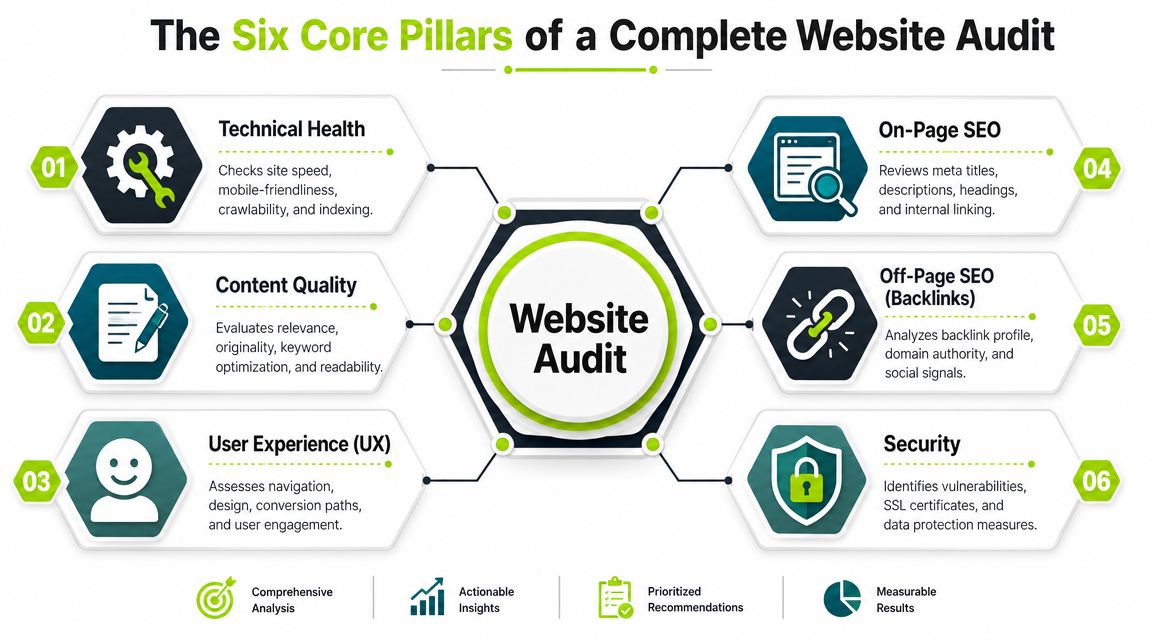
The Six Core Pillars of a Complete Website Audit
A complete audit works like a car inspection. You don't just look at the paintwork and call it roadworthy. You check the engine, brakes, tyres, electrics, and warning lights because each system affects the others.
A website works the same way. If one pillar is weak, the rest can't carry the load.
The six pillars in plain language
Here's the framework I use with teams.
| Audit Pillar | Primary Goal | Key Focus Areas |
|---|---|---|
| Technical Health | Make the site crawlable, indexable, and stable | Speed, sitemaps, redirects, broken links, mobile optimization, schema |
| On-Page SEO | Help search engines understand page purpose | Titles, headings, internal linking, metadata, URL structure |
| Content Quality | Make pages useful and relevant | Depth, clarity, freshness, search intent, duplication |
| User Experience | Reduce friction for visitors | Navigation, layout, readability, forms, conversion paths |
| Off-Page SEO | Understand authority and trust signals | Backlinks, brand mentions, link quality |
| Security | Protect users and maintain trust | HTTPS, vulnerabilities, access issues, data protection basics |
Technical health is the foundation
The nature of an audit often determines whether it becomes valuable or merely creates noise. A technical audit is not just a checklist of random issues. Elementor describes it as a crawl-and-indexability diagnostic focused on systems search engines rely on, including site speed, sitemaps, schema markup, mobile optimization, broken links, redirect chains, and missing title tags. It also explains why these findings matter. If crawlers hit slow responses, blocked resources, or broken internal links, crawl efficiency drops and updated content can be discovered more slowly, which can suppress search visibility. You can read that in Elementor's overview of what a technical website audit covers.
This is also where workflow matters. If you want a practical example of how teams move from issue lists to remediation, the technical site audit workflow shows the kind of sequence that helps prevent audits from dying in a spreadsheet.
The middle layers decide usefulness
Technical health makes a site accessible. It does not make it persuasive.
That's where on-page SEO, content quality, and UX come in. These pillars answer different questions:
- On-page SEO asks whether the page signals its topic clearly.
- Content quality asks whether the page solves the visitor's problem.
- UX asks whether the visitor can move through the page and take action without hesitation.
A common mistake is to merge all three into “content.” That hides the underlying issue. A page can have strong information but weak headings. It can have good headings but a poor layout. It can look clean but still fail because the copy never answers the query directly.
For additional process detail, I like insights from UFO Performance Marketing because they frame audits as an operational exercise rather than a theoretical one.
A quick walkthrough helps:
The pillar most teams still miss
The classic six-pillar model is useful, but modern audits need one more lens layered across the others. AI visibility.
That doesn't replace SEO. It changes how you evaluate clarity and extractability. If an answer engine or AI summary system lands on your page, can it identify the main answer fast? Can it separate definitions, steps, comparisons, and supporting detail? Can it quote or summarize the page cleanly without fighting messy structure?
That question now belongs inside a serious website audit, even if many older frameworks still leave it out.
A Simple Four-Step Website Audit Process
Many individuals get overwhelmed because they think an audit starts with tools. It doesn't. It starts with scope.
A manageable audit has four steps. Not twenty. Not an endless checklist copied from five blog posts. Four steps.
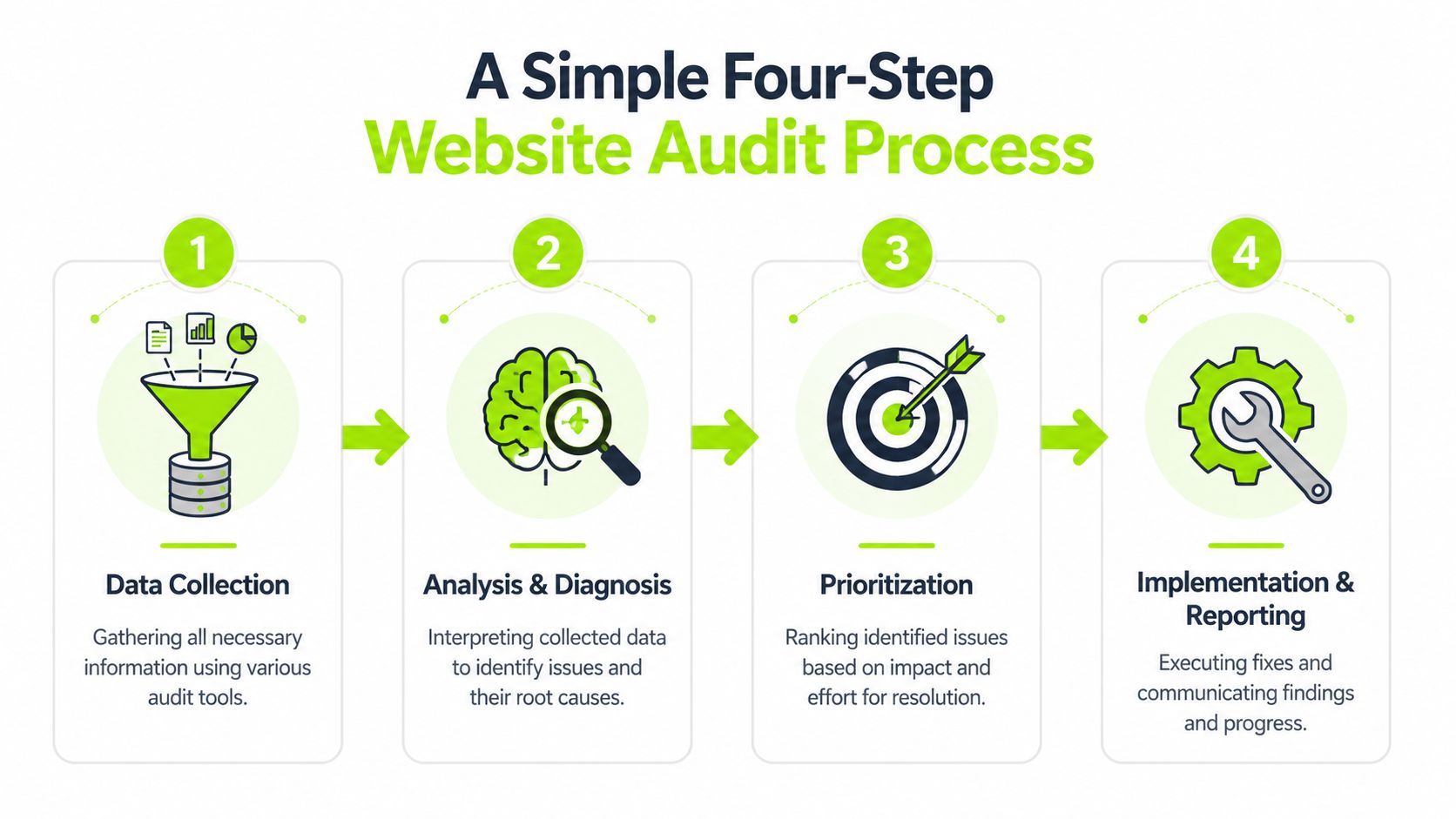
Step one defines what you're really auditing
Start with the business problem, not the tool stack.
If leads are down, your audit should focus heavily on conversion paths, page intent, and friction. If organic visibility is unstable, start with crawlability, indexing, internal linking, and content alignment. If stakeholders keep saying “the site feels slow,” don't run a broad brand review. Investigate performance first.
Write down a simple hypothesis before you touch a crawler. Examples:
- Traffic problem: Important pages may not be getting crawled or indexed properly.
- Conversion problem: Users may be dropping off because the pages are hard to use or trust.
- Discovery problem: Content may be hard for AI systems to summarize or cite.
That one move keeps the audit from turning into a warehouse of disconnected findings.
Step two gathers evidence from several angles
You pull data from crawlers, analytics, search data, and page-level reviews.
I usually break evidence collection into three buckets:
- Site-level signals: crawl issues, broken links, redirects, indexing patterns
- Page-level signals: titles, headings, content structure, template issues, CTAs
- User-level signals: engagement patterns, device experience, conversion flow friction
The biggest mistake here is relying on one source. A crawl tells you what exists. Analytics tells you what people do. Search data tells you what Google can or can't surface. You need all three to diagnose correctly.
If you want another practical checklist that leans into both performance and user experience, IMADO has a useful guide on a performance and UX website audit.
Don't collect data just because a tool can export it. Collect data that helps you confirm or reject your working hypothesis.
Step three looks for patterns, not isolated errors
Junior teams often get stuck. They come back with a list of issues, but no diagnosis.
An audit becomes useful when you connect findings. For example:
- Slow pages and weak mobile layouts often show up together.
- Thin content and poor ranking pages often share weak internal support.
- Strong pages that don't convert often have UX friction, unclear offers, or weak trust signals.
- Pages that are informative but hard to quote often bury the answer too deep or mix multiple intents on one URL.
A broken link matters. A pattern of broken internal navigation matters more. One missing title tag is a task. A template generating poor metadata across a section of the site is a systemic issue.
Step four turns diagnosis into an action plan
The final output shouldn't be a giant deck full of screenshots. It should be a ranked action plan with owners.
A strong audit report includes:
- What's wrong: the issue
- Why it matters: the business or visibility impact
- Where it appears: templates, folders, or page groups
- What to do next: the fix in plain language
- Who should own it: SEO, dev, content, design, analytics
That last point matters. Audits fail when findings are technically correct but operationally vague. If nobody owns the work, the audit becomes expensive documentation.
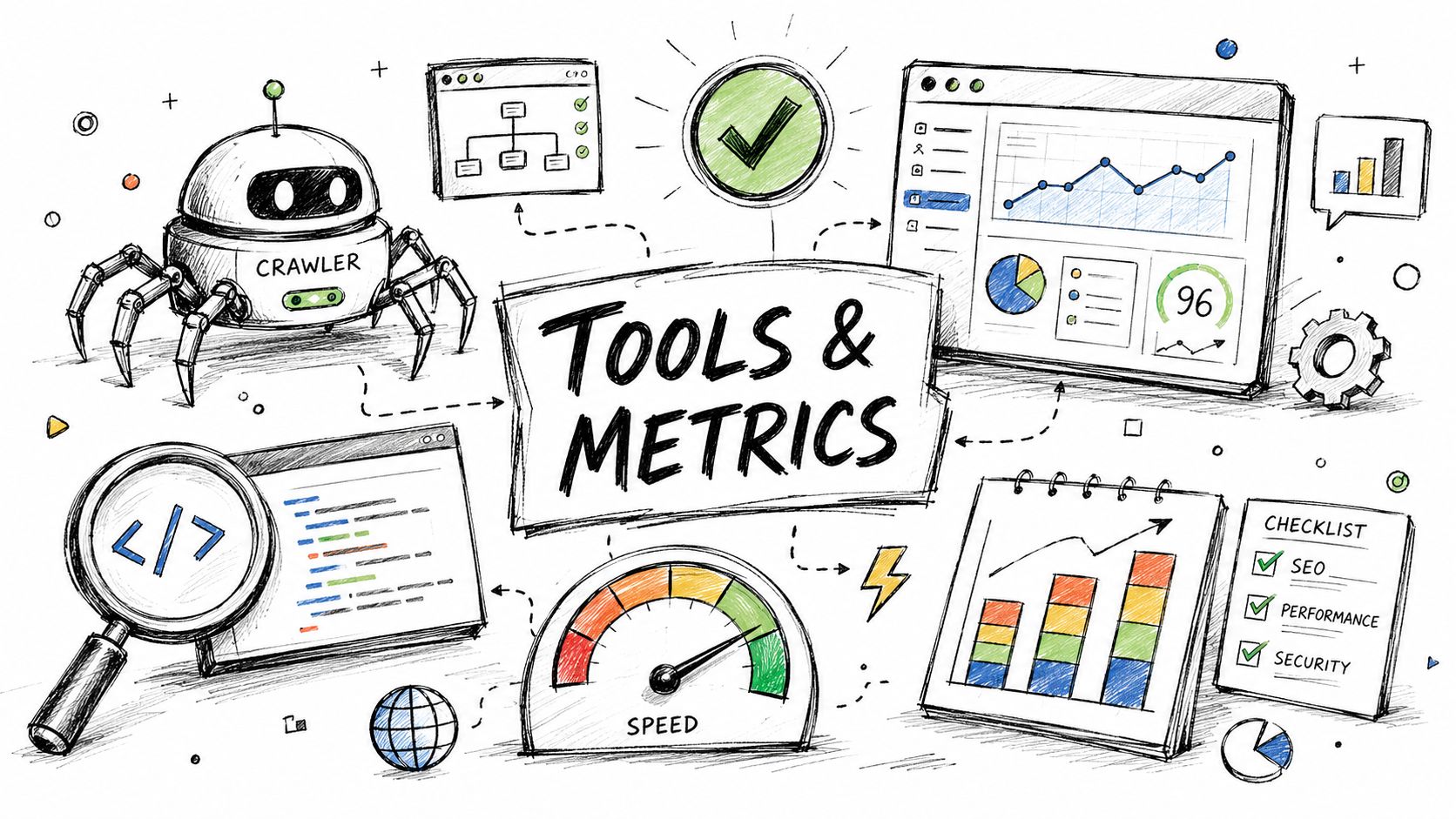
Essential Tools and Key Metrics for Your Audit
The right tool depends on the question you're trying to answer. That's the simplest way to think about audit tooling.
A crawler won't tell you why users hesitate. Analytics won't expose redirect chains clearly. A performance tester won't explain whether the page answers the query. Good audits combine tools by function.
Use crawlers to map the site
Start with a crawler such as Screaming Frog or Sitebulb. These tools are useful when you need to see the site as a search engine would see it.
They help surface things like:
- Broken internal links: pages that point users and crawlers into dead ends
- Redirect chains: sequences that waste crawl budget and create avoidable latency
- Missing or duplicate metadata: titles and descriptions that don't help page differentiation
- Orphaned pages: URLs with little or no internal support
This is your structural view. Without it, you're auditing blind.
Use search and analytics platforms to understand behaviour
Next, pair structural data with Google Search Console and Google Analytics 4.
Search Console is useful for understanding indexing status, search appearance, and query-to-page relationships. GA4 is useful for seeing which landing pages draw traffic and what users do after arrival. If a page attracts visits but produces no meaningful movement, you likely have a mismatch between traffic intent and page experience.
For teams that want a combined reporting layer rather than jumping between disconnected tools, platforms that organize audit data and visibility trends into one interface can reduce friction. If you're comparing options, this overview of SEO dashboard software is a practical place to see how reporting setups differ.
Use performance tools for page experience
When a page feels slow, use tools built for that job. Google PageSpeed Insights, Lighthouse, and WebPageTest are common choices.
Look at metrics such as:
| Tool Type | What It Helps You Measure | Why It Matters |
|---|---|---|
| Crawler | Crawl errors, links, metadata, indexability patterns | Reveals structural blockers |
| Analytics platform | Landing page behaviour, conversion paths, engagement signals | Shows where users struggle |
| Search platform | Query visibility, indexing, page discovery | Connects pages to search performance |
| Performance tester | Core Web Vitals, loading behaviour, rendering issues | Explains slow or unstable experiences |
The point isn't to admire the metrics. The point is to tie them to a decision. If a key commercial page has poor performance, weak structure, and a messy CTA path, that's not three separate notes. It's one priority problem.
Don't ignore AI visibility checks
This category is newer, but it belongs in a modern audit stack.
You should review whether important pages are easy to extract answers from. That means checking for clear headings, concise definitions, direct answers near the top, logical sections, and content that can be summarized without losing meaning. Tools can help track patterns, but a manual review still matters here because extractability is often obvious when you read a page with fresh eyes.
A page built only for keyword coverage often sounds complete to a marketer and incomplete to an AI system trying to quote it.
One mention is enough here: Surnex combines site audits, rankings, backlinks, and AI visibility tracking in one platform, which is useful for teams that need to monitor both traditional search and emerging AI discovery without spreading work across several dashboards.
How to Prioritize Your Audit Findings
A real audit can produce a long list of issues. That's normal. The hard part isn't finding problems. It's deciding which ones deserve attention first.
A common reason for shortcomings here is prioritizing based on immediate annoyances rather than overall impact.
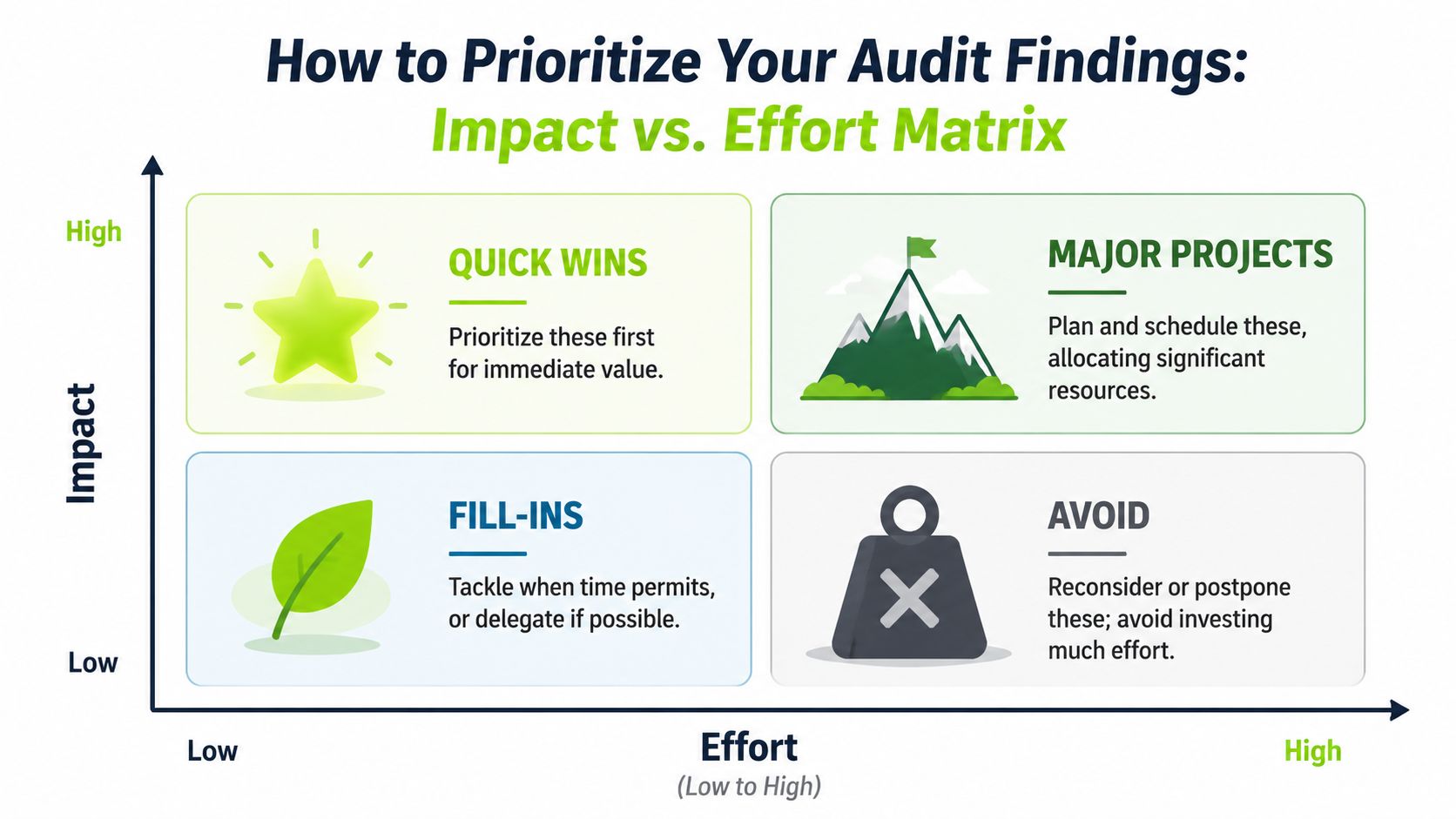
That's how you end up spending days polishing tiny metadata issues while a broken conversion path sits untouched. A better method is the Impact vs. Effort matrix.
The four quadrants that keep teams honest
Use a simple grid:
| Impact | Effort | What to Do |
|---|---|---|
| High | Low | Do these first |
| High | High | Plan these as projects |
| Low | Low | Fit them in when useful |
| Low | High | Delay or reject |
This works because it forces trade-offs into the open. Every audit issue sounds important when it's written in a report. The matrix asks a tougher question. Will fixing this materially improve visibility, usability, or conversions, and what will it cost the team to implement?
What belongs in each category
Here's how this often plays out in practice:
- Quick wins: fixing broken internal links, updating missing titles on important pages, repairing obvious redirect mistakes, clarifying a key CTA
- Major projects: rebuilding a weak site architecture, redesigning a conversion funnel, overhauling a slow template, consolidating thin content across a large section
- Fill-ins: minor copy edits on low-priority pages, small image alt text cleanups where no larger issue exists
- Avoid for now: anything time-heavy with little likely upside, especially if it only satisfies internal preference
If your team needs a practical companion to this way of thinking, these notes on SEO quick wins align well with the “high impact, low effort” side of the matrix.
Why AI citation-readiness now belongs near the top
One area deserves higher priority than many teams currently give it. AI visibility and citation-readiness.
As explained in GeeksforGeeks' discussion of modern website audits, a major underserved angle is whether an audit includes AI visibility alongside classic SEO, performance, and UX. The useful distinction is that pages now need to be not only rankable, but also retrievable and quotable in AI-driven discovery. If your content is hard to extract, hard to summarize, or written without clear answer structures, you can miss visibility even when the page is otherwise solid.
That's why I now treat many AI-readiness fixes as high-impact work, especially on pages that define products, services, comparisons, and category-level topics.
If a page can't state its core answer clearly, both users and AI systems struggle with it. One problem hurts two channels.
Good prioritization is blunt
A tidy spreadsheet full of equal-priority issues is not prioritization. It's avoidance.
Strong teams make uncomfortable decisions. They accept that some issues can wait. They protect developer time for structural problems. They give content teams a short list of pages that matter most. And they recognise that visibility is no longer just about ten blue links. It's also about whether your pages can be understood and cited in emerging search environments.
Turning Your Audit into a Continuous Strategy
The worst way to run a website audit is as a one-off clean-up project that gets filed away for next year.
That approach creates a predictable cycle. Teams ignore small issues, let them accumulate, run a large audit, fix part of it, then drift back into reactive mode. It feels productive, but it doesn't build control.
According to Tracking Plan's view of website audits, audits should be treated as an ongoing risk-reduction process. That includes regular checks of crawl errors, Core Web Vitals, tracking tags, and mobile responsiveness. The same source notes that audits should run at least annually, and more often, such as biannually or quarterly, depending on site size and capacity. That shift matters because site health changes continuously. New pages get published. templates change. scripts get added. migrations happen. tracking breaks.
The operating model that works better
A continuous strategy usually looks like this:
- Quarterly technical reviews: catch crawl, indexing, speed, and tracking issues before they spread
- Regular content reviews: update weak pages, merge overlap, improve structure, refresh intent alignment
- Ongoing UX checks: test forms, key journeys, mobile interactions, and friction in high-value paths
- Recurring AI visibility reviews: inspect whether important pages remain clear, extractable, and citation-ready
This doesn't mean running a massive audit every few weeks. It means turning the audit into a maintenance system.
What changes when you work this way
Teams make better decisions because they compare trends over time instead of reacting to isolated snapshots. They also stop treating every issue like an emergency. If you know what you monitor regularly, you can distinguish between a real problem and normal fluctuation.
That's especially important now that search performance spans both traditional rankings and AI-mediated discovery. You need a workflow that can track site health, report changes, and keep owners accountable. If you're building a repeatable reporting process, this guide to an SEO audit report format is a useful reference for keeping audits actionable instead of bloated.
A website audit should leave your site healthier. A continuous audit strategy keeps it that way.
If you need one place to monitor technical issues, SEO performance, and AI visibility without juggling several disconnected tools, Surnex is built for that workflow. It gives agencies, in-house teams, and developers a clearer view of how pages perform across traditional search and emerging AI discovery, so audit findings are easier to track, prioritize, and report over time.