A client page is stuck in position five. The title is solid, the intent match is close, and the content is better than what sits above it. Yet a competitor keeps winning. In practice, that usually means there’s an advantage you can’t see in the SERP snippet.
A lot of the time, that advantage is the link profile around the page. Sometimes it’s external links from relevant sites. Sometimes it’s a stronger internal path that makes the page easier to find, crawl, and prioritize. Sometimes it’s both.
Knowing how to find pages that link to a page is one of those skills that separates surface-level SEO from diagnostic SEO. It helps you answer the useful questions fast. Why is this competitor hard to dislodge? Which pages on our site are carrying authority? Which content pieces attract links naturally? Which target pages are under-supported? And which workflows should stay manual versus move into an API or dashboard?
Why Finding Linking Pages is a Core SEO Skill
When a page performs better than expected, link analysis usually explains part of the gap. That applies to both external links that build authority and internal links that shape discovery and equity flow inside a site.
For a new hire, I frame it this way. If you can’t trace which pages link into a target URL, you can’t explain ranking durability with much confidence. You’re left guessing whether the problem is content quality, authority, crawlability, or simple lack of support from the rest of the site.
There are two separate jobs here:
- External link analysis tells you who on the web is endorsing a page, which pages attract links naturally, and how a competitor built authority.
- Internal link analysis tells you how your own site routes relevance and crawl access toward key pages.
That distinction matters because the tool choice changes with the job. A free report in Search Console is great for a quick check on your own site. A crawler is better for architectural work. A backlink suite is what you use when a client asks why a competitor ranks above them. An API is what you use when the same question appears across dozens of accounts every month.
Practical rule: Don’t start with a tool. Start with the decision you need to make.
If the decision is “which content asset should we promote again,” you want top-linked pages. If the decision is “why is this money page weak,” you want internal inlinks and crawl depth. If the decision is “how many links are we realistically competing against,” you want competitor page-level backlink benchmarks.
Teams that manage this well usually stop treating links as a monthly report line item. They treat them as operational intelligence. That’s also why platforms that combine backlink and search context are useful in day-to-day work, such as Surnex domain overview, where link data sits alongside broader visibility signals instead of living in a separate workflow.
Free Methods for Quick Link Discovery
Free methods won’t give you a complete market view, but they’re good enough for first-pass diagnostics. They help you confirm whether a page has support, spot obvious gaps, and decide if a deeper paid analysis is worth the time.
Use Google Search Console for your own site
For your own domain, Google Search Console is the first place to look. It’s direct, free, and tied to how Google sees your site.
According to SE Ranking’s explanation of backlink discovery, Google Search Console offers Internal Links Reports under “Top internally-linked pages”, listing URLs linked most within a site, and External Links Reports under “Top linked pages – externally”, showing total external links and top linking sites. That same source notes that backlink discovery moved from manual checks to automated workflows after Google’s 2005 nofollow introduction, which reduced spam by 30-50% in link graphs per industry estimates.
Use it in two passes.
First, check internal support for a target URL:
- Open the site property in Search Console.
- Go to the Links report.
- Review Top internally-linked pages.
- Click the page you care about.
- Review which internal pages link to it.
Then check external support:
- Stay in the same Links area.
- Review Top linked pages – externally.
- Click into the target URL.
- Look at top linking sites and whether the linking pattern looks relevant or random.
This is enough to answer a lot of practical questions. Does the page get any meaningful internal support? Is one blog post carrying most of the internal weight? Did a page attract links naturally from outside the domain, or is it mostly invisible?
What Search Console is good at and where it stops
Search Console is strongest when the target is your own site. It’s reliable for validating whether a page is structurally supported and whether Google recognizes external links to it.
It’s weak when you need competitor intelligence. You also won’t get the broader prospecting workflows that dedicated backlink tools offer.
Use it for:
- Quick validation: Confirm whether a page has internal and external support before opening heavier tools.
- Internal cleanup: Spot pages that should be linked more often from relevant content.
- Client sanity checks: Verify whether a “we built links to this page” claim shows up in Google’s reporting.
Avoid using it as your only source when the brief is competitive analysis. That’s not its job.
Use search engines to find mentions and loose references
The old link: operator isn’t the answer anymore. For quick discovery, quoted URL searches and brand-plus-URL searches can still surface pages that mention a target page or reference it indirectly.
Useful patterns include:
- Quoted full URL: Search the full target URL in quotation marks.
- Quoted path: Search a shorter page path in quotation marks when sites strip protocols or tracking parameters.
- Brand plus topic plus page name: Useful when the page is cited without the exact URL.
This won’t return a clean backlink database. It does help with real tasks such as finding copied references, syndicated mentions, resource page inclusions, or pages that cite a report but don’t link in a standard way.
Don’t confuse discovery with confirmation. A search result can reveal a mention. It doesn’t prove the page passes value or even contains a live link.
That’s where manual validation matters. Open the result. Check if the page is indexed. Confirm whether the link exists and whether it’s visible in rendered HTML.
Use Bing Webmaster Tools when available
Bing Webmaster Tools is underused in agency workflows. It won’t replace a dedicated backlink platform, but it gives another free perspective on your site’s link profile.
I treat it as a secondary check, especially when:
- Search Console access is delayed
- the client has patchy setup across Google properties
- I want another free source before escalating to a paid crawl or backlink suite
If two free sources both show weak support for a page, that’s usually enough to prioritize a deeper review.
A short walkthrough helps if you want to see the Search Console workflow in action:
A practical free-tool triage workflow
For new team members, I usually suggest this order:
| Method | Best use | What you learn fast | Main drawback |
|---|---|---|---|
| Google Search Console | Your own site | Internal support and known external links | No competitor view |
| Quoted URL search | Quick mention hunting | Whether a page is cited or referenced publicly | Incomplete and noisy |
| Bing Webmaster Tools | Secondary site check | Another free signal on backlink presence | Limited compared with paid suites |
If the page clearly lacks internal support, fix that first. If internal support looks healthy but the page still trails competitors, that’s the signal to move into competitive backlink analysis.
Using Site Crawlers for Internal Link Audits
A backlink report tells you how the web links to a page. A crawler tells you how your own site does it. The significance of that difference is often underestimated.
I explain internal linking to new hires like a building’s hallways. The homepage, category pages, and strong blog posts are the main corridors. If an important page sits behind too many turns, or no hallway leads to it at all, people and crawlers will reach it less often.
Why crawl depth changes outcomes
Crawl depth is the number of clicks from the homepage to a page. According to SEO Site Checkup’s internal linking guidance, crawl depth directly impacts indexation likelihood, and practitioners use InLink Rank and a page’s Inlinks tab inside auditing tools to route link equity more deliberately.
That gives you the primary purpose of this audit. You’re not collecting internal links for the sake of reporting. You’re checking whether the site is making its important pages easy to reach and easy to prioritize.
How to pull inlinks for a target page
Use a crawler such as Screaming Frog, Sitebulb, or a cloud crawler with page-level inlink reporting.
The workflow is simple:
- Crawl the full site.
- Find the target page in the page list.
- Open the Inlinks view or equivalent.
- Export the list of internal pages linking to that URL.
- Review anchor text, link location, and source page strength.
That export becomes useful quickly. You can sort linking pages by traffic proxies, internal prominence, or content relevance. Then you can decide whether the target page is getting support from meaningful pages or just from template clutter.
What to look for in the export
Most internal link reports are noisy until you separate signal from structure.
Check for these patterns:
- Template-heavy support: The page gets linked from navigation, footer, or boilerplate only.
- Weak contextual support: Few editorial links from relevant articles or category hubs.
- Orphan risk: The page has very few internal links, or none from pages crawlers reach early.
- Misaligned anchors: Links exist, but anchor text gives weak topical cues.
- Equity bottlenecks: Strong pages aren’t linking to commercially important URLs they could support.
A page can have many internal links and still be under-supported if those links come from low-value locations.
That’s the trade-off many teams miss. Link count alone doesn’t tell you whether the architecture is helping.
Internal audit decisions that actually matter
When the crawl is done, the next action usually falls into one of three buckets.
The first is recovery. A key page has poor internal support, so you add contextual links from relevant high-authority articles, guides, hub pages, or category pages.
The second is rebalancing. A page already has a lot of internal links, but they’re scattered across low-value placements. In that case, trimming noise and adding fewer contextual links from stronger pages often helps more than adding another batch of random links.
The third is cluster design. A content area exists, but the pages don’t reinforce each other. That’s where content cluster mapping helps. Pillar pages should receive support from closely related subtopic pages, and those subtopic pages should link back with descriptive anchors.
If you need a repeatable process for this kind of work, an internal workflow like technical site audit operations keeps link architecture from becoming an afterthought during broader audits.
What doesn’t work in internal link audits
Three habits waste time fast.
- Counting every internal link equally: A contextual link in a relevant article and a footer sitewide link don’t do the same job.
- Forcing links into unrelated pages: Internal linking should reinforce topic relationships, not create them artificially.
- Auditing only orphan pages: Some pages aren’t orphaned. They’re just buried too deep or linked from weak parts of the site.
A solid internal audit isn’t about making every page “more linked.” It’s about making the right pages easier to reach from the right places.
Advanced Backlink Analysis with Third-Party Tools
When the question shifts from “does this page have links?” to “why does this competitor keep winning?”, free tools stop being enough. That is when third-party platforms earn their cost.
What you need at this stage is breadth, filtering, and page-level competitive context. You’re no longer checking whether links exist. You’re trying to understand what kind of pages attract them, how strong those linking domains are, and how far behind your target page is.
What these tools are for
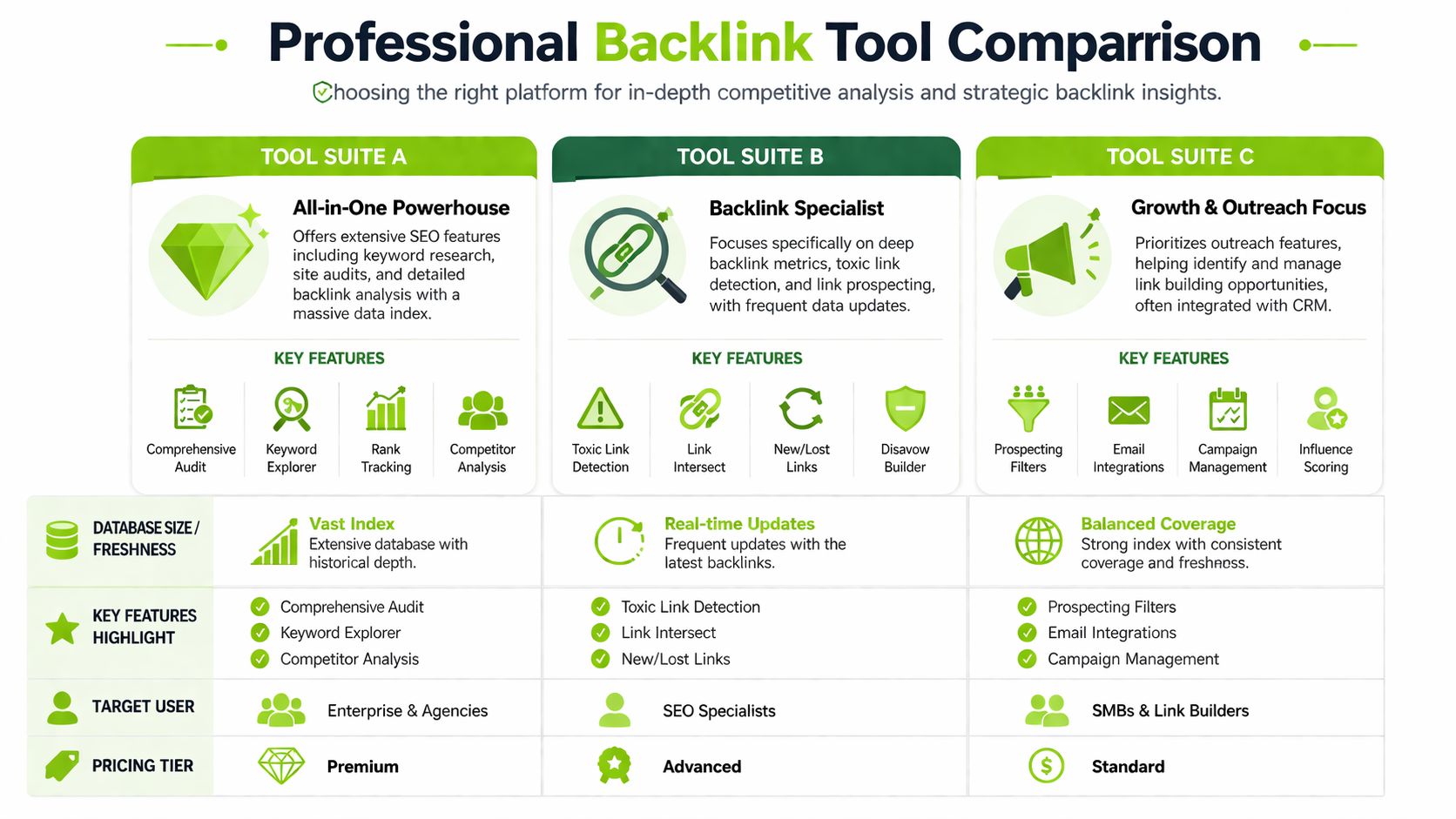
Ahrefs, Semrush, Moz, and Majestic all solve roughly the same core problem. You enter a page or domain and inspect who links to it. The difference is in workflow emphasis.
- Ahrefs is often the fastest route to page-level backlink inspection, competitor top pages, and broken link opportunity research.
- Semrush is useful when link analysis needs to sit alongside broader campaign reporting and outreach workflows.
- Moz is accessible for teams that want cleaner metric layers without as much interface depth.
- Majestic is still useful when you care about link graph patterns and specialized backlink metrics.
For agency work, the right choice usually depends less on brand loyalty and more on the type of analysis you repeat every week.
How to benchmark a page against the SERP
A useful benchmark starts at the page level, not the domain level.
According to Get AIrefs on finding pages that link to a page, top-ranking pages on Google have 3.8 times more backlinks than pages ranking in positions 2 through 10. The same source recommends identifying the top 3-5 competing pages, documenting backlinks and referring domains for each, and using the average as a baseline target.
That’s the method I’d hand to any new analyst:
- Search the target keyword.
- Pull the top competing pages, excluding obvious publisher outliers if they rank mostly on domain authority.
- Run each page through your backlink tool.
- Record backlinks, referring domains, and notable link types.
- Compare the average against your target page.
That process does two things well. It stops vague conversations about “needing more links,” and it gives clients a benchmark rooted in pages they’re competing with.
Comparison of Link Finding Methods
| Method | Best For | Data Scope | Cost | Key Limitation |
|---|---|---|---|---|
| Google Search Console | Validating links to your own site | Internal and external data Google reports for your property | Free | No competitor visibility |
| Site crawler | Internal architecture review | Internal links on your own domain | Paid or freemium, depending on crawler | No off-site backlink intelligence |
| Ahrefs or similar backlink suite | Competitor and page-level backlink analysis | External links across large web indexes | Paid | Metrics vary by provider and need interpretation |
| API-driven stack | Ongoing monitoring across many pages or clients | Depends on provider and integration design | Paid plus implementation time | Requires technical setup |
What to extract beyond raw counts
A backlink export gets useful when you stop staring at totals and start classifying patterns.
Look for:
- Content type patterns: statistics pages, tools, glossaries, original research, guides
- Link context: editorial mention, resource page, directory, citation, forum mention
- Anchor text mix: branded, topical, navigational, raw URL
- Link freshness: whether links are still being earned or mostly historical
- Broken opportunities: competitor pages that gained links and now return errors
This is also the point where one product mention makes sense. If your team wants page-level backlink review with new and lost link monitoring in the same environment as other SEO workflows, Surnex backlinks is one option alongside the established backlink suites above.
When a page earns links repeatedly, don’t just copy the links. Study the asset type that made people link in the first place.
That distinction changes strategy. If a competitor’s guide has a few nice placements, outreach replication may work. If their links cluster around a data asset or stats page, you’re dealing with a content format advantage, not just an outreach advantage.
What works and what doesn’t in third-party analysis
What works:
- comparing page to page, not only domain to domain
- excluding obvious news and publisher outliers when they distort the benchmark
- checking referring domains alongside total backlinks
- reviewing broken competitor URLs for reclamation-style opportunities
What doesn’t:
- using one metric like DR or DA as the whole story
- treating all referring domains as equally relevant
- pulling a giant link export with no classification plan
- promising clients a target number without looking at the current SERP
The tools are excellent at finding pages that link to a page. They are not excellent at deciding what those links mean. That’s still your job.
Automating Link Discovery with APIs
Manual backlink checks break down fast once you manage multiple clients, multiple markets, or a large site with many important URLs. The bottleneck isn’t finding data once. It’s keeping analysis current without turning it into a recurring spreadsheet project.
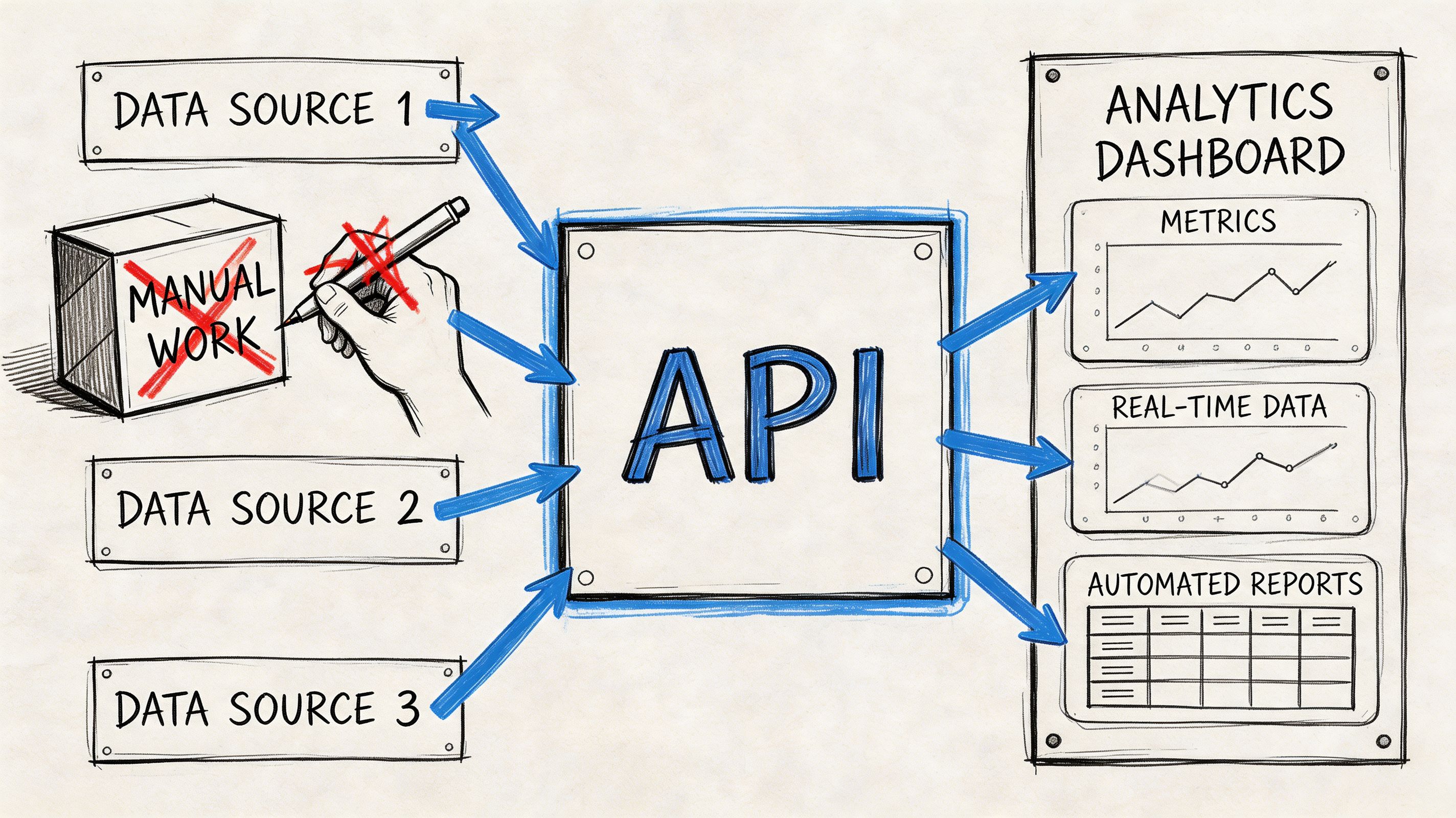
That’s where APIs matter. They let you query backlink providers programmatically, store results, compare snapshots, and trigger alerts when something important changes.
Why automation is worth the effort
According to the verified data tied to Wikipedia pageview statistics, tools like Ahrefs index over 30 trillion links, and their APIs enable scalable analysis. That same verified data states that agencies can see 40% efficiency gains in client reporting when backlink data is unified with other SEO metrics in a single dashboard.
That’s the business case in plain terms. Automation reduces repeated manual lookups and makes backlink review part of a system instead of a monthly fire drill.
Use API workflows when you need to:
- monitor new and lost links for priority pages
- benchmark competitor link growth over time
- enrich internal dashboards with backlink data
- trigger alerts when a high-value page loses support
- feed downstream reporting, scoring, or outreach systems
A practical monitoring workflow
The simplest useful automation monitors a short list of strategic URLs. That might be service pages, linkable assets, category pages, or the pages clients care about most.
A lightweight workflow looks like this:
- Maintain a list of tracked URLs and competitor equivalents.
- Query a backlink API on a schedule.
- Normalize the response into your schema.
- Flag new, lost, or changed links.
- Score for relevance and priority.
- Push alerts to email, Slack, or your reporting dashboard.
You don’t need a perfect scoring model to make this worthwhile. Even a basic “new referring domain to competitor money page” alert gives analysts something timely to investigate.
Python example for recurring backlink checks
Below is a simple pattern. It’s intentionally generic because each provider structures endpoints differently, but the workflow stays the same.
import csv
import requests
from datetime import date

API_KEY = "your_api_key"
TARGETS = [
    {"label": "client_service_page", "url": "https://example.com/service-page"},
    {"label": "competitor_page", "url": "https://competitor.com/service-page"}
]

def fetch_backlinks(target_url):
    endpoint = "https://api.provider.com/backlinks"
    params = {
        "target": target_url,
        "mode": "exact",
        "limit": 1000,
        "api_key": API_KEY
    }
    response = requests.get(endpoint, params=params, timeout=30)
    response.raise_for_status()
    return response.json().get("results", [])

def filter_high_value(rows):
    filtered = []
    for row in rows:
        source_url = row.get("source_url", "")
        anchor = row.get("anchor", "")
        rel = row.get("rel", "")
        if source_url and rel != "nofollow":
            filtered.append({
                "source_url": source_url,
                "target_url": row.get("target_url", ""),
                "anchor": anchor,
                "rel": rel,
                "first_seen": row.get("first_seen", "")
            })
    return filtered

today = str(date.today())
outfile = f"backlink_snapshot_{today}.csv"

with open(outfile, "w", newline="", encoding="utf-8") as f:
    writer = csv.DictWriter(
        f,
        fieldnames=["label", "source_url", "target_url", "anchor", "rel", "first_seen"]
    )
    writer.writeheader()

    for target in TARGETS:
        raw_rows = fetch_backlinks(target["url"])
        clean_rows = filter_high_value(raw_rows)

        for row in clean_rows:
            row["label"] = target["label"]
            writer.writerow(row)
This is enough to create daily or weekly snapshots. From there, compare current rows against the previous run to detect new and lost links.
What to automate first
Don’t automate everything at once. Start with workflows that remove repetitive labor and create faster decisions.
Good first candidates:
- Priority-page monitoring: Check whether key commercial pages gained or lost referring domains.
- Competitor watchlists: Track a small group of pages that compete directly with your core targets.
- Broken-link detection: Flag linked pages that now return errors so the team can reclaim value.
- Dashboard enrichment: Blend backlinks, rankings, and page-level notes into one client-facing view.
A useful adjacent idea is combining backlink events with external trend signals. For teams doing outreach or prospecting, Twitter Trend API for lead generation is a practical reference for how trend data can feed a broader acquisition workflow when you want link targets tied to emerging topics rather than static lists.
Automate repeated collection first. Automate judgment later.
That order matters. It’s much easier to trust a system that gathers consistent backlink data than one that tries to classify every link perfectly from day one.
Common API mistakes
Three things usually cause these projects to stall:
- Pulling too much data too early: Start with exact-page targets, not entire domains and every possible endpoint.
- Skipping normalization: Different providers label link attributes differently. Clean the schema before anyone builds reports on top of it.
- No alert threshold: If every new link creates a notification, people ignore the feed.
The best automation setups feel quiet until something changes that deserves attention.
Turning Link Data into Actionable Strategy
Finding links is the easy part. Deciding what to do with them is where many operations slow down.
The first step is validation. Check whether the linking page is indexed, whether the link is live, whether it appears in a meaningful context, and whether it points to the page you want to strengthen. Then ask a harder question: does this link improve the page’s competitive position, or is it just another row in a report?
Evaluate quality before quantity
The biggest strategic gap in this work is the trade-off between link quality and quantity. Verified guidance from Xamsor on finding pages linking to a page notes that tools can locate links but rarely tell you when a page is over-linked, diluting authority, versus supported by a smaller number of stronger internal sources.
That applies to external links too. A handful of relevant, editorially placed links can matter more than a long list of weak placements. The same logic works internally. Fifty sitewide links don’t automatically beat a few strong contextual ones from pages that already carry attention and trust.
Turn findings into workstreams
Once you’ve reviewed the links, route them into clear actions:
- Reclaim: Recover value from broken target URLs, removed links, or pages that should redirect to the right destination.
- Reinforce: Add internal contextual links from relevant pages that already have visibility and authority.
- Replicate: Review competitor referring pages and identify placements your team can realistically earn too.
- Rebuild: If competitors win links because of asset type, create a better tool, data page, guide, or reference resource.
- Review regularly: Keep a recurring review cycle so losses, gains, and anomalies don’t sit unnoticed.
For the competitive side, it helps to think in a structured way about rival analysis criteria. A practical companion resource on understanding competitive parameters is useful because it pushes the analysis beyond “who has more links?” and toward “which competitive variables explain the gap?”
Build a review system, not a one-off audit
The teams that get the most value from link data don’t treat it as a campaign artifact. They treat it as an ongoing review process tied to rankings, content performance, and technical health.
That means maintaining a repeatable queue:
- pages losing key links
- pages with weak internal support
- competitor pages earning links consistently
- broken opportunities worth reclaiming
- outreach prospects mapped to specific target URLs
If you want that process formalized, backlink review and opportunity workflows are the kind of operating layer that keeps link analysis connected to actual tasks instead of stranded in exports.
Strong link strategy is usually less about finding more links and more about making better decisions with the ones you can already see.
Surnex fits teams that want AI visibility tracking, backlinks, audits, and search reporting in one place instead of spread across separate tools. If you’re trying to reduce tool sprawl while keeping link analysis tied to modern search workflows, Surnex is worth a look.