How long can a URL be before it becomes a problem?
That sounds like a simple technical question. It isn't. Teams usually want one safe number, but URL length works like a chain of limits. A browser may accept the URL, a server may reject it, a proxy may truncate it, and a crawler may handle it differently depending on how the URL is generated and served.
That matters for more than engineering hygiene. Long URLs can break sharing, trigger request errors, create duplicate versions through parameters, and make already messy crawl paths even harder to debug. They can also reduce clarity in places where people and machines both need fast context, including search results, analytics tools, and AI-driven discovery experiences.
The practical goal isn't finding a mythical universal maximum. It's figuring out which system in your stack is most likely to fail first, then designing URLs that stay well inside that boundary.
The Right Question About URL Length
Many ask, “What's the maximum URL length?”
A better question is: What is the first system in my URL's journey that's likely to break?
That shift changes how you solve the problem. If you're only thinking about a browser, you may miss the reverse proxy or web server. If you're only thinking about crawling, you may miss what happens when marketers append tracking parameters to already long faceted URLs. If you're only thinking about SEO, you may overlook the simple fact that users trust short, readable URLs more than bloated ones.
Think in terms of a chain
A URL doesn't live in one place. It moves through several layers:
- The browser accepts, displays, and sends it.
- Intermediary systems such as proxies, CDNs, or app layers may inspect it.
- The server decides whether the request line is acceptable.
- Search engines and crawlers need to fetch and interpret it.
- Analytics and reporting tools may create more variants through parameters.
Any one of those can become the weak link.
Practical rule: A URL that works in one test environment isn't automatically safe in production.
This is why “keep URLs short” is common advice, but not very useful on its own. Short for what? A product page slug? A filtered category? A campaign landing page with tracking? An API request with a huge query string? The risk changes by use case.
Why marketers and developers both need to care
For marketers, long URLs often show up as ugly parameter-heavy pages, duplicate paths, and campaign links that become hard to share or audit.
For developers, the same issue appears as request-line failures, brittle routing, and app states stuffed into GET parameters when they should have been sent in the request body.
When these teams treat URL length as a shared constraint instead of an isolated bug, decisions improve fast. Slugs get cleaner. Parameters get controlled. Routing becomes more predictable. Crawl paths become easier to test.
Why There Is No Single URL Length Limit
The idea of a universal URL cap sounds tidy. The web doesn't work that way.
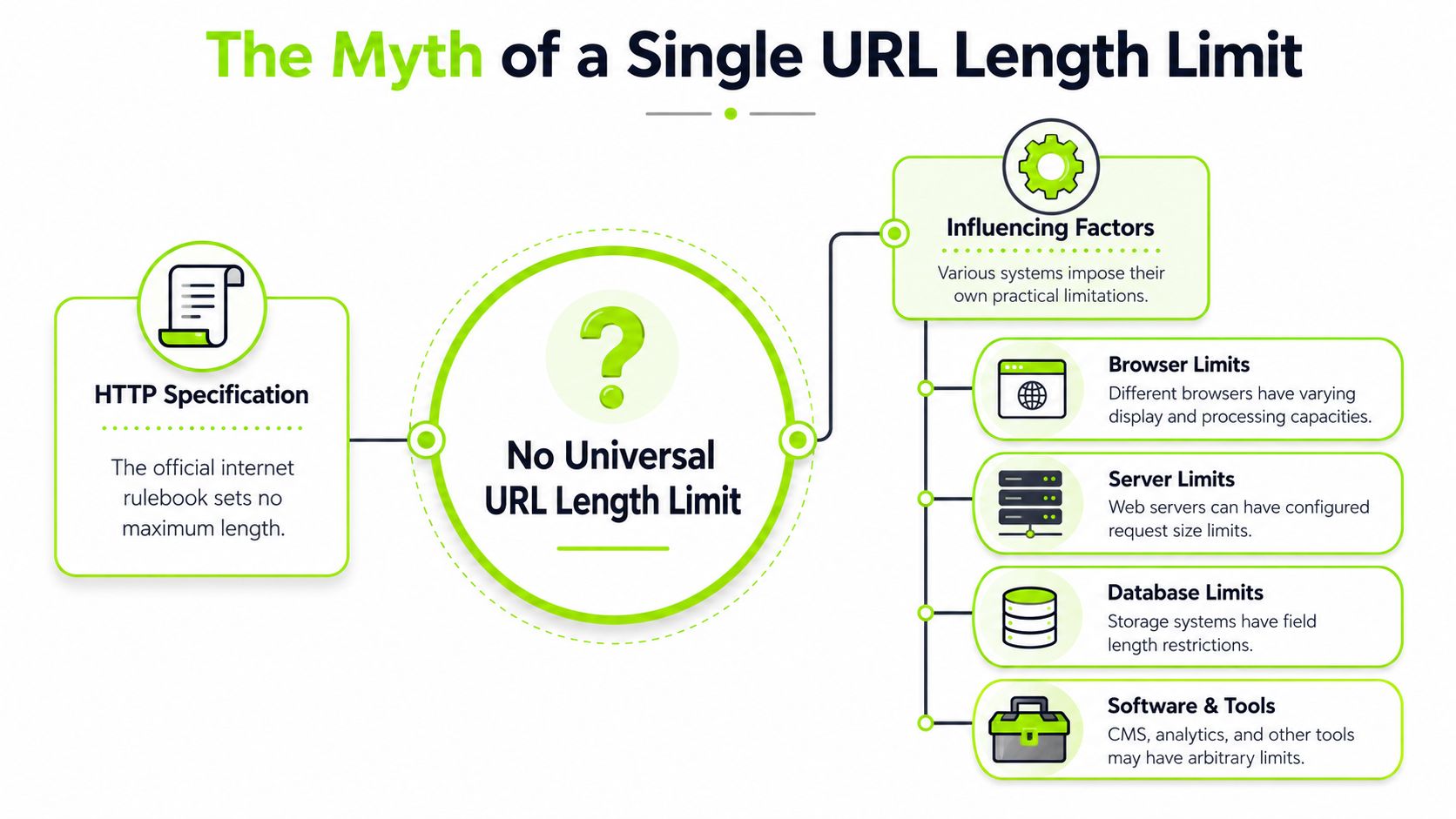
The first reason is simple: the HTTP specification doesn't define a hard maximum URL length. In practice, the limits come from software implementations such as browsers, intermediary systems, and server configuration. Chromium's own documentation notes a 2 MB practical URL cap for inter-process communication and says the omnibox display is limited to 32 kB on most platforms, which shows how a URL can be technically accepted in one place and still be constrained in another (Chromium URL display guidelines).
The spec isn't the bottleneck
Teams often get tripped up. They hear that HTTP doesn't set a hard limit and assume long URLs are safe. That conclusion skips the systems that handle the request.
A useful analogy is parcel delivery. The official network may not forbid a large package, but the van, sorting center, and mailbox each have their own limits. URLs behave the same way. The protocol isn't the only thing that matters. The software touching the URL is what decides whether the request survives intact.
Different layers fail in different ways
One layer may reject the request outright. Another may display only part of it. Another may pass it through but log it poorly, making debugging painful. That's why a URL can seem “fine” in a browser test and still fail in production traffic.
Watch for these differences:
- Display limits affect what users and teams can see in the browser UI.
- Transport limits affect whether the request is sent and processed correctly.
- Configuration limits affect whether your own infrastructure accepts the request.
- Tooling limits affect how cleanly data is tracked, grouped, and audited.
A long URL isn't just one object. It's a string that every system in the request path has to tolerate.
The practical takeaway is that there's no single answer because there isn't a single gatekeeper. There are several. That's why experienced teams stop asking for one magic number and start mapping the request path instead.
Real-World Limits in Browsers and Servers
Once you move from theory to implementation, the safe range gets narrower.
A widely cited practical benchmark is about 2,048 characters in Chrome's address bar, while Firefox is commonly documented around 65,536 characters and Safari around 80,000 characters. Older Internet Explorer behavior is often cited at 2,083 characters. On the server side, many environments still use an 8,190 to 8,192 byte request-line limit, which is one reason URLs above roughly 2,000 characters are treated as risky for broad compatibility (browser and server URL length guide).
Practical URL Length Limits by System
| System | Common Limit (Characters) | Notes |
|---|---|---|
| Chrome address bar | 2,048 | Common practical benchmark in address-bar contexts |
| Firefox | 65,536 | Often documented with a much higher tolerance |
| Safari | 80,000 | Commonly documented higher than Chrome |
| Internet Explorer | 2,083 | Legacy behavior still influences conservative guidance |
| Many server request lines | 8,190 to 8,192 bytes | Server-side handling can fail before modern browsers do |
Why the safe benchmark is lower than the biggest number
A lot of teams see the Firefox or Safari numbers and assume they can safely generate very long URLs. That's the wrong lesson. The largest documented browser tolerance doesn't define the operational standard.
The effective standard is set by the weakest compatibility point in the chain. For many sites, that isn't a modern browser. It's the web server, reverse proxy, CDN rule, app framework, or an older client environment still present in the traffic mix.
If you manage large sites, this also affects discovery work. During crawls and URL exports, parameter-heavy variants can balloon quickly, especially on internal search, faceted navigation, and filtered listing pages. That's one reason teams auditing site architecture often start with a full URL inventory, not just a page template review. A practical method is outlined in this guide on getting all pages of a website.
What actually breaks in production
Long URLs usually don't fail elegantly. Common symptoms include:
- Rejected requests because the request line exceeds what the server accepts.
- Broken sharing when long query strings are wrapped, truncated, or copied badly.
- Logging issues when tools don't present the full path clearly.
- Testing blind spots because a browser accepted the URL even though another layer won't.
When teams want one operational rule, I usually keep it simple: if a production URL is drifting toward the upper compatibility range, treat that as a design problem, not a formatting quirk.
How URL Length Impacts SEO and AI Visibility
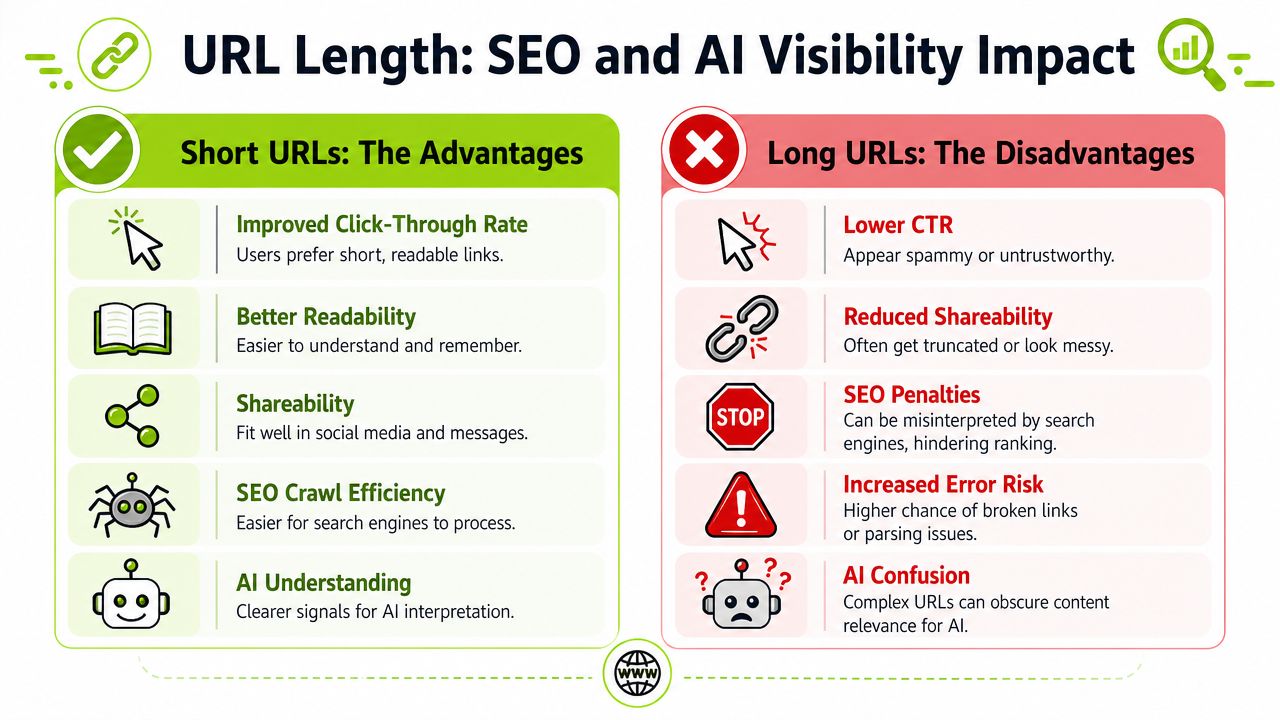
Long URLs don't usually hurt because of a single ranking penalty. They hurt because they create friction across crawlability, trust, maintenance, and interpretation.
Industry guidance commonly says most search engines accept URLs in the 2,000 to 2,500 character range, while web development references emphasize that staying under 2,000 characters improves the odds that URLs will work across browsers, proxies, and servers. If you exceed server limits, you can trigger 414 Request-URI Too Long errors instead of getting a graceful fallback (URL length and SEO guidance).
Search visibility suffers from clutter, not just length
A short URL isn't automatically good, and a long one isn't automatically bad. The problem is usually what makes it long. Repeated parameters, session-like fragments, filter combinations, tracking tags, and inconsistent path rules all send noisy signals.
That noise creates practical SEO issues:
- Crawl inefficiency when faceted combinations multiply crawlable URLs.
- Duplicate-like variants when parameters generate many versions of the same page.
- Lower click confidence when users see unreadable strings in visible URL contexts.
- Messier internal linking when teams link to variant URLs instead of the canonical one.
Clean URLs support cleaner SEO operations. They're easier to crawl, easier to review, and easier to trust.
This also intersects with snippet work. A readable slug won't replace a good title or snippet, but it contributes to overall clarity. If you're reviewing search-result presentation more broadly, this guide on how long meta descriptions should be is useful because it frames another place where presentation limits shape performance.
A short explainer helps illustrate the broader SEO trade-offs:
Why AI systems prefer cleaner URL patterns
AI visibility adds another reason to care. Large language model workflows and AI search features often rely on retrieved pages, cited sources, and machine-readable patterns. A concise, descriptive URL gives clearer context than a query string packed with opaque variables.
Long parameter-heavy URLs create several problems in AI-oriented discovery:
- Citation quality drops when URLs look unstable or hard to interpret.
- Parsing risk rises when the path doesn't clearly reflect page intent.
- Duplication signals get muddier when many URL variants point to near-identical content.
- Trust and readability decline when a human reviewer sees a cluttered link attached to a citation.
For teams tracking this shift, SEO for AI search is a useful reference because it connects classic technical SEO decisions with how brands surface in newer AI-driven experiences.
Best Practices for Future-Proof URLs
For production systems, the most reliable engineering boundary is still about 2,000 characters for cross-browser compatibility, because legacy and server-side request-line limits often fail earlier than modern browser parsing. When bulky state needs to travel with the request, the practical fix is to move that data into the request body, such as POST instead of query strings (request URI size guidance).

Build URLs that stay stable
Most URL problems start long before the character count becomes extreme. They start with sloppy structure.
Use this checklist:
- Keep slugs descriptive and short. A product or article slug should identify the page without stuffing it with every keyword variation.
- Use hyphens for readability. They make paths easier to scan in search results, documents, and chat interfaces.
- Limit folder depth. Deep paths often reflect organizational complexity rather than user or crawler needs.
- Avoid unnecessary parameters. If a parameter doesn't change the core content a user should land on, question whether it belongs in the indexable URL.
- Keep naming stable. URLs shouldn't change every time a campaign, template, or CMS field changes.
If your team needs a quick helper for cleaner paths, a tool that can create SEO-friendly slugs can speed up editorial work while keeping naming conventions consistent.
Know when GET is the wrong tool
Developers often inherit systems where filters, app state, sort logic, and selections are all packed into query strings. That works until it doesn't.
Use GET for shareable, meaningful resource requests. Switch approach when the query string starts carrying bulky application state.
A better pattern looks like this:
- Reserve indexable URLs for durable page states. Category, product, article, location, and other canonical resources belong here.
- Move heavy state into POST when the request is operational, not indexable. Bulk filters, report builders, complex API queries, and app actions fit better in the request body.
- Separate tracking from canonicalization. Marketing parameters may still be necessary, but they shouldn't define the preferred version of the page.
Implementation note: If a URL is growing because the application is transmitting state, the problem usually isn't SEO. It's request design.
Control variants before they multiply
Marketers often discover URL length issues through campaign tagging and faceted pages. Developers often discover them through logs and server errors. Both are seeing the same root issue: too many variants.
A solid workflow includes:
- Canonical tags for pages that can appear with alternate parameters.
- Rules for faceted navigation so only valuable states stay crawlable.
- Crawl testing across templates and filtered paths.
- Sitemap review to make sure preferred URLs, not noisy variants, are being surfaced.
That last point is easy to miss. If you need to validate what your site is advertising to crawlers, this guide on how to find a sitemap on a website is a practical starting point. For monitoring URL patterns alongside broader visibility and technical SEO signals, Surnex is one option teams use to track indexation, AI visibility, and URL-related site issues in the same workflow.
Answering URL Length Edge Cases
Edge cases are where bad URL policies usually surface. Not on clean article pages. On filtered categories, multilingual paths, migration projects, and links passed between tools.
Google's documentation is more useful when you treat URL length as a chain of different ceilings across browsers, servers, and crawlers. The key question is: what is the first system likely to break: the browser, the server, or Google's crawler? That framing is more actionable because risk depends on where and how the URL is used (Google URL structure documentation).
Do URL shorteners hurt SEO
A URL shortener isn't automatically a problem. The underlying issue is how it redirects and whether the destination URL is the one search engines should treat as canonical. For SEO, shorteners are usually a campaign and sharing tool, not a fix for bad site architecture.
If you're using them, make sure the redirect behavior is consistent and that internal linking still points to the final preferred URL, not the shortened wrapper.
Why encoded URLs get long fast
Non-ASCII characters and percent-encoding can inflate what looks like a modest URL in a CMS field into a much longer request string in practice. That's one reason teams should be careful with generated filter values, copied user input, and multilingual edge cases.
The visible path may look manageable. The transmitted URL may be far less tidy.
What about faceted navigation
Faceted navigation is where URL length and crawl waste meet. A few filters rarely matter. Large combinations do.
The fix usually isn't one setting. It's a mix of decisions:
- which filter states deserve crawlable URLs
- which should stay user-facing but non-indexable
- which combinations should never be generated as shareable URLs at all
If you're planning a redesign or platform move, this belongs on the migration checklist early. It's much easier to prevent parameter sprawl than to clean it up later. This site migration SEO checklist is a useful reference for catching structural issues before they go live.
So what is the safest takeaway
If you want one operational rule, use this:
Keep production URLs comfortably under the common compatibility ceiling, and treat anything approaching that boundary as a warning sign.
That mindset is better than chasing the highest number a browser might tolerate. The web doesn't fail at the strongest point. It fails at the weakest one.
Surnex helps teams track how technical SEO decisions affect both classic search performance and newer AI visibility. If you're trying to spot unstable URL patterns, citation gaps, crawl issues, and search visibility changes in one place, Surnex is built for that workflow.