Launch week for a migration usually starts with confidence. The new build is faster, the design team is happy, the CMS fixes old publishing headaches, and stakeholders want to flip the switch. Then SEO starts asking for redirect maps, sitemap plans, schema checks, crawl rules, analytics validation, and rollback steps. On high-stakes migrations, those requests are not caution for caution’s sake. They are what protects revenue, lead flow, and visibility after launch.
A migration now affects two discovery systems at once. You are trying to preserve rankings in traditional search while also protecting the page signals that influence AI Overviews, AI-assisted search experiences, and LLM citation patterns. If core URLs change, internal linking gets weaker, structured data disappears, or content loses context, the problem is larger than a temporary ranking dip. You can lose the pages search engines trust and the passages AI systems pull from.
That is why a site migration SEO checklist needs to do more than cover technical hygiene. It needs to help a team preserve authority, maintain content meaning, and keep the new site easy for crawlers, indexers, and machine-generated answer systems to interpret.
Agency teams feel this pressure first. Large migrations often involve thousands of URLs, multiple stakeholders, developer deadlines, QA bottlenecks, and clients who expect traffic to hold steady while the site improves. The work has to be repeatable. It also has to account for real trade-offs. A cleaner taxonomy can create redirect complexity. A design-led content consolidation can improve usability while weakening long-tail relevance. A faster build can still lose visibility if templates strip out copy, links, or schema.
I treat migrations as controlled risk, not simple launches. The goal is to keep every useful signal you have earned, remove the technical debt worth removing, and avoid introducing new ambiguity for Google or AI-driven discovery systems.
This checklist is built for that job. It covers the operational details that keep large migrations under control, from redirect mapping and sitemap handling to structured data, crawl management, post-launch monitoring, and recovery planning. For teams managing replatforms, redesigns, domain moves, or large URL restructures, Grumspot on 301 redirects is also a useful reference point for one of the highest-risk parts of the process.
1. 301 Redirect Mapping and Implementation
If there’s one place migrations fail first, it’s redirects. Teams spend weeks on design QA and content entry, then treat redirect mapping like an export they can clean up the night before launch. That shortcut usually creates the biggest SEO mess.
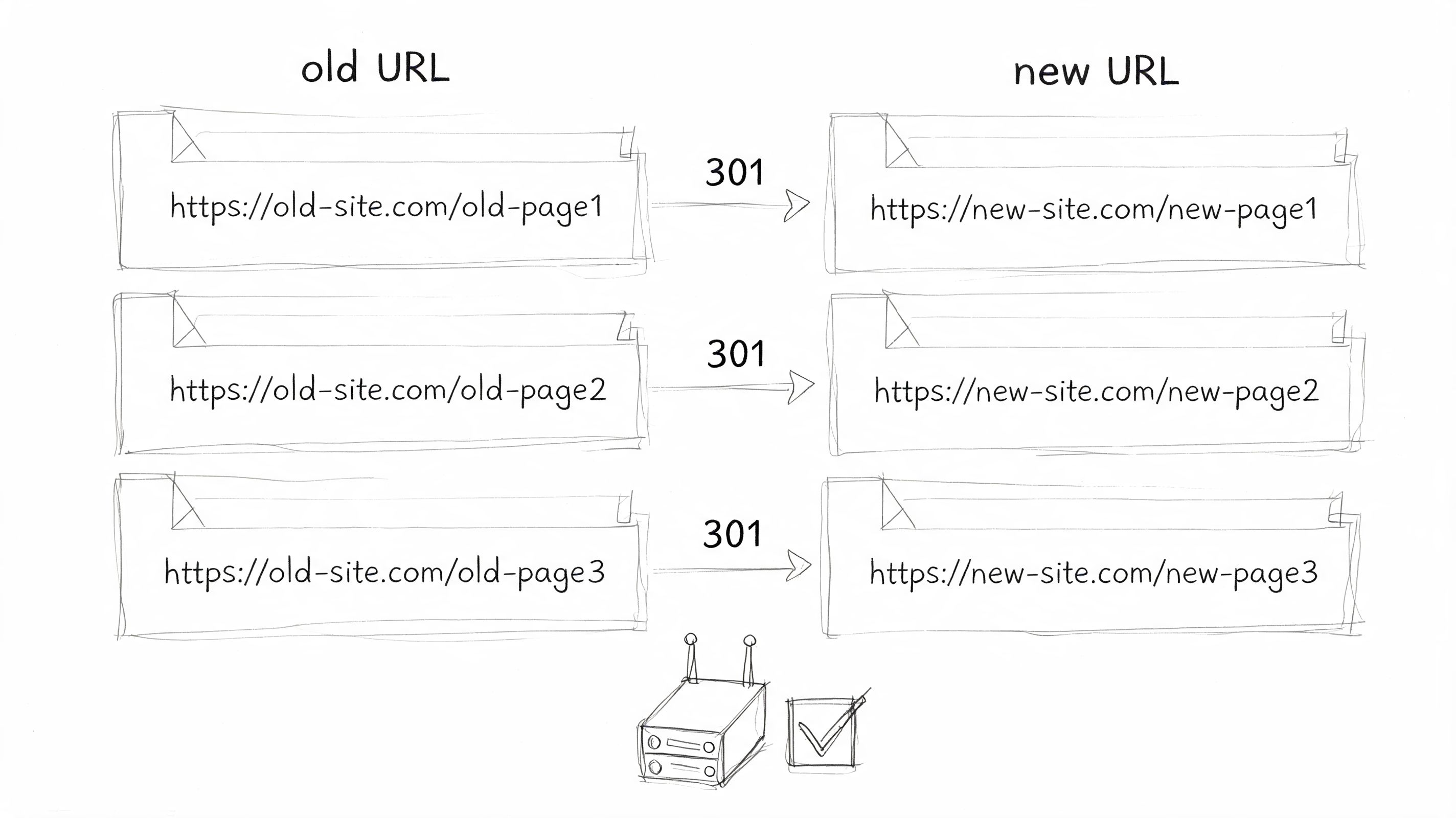
A proper redirect map starts with a full export of live URLs. Pull every important page, not just the pages in nav. Include blog posts, campaign landers, PDFs, media files that attract links, paginated archives if they matter, and old pages that still get visits. For a domain migration or a major replatform, I’d rather have an oversized redirect sheet than discover missed assets after launch.
Match intent, not just URL patterns
The best redirect is old page to closest equivalent new page. Not old page to homepage. Not old category to generic resources hub. If a guide about Shopify collections moves to a new resource center, send users and crawlers to that guide’s new equivalent page.
This matters for rankings, user experience, and link equity transfer. It also matters for agencies handling large inventories, because page-level mapping makes QA much easier when rankings shift.
Practical rule: If you can’t explain why a specific old URL belongs on a specific new URL, the redirect probably isn’t ready.
Use a spreadsheet with three essential columns: old URL, new URL, and status after testing. Add owner and notes if multiple teams are involved. Bulk rules are fine when URL changes follow a strict pattern. They’re dangerous when content has moved unevenly.
A few implementation habits save a lot of cleanup:
- Use server-side 301s: Keep redirects in server configuration when possible. Avoid meta refreshes and JavaScript redirects for migration-critical paths.
- Test in staging first: Crawl the old URL list against staging and verify destination pages resolve correctly.
- Eliminate redirect hops: Point old URLs directly to final URLs. Don’t create A to B to C chains.
- Keep redirects live long enough: Don’t remove them as soon as launch week passes. Old links and bookmarks keep sending signals.
For teams working through platform-specific edge cases, Grumspot’s guide to 301 redirects in Shopify migrations is a useful operational reference.
Before launch, I want one person responsible for redirect signoff. Shared ownership sounds collaborative. In practice, it means no one catches the misses.
A quick walkthrough helps non-SEO stakeholders see what should happen on launch.
2. XML Sitemap Updates and Resubmission
A migration changes the map search engines rely on to discover and confirm your important URLs. If the XML sitemap still lists retired pages, parameter clutter, or staging leftovers, you’re giving crawlers bad instructions at the exact moment you need clarity.
The sitemap should be ready before launch, not built in a panic after someone notices indexing lag. Every included URL should return the right live status, reflect the final canonical version, and belong on the new site. If a page is redirected, blocked, or intentionally removed, it usually doesn’t belong in the main sitemap set.
Build the sitemap around the new architecture
For larger sites, split sitemaps by content type. Product pages, editorial content, feature pages, and location pages often benefit from separate sitemap files inside one sitemap index. That structure makes troubleshooting easier when one section indexes more slowly than another.
Keep the file clean. Don’t stuff it with old URLs just because they used to matter. The sitemap’s job after migration is to guide discovery of what should rank now.
Post-launch speed matters here. Guidance summarized in a migration checklist cited by Niteco notes that traffic drops can be severe if XML sitemaps aren’t submitted within the first day, and that Google discovers new URLs faster when sitemaps are submitted promptly after launch, according to the Niteco migration checklist.
That aligns with what most practitioners see in real projects. The cleaner and faster you submit, the less ambiguity crawlers face.
Use a practical sequence:
- Validate the sitemap file: Check syntax and confirm it contains only live canonical URLs.
- Reference it in robots.txt: Include the sitemap location so crawlers can find it in more than one place.
- Submit it right after launch: Add the new sitemap in Google Search Console as soon as the site is live.
- Replace stale versions: If old sitemap files remain accessible, make sure they don’t keep advertising retired URLs.
Submit the sitemap once the live environment is final. Submitting too early from a half-ready state creates noise you’ll spend days untangling.
For ecommerce and publisher migrations, I also like to keep a separate list of high-priority URLs outside the sitemap file. If indexing slows, that short list becomes your manual review queue.
3. Search Console and Webmaster Tools Migration
A migration goes sideways fast when the new site is live, redirects are in place, and nobody can see what Google or Bing is doing with it. Search Console is not a reporting add-on in that moment. It is the control panel for indexing, crawl access, and early failure detection.
Set up the properties before launch, not after. For a domain move or protocol change, I want the final Google Search Console properties verified in advance, usually both the domain property and the URL-prefix property. The domain property gives full coverage across protocols and subdomains. The URL-prefix property is still useful when a team needs to isolate a directory, test a hostname variation, or confirm that one section is behaving differently from the rest.
If the migration includes a permanent domain change, submit Google’s Change of Address request after the redirects are live and validated. It supports the redirect signals. It does not replace them.
Bing Webmaster Tools deserves the same treatment. Agencies that manage migrations at scale cannot afford a blind spot in Bing, especially now that Bing-powered discovery can influence AI assistants, citations, and secondary visibility beyond standard blue-link rankings.
A clean setup checklist keeps launch week tighter:
- Verify ownership early: DNS verification is usually the most stable option for domain-level access.
- Confirm permissions before launch: SEO, development, analytics, and client stakeholders should already have the access they need.
- Match the live version exactly: Verify the final protocol, hostname, and any subdomain variants that will remain active.
- Route alerts to one operating team: Coverage issues, manual actions, and crawl warnings should not sit in separate inboxes.
- Keep a priority URL watchlist: Pair Search Console monitoring with a reviewed list of critical pages and referring URLs, especially if your team already uses a process for backlink review and link opportunity tracking.
The first few weeks matter more than the first few hours. Watch indexed pages, coverage issues, sitemap status, crawl anomalies, and query shifts by page group. Compare them against your pre-migration baseline so the team can tell the difference between expected volatility and a real implementation problem.
That comparison is where experienced teams save time. Instead of reacting to every dip, they review patterns at fixed checkpoints, usually after the first few days, then weekly through the first month. This is also the right window to check whether priority pages still appear for branded queries, whether rewritten templates are affecting rich results, and whether AI-facing summaries are still pulling the right canonical pages after the move.
Search Console does not show everything, but it gives the fastest reliable read on whether the migration is being interpreted the way you intended.
4. Backlink and Internal Link Audit
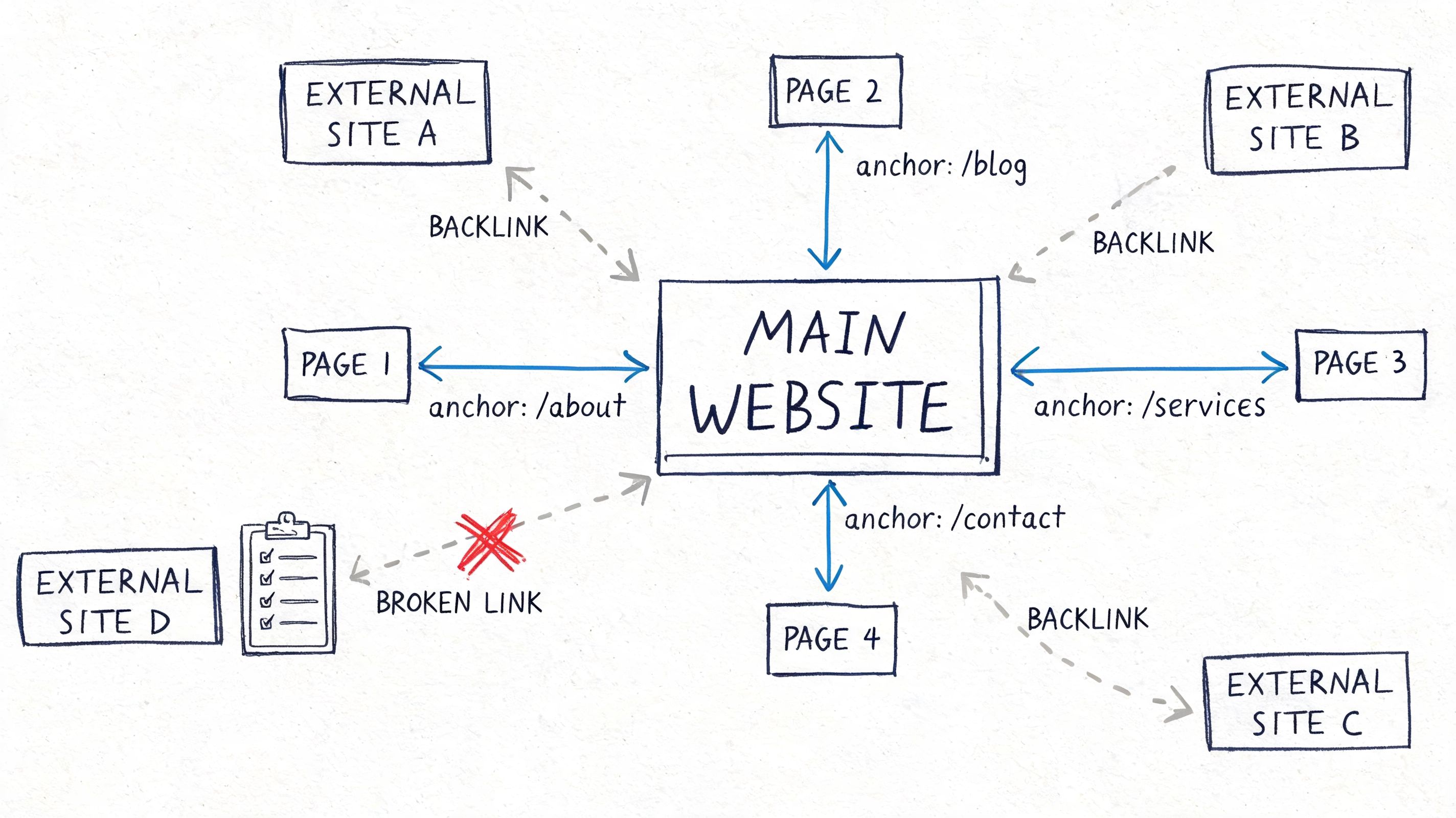
A migration can preserve rankings and still lose authority if links are handled badly. External links may keep passing through redirects, but internal links often become the bigger hidden problem. Teams launch with menus updated, then forget body links, breadcrumbs, related content widgets, faceted paths, and legacy footers.
That leaves crawlers walking through old routes when the new architecture should be doing the work.
Fix internal links before chasing outreach
Start with a crawl of the old site and the staging environment. Export all internal links and compare where they point. If old inlinks still hit redirected URLs after launch, update them to the final destination. Internal links should almost never rely on redirects once the new site is live.
This matters for crawl efficiency, relevance, and consistency of page signals. It also helps AI-facing systems interpret the site’s topical structure more clearly, especially when key hubs and supporting pages have changed names or paths.
For backlinks, don’t waste time emailing every referring domain. Prioritize pages with strong links, consistent traffic value, or important brand mentions. Keep a shortlist of high-value domains and ask for direct updates where it’s realistic.
A practical working method looks like this:
- Export backlink targets: Identify which old URLs attracted the strongest links.
- Protect linkable assets: Guides, research pages, comparison pages, and tools often deserve extra redirect QA.
- Update core internal modules: Nav, breadcrumbs, related posts, footer links, and contextual in-body links should point straight to new URLs.
- Track missed opportunities: Log backlinks that still point to dead or poorly matched locations for manual follow-up.
For teams that need a repeatable audit workflow, Surnex’s backlink review and opportunity process is built for this kind of cleanup and prioritization.
Good migrations don’t just preserve old authority. They reorganize it so the new site’s strongest pages receive clearer internal support.
One mistake I see often is over-fixating on domain-wide authority while ignoring page-level destinations. Rankings usually move at the URL level first. That’s where your audit should stay focused.
5. Meta Tags, Schema, and Structured Data Migration
A redesign often changes far more than layout. Title tags disappear. canonicals reset. Open Graph fields get dropped by the new CMS. JSON-LD scripts fail to render because the component library changed. The pages still exist, but their metadata layer is weaker or inconsistent.
That kind of loss doesn’t always show up in visual QA. Search performance notices first.
Preserve meaning, not just fields
Metadata migration isn’t a copy-paste exercise. If the content changes, titles and descriptions should still reflect the updated page accurately. But don’t let developers launch with placeholder values or auto-generated defaults on important templates.
Canonicals deserve special scrutiny. Self-referencing canonicals should resolve to the final live URL, especially after URL changes or content consolidation. If canonicals still point to retired pages, search engines get mixed signals about which version matters.
Structured data needs the same discipline. Product, Article, FAQ, BreadcrumbList, Organization, and Review markup often break during template rebuilds. Validate important templates before launch and recheck them on production after launch because rendering differences between staging and live are common.
A few pages usually deserve priority review:
- Revenue pages: Product, service, pricing, or conversion-focused landing pages
- Editorial templates: Blog posts, guides, newsroom pages, or help center articles
- Navigational support pages: Category, breadcrumb, and brand identity markup at the site level
For schema-specific implementation ideas, especially on FAQ-style content where teams often overuse markup without enough editorial control, Roman Sydorenko’s FAQ schema insights are useful as a practical reference.
Don’t ignore AI-facing clarity
This part of migration matters beyond standard SERPs. AI systems rely on consistent page identity, clear entities, coherent headings, and stable structured signals. Webflow’s migration guidance highlights an overlooked issue here: newer search experiences can be more fragile after migrations, and AI visibility can take longer to recover when semantic signals and entity structure aren’t preserved, as noted in Webflow’s site migration SEO checklist.
That means schema isn’t just for rich results anymore. It helps reinforce what the page is, who it’s about, and how it fits into the site after major structural change.
6. Content Parity and Duplicate Content Resolution
Most migration losses aren’t caused by one catastrophic mistake. They come from quiet content drift. A developer launches a trimmed template. A copywriter shortens key paragraphs to fit the redesign. Three similar pages get merged without checking which one earned traffic. A resource section loses downloadable files because no one included them in scope.
The site is technically live. The search value is no longer the same.
Inventory content before anyone starts cutting
Create a content inventory that records source URL, target URL, page type, migration status, and decision notes. That sounds boring, and it is. It’s also how you prevent accidental deletion of pages that still carry rankings, links, or conversion value.
Look beyond page count. Parity means preserving the parts of the page that supported search performance in the first place. That includes headings, copy depth, internal links, media assets, FAQs, and supporting modules that helped satisfy intent.
When duplicates exist, use the migration to resolve them on purpose. Keep the strongest version, fold useful material into it, and redirect the weaker variations. Don’t leave multiple thin replacements competing on the new site.
Teams should compare old and new manually for priority pages. I don’t trust template-level assumptions alone. A page can keep its title and URL while losing the actual material that made it rank.
A solid review process includes:
- Protecting top pages first: Revenue pages and strong organic landing pages get manual parity checks
- Logging consolidation decisions: If two pages become one, write down why and where signals should flow
- Checking orphan risk: Replatforms often import content but fail to reconnect it through navigation and internal links
- Reviewing media and downloads: PDFs, images, tools, and embedded assets often disappear during content migration
Search engines won’t reward a “cleaner” page if it no longer answers the query as well as the original. Better design doesn’t compensate for weaker substance.
7. Performance Monitoring and Ranking Tracking Setup
Launch morning looks calm until the first report lands. Organic traffic is down on a few high-value pages, rankings are mixed, paid teams are asking whether branded demand shifted, and the client wants to know whether this is normal volatility or a migration problem. If the baseline was never captured, the discussion turns into guesswork.
Set up monitoring before anything moves.
Build a baseline that supports diagnosis
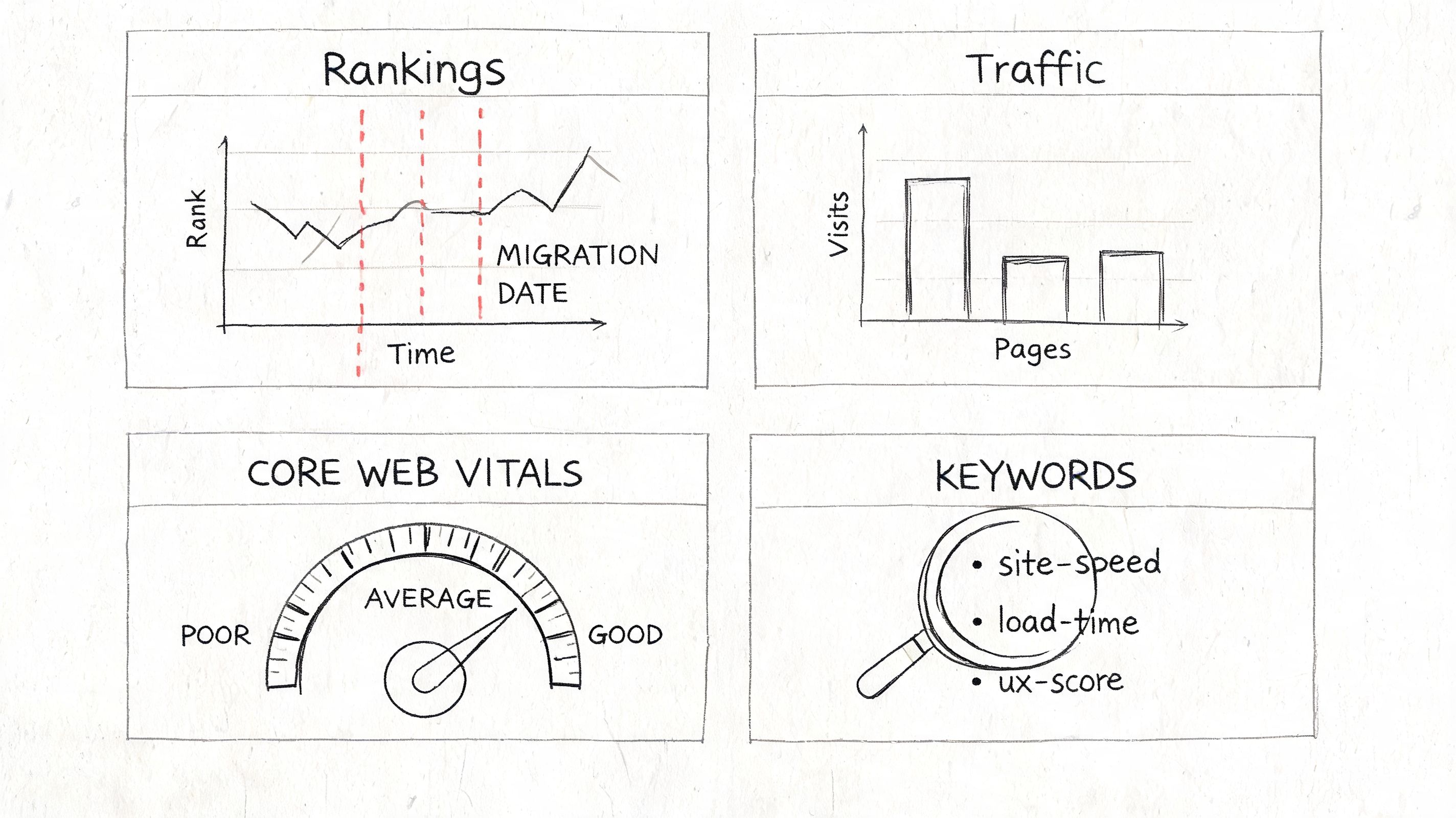
Pull pre-migration exports from Google Search Console, analytics, and your rank tracker. Save them outside the platform UI so the team can compare clean snapshots later. For large sites, segment by market, device, and template type. Sitewide averages hide the pages that usually matter most.
Track more than rankings. Capture clicks, impressions, CTR, average position, landing-page sessions, and organic conversions for the URLs the business deems important. I also recommend keeping a template-level performance view, especially for category, product, service, and article pages. That helps agencies spot whether the issue sits in a section of the site, not just in a handful of URLs.
Include AI search visibility in the baseline where possible. A migration can preserve classic rankings while reducing the page features that make it usable for AI Overviews and LLM citation patterns, such as clear entities, stable headings, concise summaries, and crawlable supporting context. If your team already tracks citation mentions or answer-surface presence, log those before launch too.
A practical setup usually has three reporting layers:
- Executive view: Organic sessions, conversions, revenue or leads, and top-line visibility trends
- SEO diagnostic view: Priority keyword groups, landing pages, indexation shifts, and template-level change detection
- Engineering watchlist: Status codes, redirect exceptions, page speed regressions, and rendering issues by template
Performance tracking should include page experience signals as well. A migration often changes JavaScript weight, image handling, and template rendering in ways that affect visibility and conversion at the same time. Use a Core Web Vitals monitoring workflow so speed and stability regressions are visible alongside ranking changes, not buried in a separate report.
Set alert thresholds before launch week
Teams lose time when every dip triggers a full investigation. Set thresholds in advance. For example, define what level of ranking loss on priority terms creates an alert, what traffic drop by template requires review, and what indexing change moves from “watch” to “action.” The point is speed. During a migration, the team needs triage rules, not a fresh debate every morning.
Use annotations aggressively. Record launch date, redirect releases, sitemap submissions, rollback decisions, major template fixes, and CMS deployments. Later, those notes help explain whether a drop started with the migration itself or with something introduced two days after launch.
For agency teams managing several migrations at once, standardize the dashboard format. Consistent views make it easier to compare patterns across clients, assign work fast, and explain trade-offs to stakeholders without rebuilding the reporting structure every time.
8. Mobile-First Indexing and Responsive Design Verification
Launch day often looks fine in a desktop QA room. Then the first real checks on phones show the actual risk. Navigation covers the H1, filters trap users, forms misfire on touch, and key content loads late enough that Googlebot and users both get a weaker version of the page.
That matters beyond classic rankings. Mobile rendering affects indexation, engagement, and how clearly your content can be interpreted in AI Overviews and LLM-driven summaries. If the mobile page hides primary copy, delays important modules, or breaks structured elements tied to the visible content, you reduce your chances of being cited accurately.
Verify mobile behavior by template and journey
Review the templates that drive search traffic and revenue, not a random sample of URLs. Check the homepage, category or service pages, product or location pages, blog templates, resource hubs, and lead forms. Then test the actual paths users take on mobile, such as category to product, article to related resource, or service page to form completion.
Use real devices for this work. Browser resizing helps with quick checks, but it misses touch targets, mobile keyboards, viewport quirks, sticky UI conflicts, and performance problems caused by weaker connections or lower-end hardware.
A practical benchmark still helps during migration QA. Largest Contentful Paint should stay fast, layout should remain stable, and key interactions should respond without delay. Teams that already use newer interaction metrics can still keep these checks in the launch workflow because they make regressions easier to spot across multiple clients and templates.
For agency teams, process is key. A repeatable technical site audit workflow for mobile template validation keeps testers focused on the same failure points across every migration instead of reinventing QA each time.
Focus reviews on:
- Primary templates on real phones: Check iPhone and Android devices, not only simulated views
- Rendered content parity: Confirm mobile shows the same main content, internal links, and supporting copy that desktop exposes
- Navigation and filter behavior: Test menus, faceted controls, accordions, and search overlays under normal user paths
- Touch completion: Submit forms, use CTAs, test checkout or lead steps, and confirm error states are usable
- Visual stability: Watch for image shifts, late-loading banners, font swaps, and sticky elements covering content
- Performance by template: Compare heavy pages before and after migration so new components do not cause a subtle performance decrease on the pages that matter most
For ongoing performance and troubleshooting, Surnex’s Web Vitals monitoring suite gives teams a practical way to keep post-launch checks in one place.
Treat mobile UX as a search visibility issue
Teams sometimes mark mobile QA complete once pages technically load and pass a cursory responsive check. That standard is too low for a migration. If users struggle to reach content, complete actions, or understand the page on a phone, search performance usually follows.
I see this most often on redesign-heavy migrations. The SEO requirements were met on paper, but mobile templates introduced heavier JavaScript, hidden copy, or awkward interactions that lowered conversion quality and weakened post-launch recovery. The fix is rarely a single ticket. It usually means tightening template rules, reducing front-end weight, and testing priority journeys again until the mobile version supports both discovery and action.
9. Crawl Budget Optimization and Robots.txt Configuration
A migration changes what crawlers need to spend time on. If robots.txt blocks the wrong directories, canonicals point inconsistently, or low-value URLs explode across the new platform, search engines waste effort on junk while important pages wait to be rediscovered.
This is especially painful on large ecommerce sites, faceted catalogs, publisher archives, and enterprise help centers where a migration can generate thousands of near-duplicate paths overnight.
Keep crawl access simple on launch
Robots.txt should do three things well after migration. It should allow important areas to be crawled, block clearly non-essential sections, and point to the right sitemap location. That’s it. Launch is not the time for clever experimental directives.
I’ve seen more migrations harmed by overblocking than by underblocking. Teams panic about duplicate URLs and end up disallowing key assets, folders, or query handling patterns they don’t fully understand. Then they spend weeks trying to figure out why indexing is stalling.
A cleaner approach is to crawl the staging site, identify obvious junk paths, and block only what you’re certain should stay out. Admin areas, internal search results, and known duplicate parameter spaces often belong on that list. Priority content folders do not.
A useful workflow includes:
- Testing robots.txt before launch: Validate syntax and confirm important paths remain crawlable
- Crawling the live site after launch: Check whether bots can reach critical templates and linked assets
- Watching indexed URL patterns: If the wrong pages start surfacing, adjust based on evidence, not assumptions
- Reviewing internal links to blocked pages: Sometimes the issue is not robots.txt alone, but poor linking into unhelpful spaces
For technical QA and crawl diagnostics, Surnex’s technical site audit workflow is the kind of repeatable process that helps teams spot these issues fast.
A restrictive robots.txt can make a clean migration look broken, even when the pages exist and redirects work.
Crawl budget isn’t a theory problem during migrations. It’s a prioritization problem. Make the important URLs easy to reach and easy to understand.
10. Client Communication, Stakeholder Alignment, and Post-Migration Recovery Planning
Monday morning after launch, the site is live, redirects are in place, and traffic still dips. The SEO team expects a settling period. The client sees red in the dashboard. Leadership wants an answer before noon. That gap between technical reality and stakeholder expectation is where migrations go off course.
Agency teams need a communication plan before launch, not after the first bad report. Keep it brief, but make it specific. Define the launch window, scope, known risks, owners by workstream, escalation paths, and what "stable" looks like in week one versus month one. If you manage migrations at scale, standardize this into a reusable template so every client gets the same operating model.
Set expectations for monitoring cadence early. Daily checks during the first stretch after launch are normal. Teams should know which signals trigger investigation, which ones deserve a watch-and-wait response, and which ones justify emergency fixes. That removes a lot of noise.
I usually want stakeholder updates framed in three buckets:
- Expected: Temporary ranking, crawl, and traffic fluctuation while search engines process redirects, canonicals, and new URL patterns
- Concerning: Losses isolated to specific sections, templates, device types, or query groups
- Critical: Sitewide indexing failures, broken redirects on priority pages, major conversion drops, or analytics gaps that block decision-making
Recovery planning also needs named owners. Someone checks Search Console each morning. Someone validates redirect and canonical fixes. Someone from development can approve urgent tickets. Someone owns client communication if high-value pages or lead-driving templates lose visibility. Without that structure, the first week turns into status meetings and guesswork.
Modern migrations also need broader reporting. Rankings and sessions still matter, but they do not tell the full story anymore. A site can preserve traditional visibility and still lose presence in AI Overviews or LLM-driven citations if entity signals weaken, structured data breaks, or key explanatory content disappears during consolidation. Agencies should report both search performance and AI-facing discoverability where the client depends on informational visibility.
That changes recovery work too. If performance drops, the answer is not always more time. It may be internal link repair, missing content blocks restored to key templates, schema fixes, stronger topical clustering, or targeted outreach to recover lost references. Good recovery plans treat these as pre-approved response paths, not improvised ideas.
The calmest migration teams are not the ones expecting a perfect launch. They are the ones who already decided who says what, who checks what, and what gets fixed first.
10-Point Site Migration SEO Checklist Comparison
| Task | Implementation complexity 🔄 | Resource requirements ⚡ | Expected outcomes 📊⭐ | Ideal use cases 📊 | Key advantages ⭐ | Quick tip 💡 |
|---|---|---|---|---|---|---|
| 301 Redirect Mapping and Implementation | High, extensive URL inventory + server config | High, dev access, QA, crawl tools, time | Preserves majority of link equity; reduces 404s; stabilizes rankings | Domain moves, URL restructuring, large migrations | Maintains backlinks & UX; clear search engine signals | Map in spreadsheet; implement server-level 301s; test in staging |
| XML Sitemap Updates and Resubmission | Medium, generate and validate sitemaps | Medium, CMS integration, validators, GSC access | Faster discovery and higher indexation rate (30–50% faster) | Large catalogs, news sites, CMS-driven migrations | Speeds crawler discovery; provides metadata hints | Resubmit within 24h; include sitemap index and validate syntax |
| Search Console and Webmaster Tools Migration | Medium, verification & property setup steps | Low–Medium, access to DNS/verification methods | Retains visibility of historical data; enables monitoring | Domain changes, multi-property consolidations | Immediate crawl/error alerts; change-of-address support | Create both domain & URL-prefix properties; verify early |
| Backlink and Internal Link Audit | High, large-scale analysis & outreach work | High, backlink tools, outreach resources, time | Identifies link equity risks; prioritizes high-value outreach | Sites with many external backlinks or complex internal linking | Reveals high-value backlinks and internal opportunities | Export backlinks 30 days prior; prioritize DA 50+ outreach |
| Meta Tags, Schema, and Structured Data Migration | Medium, template updates + validation | Medium, dev help, testing tools, validation | Preserves rich snippet eligibility; prevents duplicate content issues | E‑commerce, recipes, news - sites relying on rich results | Improves SERP features and social sharing | Validate with Rich Results Test and JSON‑LD validator |
| Content Parity and Duplicate Content Resolution | High, content inventory and consolidation decisions | High, SME input, content ops, analytics | Prevents duplicate penalties; improves topical authority | Mergers, consolidations, multi-location sites | Strengthens content quality and crawl efficiency | Keep best-performing version; document consolidation rationale |
| Performance Monitoring and Ranking Tracking Setup | Medium, multi-tool configuration & dashboards | Medium–High, rank trackers, analytics, dashboards | Early detection of issues; data-driven recovery decisions | Enterprise migrations; agency-managed client rollouts | Rapid problem identification; client reporting confidence | Baseline 2–4 weeks pre-migration; alert on >10‑position drops |
| Mobile-First Indexing and Responsive Design Verification | Medium, testing across devices & templates | Medium, dev fixes, real device testing | Ensures mobile indexing parity; prevents mobile-specific ranking drops | Any site with significant mobile traffic | Improves mobile UX and Core Web Vitals ranking signals | Test on real devices & slow 4G; aim LCP <2.5s, CLS <0.1 |
| Crawl Budget Optimization and Robots.txt Configuration | Medium, rules planning & testing | Low–Medium, monitoring, robots.txt edits | More efficient crawling; protects low-value pages from indexing | Large sites with many low-value or duplicate URLs | Focuses crawler on priority content; reduces server load | Start conservative; test in GSC and review crawl stats |
| Client Communication, Stakeholder Alignment, and Post-Migration Recovery Planning | Medium, planning and documentation effort | Medium, PM time, dashboards, SLAs | Reduces panic; sets realistic expectations; speeds recovery | Agency projects, enterprise migrations, stakeholder-heavy moves | Prevents premature rollbacks; improves trust & accountability | Provide executive summary; schedule bi-weekly check-ins and dashboards |
Beyond the Launch Mastering Post-Migration SEO
Monday morning after launch usually looks the same. Traffic is uneven, a few high-value pages have slipped, the client wants answers, and three different teams are diagnosing three different causes. Post-migration SEO is the discipline that turns that noise into a recovery plan.
The work after launch is less about repeating the checklist and more about deciding what matters first. A 20 percent drop in one folder means something different from a sitewide indexing problem. A rankings dip with stable conversions calls for a different response than a drop in branded visibility across AI Overviews, organic search, and referral paths from citation-heavy pages. Good teams separate signal from panic quickly.
Start with triage. Confirm which losses affect revenue, lead flow, or priority markets. Then map each issue to one of four buckets: indexing, crawling, relevance, or authority. That framework keeps teams from wasting a week rewriting copy when the actual problem is canonical confusion or blocked assets.
For agency teams managing several migrations at once, the process has to be repeatable:
- Review priority page groups, not just sitewide averages.
- Compare post-launch behavior across organic traffic, conversions, and assisted conversions.
- Check whether dropped pages also lost AI visibility, branded mentions, or structured context that supported citation in answer engines.
- Assign one owner per issue with a deadline and rollback threshold.
- Document every fix so reporting, QA, and client updates stay aligned.
AI search changes the standard post-launch review. A page can keep ranking in classic search while losing the signals that help it appear in AI-generated answers. That often happens when migrations strip FAQ schema, weaken entity associations, flatten internal links to supporting content, or break citation paths from high-trust pages. If your migration checklist stops at rank tracking, you can miss part of the visibility loss.
This section matters because the post-launch phase is where operational maturity shows up. Strong migration teams do not treat launch day as the finish line. They treat it as the handoff from implementation to controlled observation, diagnosis, and correction.
Use the checklist as a live operating document for the first few weeks after launch. Mark confirmed issues, separate defects from normal volatility, and keep a running log of what changed, why it changed, and what result followed. That record shortens recovery time and makes the next migration easier to run.
If your team needs one place to manage migration tracking across rankings, backlinks, technical issues, and AI visibility, Surnex gives agencies and in-house teams a cleaner way to do it. It helps you monitor traditional SEO performance alongside how brands surface in AI Overviews, ChatGPT-driven discovery, and other emerging search experiences, so you can diagnose post-migration issues faster and report with more confidence.