
Let's be honest: a website audit is so much more than just ticking boxes on a generic checklist. It's a deep dive into a site's technical health, content quality, and overall user experience to find what's holding it back. It’s about creating a strategic action plan that actually moves the needle.
The process itself isn't rocket science. It boils down to defining your goals, crawling the site to see what you’re working with, digging into the technical and content gaps, checking out the backlink profile, and finally, building a prioritized roadmap for what to fix first.
A Practical Blueprint for a Modern Website Audit
Welcome to our guide on how to run a proper website audit in 2026. This isn't just theory; it's a field-tested workflow that we’ve used for years, both in agencies juggling dozens of clients and on in-house teams with a laser focus on one brand.
Today's audit has to look beyond old-school SEO. We need to factor in user experience, the authority carried by backlinks, and—critically—how a site shows up in new AI-powered search results. The demand for this kind of sharp analysis is exploding. The global SEO services market is projected to jump from $81.46 billion to $108.28 billion by 2026, a massive 32.7% increase.
Yet, a surprising number of sites are leaving performance on the table. For example, only around 54.6% of websites currently pass Google's Core Web Vitals benchmarks. That's a huge opportunity waiting to be unlocked by a thorough audit.
The Core Pillars of a Website Audit
It's easy to get lost in the sea of data an audit can produce. The trick is to break the process down into a few core pillars. By focusing on one area at a time, you can systematically piece together the full performance story, from the technical nuts and bolts to the effectiveness of your content.
This is how we see the modern audit process, broken into three essential phases:
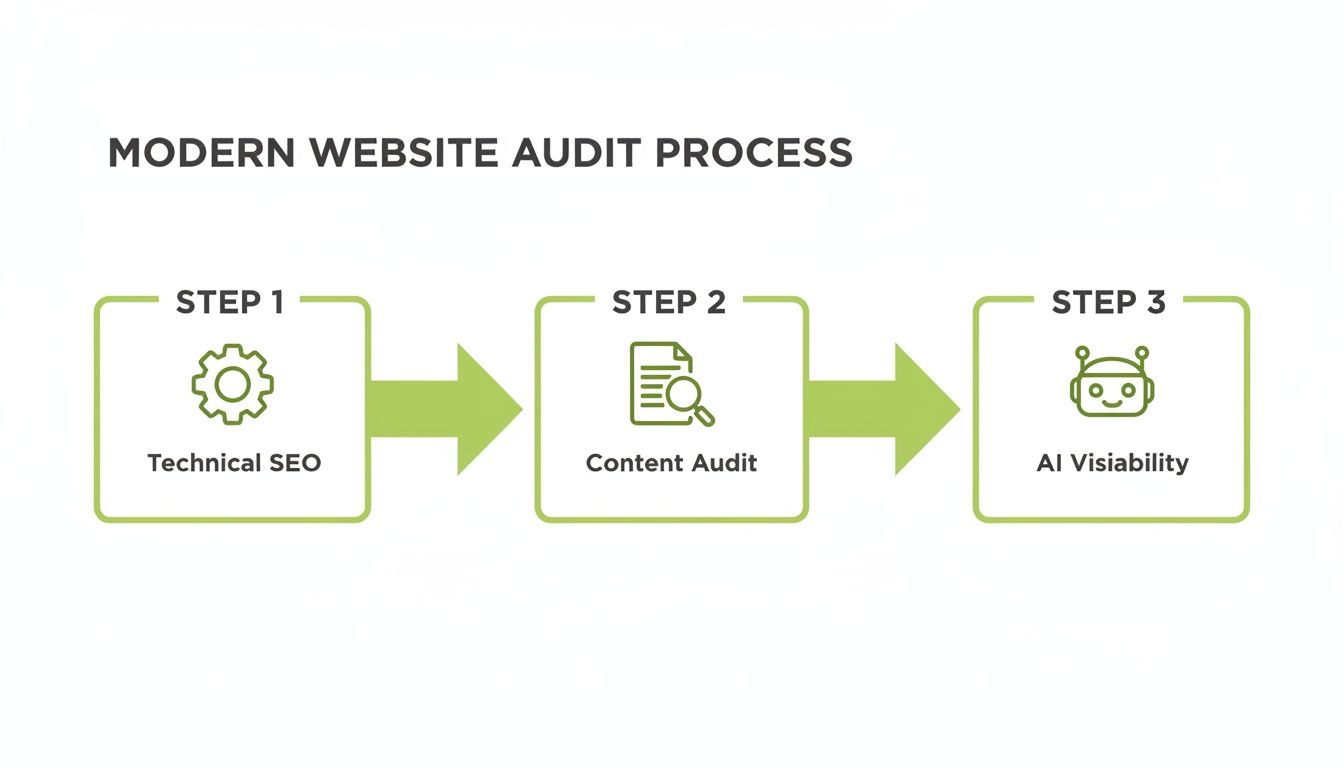
This approach ensures you’re not just fixing technical errors but are also building a site that’s ready for the future of search.
Here are the core pillars of a modern website audit and the primary goal for each area.
Website Audit Key Focus Areas
| Audit Pillar | Primary Goal | Example Metric |
|---|---|---|
| Technical & Performance | Ensure search engines can easily crawl, index, and understand the site. | Crawl Errors |
| Content & Authority | Validate that content is high-quality, relevant, and authoritative. | Thin Content Pages |
| UX & Core Web Vitals | Confirm the site provides a fast and seamless user experience. | LCP (Largest Contentful Paint) |
| Backlinks & Authority | Assess the quality and relevance of the external link profile. | Referring Domain Toxicity Score |
| AI & SERP Visibility | Check visibility and accuracy in AI Overviews and new SERP features. | Number of AI Overview mentions |
By tackling each pillar, you can methodically uncover technical debt, spot glaring content gaps, and even find new opportunities in AI-driven search. This guide will walk you through the entire workflow, from setting clear goals to delivering reports that stakeholders will actually read and act on.
A great website audit doesn’t just spit out a list of errors. It delivers a strategic roadmap for growth, directly connecting technical fixes and content wins to real business goals.
Here’s a quick breakdown of what that unified approach covers:
- Technical & Performance: We're looking at everything from crawlability and indexation to site speed and Core Web Vitals.
- Content & Authority: This involves a hard look at content quality, finding where the topical gaps are, and auditing the backlink profile.
- AI & SERP Visibility: We’ll assess how the site looks in AI Overviews and other new search formats that are popping up.
This blueprint is designed to help you turn a website from a simple online brochure into a high-performing engine for growth. With a structured approach and the right tools, you can stop drowning in spreadsheets and start delivering confident reports that prioritize real opportunities. To see how these workflows are built into a platform, you can check out our all-in-one Surnex SEO Suite.
Defining Your Scope and Crawling Your Website
Every great site audit begins with a simple question: why are we doing this? Before you fire up any crawler or dive into a spreadsheet, you have to get crystal clear on the objectives. A blind crawl is just a data dump; a focused audit is a roadmap for growth.
The scope can change dramatically from one project to the next. Are you onboarding a new client who needs a complete overhaul? Or is this a routine quarterly check for an existing partner? Maybe you're handling a high-stakes pre-migration audit where one mistake could be catastrophic. Each scenario demands a different approach.
Think about it this way. You’ve just signed a new e-commerce client. Their real goal isn’t just to "do better SEO." It’s to boost organic revenue by 20% in the next six months. Suddenly, your audit isn't about finding every last broken link. It's a targeted hunt for conversion-killing issues on their most valuable product and category pages.
On the other hand, a quarterly health check for a long-term client might be much tighter. You’re likely focused on monitoring Core Web Vitals, checking for new indexability problems, and ensuring nothing has broken since your last review.
Aligning Goals with Stakeholders
The first real step is getting everyone in a room (virtual or otherwise) to agree on what success looks like. This is where you turn vague requests like "we need more traffic" into concrete, measurable targets. A good kickoff call is all about defining specific KPIs.
For instance, instead of "fix the website," you should aim for goals like these:
- Boost organic traffic to our
/servicespages by 15% in Q3. This immediately tells you to focus on the money-making sections of the site. - Get the LCP (Largest Contentful Paint) under 2.5 seconds for our top 10 landing pages. Now you have a clear performance benchmark.
- Hit a 90+ mobile performance score in Lighthouse for all blog posts published this year. This prioritizes user experience on new content.
Defining clear, measurable KPIs transforms a vague "health check" into a strategic project. It's the difference between handing over a list of problems and delivering a plan that directly impacts the bottom line.
Once those goals are locked in, you’re ready to get your hands dirty. It’s time to crawl the site and gather your raw data.
Configuring Your First Website Crawl
Crawling is how we map out the entire website, seeing it through the eyes of a search engine. Tools like Screaming Frog or integrated platforms like Surnex are your best friends here, but simply hitting "start" on a default crawl is a rookie mistake. Your initial settings are crucial for getting the right data.
Here’s how we set up every initial crawl to build a solid foundation.
User-Agent: Always, always start by crawling as Googlebot (Smartphone). Google has been using mobile-first indexing for years, so this gives you the most accurate picture of what it’s actually seeing. A desktop-only crawl can easily hide major mobile-specific problems.
Crawl Speed and Depth: Play nice. When you're auditing a new client's site for the first time, throttle your crawl speed—something like 2-3 URLs per second is a safe starting point. You don't want your first impression to be crashing their server. For most sites, the default crawl depth is fine, but for massive enterprise sites, you might need to bump it up to make sure you reach every important page.
Respecting Directives:
Make sure your crawler is set to obey robots.txt rules. This is non-negotiable for your first pass. It shows you exactly what the site is intentionally blocking from search engines. You can always run a second crawl later that ignores robots.txt to find pages that are blocked by accident, but your initial run should mimic a search engine’s polite behavior.
Getting this foundation right is everything. For a deeper dive into this process, our guide on how to conduct a complete technical site audit breaks down every step in detail.
Diagnosing Technical SEO and Performance Bottlenecks
Now that you have all that crawl data, the real detective work begins. This is where we turn a mountain of raw information into a prioritized hit list of technical issues that are actively holding back search performance and frustrating users. We're going way beyond just finding a few broken links; we're hunting for the high-impact problems that really move the needle.
The point isn't just to make a list of errors. It's to understand why they're happening. A great audit focuses on fixes that give you the most bang for your buck, so we’ll start with the foundations: indexability, site structure, and—of course—site speed.
Uncovering Indexability and Crawlability Issues
First things first: can search engines actually find, crawl, and index your most important content? If the answer is no, nothing else you do for SEO really matters. Your crawl data holds the clues to these fundamental problems.
Start by looking for any signs that you might be accidentally telling Google to stay away. These are often the biggest and easiest wins.
- Misconfigured
robots.txtRules: I’ve seen it happen more times than I can count—a strayDisallow: /can render your entire site invisible to search engines. Check for rules that are blocking critical sections, like your/blog/or/products/directories. - Rogue
noindexTags: It's a classic, face-palm moment when you find anoindextag was left on a major landing page after a developer pushed the site live from a staging environment. Filter your crawl to find every page with anoindextag and make sure it’s there on purpose. - Canonical Tag Errors: Canonical tags are supposed to clear up duplicate content issues, but when they're wrong, they just create more confusion. Look for pages canonicalizing to the wrong URL or paginated series that all self-canonicalize instead of pointing back to the main category page.
These kinds of issues can absolutely torpedo your rankings, but the good news is they are usually quick fixes once you spot them.
Evaluating Site Architecture and Internal Linking
A clean, logical site structure is your best friend. It helps search engines map out the relationships between your pages and gives users a clear path to follow. A shallow architecture, where important content is easy to find, is key to spreading authority and keeping users engaged.
As you review the site, hunt for structural weaknesses that either trap authority or just create dead ends for users. The first thing to look for is orphan pages—these are URLs with zero internal links pointing to them. To crawlers and users, they might as well not exist.
Also, pay close attention to click depth. As a rule of thumb, your most valuable, money-making pages should be no more than three clicks away from the homepage. If a key service page is buried five or six clicks deep, it’s a red flag that your internal linking needs a rethink.
Think of internal links as the roads of your website. If your most important destinations are only accessible via long, winding backroads, very few people—or crawlers—will ever find them.
A solid internal linking strategy does more than just help crawlers; it funnels "link juice" (authority) around your site. Your heavy hitters, like the homepage or a viral blog post, should be linking out to support your important but less-visible product or service pages.
Pinpointing Performance Bottlenecks and Core Web Vitals
Let's be clear: site speed is no longer a "nice to have." It's a core component of modern technical SEO. A slow website creates a terrible user experience and can directly hurt your rankings. Google's Core Web Vitals are the metrics that matter most here.
Your audit needs to take a serious look at these three pillars of user experience:
- Largest Contentful Paint (LCP): How fast does the most important content on the page load? The goal is to be under 2.5 seconds. A slow LCP is often the fault of huge, unoptimized images or a sluggish server.
- Interaction to Next Paint (INP): When a user clicks a button or taps the screen, how quickly does the page react? A poor INP feels laggy and unresponsive, and it’s usually caused by too much JavaScript running on the page.
- Cumulative Layout Shift (CLS): Do things jump around on the screen while the page is loading? A low CLS score means the layout is stable. Pop-ups, ads without reserved space, or fonts loading in late are common culprits here.
Run your key pages through tools like Google PageSpeed Insights or Lighthouse. But don't just fixate on the score. Dive into the diagnostics to find the root cause. Is it render-blocking code? Bloated CSS files? Massive image files? Fixing these won't just improve your scores; it'll make your site genuinely better for your visitors. For a deeper look, you can learn more about how to check and improve your Core Web Vitals in our dedicated guide.
Auditing Content Gaps and Backlink Quality
Now we're digging into two sides of the same coin: what's on your pages (content quality) and what other sites are saying about you (your backlink profile). Looking at them together gives you a complete picture of your site's true ability to compete in search.
Conducting a Strategic Content Audit
The point of a content audit isn't just to hunt for typos. It's a strategic review of every page. Does it serve a purpose? Does it get traffic? Is it still relevant to your audience? You’re essentially looking for opportunities to improve, combine, or get rid of content to make your site’s overall message stronger.
To start, you’ll want to merge data from your site crawler with metrics from your Google Analytics and Google Search Console accounts. This creates a master spreadsheet of your URLs, packed with traffic numbers, engagement stats, and conversion data.
Your first pass should be for the low-hanging fruit—the obvious underperformers. I always look for pages that fall into these categories:
- Thin Content: Pages with very little substance, often under 300-400 words. These are usually old blog posts or bare-bones product pages that add almost no value.
- Duplicate Content: Multiple pages with nearly identical text, all trying to rank for the same keywords. This just splits your authority and confuses Google. Your crawler can help you find pages with the same title tags or H1s.
- Outdated Content: Think blog posts quoting stats from five years ago or service pages that talk about obsolete technology. This stuff can really hurt your credibility.
A content audit isn't about creating more content; it's about making your existing content work harder. Every single page should have a clear job and contribute to your business goals.
Once you have a list of these problem pages, you can decide what to do. You can update and improve them, merge several weak pages into one powerful resource, or simply delete and redirect them.
Analyzing Your Backlink Profile for Authority
Backlinks are still a huge ranking factor. Think of them as votes of confidence from other websites. But here’s the thing: not all votes carry the same weight. A good backlink audit helps you see the quality and relevance of the sites linking to yours.
Pull a full list of your referring domains using a tool like Ahrefs or Semrush. Don’t just get mesmerized by the total number of links; you need to analyze the story they tell.
Link Quality and Relevance: Are the links coming from respected, relevant sites in your field? Or are they from sketchy directories and spammy forums? A high number of links from toxic or totally unrelated domains is a major red flag.
Link Velocity: Check the rate at which you’re getting new links. A healthy backlink profile shows steady, natural growth. A sudden, massive spike in new links could be a sign of a negative SEO attack or a cheap link-building campaign that Google might penalize.
Anchor Text Distribution: The clickable text in your backlinks should look natural and varied. If 90% of your links use the exact same keyword-heavy anchor text, it screams "manipulation" to search engines. You want to see a healthy mix of your brand name, the raw URL, and topical keywords.
Spotting Toxic Links and Disavow Opportunities
Google's algorithms are pretty good at just ignoring bad links these days, but a huge number of toxic links can still cause problems. We're talking about links from obvious spam sites, paid link farms, or sites that have absolutely nothing to do with your industry.
For instance, if you run an accounting firm and have hundreds of backlinks from foreign-language online casinos, you have a problem. Those links are worthless and can damage the trust search engines have in your website.
In extreme cases like that, you might need to use Google’s Disavow Tool. But use it with caution—it should be your last resort. For most websites, the best move is to focus on earning new, high-quality links to outweigh the junk. This audit gives you the data you need to make that call with confidence and turn your off-page authority into a real asset.
Auditing for AI Overviews and Future Search Visibility

This part of the audit isn’t about chasing the #1 spot anymore. It’s about getting your brand cited inside those generated answers. The goal is to figure out where you’re showing up, where you’re not, and how to structure your content so AI models see you as the authority.
And let's be clear, the stakes are massive. Projections show that by 2026, AI Overviews could hit 2 billion monthly users. Early data is already a wake-up call, with some seeing organic click-through rates drop by as much as 61% when an AI answer appears. In a world where 60% of searches end without a click and AI referrals have skyrocketed by 357% year-over-year, you have to be in the answer box. You can dig into more of this data by checking out the latest AI SEO statistics from Semrush.
Identifying AI-Ready Content
First things first: you need to find which pages on your site are most likely to get pulled into an AI Overview. The AI is on the hunt for clear, direct answers, and some content formats are practically tailor-made for it.
During your audit, be on the lookout for these prime candidates:
- How-to guides and tutorials with clean, step-by-step instructions.
- Definitions and glossaries that break down complex topics simply.
- Product or service comparisons, especially those using tables or structured lists.
- FAQ pages that give straight answers to common questions.
Once you’ve got a list of these pages, take a hard look at their structure. Is the most critical information right at the top? Is the language factual and to the point? AI models love clean, concise text they can easily grab and repurpose.
Hunting for Citation Gaps
A citation gap is gold. It’s when you find an AI Overview for a key search term, but your brand is nowhere in sight. Finding these gaps is one of the most actionable parts of an AI audit because it shows you exactly where you can steal visibility from the competition.
Start by pulling a list of your most important, high-intent keywords. Pop open an incognito window and start searching. When an AI Overview appears, ask a few questions:
- Who is being cited?
- What specific information is the AI pulling from their content?
- What format is the answer in—a list, a definition, a comparison?
For instance, say you sell project management software. You search "best tools for small teams" and see an AI Overview citing three competitors. That's your cue. Go look at their pages. You might find they all have a slick comparison table or a "Key Features" section that your own page is missing.
A citation gap isn't a failure; it's a blueprint. It shows you exactly what kind of content you need to create or restructure to earn your place in the answer.
This analysis gives you a clear, data-driven path forward. You're not just guessing what the algorithm wants—you're seeing it in action and reverse-engineering your way in.
Structuring Content for AI Extraction
To give your content the best shot at being featured, you need to make it incredibly easy for machines to read. That means using clean formatting and structured data to signal what your information is all about.
Your audit should put these elements under the microscope:
- Logical Heading Structure: A single
<h1>is non-negotiable. Follow it with a clear hierarchy of<h2>and<h3>tags that break up the text and signal the main topics. - Use of Lists and Tables: Bullet points, numbered lists, and good old-fashioned HTML tables are a dream for AI to parse. They’re easy to digest and perfect for a summarized answer.
- Schema Markup: Get your schema in order. Implementing
FAQPage,HowTo, orArticleschema explicitly tells search engines what kind of content they're looking at.
Making your site AI-ready is how you future-proof your SEO. We cover more specific tactics in our guide to optimizing for Google's AI Overviews. This is the kind of forward-thinking work that keeps you visible as user behavior continues to evolve beyond the classic blue links.
Prioritizing Findings and Delivering Actionable Reports
So you’ve finished the audit. You’re probably staring at a sprawling spreadsheet with thousands of rows, full of crawl data, performance metrics, and content notes. It's easy to feel overwhelmed at this stage.
The real challenge isn't finding issues; it's turning that data dump into a clear, strategic roadmap that gets people to actually do something. An audit that sits in a folder is a waste of everyone's time.
Using the Impact vs. Effort Matrix
This is where prioritization becomes your secret weapon. A missing alt tag on a blog post from 2015 isn't nearly as critical as a noindex tag accidentally left on your main services page. You have to focus on what moves the needle for the business.
We swear by a simple but powerful tool for this: the Impact vs. Effort matrix. It’s a straightforward framework for sorting every single finding, making it crystal clear where to start. You just plot each task on a grid based on how much value it will bring (Impact) and how hard it is to get done (Effort).
- Quick Wins (High Impact, Low Effort): These are the no-brainers and your top priorities. We’re talking about things like fixing a critical error in your
robots.txtfile, rewriting a few crucial page titles, or optimizing a massive hero image that’s slowing down the homepage. - Major Projects (High Impact, High Effort): These are the game-changers that will require serious planning and resources. Think a complete site architecture overhaul to improve topical authority or a major content refresh for your most important commercial pages.
- Fill-ins (Low Impact, Low Effort): These are the "nice-to-have" tasks you can chip away at when you have spare cycles. This might include fixing a small batch of broken internal links or cleaning up some inconsistent metadata.
- Reconsider (Low Impact, High Effort): Seriously question these. If a task requires weeks of a developer’s time for a barely noticeable SEO gain, it’s probably not worth it right now. Put it on the back burner, or forget it entirely.
This simple exercise instantly cuts through the noise and transforms a messy list of problems into an actionable plan.
Creating Reports That Get Read
Now for the final piece: the report. Remember, your audience is likely executives and stakeholders, not other SEOs. They don't care about crawl depth or render-blocking scripts; they care about traffic, leads, and revenue.
Your report isn't a technical document—it's a business case.
Your audit report shouldn't just list problems; it should tell a story. Start with the "why" (the business impact), then present the "what" (the issue), and finish with the "how" (the solution).
Translate the technical jargon into business terms. Instead of saying, "The LCP is 4.8 seconds," frame it with what matters: "Our main landing page takes nearly 5 seconds to load. Industry data shows this slow speed likely causes 30% of potential customers to leave before the page even finishes loading." See the difference?
Use visuals like charts, graphs, and screenshots to make your points hit home instantly.
Finally, structure the report for clarity. Kick it off with an executive summary that highlights the top 3-5 priorities (your Quick Wins and most critical Major Projects). Then, break the rest of the report into the core areas you audited—Technical, Content, Backlinks—and present your prioritized findings with clear next steps for each one. The goal is to hand over a strategic plan, not a technical manual that gathers dust.
Answering Your Top Audit Questions
Over the years, we've noticed the same handful of questions pop up every time we talk about website audits. Here are the straight answers, based on what we see in the trenches every day.
How often do we really need to do this?
This is probably the #1 question we get. For most sites, a deep-dive, comprehensive audit once a year is a great rhythm. It gives you a solid annual benchmark.
But don't just set it and forget it. We always recommend running quarterly health checks to catch technical problems before they snowball. If you’re running a high-traffic ecommerce shop or a news site, you should be checking things like Core Web Vitals and indexability at least monthly. Things can break fast on big, active sites.
What are the biggest red flags you usually find?
It's funny, but after auditing hundreds of sites, you start to see the same critical offenders again and again. The most common showstoppers are almost always related to performance and visibility.
We consistently find serious problems with:
- Poor mobile experiences
- Slow page load speeds that flunk Core Web Vitals
- Major indexability issues, like
noindextags accidentally left on important pages - A serious lack of quality backlinks pointing to the pages that actually make money
Can I just use free tools for an audit?
Absolutely. You can get a surprising amount of information without spending a dime. In fact, you can't do a proper audit without using free tools like Google Search Console and PageSpeed Insights. Many crawlers also have free versions that work perfectly for smaller sites.
That said, once you're dealing with a site of any real size or complexity, professional tools become non-negotiable.
You simply can’t get the full picture—especially for things like in-depth backlink analysis, competitor tracking, or seeing how you show up in new AI Overviews—without investing in a proper toolkit.
The Surnex AI Search and SEO platform unifies all the data you need for a modern audit—from technical health and backlinks to AI Overview visibility—into one clear dashboard. Start your free trial today.
Powered by Outrank app