You’ve probably hit the same wall many teams encounter with a google rank tracker api. The first script works. It finds one keyword, one domain, one country, and it feels done. Then the complex requirements show up: mobile versus desktop, city-level checks, deep pagination, local packs, reporting history, and now AI Overviews.
That’s where most tutorials stop being useful. They teach “get rank for keyword” and skip the parts that break in production.
A solid setup today has to do two jobs at once. It has to track classic organic rankings with enough control over geo, device, and language to be trustworthy. It also has to parse richer search result layouts so you can see whether your brand appears in AI-generated summaries, citations, and other SERP features that no longer fit into a single position number.
How to Choose the Right Google Rank Tracker API
A rank tracking integration usually fails after the pilot. The first week looks fine. Then a client asks for city-level checks on mobile, your analysts want SERP features in the export, and leadership asks whether the brand appeared in AI Overviews. The provider you picked now determines your schema, retry policy, queue design, and reporting limits.
Pricing matters, but payload design and query control usually cost more over time. ScrapingBee’s comparison of rank tracker APIs highlights how far pricing can swing, with SerpApi starting around $75 per month for 5,000 searches while ScrapingBee starts at $49 per month with rich SERP parsing included in its offer, according to ScrapingBee’s rank tracker API comparison.
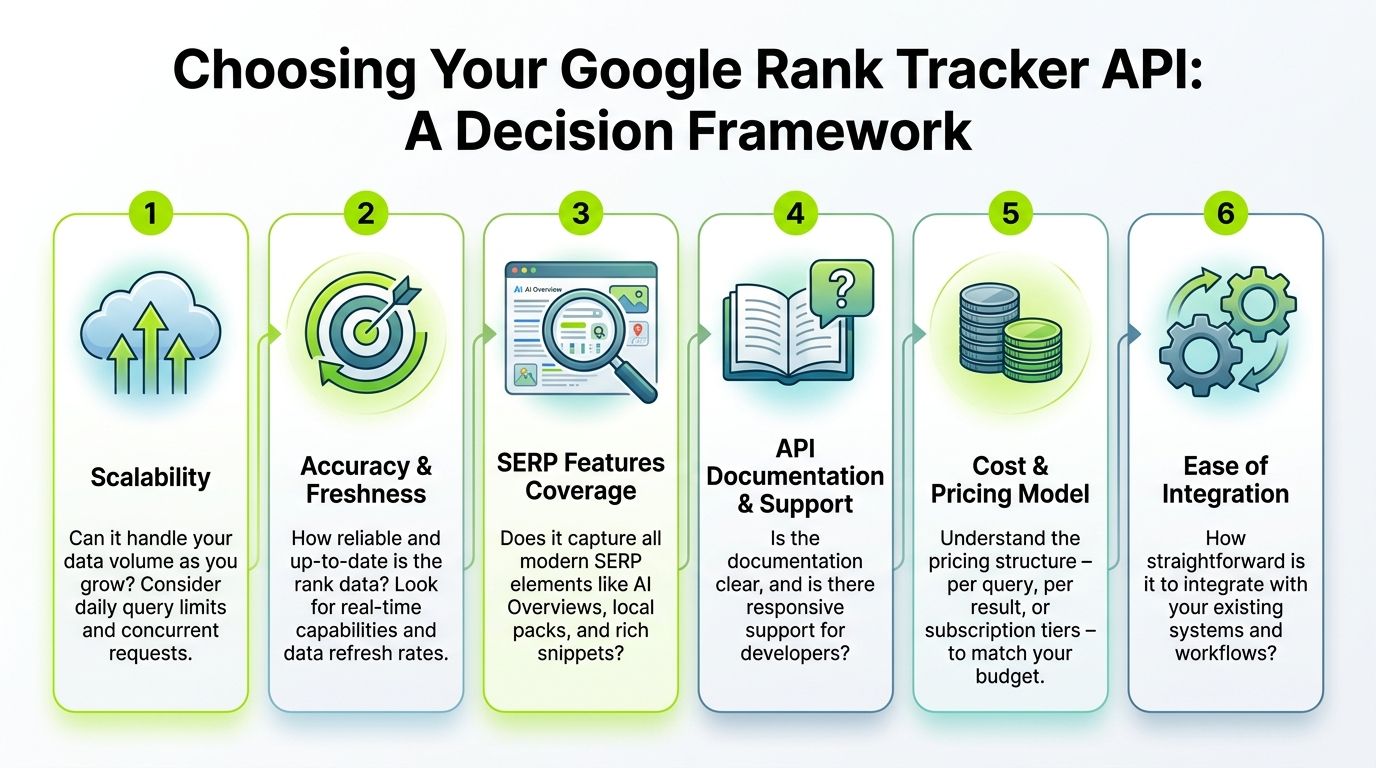
The decision factors that matter
Start with the output you need to store six months from now, not the demo query you need today.
If the API only gives you a rank number and a title, you can ship a basic tracker quickly. You will also hit a wall quickly. Modern SERPs are mixed layouts. Organic links share space with local packs, shopping blocks, featured snippets, video modules, discussions, and AI-generated answer layers. A provider that returns rawer, broader SERP JSON is often harder to parse on day one, but it gives you a better base for a system that can track both classic rankings and AI Overview visibility in one workflow.
Use this matrix before you commit.
| Consideration | What to Look For | Why It Matters |
|---|---|---|
| Query Controls | Country, language, device, and local targeting parameters that behave predictably | Bad targeting corrupts your baseline before storage or reporting even starts |
| SERP Coverage | Organic results plus local packs, snippets, shopping, videos, discussions, and AI-related elements when available | A single rank field cannot explain real search visibility |
| Response Shape | Stable JSON fields, explicit feature blocks, and enough metadata to distinguish result types | Clean schemas reduce parser drift and simplify downstream analytics |
| Throughput | Batch support, concurrency tolerance, clear rate limits, and retry-safe behavior | Daily tracking jobs fail under load if the provider only works for one-off requests |
| Documentation and Support | Parameter definitions, sample payloads, error responses, and change notices | Integration work slows down fast when engineers have to infer field meaning |
| Pricing Model | Clear billing for requests, locations, devices, and parsed features | Forecasting cost gets harder as keyword sets, locations, and result depth increase |
What I check before signing a contract
I test query controls first. Country, language, and device settings must be explicit. For local SEO, I also want city or coordinate-level targeting, or at least a clear description of how the provider approximates locality. If that part is vague, I assume the data will be hard to defend in client reporting.
Then I inspect the response itself. I want to see whether the API separates organic_results, local results, ads, and AI-related blocks cleanly or shoves everything into one generic array. The second pattern creates avoidable parser logic, especially when Google changes result layouts. It also makes historical analysis harder because feature types drift over time.
One practical check helps here. Ask whether you can answer these questions from the raw payload without scraping HTML yourself:
- Did our domain rank organically?
- Did it appear inside or beneath an AI Overview?
- Was a local pack present?
- Did a featured snippet suppress the first organic click opportunity?
- Did mobile and desktop produce different SERP feature layouts?
If the answer is no, keep looking.
Documentation quality affects implementation cost
Engineers tend to underestimate docs until the first schema change breaks production. Good documentation shortens onboarding, makes test fixtures easier to build, and reduces the number of support tickets needed to ship. Bad documentation turns normal integration work into reverse engineering.
If you want a baseline for evaluating vendor docs, What Is API Documentation and Why It Matters is a useful checklist. I look for concrete parameter definitions, example error payloads, field-level descriptions, and versioning behavior. Marketing pages do not count.
Teams that want rank tracking to feed a wider reporting stack can also review how rank tracking workflows fit into a broader SEO reporting system.
Trade-offs that usually decide the winner
The cheapest provider can still be the right one if you control request volume tightly and do not need broad SERP feature coverage. The expensive provider can still be cheaper in practice if it saves weeks of parser maintenance and gives you stable location targeting.
Three trade-offs come up often:
- Low cost vs. clean data: Budget APIs can work, but they often require more defensive parsing, more retries, and closer monitoring of edge cases.
- Simple payloads vs. future-proof payloads: Small JSON responses are easy to map at first. Richer responses are better if you plan to measure AI Overviews, citation presence, and feature ownership later.
- Fast integration vs. reporting depth: If your team needs dashboards quickly, choose the clearest schema. If your clients ask why traffic dropped despite “stable rankings,” choose the provider that exposes the full SERP context.
My rule is simple. Buy for the reporting questions your stakeholders will ask next quarter, not the script you can finish this afternoon.
A simple shortlist checklist
A provider makes the shortlist if the answer is yes to all six:
- Can it return structured SERP features, not just blue links
- Can it target country, language, device, and local intent with predictable parameters
- Can it handle your expected daily volume without fragile retry behavior
- Can your engineers understand the docs and error responses without guesswork
- Can you store the payload in your own schema without one-off exceptions everywhere
- Can the same workflow support classic organic tracking and AI Overview monitoring
Your First API Call and Authentication
A first call usually fails for boring reasons. The key is missing in one environment, the provider expects gl=us instead of country=us, or the response is valid JSON but the rank field is not where you expected. Catch those problems now, with one query and one target domain, before you schedule 50,000 requests a day and fill your warehouse with bad data.
Treat this step as a contract test, not a hello-world demo. The goal is to confirm four things: authentication works, location and device settings are honored, the payload contains the SERP elements you plan to store, and the same request flow can later support AI Overview monitoring alongside classic rankings. If the provider exposes AI result blocks through the same endpoint, you avoid maintaining two collectors later. That is one reason teams evaluating an AI Search Tracking API should test response shape early, not after launch.
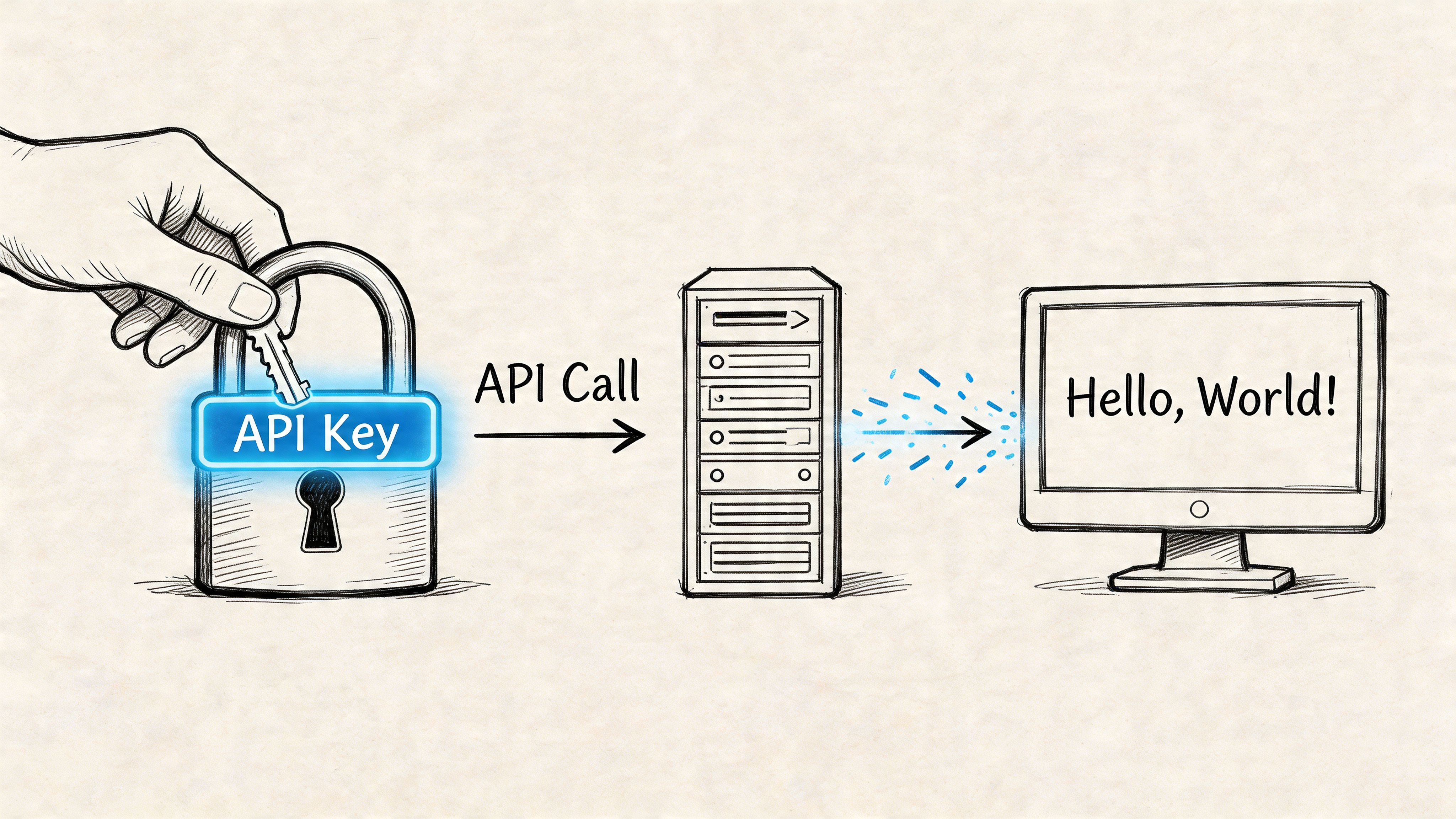
Store the API key correctly
Keep the key out of source control and out of the request URL logs if your provider supports header auth. Some rank APIs only accept query-string tokens. If that is the case, scrub logs at the proxy layer and in your job runner.
Environment variables are enough for a first integration:
- Python env var
RANK_API_KEY - Node env var
RANK_API_KEY
For teams standardizing secrets, scheduled jobs, and audit trails across SEO tooling, this belongs in the same operational layer as the rest of your technical SEO stack workflows.
Python example
This example follows the common pattern used by SERP APIs: pass a query, country, page, and auth token, then scan organic_results for your domain.
import os
import requests
from urllib.parse import urlparse

API_KEY = os.environ.get("RANK_API_KEY")
ENDPOINT = "https://api.scrapingdog.com/google/"

params = {
    "api_key": API_KEY,
    "query": "web scraping api",
    "country": "us",
    "page": 0
}

target_domain = "scrapingdog.com"

resp = requests.get(ENDPOINT, params=params, timeout=30)
resp.raise_for_status()
data = resp.json()

rank_found = None

for result in data.get("organic_results", []):
    link = result.get("link", "")
    hostname = urlparse(link).netloc.replace("www.", "")
    if target_domain in hostname:
        rank_found = result.get("rank")
        break

print(f"Rank for {target_domain}: {rank_found}")
That code is fine for a smoke test. For production, add two checks immediately: fail fast if API_KEY is empty, and log the provider request ID if one is returned in headers. Those two details save time when support asks for an example failure.
Node.js example
Same request pattern. Keep the first version small enough to debug in one screen.
const axios = require("axios");

const API_KEY = process.env.RANK_API_KEY;
const ENDPOINT = "https://api.scrapingdog.com/google/";
const targetDomain = "scrapingdog.com";

(async () => {
  const response = await axios.get(ENDPOINT, {
    params: {
      api_key: API_KEY,
      query: "web scraping api",
      country: "us",
      page: 0,
    },
    timeout: 30000,
  });

  const results = response.data.organic_results || [];
  const match = results.find((item) => {
    const link = item.link || "";
    try {
      const host = new URL(link).hostname.replace("www.", "");
      return host.includes(targetDomain);
    } catch {
      return false;
    }
  });

  console.log(`Rank for ${targetDomain}: ${match ? match.rank : null}`);
})();
One practical warning. host.includes(targetDomain) can create false positives if you track brands with reseller domains or country subdomains. In production, normalize domains into a canonical table and compare exact hostnames or approved subdomain patterns.
If this single request is flaky, stop there. Fix authentication, parameter mapping, retries, and payload validation before you add batching or historical storage.
A visual walkthrough can help if you’re wiring this up for the first time:
What to validate in the first response
A 200 OK only means the server answered. It does not mean the data is usable.
Check these fields on the first response:
- Organic results exist and are not an empty placeholder array
- Rank semantics are clear, because some APIs return absolute position, some return page-relative position, and some omit rank for blended features
- Canonical URL handling is predictable so tracking parameters, mobile hosts, and redirect URLs do not break domain matching
- Geo and device settings were applied exactly as requested
- SERP feature blocks are present in the payload, even if you are only storing organic rank today, because that decides whether the same collector can support AI Overviews and other advanced result types later
- Error payloads are structured enough to classify auth failures, quota exhaustion, and transient upstream issues
This validation work is where good rank tracking systems start. The teams that skip it usually discover the problem a month later, after they have charts, alerts, and client reports built on the wrong assumptions.
Parsing Advanced SERPs AI Overviews and Features
Most rank trackers still reduce the SERP to one number. That’s no longer enough. A page can lose one organic position and still gain visibility through citations, featured elements, local packs, or AI-generated summaries.
That gap is becoming harder to ignore. As of early 2026, AI modes influence 15-20% of queries in major markets, yet most tutorials still focus on traditional organic positions instead of AI Overviews or citation tracking, according to IPRoyal’s discussion of rank tracker API gaps.
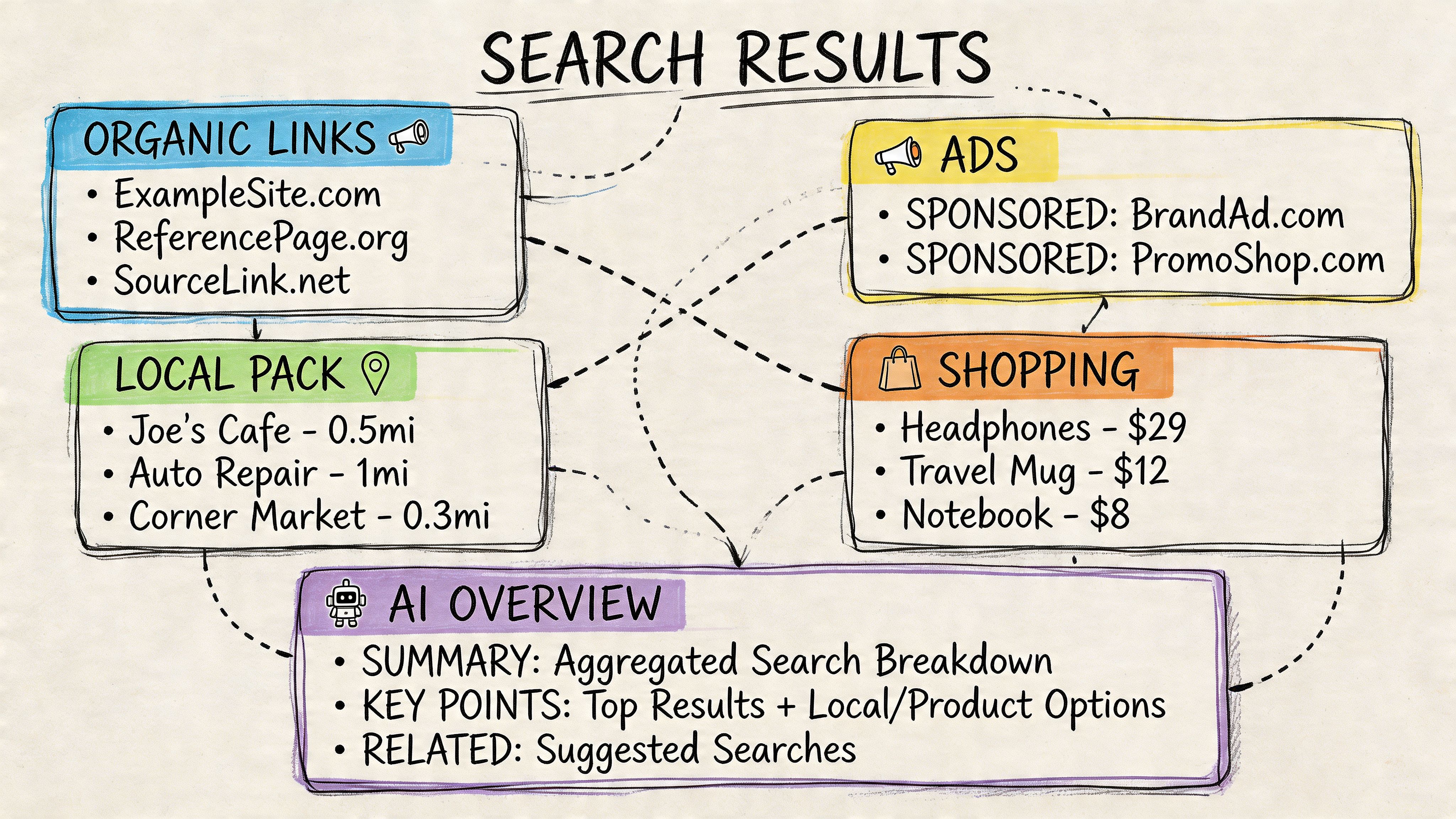
Think in visibility layers, not rank alone
When I review SERP payloads, I separate them into layers:
- Classic organic positions
- SERP features attached to organic visibility, such as sitelinks or featured snippets
- Non-organic discovery surfaces, such as local packs, shopping, videos, and AI summaries
That model makes storage and reporting cleaner. It also matches how stakeholders ask questions. They don’t just ask, “What rank are we?” They ask, “Are we visible?”
A practical parsing pattern
Most JSON payloads for advanced search results are nested. Instead of looking only at organic_results, create extractors for each feature family.
Here’s a Python pattern that keeps parsing modular:
from urllib.parse import urlparse

def normalize_host(url):
    try:
        return urlparse(url).netloc.replace("www.", "")
    except Exception:
        return ""

def extract_organic_presence(data, brand_domain):
    matches = []
    for item in data.get("organic_results", []):
        host = normalize_host(item.get("link", ""))
        if brand_domain in host:
            matches.append({
                "type": "organic",
                "rank": item.get("rank"),
                "title": item.get("title"),
                "link": item.get("link")
            })
    return matches

def extract_local_pack_presence(data, brand_domain):
    matches = []
    for item in data.get("local_results", []):
        website = item.get("website", "")
        host = normalize_host(website)
        if brand_domain in host:
            matches.append({
                "type": "local_pack",
                "title": item.get("title"),
                "website": website
            })
    return matches

def extract_ai_overview_citations(data, brand_domain):
    matches = []
    ai_block = data.get("ai_overview", {})
    for citation in ai_block.get("citations", []):
        link = citation.get("link", "")
        host = normalize_host(link)
        if brand_domain in host:
            matches.append({
                "type": "ai_overview_citation",
                "title": citation.get("title"),
                "link": link
            })
    return matches
This assumes your provider returns a distinct AI block. Not all do. Some put AI-related elements under broader rich-result objects, and some don’t expose them reliably at all. That’s one reason provider selection matters so much earlier than is often understood.
What usually breaks in AI Overview parsing
AI Overview tracking fails for three recurring reasons:
- The provider doesn’t render enough of the SERP to expose the AI block consistently
- The parser assumes one schema when the provider returns different structures by query type
- The team only stores rank fields, so there’s nowhere to save citation-level visibility
Track two things separately: whether an AI Overview appeared, and whether your brand was cited inside it. Those are different events.
A lot of teams also forget that an AI citation may point to a deep article, not the homepage. If your matching logic only checks one canonical domain pattern, you’ll miss valid brand presence.
A normalized event model works better
Instead of treating every SERP feature as a custom exception, model them as events. For each keyword snapshot, generate visibility events like:
organic_rank_foundfeatured_snippet_foundlocal_pack_foundai_overview_presentai_overview_brand_citedvideo_carousel_found
That event-style approach makes downstream reporting much easier. It’s also how I’d structure a hybrid dashboard that compares classic search and AI visibility side by side.
If you’re building specifically around citation detection in Google’s AI layer, AI Search Tracking API is a useful reference point for how teams are starting to think beyond plain SERP rank extraction. For a productized view of monitoring this layer, Surnex AI Overviews tracking shows the kind of end-state many internal tools are moving toward.
What to report to stakeholders
Don’t send clients or leadership a spreadsheet with only average rank. Add a small set of fields that reflects modern search behavior:
| Signal | Why it matters |
|---|---|
| Organic rank | Still the baseline performance metric |
| Featured result presence | Explains traffic changes when rank alone doesn’t |
| Local pack appearance | Critical for location-based businesses |
| AI Overview shown | Indicates query class has changed |
| AI citation presence | Shows whether the brand appears in the answer layer |
That reporting model answers a more honest question: “How visible are we across the full results page?”
Building a Scalable and Resilient Tracking System
A script becomes a system when failure starts costing money. That happens fast with a google rank tracker api.
The biggest problems in production are rarely about parsing one JSON object. They’re about request volume, retries, and waste. The most common self-inflicted cost issue is simple. If a keyword ranks at #3 and you still fetch all 10 SERP pages, you waste 90% of the API credits for that query, as shown in Scrapingdog’s Python rank tracker walkthrough.
Stop pagination the moment you have the answer
This is the first optimization I add. Always.
If your goal is “find the domain rank in the top 100,” then the loop should exit as soon as the domain is found. That’s basic control flow, but many teams skip it and needlessly burn through credits.
import requests
from urllib.parse import urlparse

def find_rank(api_key, keyword, domain, country="us"):
    endpoint = "https://api.scrapingdog.com/google/"
    for page in range(10):
        resp = requests.get(endpoint, params={
            "api_key": api_key,
            "query": keyword,
            "country": country,
            "page": page
        }, timeout=30)
        resp.raise_for_status()
        data = resp.json()

        for result in data.get("organic_results", []):
            link = result.get("link", "")
            host = urlparse(link).netloc.replace("www.", "")
            if domain in host:
                return {
                    "keyword": keyword,
                    "rank": result.get("rank"),
                    "page_fetched": page
                }
    return {
        "keyword": keyword,
        "rank": None,
        "page_fetched": 9
    }
Control concurrency deliberately
The next failure point is usually “fast” code that overwhelms either your provider or your own infrastructure. You don’t need fancy distributed systems first. You need bounded concurrency.
Use a worker pool. Keep the batch size configurable. Log response times and failure reasons per request. That gives you the data needed to decide whether the bottleneck is network latency, provider throttling, malformed input, or your own parser.
A practical queue strategy looks like this:
- Create keyword jobs with keyword, market, device, and tracking date
- Run workers with a fixed concurrency cap instead of unbounded async fanout
- Store raw responses temporarily when debugging new providers or SERP layouts
- Retry only transient failures such as timeouts or temporary upstream errors
Add retries, but not blind retries
A retry loop without classification can double your costs and still fail.
I usually split errors into three buckets:
-
Retryable Network timeouts, temporary upstream issues, and occasional malformed partial payloads.
-
Non-retryable Invalid auth, bad query parameter combinations, disabled accounts.
-
Review-needed Sudden schema drift, empty result blocks for valid queries, or strange changes in feature structure.
A resilient tracker doesn’t retry everything. It knows which failures deserve another request and which failures deserve a developer.
Here’s a compact Node example with exponential backoff:
const axios = require("axios");

async function fetchWithRetry(url, params, maxAttempts = 4) {
  let attempt = 0;

  while (attempt < maxAttempts) {
    try {
      const res = await axios.get(url, { params, timeout: 30000 });
      return res.data;
    } catch (err) {
      attempt += 1;
      const status = err.response ? err.response.status : null;
      const retryable = !status || status >= 500;

      if (!retryable || attempt >= maxAttempts) {
        throw err;
      }

      const waitMs = Math.pow(2, attempt) * 1000;
      await new Promise((resolve) => setTimeout(resolve, waitMs));
    }
  }
}
Keep data consistent across markets and devices
Accuracy falls apart when teams mix desktop and mobile results, or use weak geo controls for local campaigns. If your workflow supports both, treat (keyword, locale, device, engine_date) as a unique tracking context.
That one design choice prevents bad comparisons later. A rank drop on mobile in one market should never overwrite a desktop result in another.
You also need change monitoring outside the fetcher itself. Alerting on sudden rank movement, missing result blocks, and parser failures belongs in the operations layer, not in your reporting dashboard. Systems built around rank monitoring and changes make that separation easier to maintain.
The production checklist I actually use
Before calling a rank tracking job “ready,” I look for these:
- Early exit pagination to stop waste
- Retry classification so failed requests don’t multiply spend
- Concurrency caps to avoid self-created outages
- Structured logging with keyword, locale, device, status, and response metadata
- Schema versioning because SERP payloads change
- Idempotent writes so reruns don’t duplicate snapshots
That stack is less exciting than visualization work. It’s also the reason the visualization stays trustworthy.
Modeling and Storing Rank Data for Analysis
Most rank tracking systems fail subtly in storage, not collection. They save only the current rank, overwrite yesterday’s data, and leave no room for SERP features or AI visibility. That makes analysis shallow and reporting brittle.
Historical storage needs to answer practical questions. Did the keyword move? Did the result type change? Did an AI Overview appear? Were you cited inside it? Those questions need a schema that stores snapshots, not just latest values.
Use snapshots plus extracted events
I prefer a two-layer model:
- Snapshot table for the request context and raw top-level outcome
- Feature or event table for extracted SERP elements tied to that snapshot
That separation keeps ingestion clean. It also lets you re-parse stored payloads later if your logic for AI features or local packs improves.
Here’s a compact relational design that works well in PostgreSQL or MySQL.
| Field Name | Data Type | Description |
|---|---|---|
| id | BIGINT | Primary key for the snapshot row |
| keyword | VARCHAR | Query being tracked |
| search_engine | VARCHAR | Search source identifier |
| country_code | VARCHAR | Country targeting value |
| language_code | VARCHAR | Language targeting value |
| device_type | VARCHAR | Desktop or mobile context |
| tracked_domain | VARCHAR | Domain being evaluated |
| organic_rank | INT | Found rank for the tracked domain, nullable |
| found_url | TEXT | Matching URL returned for the domain |
| serp_has_ai_overview | BOOLEAN | Whether an AI Overview appeared |
| serp_has_local_pack | BOOLEAN | Whether local results appeared |
| serp_has_featured_snippet | BOOLEAN | Whether a featured snippet appeared |
| raw_payload | JSON or JSONB | Stored provider response for reprocessing |
| provider_name | VARCHAR | API provider used |
| fetched_at | TIMESTAMP | When the SERP was fetched |
| created_at | TIMESTAMP | Insert timestamp |
Add a second table for visibility events
The snapshot row alone isn’t enough if you want to track citations, multiple URLs, or several feature appearances. Add an event table like this conceptually:
- snapshot_id
- event_type
- event_label
- event_rank
- source_url
- source_title
- metadata_json
- created_at
That lets one SERP snapshot produce multiple rows such as:
- organic result found at rank
- local pack mention found
- AI Overview present
- AI Overview citation matched domain
- video result matched domain
Example SQL schema
This keeps the core storage normalized without becoming over-engineered too early.
CREATE TABLE rank_snapshots (
  id BIGSERIAL PRIMARY KEY,
  keyword VARCHAR(255) NOT NULL,
  search_engine VARCHAR(50) NOT NULL DEFAULT 'google',
  country_code VARCHAR(10),
  language_code VARCHAR(10),
  device_type VARCHAR(20),
  tracked_domain VARCHAR(255) NOT NULL,
  organic_rank INT,
  found_url TEXT,
  serp_has_ai_overview BOOLEAN DEFAULT FALSE,
  serp_has_local_pack BOOLEAN DEFAULT FALSE,
  serp_has_featured_snippet BOOLEAN DEFAULT FALSE,
  raw_payload JSONB,
  provider_name VARCHAR(100),
  fetched_at TIMESTAMP NOT NULL,
  created_at TIMESTAMP NOT NULL DEFAULT NOW()
);

CREATE TABLE rank_events (
  id BIGSERIAL PRIMARY KEY,
  snapshot_id BIGINT NOT NULL REFERENCES rank_snapshots(id),
  event_type VARCHAR(100) NOT NULL,
  event_label VARCHAR(255),
  event_rank INT,
  source_url TEXT,
  source_title TEXT,
  metadata_json JSONB,
  created_at TIMESTAMP NOT NULL DEFAULT NOW()
);

CREATE INDEX idx_rank_snapshots_lookup
ON rank_snapshots (keyword, country_code, language_code, device_type, fetched_at);

CREATE INDEX idx_rank_events_snapshot
ON rank_events (snapshot_id, event_type);
Store the raw payload when you can. Parser logic changes faster than database schemas, and historical reprocessing is often cheaper than recollecting SERPs.
What this model enables immediately
With this schema, common reporting becomes straightforward.
You can query:
- rank history for one keyword over time
- all keywords where AI Overviews appeared
- all snapshots where the brand got cited in AI blocks
- local pack visibility by market
- feature appearance trends by device
You also avoid a common mistake: trying to cram every SERP nuance into one giant table with dozens of nullable columns. A snapshot-plus-events model is cleaner and survives feature changes better.
Example insertion flow
I usually ingest in three stages:
- Fetch the SERP payload
- Create one snapshot row
- Extract and insert event rows
Pseudo-code for the event insert process looks like this:
snapshot_id = insert_snapshot(snapshot_data)

for organic_match in extract_organic_presence(payload, domain):
    insert_event(snapshot_id, "organic_result", organic_match)

for local_match in extract_local_pack_presence(payload, domain):
    insert_event(snapshot_id, "local_pack_result", local_match)

for ai_match in extract_ai_overview_citations(payload, domain):
    insert_event(snapshot_id, "ai_overview_citation", ai_match)
That’s enough to support dashboards without rebuilding your pipeline every time Google changes the SERP layout.
Reporting layer design
Once the data is modeled correctly, dashboarding becomes much easier. I’d build separate views for:
- Keyword trend view with historical organic rank
- SERP feature view with counts of local, snippet, and AI appearances
- Brand citation view showing where the domain appears in AI-generated answers
- Market comparison view split by country and device
That kind of layout is what teams eventually want anyway: one place to inspect rank movement, SERP feature changes, and AI-surface visibility without stitching separate exports together by hand.
What not to do
A few storage mistakes create pain fast:
- Don’t overwrite current rank in place. You lose trend data instantly.
- Don’t store only averages. Aggregates hide rank volatility and feature changes.
- Don’t discard raw JSON too early. You’ll want it back when parsing logic improves.
- Don’t mix contexts. Country, language, and device should travel with every record.
The system becomes valuable when someone asks a hard question and you can answer it from history, not from memory.
Frequently Asked Questions About Rank Tracker APIs
How do I handle Google’s 10-result page limit for deep tracking
Treat page one as the first step, not the whole job. This issue shows up constantly on competitive and long-tail queries. Analysis cited by SerpApi notes that 40% of long-tail queries require checking beyond the first page, and APIs with advanced proxy rotation reach a 95% success rate on paginated fetches in that context, according to SerpApi’s discussion of tracking app challenges.
In practice, deep tracking works best when you:
- Paginate intentionally rather than assuming one call is enough
- Stop once the domain is found so cost doesn’t spiral
- Use providers with stronger anti-blocking infrastructure for page two and beyond
Should I track desktop and mobile separately
Yes, if the business depends on search visibility in any meaningful way. The SERP layout and feature mix differ enough that combining them muddies the data. Keep them as separate contexts in collection and storage.
Is Google Search Console enough
Not for most operational rank tracking. Search Console is strong for performance history, but it isn’t a live SERP retrieval system and doesn’t give the same view of competition, layout, and rich features that a SERP API can provide.
What’s the best way to match a domain in results
Normalize the hostname first. Remove www, parse the netloc, and compare against the tracked domain carefully. If you only compare raw URLs, subdomains and parameterized links will create false misses.
How should I track AI Overviews if my provider barely documents them
Start by storing raw payloads and writing feature-specific parsers outside your core organic rank logic. If the provider later changes the AI schema, you can reprocess historical responses. If you hardwire AI logic into the same field path as organic results, maintenance becomes messy fast.
What causes the biggest cost overruns
Usually three things:
- Over-pagination
- Retrying non-retryable failures
- Tracking too many contexts without clear reporting needs
A lot of teams track every keyword across every market and every device before they’ve proven anyone will use the report. Start from business questions, then expand collection.
If you want one place to track classic rankings, SERP features, and emerging AI visibility without juggling separate tools, Surnex is built for that workflow. It gives agencies, in-house teams, and developers a unified way to monitor search performance across traditional SEO and AI-driven discovery so reporting stays clear as search keeps changing.